Skip to the content
JAI CRM

ProcurementOrders, bills, payments out

Purchase orders, bills and vendor payments, tracked line by line

Purchase order software for Indian businesses of five to two hundred people, with purchase bills and debit notes on the same engine. What you ordered, what arrived and what you were billed for sit on the same line, and TDS (tax deducted at source) is booked on each purchase bill as it is entered, then settled as you pay. From ₹149 per user per month.

No card needed. From ₹149 per person a month.

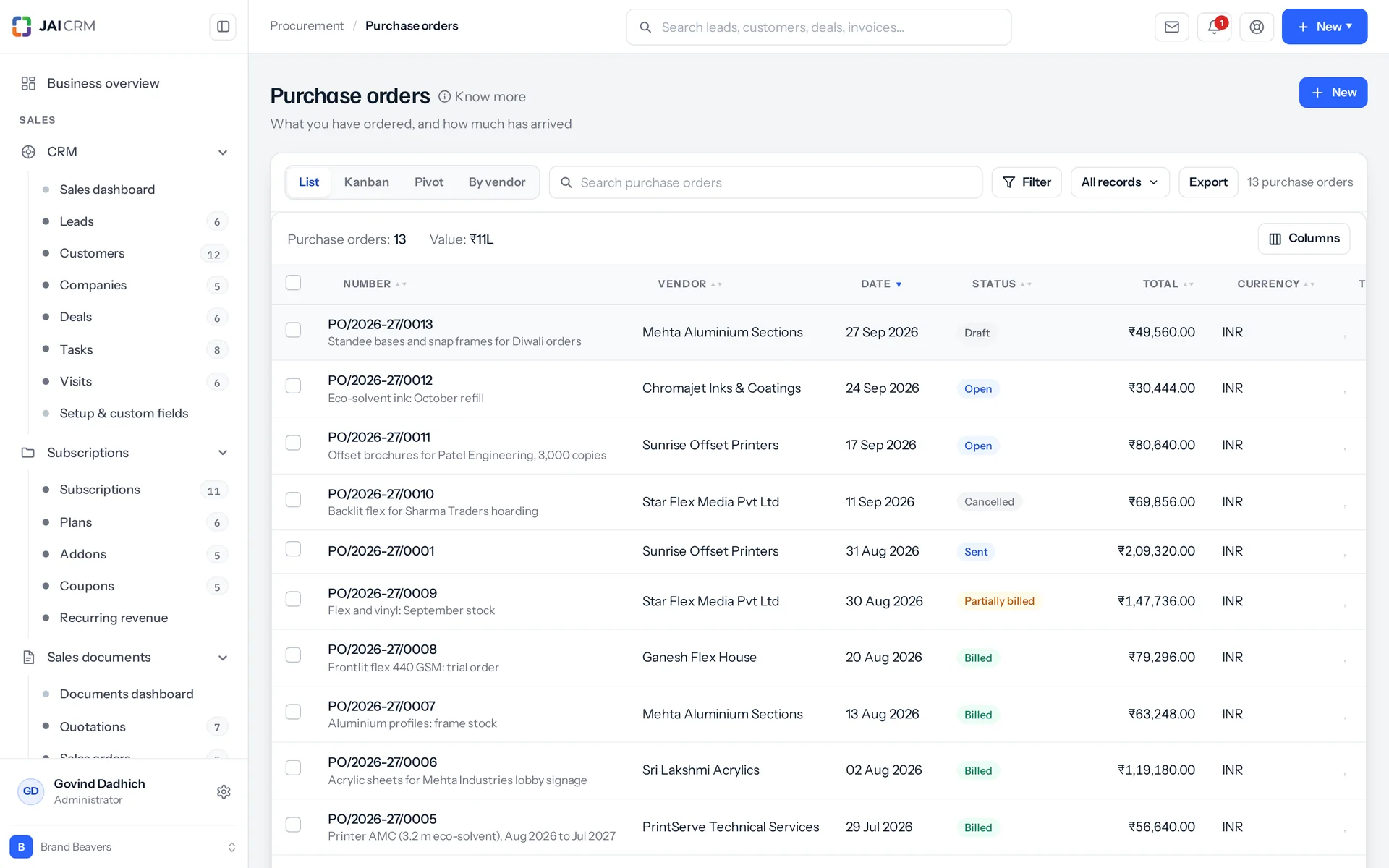
Purchase orders with vendor, expected date, status and value.
7 things it doesEvery one in the product today

What is Procurement in JAI CRM?

Procurement in JAI CRM is the buying side of the suite: purchase orders, purchase bills, debit notes, goods receipts and vendor payments. Each order line keeps ordered, received, billed and called-off quantities apart. You can only buy from approved vendors. TDS is booked on each bill as it is entered and settled as you pay, and reverse charge GST is set from the vendor.

What goes wrong between ordering and paying a supplier?

None of these are rare. They happen when the order, the delivery note and the bill live in three different places, and nobody holds all three at once.

  • You ordered ten, six arrived, and the bill said ten

    The order is in an email. The delivery note is on a clipboard in the store. The bill is in the accounts folder. That is three papers and three people, and nobody holds all of them at once. The short delivery is real and you can prove it. But it gets noticed at year end, when someone counts stock. That is four months too late to raise it with the supplier.

  • An order went out before anyone agreed to it

    Someone needed the material, so someone sent a PO (purchase order). The talk about whether the company wanted to spend ₹9,00,000 only happens when the invoice arrives. By then the goods are in the shed and the vendor has delivered. The only question left is who will sign it off. That is not a decision. It is a formality with an argument attached.

  • A vendor's GST certificate ran out in March

    The papers were collected once, at the start, and filed away. Nothing in the business reads a date on a PDF. An auditor, or a customer's compliance team, finds the expiry. The bills raised in between are now a problem you have to explain. With a week's notice, you could have avoided it.

  • ₹40,000 sent to a bank account nobody had checked

    The account number came off a letterhead. Or it came in a WhatsApp message from a number that said it was the supplier. Someone typed it into the bank's site, trusting whoever typed it into the system. Nobody ever checked it against a cancelled cheque. In most systems, the account number and the record that someone checked it are the same field. So there is no such record at all.

  • Working out TDS in the second week of July

    The quarter is over and the payments are made. Now you rebuild the TDS (the tax you hold back from a vendor payment and pay to the government) from bank statements and memory. Which section applied to which vendor? Which vendors never gave a PAN, and should have had twenty per cent deducted rather than ten? Which payment settled which bill? You knew every answer on the day you paid. Nobody wrote it down.

What the purchase order software does, in plain words

Nothing below is on a roadmap. Every one is in the product today, and a 14-day trial is long enough to check any of it.

The documents

Three purchase documents that run on one engine

Purchase orders, purchase bills and debit notes all run on one engine. They are rows in the same table the sales side uses, told apart by two columns. They share the tax engine, the numbering series, the print templates and the conversion chain (the steps that turn one document into the next). So a change to how tax is worked out reaches all three at once, not just two of them.

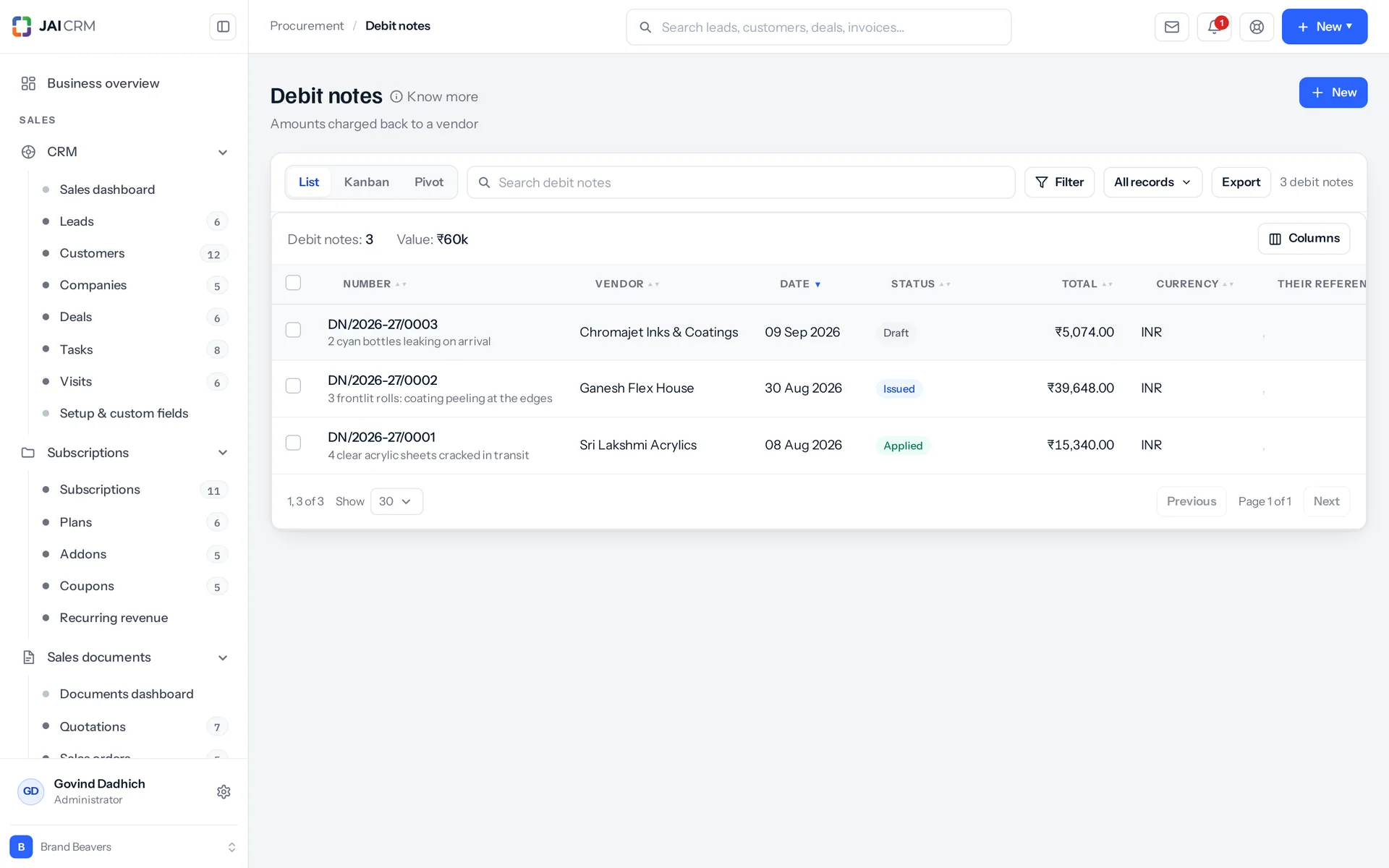
Debit notes raised against vendor bills for returns and short supply.
The same nine actions on every kind
Each document type is set up as data: its type, the permission it needs, where it sits and what it is called. Each gets the same nine actions: list, open, create, edit, delete, change status, duplicate, print, and check what depends on it. The three kinds have sixteen statuses between them and twenty-three allowed moves. If a move is not allowed, the message tells you what is: “A purchase bill that is partially paid can only move to paid, overdue, cancelled.”
Only a bill counts as money owed
An amount due is written only on document types that carry a balance. An order is a promise, not a debt. So it does not sit in payables (what you owe) and it does not claim money. It was not always this way, and the reason it changed matters. When an order also carried a balance, the order and the bill raised from it both claimed the same rupees. So anything adding up what a vendor was owed counted it twice.
One place where rupee amounts are worked out
No action works out a figure on its own. One function rebuilds every line, every charge and every document-level tax through the shared tax engine. It then writes the sixteen computed money columns back. These run from the gross amount and the two discounts, through taxable value, tax, cess and the reverse charge total, to the round-off, the total, the amount due, the TDS and what you actually pay. Freight, packing and installation are charged and taxed on their own, or deducted. Quantities keep four decimal places and money keeps two. So a rounding difference is never read as someone going over a limit.
A debit note cannot be bigger than its bill
A debit note (a note that reduces a bill) must be linked to that bill before you can issue it. Issuing one needs the approve permission, not just the right to edit it. All other notes against the same bill are counted first. If a new note would take the total past the bill, it is refused and you are told how much room is left: “₹4,200.00 of BILL-0007 is still undebited. Reduce the note to that or less.” Raise the note from the bill and it starts linked, with the bill's lines to trim. Issued, it is spent on its bill as far as the bill still owes, brings down the bill's TDS with the taxable value it takes off, and takes its input tax credit back in that month. Whatever the bill cannot take stays on the note as the vendor's credit, to set against another of their bills or to record when they refund it. An issued note cannot be edited. Cancel it and all of it reverses: credit spent on bills comes back off them, the returned quantities go back onto the bill lines, and the balances are worked out again. A note the vendor has refunded cannot be cancelled until the refund is taken back.

Ordering

Bill half an order today, the rest next month

You can bill a purchase order in parts: some now, the rest later. Most orders are not filled in one go, and software that assumes they are leaves someone keeping the remainder in their head. Here, the remainder is a number on the line. Everything that acts on the order must respect it, and every refusal tells you the actual number.

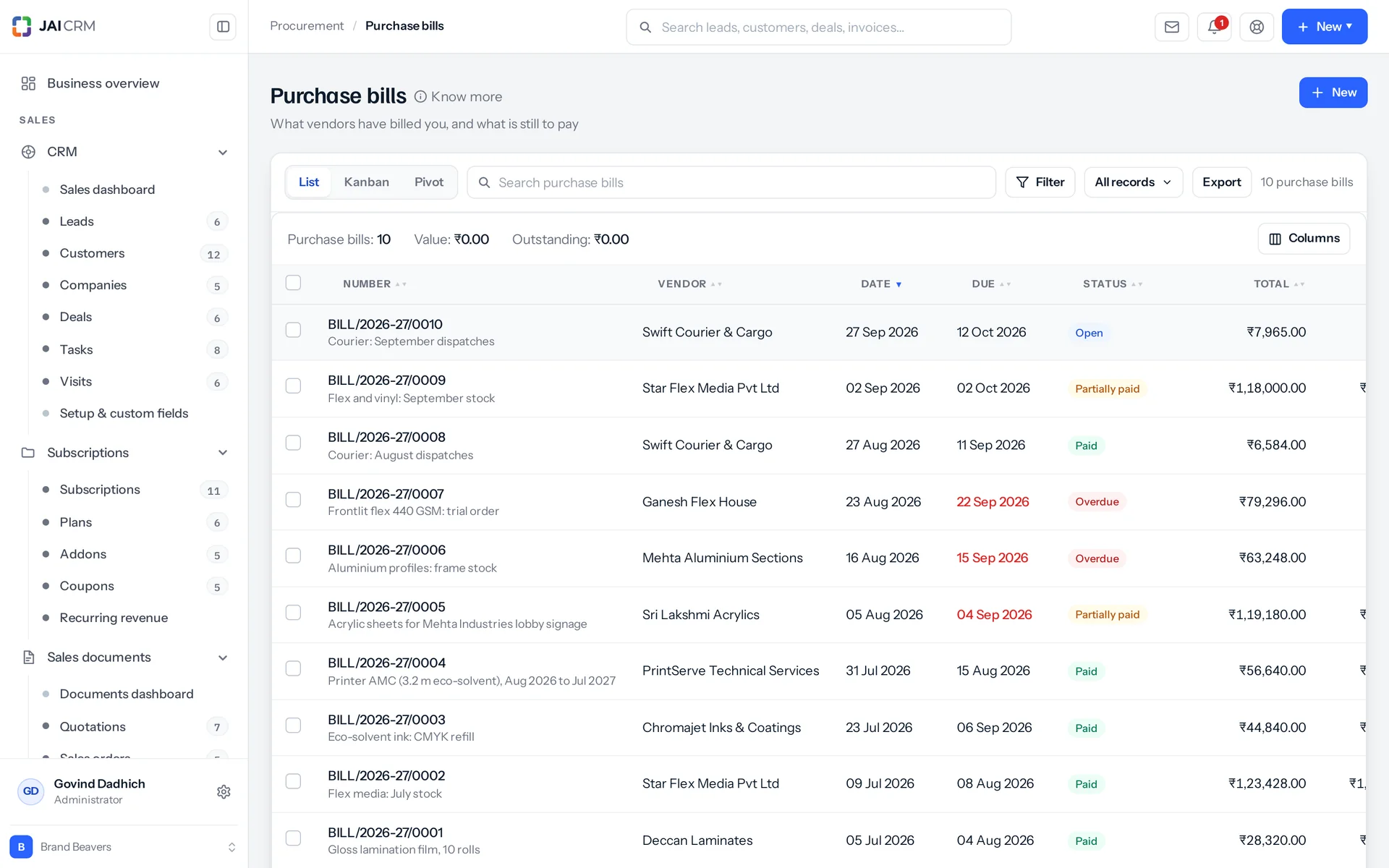
Vendor bills, paid, part paid and overdue, against the orders they came from.
Who you are buying from is settled before the order
You can raise an order, a bill or a payment only against a vendor who is approved, active or inactive. A blocked vendor is refused, with the reason quoted back. A vendor nobody has checked is refused by name: “Acme Steel has not been approved yet: they are shortlisted. Approve them before a purchase bill is raised, so somebody has checked who is being committed to.” A half-finished order goes nowhere either. It cannot leave draft with no lines on it. And you cannot bill or receive goods against a draft order: “Send the purchase order to the vendor before billing it. A draft order has not been agreed yet.”
Bill exactly what was agreed
One press turns the order into a bill. It takes everything still outstanding, or only the lines and quantities you pick. The bill copies the order's full tax and money details: currency, exchange rate, place of supply, export and SEZ flags, letter of undertaking, reverse charge, rounding, discount, TDS section and rate, terms and notes. Each bill line remembers the order line it came from. The reply is either “Bill X created. 4 still to bill on order Y” or “Order Y is now fully billed.” An optional tick also marks the same quantities as received at the same time.
Outstanding is simple arithmetic
Outstanding is the quantity ordered, minus what has been billed, minus what has been called off. Called-off quantity is left out on purpose. It was ordered and then dropped, so billing it would mean paying for something nobody will send. The same figure drives the convert check, the menu option and the message, so they can never disagree: “Only 4 of ‘Steel rod 12mm’ is still to be billed on this order. Reduce the quantity to that or less.”
Called off, not deleted
Say the vendor can only send six of the ten. The other four are recorded against the line as called off, not removed. A reason is noted beside them if someone gives one. That is because the order said ten and someone agreed to ten. Anything already billed cannot be called off. That money is on a bill, and undoing it takes a debit note. A bulk call-off tells you which lines it could not do and why. It does not quietly skip half of what you picked. Restore the four later, and an order that closed only because everything was called off opens again.

Receiving

What arrived is counted separately from what was billed

Receiving goods is tracked apart from billing them. Many people assume a purchase order is finished when the boxes turn up. This module rejects that idea on purpose. Delivery and payment are two different questions, and one status word cannot honestly answer both.

Received is its own number
To record a receipt against an order, you enter a quantity per line. It refuses more than is still outstanding on that line: “Only 6 of ‘Cement bag’ is still outstanding”. It then replies either “Everything on this order has now arrived” or “Receipt recorded. The order stays open for the rest.” Whether everything has arrived is worked out from the quantities, on purpose, not from the order's status.
The status tells you about billing
An order's status is open, partly billed, billed or closed. “Received” used to be one of them and was taken out. An order marked received said nothing about whether it had been paid for. It also left no word at all for an order that was half billed. Called-off quantity is left out of the count too. An order for ten, with four called off and six billed, is finished, not sixty per cent done. So it closes instead of staying open for ever.
A goods receipt is drafted first, then posted
A goods receipt is the record of what came in. Posting it is what moves stock, so you can fix a mis-keyed line before it reaches the ledger. Posting writes the accepted quantity back onto the purchase order line. It creates the batch with its expiry and cost if the batch number is new, or updates the expiry on one already on file. It records serial numbers, and it can raise the bill in the same step. You reject goods line by line, with a reason. Accepted plus rejected cannot be more than what was received. A posted receipt cannot be deleted: “Stock has already been taken in on this receipt. Adjust it out instead.”
A failed quality check does not stop the receipt
Quality checks set up for purchase receipts are raised when the receipt is posted. A failed check does not block the posting. The vendor's stock is already in the building, good or not. Refusing to record it would leave the shelf and the stock register disagreeing. A failed inspection on a receipt calls for a debit note, not a rejected transaction.

Vendors

A supplier moves through stages, not just a tick box

Vendor management here tracks each supplier through stages. Before the first order, someone is collected at a trade fair, screened, shortlisted for one job, then cleared by finance. After the last order, someone has gone quiet, or someone should never be used again. A single “active” tick box says nothing about either end.

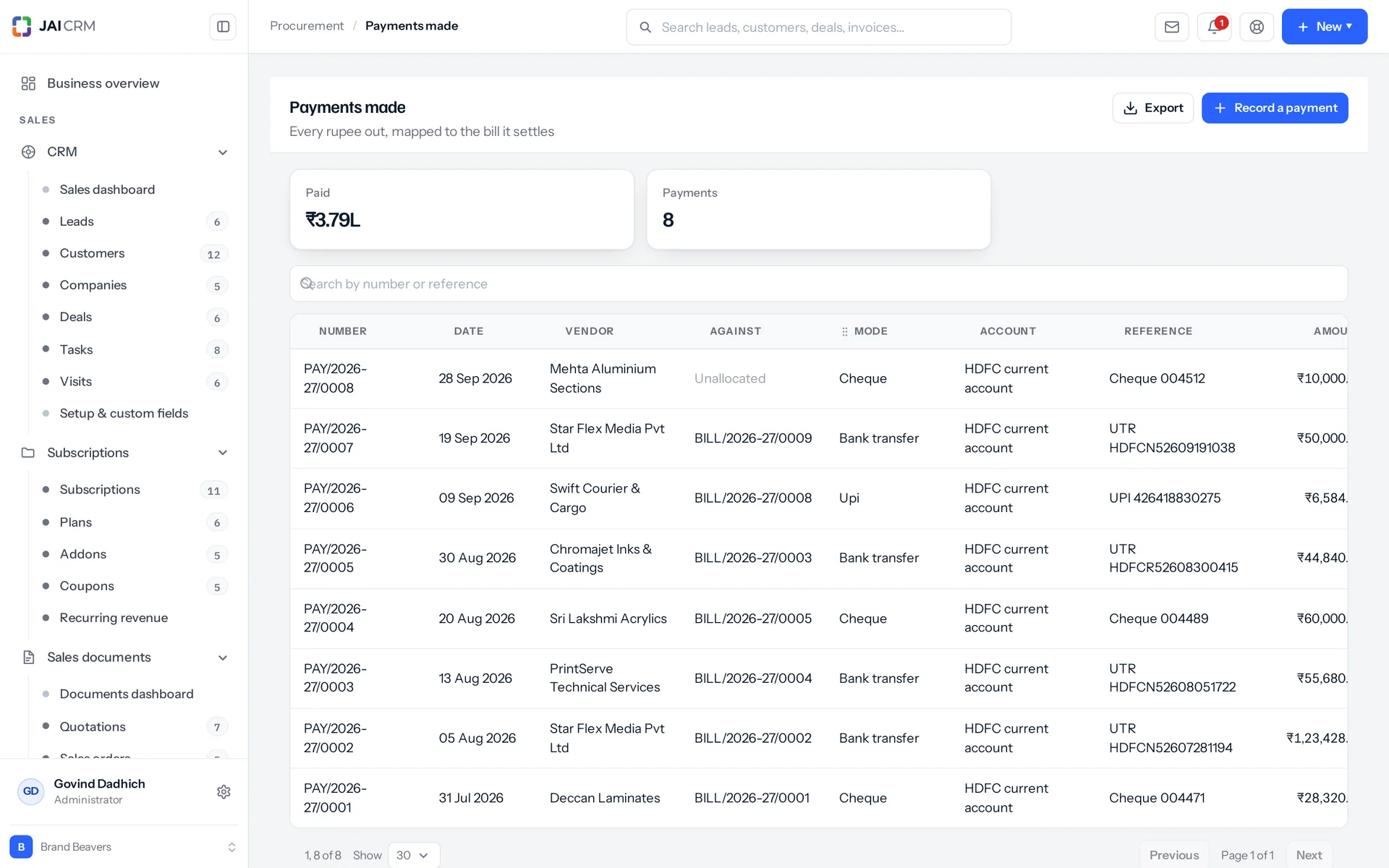
Payments made to vendors, with TDS deducted where it applies.
Seven stages, twenty-six allowed moves
The stages are collected, available, shortlisted, approved, active and inactive. Then there is blocked, which sits outside that run. If a move is not allowed, you are not just told no. You are shown the stages you can move to from where the vendor actually is. A bulk stage change reports what it refused: “12 moved. 3 could not: Acme Steel, Bharat Tools, Delta Fab.”
Approved is where buying becomes possible
Only approved, active and inactive vendors can have an order, a bill or a payment. Approving a vendor is its own permission, separate from the right to raise the document. The approve action asks for papers before it goes through: a PAN, a bank account, and a GSTIN if the vendor is registered. That way payments and TDS can be filed correctly. The bank account has its own “checked” mark, and that tick is kept off the vendor form on purpose. Checking an account against a cancelled cheque or a penny drop (a tiny test payment) is something a person does, not something a person types.
The vendor list keeps itself up to date
Raise an order, enter a bill or make a payment, and an approved or gone-quiet vendor moves to active by itself. An audit line records which document did it: “Acme Steel is active again: purchase order PO-0012 raised.” It never touches a vendor who is blocked or still being screened. Going quiet works the other way, and it is a setting. Choose the number of silent days after which an approved or active vendor drops to inactive. A nightly run moves them, with the same audit line. Leave it blank and nobody is moved down. That is a fair choice, and not one the software should guess.
Blocked means blocked, and says why
To block a vendor you must give a reason, at least three characters long. It is quoted back to the next person who tries: “Acme Steel is blocked, so a purchase order cannot be raised against them. Reason on the record: quality failures on three deliveries.” Blocking also counts that vendor's purchase orders that are neither closed nor cancelled, and tells you: “Blocked. 3 purchase orders are still open. Close or cancel them to stop further supply.” Nothing already raised is changed. Blocking only stops new work.

Paying

Pay vendors with the TDS already taken off

Vendor payments here settle the TDS each bill booked when it was entered. A vendor payment in India is really two numbers: what leaves your bank, and what you hold back and owe the government. The bill already knows the second, so the payment asks only for the first, and the quarterly TDS return is never a job of rebuilding everything.

One payment, several bills, and advances
One payment can be split across any number of purchase bills and purchase orders. Each split carries its own share of the TDS. There are seven payment modes, from bank transfer and UPI to a cheque with its number and clearing date. Anything you do not allocate is recorded on the payment as unallocated. It shows on the list, in the summary totals and in the CSV export. A completed payment with a bank account named changes that account's balance. A closed account is refused, not quietly accepted.
Payment plus TDS is what clears a bill
A ₹1,00,000 bill plus 18% GST under 194J at 10% books ₹10,000 of TDS on the ₹1,00,000. Pay ₹1,08,000 and the ₹1,18,000 bill is clear. The payment window asks for that cash due, and the check adds the payment and the bill's TDS together, so it does not refuse a payment that looks short. Ask for more than a bill can take, and it tells you how much is left: “BILL-0007 has only ₹4,200.00 outstanding.” A bill from another vendor is refused by name, and so is a draft bill. Listing the same document twice is refused too.
Part payments settle the TDS in proportion
Pay half a bill and half its TDS is settled; the last payment settles whatever is left, to the paisa. Money paid ahead on a purchase order, before any bill exists, has its TDS deducted at the payment, on the taxable part of the order. Give one figure and it is spread across the orders in proportion to their size, with any rounding leftover on the last one. Give none and it is grossed up from the amount you paid, at the vendor's own rate if they have one, otherwise the section's, and the section's higher rate if the vendor has no PAN.
Reversing a payment undoes all four things
Delete a payment and four things happen. The money goes back onto every bill it settled. The allocation rows are removed. The bank balance is restored. Any TDS the payment itself deducted on an advance is withdrawn, while the TDS a bill booked stays with the bill, waiting to be settled again: “Payment reversed. The bills it settled are open again and the bank balance has been restored.” Seeing what is still to pay for one vendor takes one question. You get every bill and order still carrying a balance, oldest first, with the total owed.

GST and TDS

GST and TDS on purchases, worked out for you

JAI CRM works out purchase GST and TDS from the vendor's details instead of asking you. Purchase tax is a set of questions with correct answers, and nearly all of them come from the vendor. Asking the buyer to choose is how a document goes out wrong on a Friday evening. It is also how an input credit (GST you can claim back) lands in the wrong month.

Reverse charge is set from the vendor's registration
Reverse charge means you, the buyer, pay the GST instead of the supplier. Buy from an unregistered supplier and the GST is yours to pay. A new purchase document works this out from the vendor and starts with the flag already set correctly. You only touch it when one purchase differs from the rule. The printed document shows a “Tax payable by us under reverse charge” line with the amount. That total is saved on the document, so no report has to work it out again later.
Place of supply is found from three sources
Place of supply is the state a purchase counts as happening in. It is taken from the vendor's stated place of supply, then their state code, then the first two digits of their GSTIN. So the choice between intra-state and inter-state tax (CGST plus SGST, or IGST) is right even when nobody filled in the field. Seven union territory codes are recognised, so UTGST is used where it applies. Cess works both as a percentage and as an amount per unit. HSN or SAC codes (the tax codes for goods and services) sit on every line, every vendor service and every item.
The higher TDS rate for a missing PAN applies by itself
A vendor with no PAN on file is deducted at the no-PAN rate, over any lower rate on the vendor, from the moment the bill is entered. The TDS entry is stamped with the reason: “Deducted at the higher rate because no PAN is on file for this vendor.” So whoever prepares the return in July knows why one row differs from the rest. The section list on the vendor offers seven: 192, 194C, 194J, 194I, 194H, 194Q and 206C.
Every deduction lands in the right quarter
Each bill that carries TDS writes one entry when it is entered, and so does each advance paid on an order. It is tagged with the financial year and quarter, worked out from your own financial year start month, not the calendar. Document numbers follow the same year. The PO, BILL, DN and PAY series reset and are labelled by Indian financial year, and they know which branch they belong to. If a number is already used on a record, the series steps over it instead of refusing every new document from then on.

The desk

What every purchase list and vendor record also has

Every purchase list and vendor record also comes with boards, pivots, exports, compliance papers, feeds and a vendor login. Nobody puts these on a feature list, but everybody uses them on a Tuesday. They are on all three document types and on the vendor, because they run on the same shared machinery as every other list in the product. They are not special cases.

A board, a pivot and an export on every list
Purchase documents group by status, vendor or currency. They pivot (summarise in a table) on total, taxable value, tax, amount due and amount paid. Vendors group by stage, category, type, owner or payment terms. A vendor row has five computed columns: orders, value ordered, billed, paid and still owed. These go into the CSV export too, because they are on screen and you can tick them. CSV import is switched off for the three document types on purpose. A document is a header plus its lines, its numbering and its totals. A flat row of columns cannot hold that.
Expiring compliance papers, checked across every vendor
Each vendor holds their papers with issue and expiry dates and a file. The papers are added and edited through their own actions, with an audit line each time. One check across the workspace lists everything expiring within a window you choose, from one day to a year. It is sorted by days remaining. It tells you how many have already lapsed and how many are just due. The same expiry dates feed the needs-attention panel on the vendor dashboard. It counts papers due in the next thirty days, along with unverified bank accounts and vendors with no GSTIN.
Comments, messages and history are three separate feeds
Comments are what your own team says about a supplier, and they never leave the business. Messages are the thread with the vendor, both ways, in the order it happened, with attachments. History shows who changed what and when, from the audit log. That is the question people ask when a rate is wrong and nobody will say who changed it. Purchase orders, bills and debit notes each have their own comment feed too.
A login for the vendor, if you want one
A vendor login is controlled by a role, not a pile of switches. What a vendor may see is a decision a business makes once and applies to all of them. Four extra permissions sit on top, set per vendor: see the orders raised against them, send in their bills, see whether they have been paid, and write to whoever manages the account. The role that comes with the product sees only that vendor's own records and nothing else.

Who opens Procurement, and what for

Swipe through the people who use it every day.

The buyer raising Monday's orders

A vendor's record lists what they supply. Each item on it has its own rate and its own payment term: per project, per day, per hour, per unit, per product or a monthly retainer. The term sits on the service, not the vendor, on purpose. A studio might design by the project and edit by the hour. That is two arrangements with one supplier. Putting the term on the vendor forces someone to pick one, and it will be wrong more often. You cannot raise the order against anyone blocked or still being screened. So who you buy from is settled before the quantities are.

The storekeeper at the gate

A goods receipt records the vehicle number, the vendor's own invoice number and its date. A gate entry and a GST reconciliation both need these three things. Accepted and rejected are separate numbers on each line, and each rejection has a reason. A line can carry a batch number with an expiry, serial numbers, and the bin the goods went into. The receipt is drafted first. So a mis-keyed quantity is fixed before stock moves, not adjusted out afterwards.

Whoever pays vendors on Friday

Ask what is outstanding for one vendor. You get every purchase bill and purchase order still carrying a balance, oldest first, with the total. The allocation screen is filled from this list. Split one payment across them and name the bank account. Each bill's TDS is already on it, so the screen asks for the cash to pay. Whatever you do not allocate is recorded on the payment as unallocated. Get one wrong, and deleting it puts every bill it settled back as it was. It also restores the bank balance and withdraws any TDS the payment itself deducted. You do not have to fix four things by hand.

The owner asking where the money actually went

The dashboard loads in one go. It shows the vendor pipeline by stage and recent orders. It shows spend by vendor category over a window you set, from one day to a year, and the top vendors by spend. It shows the total payable and how much of it is overdue, with the bill count for each. It shows vendors waiting at shortlisted for a decision, and compliance papers about to lapse. The same orders can also be grouped by supplier, by what was bought, by status or by month. Grouping by what was bought splits an order's value across its own lines. So a two-line order does not count its whole value twice.

The person bringing a new supplier on

Adding a vendor takes eight steps, with exactly four required fields. A vendor record really is eight different conversations, not one long form. Behind it sit twelve master lists that you can edit, instead of working around them. There is also a capability profile most systems have no field for: working days, working hours, response time, team size and the tools they use. These are the questions you ask before giving out a job. Then one press turns what the vendor says they supply into catalogue items. It matches on name, so running it twice never creates duplicates. On items that already exist, it only fills in the blanks.

The salesperson who has just promised something you do not have

A sales order can raise the purchase order for it. The sales order itself is left untouched on purpose. Promising to deliver and arranging to buy are two promises, to two different people, that happen to name the same goods. Three things do not carry over: the customer, the tax details and the price. On a purchase, the vendor is the supplier and the place of supply is your own. Lines are re-priced from each item's purchase rate. If an item has no purchase rate, the reply tells you how many lines fell back to the selling price. A purchase order priced at the selling price is one somebody signs by mistake.

What is different once you have it

You stop paying for goods that never arrived

Ordered, billed, received and called off are four separate numbers on the same line. They are not squashed into one status. A bill cannot be raised for more than is still outstanding, and the refusal names the line and the figure. A short delivery shows on the order the day it happens. That is the only day you can still do something about it with the supplier.

Your quarterly TDS return is written as you go

Every deduction becomes one entry the moment the bill is entered, or an advance is paid. It is tagged with its section, the financial year and the quarter. It uses the vendor's rate or the section's rate. Where no PAN is on file, it uses the higher rate and marks it as such. In July you simply read the records, instead of digging through bank statements.

Your approved vendor list finally means something

Vendors move to active on their own when there is activity. Once you say how many days of silence count, quiet ones drop to inactive. The list refuses an order, a bill or a payment against anyone unscreened or blocked, and quotes the reason to the person about to raise the document. Approving a vendor needs a PAN and a bank account first, plus a GSTIN if they are registered. And it tells you which papers lapse in the next thirty days, instead of leaving that to an auditor.

The person placing the order is not the one who cleared the supplier

You can only commit money to a vendor someone has already approved. Approving is its own permission, kept apart from the right to create a purchase order, by design. The approve action asks for the papers before it goes through. Blocking needs a written reason and quotes it back to the next person who tries to buy. None of this depends on anyone remembering to check.

What it works with

On its own it is a better spreadsheet. The value arrives when what it makes is what another part uses, with nobody typing it again.

Vendors

The supplier master that this module works from. It holds the seven stages, the services with a rate and payment term each, the compliance papers with their expiry dates, the portal login, the site visits and the rating. Procurement raises the documents. Vendors is where the relationship itself lives, with ten tabs on the record, six of them served by a single shared route. About Vendors

Inventory

The goods receipt that posts the stock, with its batches, expiry dates, serial numbers and bins. The item on a purchase line carries its preferred vendor, its purchase rate, its lead time and its reorder point. A vendor's service list can be turned into items without ever duplicating what already exists. About Inventory

Sales documents

Purchases use the same table, tax engine, numbering system and print templates as sales documents. That is why a change to how tax is worked out reaches both sides at once. A sales order can also raise the purchase order for goods you have just promised and do not have. About Sales documents

Accounting & finance

This is where the TDS ledger is read from. Every TDS entry is tagged with its section, financial year and quarter, next to the section rows that set the rate. It also holds the bank account whose balance a completed payment changes, and changes back if the payment is reversed. About Accounting & finance

Quality

Inspections set up for purchase receipts are raised when the receipt is posted. A failure is recorded but does not block the stock, because the stock is already in the building. What follows is a debit note against the bill, not an undone transaction. About Quality

Notifications

When you block vendors in bulk, a notice goes out for each vendor, not one for the whole batch. Whoever buys from a vendor needs to hear about that vendor, not about a count. The same goes for compliance papers about to lapse and a goods receipt that has just been posted. About Notifications

Take Procurement on its own, or take the lot

Priced per person, per month, in rupees, with GST shown separately. Every plan includes the basics of the whole product: custom fields, roles, reports, documents and notifications. Change plan whenever you like and nothing is typed again.

5 people

CRM + Sales Documents

Leads, customers and deals, with quotations and GST invoices

₹149 per person a month

For 5 people: ₹745 a month, billed as ₹8,940 a year. ₹10,549.20 with 18% GST.

  • Leads, customers, companies and deals
  • Quotations, sales orders and GST invoices
  • Your own mailbox, with replies filed against the record
  • Reports, dashboards and exports
  • 1 GB storage per workspace (organisation)
Start free

CRM + Sales Documents + Subscriptions + Warranty

For a business that bills on a cycle and stands behind what it sells

₹299 per person a month

For 5 people: ₹1,495 a month, billed as ₹17,940 a year. ₹21,169.20 with 18% GST.

  • Everything in CRM + Sales Documents
  • Recurring billing, plans, add-ons and coupons
  • Warranty registration and claims
  • Items and stock, which warranty is held against
  • 1 GB storage per workspace (organisation)
Start free

Every plan, and what is in each Prices in rupees, per person, per month. Parts can also be bought on their own.

Only want Procurement?

Any single part is ₹149 per person a month on the yearly rate, with the settings, reports, documents and notifications that go with it. See every part’s price.

A part you do not buy

Is not in your menu. Not greyed out behind an upgrade message, just not there. That is why the product is sold in parts.

How many people, and can I change it?

You choose when you sign up and change it whenever you like, up or down. There is no minimum number of users and no penalty for going down.

Yearly or monthly?

Both. Yearly works out cheaper per month and is paid once at the start. Monthly costs a little more and stops at the end of any month.

Questions people ask about Procurement

Answered in full. If yours is not here, ask us. A person replies.

Ask us something
What is the Procurement module in JAI CRM?

It is the buying side of JAI CRM. You raise purchase orders, record purchase bills and debit notes, receive goods and pay vendors. Each order line keeps what you ordered, received, billed and called off as separate numbers. You can bill half an order today and the rest next month. TDS is booked on each bill and settled as you pay, and reverse charge GST is set from the vendor's registration. You can only buy from vendors someone has approved.

Who is this purchase order software for?

It is for Indian businesses of five to two hundred people that buy from suppliers. It fits manufacturing, engineering and fabrication, trading and distribution, construction and interiors, pharmaceuticals, textiles and apparel, printing and packaging, and food and FMCG. Inside the business, it serves the buyer, the storekeeper at the gate, whoever pays vendors, the owner, the person bringing on new suppliers, and the salesperson who needs goods bought.

How much does JAI CRM procurement software cost?

It starts from ₹149 per user per month. The price is per user, so you pay for each person on your team who uses JAI CRM, each month.

Who can commit company money to a supplier?

Two separate people, by design. Raising a purchase order or a bill needs create or edit rights on that document type. Clearing the supplier is a different permission, on the vendor. The approve action asks for a PAN and a bank account first, plus a GSTIN if the vendor is registered. You cannot order, bill or pay a vendor still at collected or shortlisted, or anyone blocked. One honest limit: there is no sign-off based on order value today. No rule says orders over ₹1,00,000 wait for a second signature. What controls spending is who may raise the document and who the vendor is.

Does receiving the goods close a purchase order?

No, and that is on purpose. The received quantity is recorded on the line. But the order's status answers the billing question: open, partly billed, billed or closed. An order can arrive in full and have none of it billed, and one word cannot honestly say both. The status used to change to “received” when the boxes arrived. That hid orders that had arrived and never been paid for, and left no word at all for an order that was half billed. Whether everything has arrived is worked out from the quantities, and the system tells you when it has.

Can I cancel a purchase order that is already partly billed?

Not the whole order. Cancelling it would leave that bill pointing at something that never happened, so the option is not offered at all. Instead, cancel the items that are still unbilled. That closes the order, and you can record a reason against each line as you go. If you delete the bill later, its quantities go back to the order line by line. The order's status is worked out again, so it can be billed again instead of staying short for ever. A cancelled order cannot be reopened. It keeps its number, and you raise a new one.

What happens if a vendor sends 6 items against an order for 10?

The missing four are recorded against the line as called off, with a reason if you give one. The line is not edited down. The order said ten and someone agreed to ten, so that quantity stays and what was dropped is recorded beside it. The six can still be billed, and the order closes when nothing is left outstanding. Called-off quantity is taken out of the count, so an order for ten with four called off and six billed is finished, not sixty per cent done. Restore the four later, and an order that closed only because everything was called off opens again.

Does JAI CRM deduct TDS on vendor payments?

Yes, when the bill is entered, not at quarter end and not only when you pay: the law asks for TDS at credit or payment, whichever comes first, and entering the bill is the credit. It is worked out on the bill's taxable value, at the vendor's own rate if they have one, otherwise the TDS section's. Paying the bill settles that TDS in proportion, and the last payment settles the rest. Money paid ahead on an order has its TDS deducted at the payment instead. Each bill writes one TDS entry with the section, financial year and quarter, based on your own financial year start month, not the calendar.

What TDS rate applies if a vendor has not given their PAN?

The higher no-PAN rate is applied automatically when the bill is entered, and the TDS entry says why: “Deducted at the higher rate because no PAN is on file for this vendor.” So whoever prepares the return later can see why that row differs from the others. Also, a PAN is one of the papers the approve action asks for before a vendor can be cleared. So a missing PAN should be the exception, not the routine.

Does JAI CRM handle reverse charge GST on purchases from unregistered suppliers?

Yes, and it works it out instead of asking you. The vendor's GST treatment decides it: registered, unregistered, composition, overseas or SEZ. So a new document starts with the flag already right, and you only change it when one purchase is different. The reverse charge total is saved on the document. The printed page shows a “Tax payable by us under reverse charge” line with the amount. Reverse charge is also one of six tax treatments you can set per line and per charge, for when only part of a document is affected.

What happens to a debit note on a bill I have already paid?

It becomes vendor credit: money the vendor owes you back. A debit note is spent on its bill only as far as the bill still owes, and the rest stays on the note. Apply it to another of that vendor's bills, or record the refund when they pay it back, into a bank account, where it shows on the statement. On a bill that carried TDS, the TDS the note gives back is set off first, so the vendor is asked for the right amount.

Can one vendor payment cover several bills?

Yes. One payment can cover several bills, and orders too as an advance, in one record. Each allocation carries its own share of the TDS. The same document cannot appear twice on one payment. A bill from another vendor is refused by name. Applying more than you are paying is refused, with both numbers shown. Anything left over is recorded on the payment as unallocated, and shown on the list and in the export. The check adds the payment and the bill's TDS together against its balance, because together they settle it. ₹1,08,000 paid on a ₹1,18,000 bill whose TDS is ₹10,000 clears it.

Can vendors log in and upload their own bills?

Yes, if you want that. You can give a vendor a portal login. It is controlled by a role, not a list of separate switches, because what a vendor may see is a decision you make once for all of them. Four extra permissions sit on top, per vendor: see the orders raised against them, upload their bills, see whether they have been paid, and write to whoever manages the account. The built-in vendor role can view, print and approve purchase orders, and view, create and print purchase bills. It only sees that vendor's own records and nothing else.

Can I import purchase bills from a spreadsheet?

No, and that is a choice, not a gap. CSV import is switched off for purchase orders, purchase bills and debit notes. A document is a header plus its lines, its numbering and its totals, and a flat row of columns cannot hold that. Export is different. Every purchase list has a CSV export. The payments export has fourteen columns, including the GSTIN, the TDS and its section, the unallocated balance and the documents the payment was applied to. The computed value columns on a vendor row are exported as well as shown.


Long enough to know, and it costs nothing to find out

Switch on procurement, put a week of real work through it, and see whether it holds. If it does not, walk away. We did not ask for a card.