Skip to the content
JAI CRM

NotificationsTriggers that actually fire

Automated reminders and alerts you read before they go out

Set reminders on your own invoices, bills, tasks and stock. 97 rules come ready-written, and each one goes to the customer, the vendor or whoever owns the record, not to a name typed into a template. Included in every plan, from ₹149 per user per month paid annually.

No card needed. From ₹149 per person a month.

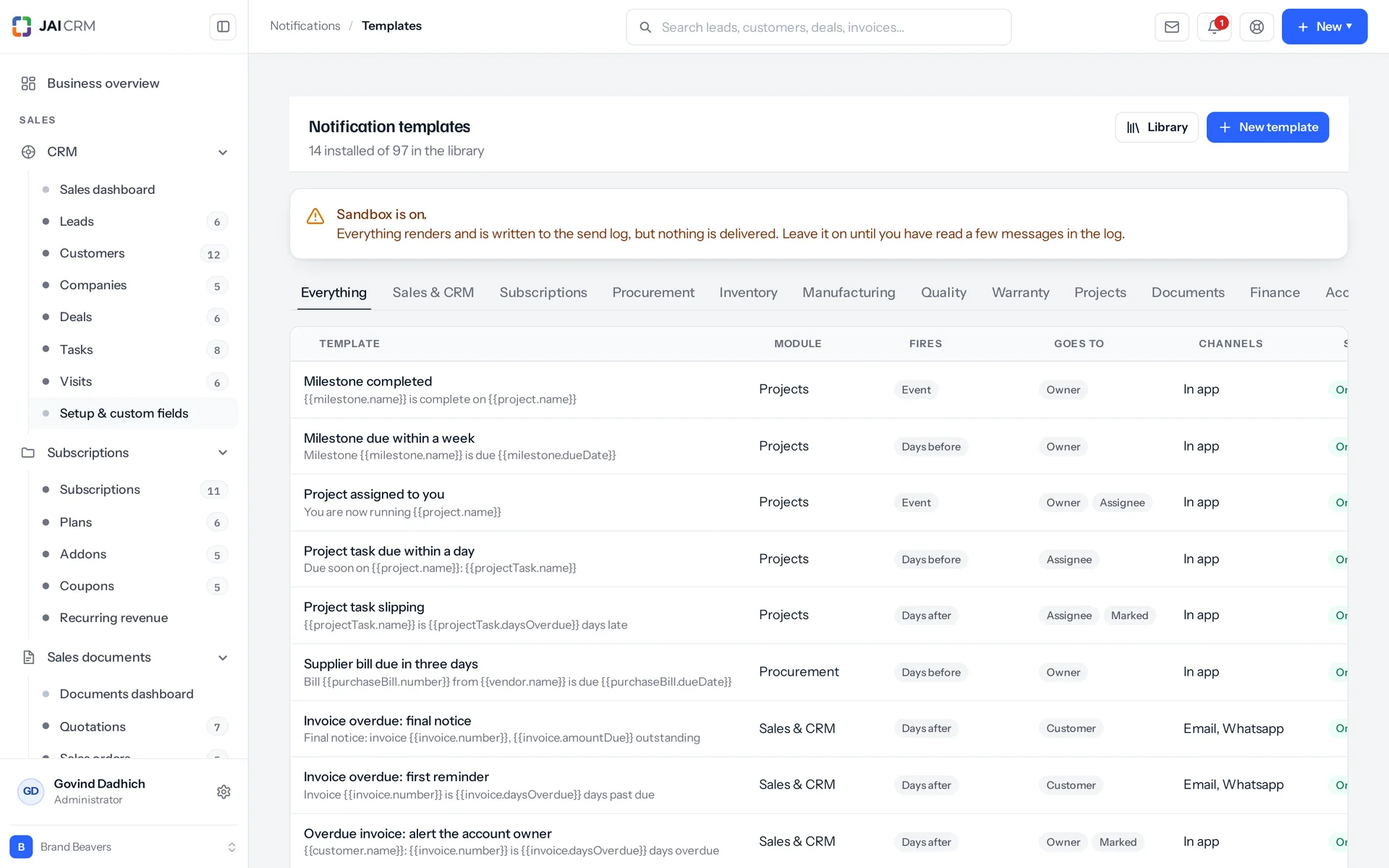
Notification templates for reminders, quotations and overdue invoices.
7 things it doesEvery one in the product today

What is Notifications in JAI CRM?

Notifications in JAI CRM is the automated reminders and alerts system for your own invoices, bills, tasks and stock. It comes with 97 ready-written rules. Each message goes to the customer, the vendor or the record's owner. A queue shows the exact message before it sends, and a late customer gets one chase, not four.

Five ways chasing quietly stops

Reminders are not hard because the maths is hard. They are hard because chasing is left to whoever remembers. And once someone installs a system, they are hard because of what that system did in its first two weeks.

  • The invoice everyone thought someone else was chasing

    It went out in June. Sales thought accounts were chasing it. Accounts thought sales had a relationship to protect. Nobody was lying. Chasing is a job that belongs to whoever remembers, and in a busy fortnight nobody does. Now the customer is 41 days late. That talk is far harder than the one you could have had on day three.

  • Four notices in one morning

    Someone finally runs the reminders. The client who is 41 days late gets the three-day, seven-day, fifteen-day and final notices, all in the same hour. They ring up angry about your software, not sorry about the money. Whoever set it up quietly switches the whole thing off that afternoon.

  • Dear ,

    A template went out with a merge field (a blank the system fills in) that the record could not answer. The customer got a greeting with a hole in it, a total that read “undefined”, or a line about a delivery date on an order that has none. Nobody caught it, because nobody had ever seen the finished message. They had only seen the template with the curly brackets still in it.

  • The reminders left when Anil did

    They were calendar entries and phone alarms on one person's phone. They knew nothing about whether the job was already done. He resigned in March. In April, two renewals slipped by quietly and a vendor's bill went two weeks past its date. It took until May for anyone to work out the common cause.

  • Everything to everybody, so nothing to anybody

    The last system could tell the whole team about every event, so someone turned it all on. Within two weeks the team had a rule filing it all in a folder. The one message that mattered went into that folder with the rest: a quality inspection failed on a batch about to ship.

What automated reminders do, in plain words

Nothing below is on a roadmap. Every one is in the product today, and a 14-day trial is long enough to check any of it.

Triggers

Six ways a reminder can start, not just one

A trigger is the moment that makes a message go out, and here there are six kinds. Most systems know only one idea: something happened, so send an email. That covers about a third of what a business needs to hear. Here each rule names the moment it cares about.

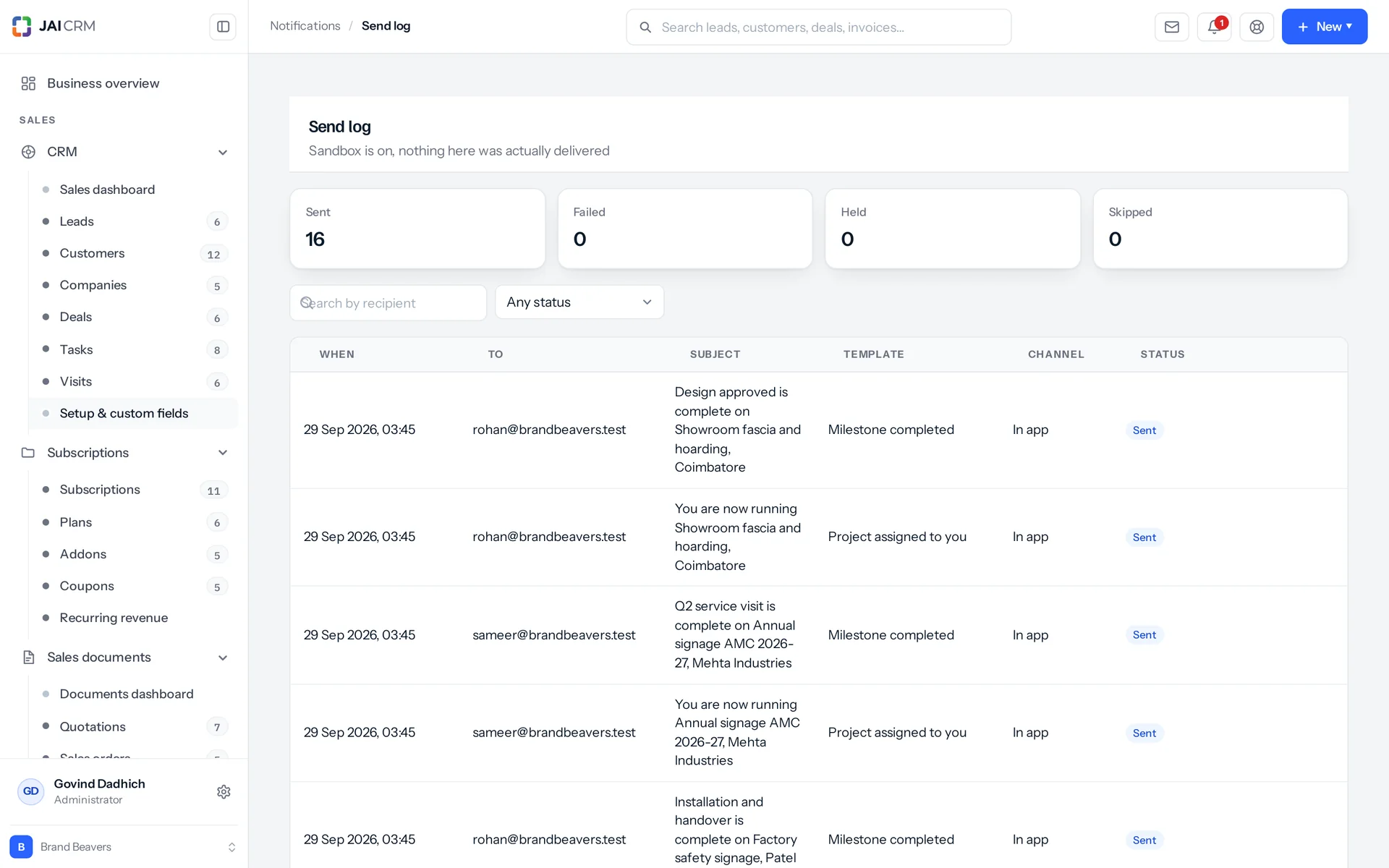
The send log: what was sent, to whom, and when.
Event, before, after, silence, threshold, digest
Event fires the moment something happens. Days before counts down to a date. Days after chases what is already late. After silence watches for nothing happening, like a lead nobody has touched for two weeks. Threshold watches a number cross a line. Digest rolls everything into one message on a schedule.
Each rule names the record and the moment on it
The trigger is written as record dot field, for example invoice.dueDate, lead.lastContactedAt or quotation.accepted. So each template says plainly what it is watching. Anyone reading the list six months later can tell without opening it.
Thirty kinds of record it can watch
The daily check (the sweep) can load and describe 30 kinds of record: invoices, quotations, sales orders, delivery challans, credit and debit notes, payments, customers, leads, deals, tasks, purchase orders, purchase bills, vendors, goods receipts, stock items, stock transfers, manufacturing orders, quality inspections, warranties, projects, project tasks, milestones, files, public links, expenses, people, import jobs, the plan you are on and the workspace itself. Each one brings its own dates, its own numbers and its own ready-made sentences for a template.
Instant messages, and a promise about them
Twelve events come from the documents themselves: a quotation sent, accepted or declined, an order confirmed, a challan dispatched, an invoice sent, part paid or paid, a credit or debit note issued, a purchase order sent and a bill recorded. Another 23 come from the modules, such as a task assigned, a deal won or lost, a payment received, a vendor blocked, a file shared, a goods receipt raised or an inspection failed. A message that cannot be built never stops the action that caused it. The message job is queued and your action finishes as normal. Anything that goes wrong is caught quietly and logged. Nobody loses an invoice because a template had a bad token (a blank that fills in a name or number).

Escalation

A client 41 days late gets the final notice, not all four

Escalation means a late customer gets only the one notice that matches how late they are. This one behaviour decides whether a reminder system survives its first month. Templates that watch the same record, the same date field and the same direction count as one ladder. Only the highest step (rung) the record has reached is sent.

The ready-made overdue ladder is 3, 7, 15 and 30 days
It has four notices that get firmer in tone. Each has a no-repeat window (dedupe window) that grows as they go: 72 hours, then 96, then 120, then a full week. Only the last one names a business consequence and a way out: further supply is put on hold, and there is a phone number to ring.
Before ladders count down, after ladders count up
One day before the date beats seven days before, because the nearer warning is the more urgent one. Thirty days late beats three days late, for the same reason the other way round. The same rule keeps leads quiet too. After 21 days of silence on a lead, only the going-cold notice is sent, not that one and the seven-day one together.
The due-soon ladder and the overdue ladder are separate
Both sit on the same invoice and escalate on their own. So a warning sent before the due date does not block the chase that comes after it.
A no-repeat window, explained in words on screen
If the same template goes to the same address about the same record inside the window, it is skipped. The reason is printed, for example: already sent 14 hours ago, inside the 72-hour dedupe window. You can set the window anywhere from zero up to a full year. A visible checkbox lets you ignore it when you want to see what was being held back.

The queue

You read the message before the customer does

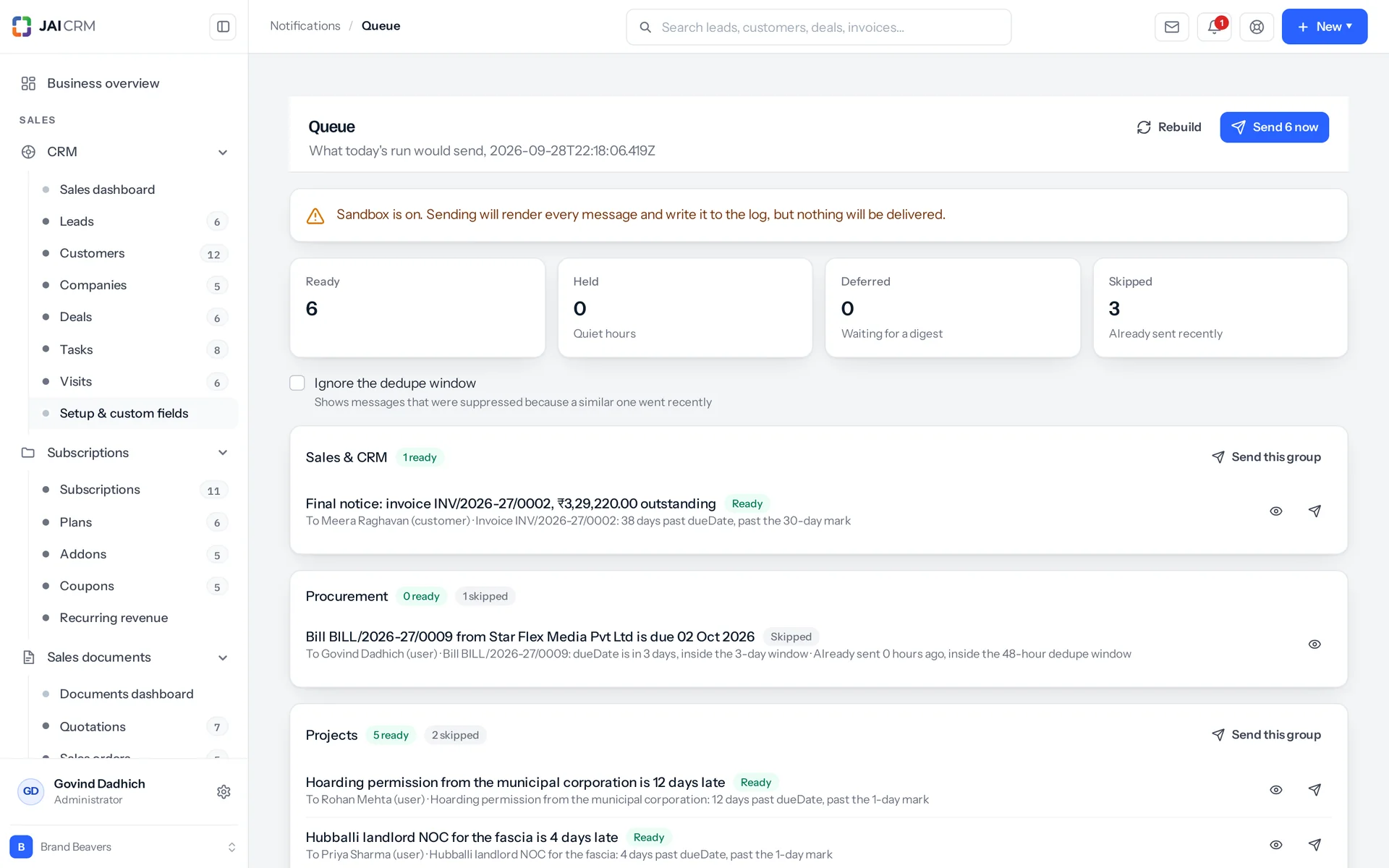
The queue shows you every message the run would send, and reading it sends nothing. Most suites give you a settings switch and hope. This one builds the run in front of you, from your invoices, tasks, bills and quotations as they stand right now.

The notification queue: messages waiting to go.
A queue with a reason on every line
Items are grouped by module. Each one is in one of four states: ready, held, deferred or skipped. Every line says in plain words why this record qualifies today, why it is in that state, and which tokens are still unfilled. You can send one item, one module's items, or everything marked ready.
Preview as a named customer, vendor or colleague
Show the draft as the person who will actually read it, and get back the email exactly as it would be sent (its HTML). Previews for sales, procurement, projects, documents, finance and system fill in from your workspace's own newest records. So you read a real customer's name next to a real figure. You can even read a vendor's copy of a message before that message exists.
Five channels planned, two sent, none faked
Email and in-app messages go out. SMS, WhatsApp and webhook (a message to another software system) are still built and written to the log as held, with the reason: no provider connected for this channel. So you can see how many would flow on the day one is connected, instead of assuming they went.
The same run the schedule will send
The queue is not a report of what already happened. It is the run itself, rebuilt each time you ask, from the records as they stand. One pass reads up to 500 open records of each kind, and up to 2,000 stock items. They are taken in order of the date being chased, so the oldest overdue invoices are always the ones in front of you.

Recipients

One template, a different message for each person on it

One template sends its own copy to each person on it. A message about an overdue invoice is really three messages: one to the customer, one to the account manager, and one to whoever is watching the account. Most systems make you write three templates and keep them matching for ever. Here one template is filled in once for each recipient.

The reader is inside the message
Every message can use the recipient's name, first name, email address and why they are on it. So one message greets the customer by name in their copy, and the account manager by name in theirs. There is no second template to forget to update.
Sent to roles, never to named people
You pick from owner, assignee, marked (people watching the record), customer and vendor. You can also pick a named circle, a named role, or one specific person where you need to. If nobody owns the record, owner falls back to whoever created it. No template ever has a person's name in it. So when an account changes owner, the next message goes to the new owner, with nothing to rewrite.
One person, one copy
Recipients are matched and duplicates removed. Someone who is both the owner and a watcher gets one message, not two. Some records carry a list of people: leads, deals, customers, tasks, projects, project tasks and vendors. On these, assignee means the people assigned and skips the watchers, while marked means the watchers.
Owner means the person it is waiting on
On a quality inspection, owner means the inspector, because the batch is waiting for the inspector. On a stock transfer, owner means whoever dispatched it, because they are waiting to hear it arrived. In-app cards are refused for customers and vendors, instead of creating a card nobody can open.

Writing one

169 tokens, and a preview that fills them in

The preview fills your draft with real data, so you never write a template blind. Writing against curly brackets is how a message with a hole in it reaches a customer. The preview uses your workspace's newest real invoice, quotation, lead, vendor or expense. So you edit against a real name and a real figure, not against {{invoice.total}}.

Fourteen common tokens and 155 module ones
The module tokens split as sales 56, purchase 26, system 23, projects 21, finance 20 and documents 9. Each token has a label, a group and a note on where it comes from, such as Settings, Business profile, or counted from the due date. So nobody has to guess what a name means. Only these six modules have a listed catalogue. Inventory, manufacturing, quality, warranty and the rest fill in their own tokens at send time without being listed. For those, check the finished message in the queue.
Sentence tokens: a missing fact says nothing at all
Some tokens fill in a whole phrase, or nothing. A task's related line says it sits on the quotation, when it does. A warranty shows its serial number in brackets, when the unit has one. A lead's company line reads “at Patel Engineering Works”, or stays silent. A transfer that arrived short says so. One that arrived complete says nothing about shortages.
A token nothing can fill is never sent
It is removed from the text and the gap is tidied: double spaces joined, a space before a comma taken out, three blank lines cut to two. Its name goes into a missing list, which the template editor and the queue both show against the item. A field that exists but is blank counts as a deliberate blank and simply leaves nothing behind, because the sentence tokens rely on that. So put your phone number in your business profile before the final notice offers it.
97 templates already written, across ten modules
Sales and CRM 36, procurement 15, projects 11, finance 10, system 9, documents 5, manufacturing 3, quality 3, inventory 3, warranty 2. Install all of them, one module's set, or a few you choose. Installing again never overwrites a template you have edited unless you say so. It reports what it created, what it refreshed and what it left alone.

Cadence

When reminders go out, and how often

Timing and volume decide whether people keep a reminder system or mute it. Three things control both here, and all three say on screen what they did.

One run a day, topped up every hour
The daily run (the sweep) builds and sends what is due at a fixed hour set on the server. Every hour after that it rebuilds the instant part, so something due at eleven in the morning does not wait until tomorrow. Digests stay on the one fixed daily pass. An hourly digest would drift earlier every day until it arrived at one in the morning. Event messages wait for none of this. They go the moment the thing happens.
Each person chooses for themselves, per module
There are twelve modules. For each one, a person picks instant, a daily digest, a weekly digest or nothing at all, in the app or by email. The system uses only the overlap between what a template sends on and what the person accepts. If there is no overlap, or the module is switched off, the item is marked skipped with the reason shown, not quietly dropped. Reading and changing your own choices needs no permission at all. It is nobody else's business. Changing someone else's does.
Eight digests, and what a digest actually replaces
A digest is one summary message instead of many small ones. There are five weekly, two daily and one monthly. Weekly ones go out on a Monday and the monthly one on the 1st, judged by your workspace's time zone, not the server's. For people who asked for a digest, it replaces the single messages. Everyone else gets it as a summary of the same day, alongside the single messages. That is why people who want a digest should set it.
A three-day warning never waits for a weekly digest
It would expire before the digest went out. Triggers that keep matching, such as overdue or gone quiet, may wait for a weekly or monthly roll-up. A countdown or a threshold only ever waits for a daily digest built by the same run. If no digest can take an item, it is sent now. The wrong timing beats never.

India

Written the way an Indian business reads it

By default, reminders show rupees in lakh and crore, and dates always read like 03 Apr 2026. A reminder gets about three seconds of reading. If the amount is grouped the wrong way, or the date reads 03/04, the reader stops to work it out, and skips the next one.

Rupees in lakh and crore, dates like 03 Apr 2026
By default, money is shown in rupees in the Indian format (en-IN), so 12,45,000 is grouped the way the reader counts. If you have set your own currency and locale, it uses those instead, so a Singapore customer on the same list reads theirs. Dates always read day, short month, year, like 03 Apr 2026, not 03/04. So nobody has to work out which part is the month.
GSTIN is a built-in token
Your GSTIN (your GST registration number) is one of the fourteen tokens every message can use. It is read from Settings and your business profile, not typed into each template. So a chase to a customer can carry it where their accounts team needs it to file against.
The vendor's papers, thirty days before they lapse
A vendor's compliance documents have expiry dates: GST registration, MSME certificate, a PAN copy. The rule watches whichever expires first. A month before, it writes to the vendor directly, with a link to upload the renewal to the portal, and copies the buyer who owns that vendor. The ready-made wording includes the line that gets it done: no new orders can be released once it has lapsed.
Credit limits, watched as a number
When you sell on credit, nobody notices a customer crossing their limit. A threshold rule compares what a customer owes with the limit on their customer record. Only customers with a limit set are checked. At 90 per cent, it tells the account manager and whoever is watching the account. One line shows the amount outstanding, the limit and the share used. Then you collect before releasing the next order, or have the limit reviewed.

Who opens Notifications, and what for

Swipe through the people who use it every day.

For the person who chases payments

The overdue ladder does the chasing at 3, 7, 15 and 30 days, and sends only the step the invoice has actually reached. The customer's copy has their name, the invoice number, the amount still due and the days overdue. The account manager gets the same event as a card in the app. Only the final notice names a consequence: further supply on hold, and a number to ring. When money comes in, a payment received message tells the desk and asks them to match it to the right invoice. That keeps the ageing report (who owes what, and for how long) correct.

For the owner who wants five alerts, not fifty

Set your own choice to a daily digest for the modules you want to keep half an eye on, and instant for the two you refuse to miss. A threshold rule tells you when a customer's outstanding crosses 90 per cent of their credit limit, before the next order goes out, not after. Nobody needs to know you changed it. Your preferences are yours, and changing them needs no permission.

For the person who pays the bills

You get fifteen procurement templates. A bill due in three days, then overdue at one day and at ten days. These are one ladder, so a bill two weeks late gets the escalation, not both notices. A purchase order past its promised date chases the vendor and copies the buyer. An expense claim waiting three days for approval chases whoever it is waiting on, because people stop claiming when approvals drag.

For the stores person watching reorder points

Every item has its own reorder point, so a rule like “below 50” cannot work. Instead the system is given the gap: how far under its own line an item has fallen. So one rule with a threshold of zero works for a whole catalogue where every line is different. Only items already at or under their line are loaded. It fires at the line, not below it. The message also says what will not fix it: it counts every warehouse, so a transfer will not help, only buying or making more.

For a projects or services business

Eleven project templates come ready. Assigning a project sends its message the moment it happens. A completed milestone says so. A task's message includes a line naming the quotation or deal it belongs to, when there is one. A lead nobody has touched for two weeks is caught by the after-silence trigger, not by someone scrolling a list on a Friday afternoon.

For the admin setting it up on a Saturday

Install the templates for one module and open the queue. Read the exact message a named customer would receive, and see which tokens are still unfilled. Nothing has gone out, because reading the queue sends nothing. Fix the wording, send that one module by hand, and leave the rest to the daily run. Writing a chase and actually sending it are separate permissions. So the person who drafts templates does not have to be the person allowed to send them.

What is different once you have it

Chasing no longer depends on who is in the office

The rule lives on the record, not in someone's calendar. It goes to the owner, the customer or the vendor, not to a name typed into a template. Reassign an account and the next chase goes to whoever holds it now, with nothing to rewrite. Work that lived in one person's memory now runs on a schedule the business can see.

You can prove what was said, to whom, and when

The log keeps the finished message and the address it went to at the moment of sending. It does not just point to a template that may have been edited since, or to an email address that may have changed. If a customer says they were never told, you answer with the message itself.

Fewer messages arrive, and people read the ones that do

One step of a ladder, not four. One copy for someone who is both owner and watcher. Nothing inside the no-repeat window. Nothing to someone who switched that module off. The result is a small number of messages that people still open in month six.

You read it before the customer does

The queue is the run itself, built from today's records. It shows the exact message each named person would get, and the reason that record qualified. Reading it changes nothing. A clumsy sentence becomes a template edit on a Saturday, not an apology on a Monday.

What it works with

On its own it is a better spreadsheet. The value arrives when what it makes is what another part uses, with nobody typing it again.

Sales documents

Twenty of the ready-written templates are for sales documents: ten on invoices, seven on quotations, and one each for a sales order confirmed, a challan dispatched and a credit note issued. Twelve events come from the documents themselves as their status changes. So marking an invoice as sent writes to the customer without anyone opening the notifications screen. About Sales documents

CRM

The other sixteen templates in the Sales and CRM set are for CRM: four on tasks, four on leads, three on deals, two on customers, one on a payment and two digests. A lead's last-contacted date is a trigger, so after-silence catches an enquiry nobody has touched for two weeks. Owner, assignee and watcher point to the people already on the record, so there is no second list of who to tell. About CRM

Accounting & finance

Ten finance templates: an expense claim submitted, one that has waited three days for approval, and one approved. There is also a weekly receivables digest (money owed to you), a weekly payables digest (money you owe) and a month-end close checklist on the 1st. Money is shown in lakh and crore, and dates read like 03 Apr 2026, so a finance message needs no decoding. About Accounting & finance

Procurement

Fifteen templates: a purchase order past its promised date, a bill falling due, a goods receipt raised and a vendor blocked. The vendor reads their own copy of the same message the buyer gets, from one template. About Procurement

Inventory

The reorder alert is given the gap between an item's stock and its own reorder point. So one rule covers a catalogue where every item's line is different. A stock transfer received sends a message, and its owner is whoever dispatched it, because they are the one waiting to hear. About Inventory

Projects

Eleven templates: project assigned, project completed and milestone completed. A task's message includes a line naming the quotation or deal it belongs to, which appears only when there is one. About Projects

Quality

Three templates: an inspection raised, an inspection nobody has picked up after two days, and an inspection failed. Here, owner means the inspector, because the inspector is the person the batch is waiting on. About Quality

Manufacturing

Three templates: a production run released to the floor, a run finished, and a run that should have started but has not. So the floor and the office hear the same thing at the same moment, instead of one of them finding out on a walk past. About Manufacturing

Warranty

Two templates, at thirty days and at seven. A serial number line appears only when the unit has a serial number. So a warranty about to run out says which unit it is about, or says nothing extra. About Warranty

Documents

Five templates: a file shared with you, a file added to a record you own, a public link three days from expiring, and a document that has waited two days for approval. About Documents

Subscriptions

Nothing is ready here yet, and this is an honest gap. The daily sweep has no way to load a customer subscription, so a renewal date cannot be watched with a days-before rule, even if you wrote one. Subscriptions does appear in the preference grid, so people can already say how they want to hear about it. Your own plan renewal is a different record, and that one does write to the workspace owner. About Subscriptions

Take Notifications on its own, or take the lot

Priced per person, per month, in rupees, with GST shown separately. Every plan includes the basics of the whole product: custom fields, roles, reports, documents and notifications. Change plan whenever you like and nothing is typed again.

5 people

CRM + Sales Documents

Leads, customers and deals, with quotations and GST invoices

₹149 per person a month

For 5 people: ₹745 a month, billed as ₹8,940 a year. ₹10,549.20 with 18% GST.

  • Leads, customers, companies and deals
  • Quotations, sales orders and GST invoices
  • Your own mailbox, with replies filed against the record
  • Reports, dashboards and exports
  • 1 GB storage per workspace (organisation)
Start free

CRM + Sales Documents + Subscriptions + Warranty

For a business that bills on a cycle and stands behind what it sells

₹299 per person a month

For 5 people: ₹1,495 a month, billed as ₹17,940 a year. ₹21,169.20 with 18% GST.

  • Everything in CRM + Sales Documents
  • Recurring billing, plans, add-ons and coupons
  • Warranty registration and claims
  • Items and stock, which warranty is held against
  • 1 GB storage per workspace (organisation)
Start free

Every plan, and what is in each Prices in rupees, per person, per month. Parts can also be bought on their own.

Only want Notifications?

Any single part is ₹149 per person a month on the yearly rate, with the settings, reports, documents and notifications that go with it. See every part’s price.

A part you do not buy

Is not in your menu. Not greyed out behind an upgrade message, just not there. That is why the product is sold in parts.

How many people, and can I change it?

You choose when you sign up and change it whenever you like, up or down. There is no minimum number of users and no penalty for going down.

Yearly or monthly?

Both. Yearly works out cheaper per month and is paid once at the start. Monthly costs a little more and stops at the end of any month.

Questions people ask about Notifications

Answered in full. If yours is not here, ask us. A person replies.

Ask us something
What is the Notifications module in JAI CRM?

It is the automated reminders and alerts system inside JAI CRM. It watches your own invoices, bills, tasks and stock, and sends messages by email and in the app. It comes with 97 ready-written templates across ten modules. A queue shows you the exact message before it sends. It is not marketing automation: every message comes from a record already in your own suite.

How much do automated reminders in JAI CRM cost?

Notifications is included in every JAI CRM plan, from ₹149 per user per month, paid annually. The 97 ready-written templates, the queue and the send log all come with your plan.

Who uses automated reminders in JAI CRM?

Anyone who chases money, pays bills, watches stock or runs projects. The person chasing payments uses the 3, 7, 15 and 30-day overdue ladder. The person paying bills gets fifteen procurement templates. The stores person gets reorder alerts. Owners can take daily or weekly digests. Messages can also go to your customers and vendors, not just your staff.

What happens if we have not set up an email server yet?

Every message is still built, filled in for each recipient and written to the send log. Each row is marked failed, with the reason: no mail server is set. In-app cards are not affected and still arrive. A recipient with no email address on file is logged as skipped, with that reason, so the gap shows up instead of vanishing. This is a useful way to run for a week. You can read exactly what would have gone to which customer, and fix the wording first.

Will a very late customer get four payment reminders at once?

No. Templates that watch the same record, the same date field and the same direction count as one ladder. Only the highest step the record has reached is sent. A client 41 days past the due date gets the final notice, not the 3, 7, 15 and 30-day notices together. The due-soon ladder and the overdue ladder on the same invoice escalate separately. So a warning before the due date does not block the chase after it.

If a customer owes on four invoices, do they get four emails?

Yes, one per invoice, and that is on purpose. The ladder runs per record, and the no-repeat (dedupe) window is tied to the template, the address and that invoice. Each message names its own invoice number and amount, which is what the customer needs to pay one of them. Inside your team it rolls up: the weekly receivables digest gives the account manager all four as one list.

Can reminders go to customers and vendors, or only to my team?

Both. Customer and vendor are recipient roles, alongside owner, assignee and marked (watchers). The message is filled in once per recipient, so the customer's copy and the account manager's copy come from one template and cannot drift apart. In-app cards are for staff only. A customer or vendor on the in-app channel is refused, instead of creating a card nobody can open.

Do I have to write all the reminder templates myself?

No. Ninety-seven templates come ready, across ten modules: sales and CRM 36, procurement 15, projects 11, finance 10, system 9, documents 5, manufacturing 3, quality 3, inventory 3 and warranty 2. Install all of them, one module's set, or a few you choose. Installing again never overwrites a template someone has edited, unless you clearly ask it to. It reports what it created, what it refreshed and what it left alone.

How do you stop a reminder going out with a blank name or amount?

A token the record cannot fill is never sent. It is removed from the text and the gap is tidied: double spaces joined, a space before a comma taken out, three blank lines cut to two. The token's name goes into a missing list. The template editor shows it, the queue shows it against the item, and the preview marks the message as not deliverable. A field that exists but is empty counts as a deliberate blank and leaves nothing behind. That is how the sentence tokens work. So fill in your phone number and GSTIN before the templates start offering them.

Will reminders go out at two in the morning?

Scheduled ones, no. The daily run happens at one fixed hour set on the server, then tops up every hour after that, so scheduled chases land in working hours for an Indian business. Event messages go the moment the thing happens, which is whenever one of your own people does it. What you cannot do today is set your own quiet window for your workspace. If that matters to you, ask before you buy, not after.

Can each person turn off the alerts they do not care about?

Yes, and without asking anyone. For each module, each person picks instant, a daily digest, a weekly digest, or nothing at all. They also pick in the app, by email, or neither. All twelve modules are on that grid. Reading and changing your own choices needs no permission, because it is only you saying how you want to be told. Changing someone else's does need permission. If a person's choices have nothing in common with a template, the item is marked skipped with the reason shown, so it is visible, not silent.

Does JAI CRM send reminders on WhatsApp or SMS?

Not today. Five channels are built in: email, in-app, SMS, WhatsApp and webhook. Two of them, email and in-app, actually send. SMS, WhatsApp and webhook messages are still built and written to the log as held, with the reason: no provider connected for this channel. That is on purpose. On the day a provider is connected, you can already see how many messages will flow, instead of finding out later that nothing ever went.

Can I stop someone from sending chases to customers?

Yes. Setting up templates, sending the queue and reading the log are three separate permissions. Sending is an approve right, not an edit right, because writing a chase and actually chasing a customer are two different jobs. Installing the templates, editing a template and sending the queue each write an audit row (a history record) naming who did it and what it covered.


Long enough to know, and it costs nothing to find out

Switch on notifications, put a week of real work through it, and see whether it holds. If it does not, walk away. We did not ask for a card.