Skip to the content
JAI CRM

DocumentsFiles with inherited sharing

Document management software: every file has an owner, history and rules

A shared company file store where folders pass their sharing down, old versions are kept whole, and the scan of a bill sits on the bill. You can link Google Drive and Dropbox files without copying them. From ₹149 per user per month.

No card needed. From ₹149 per person a month.

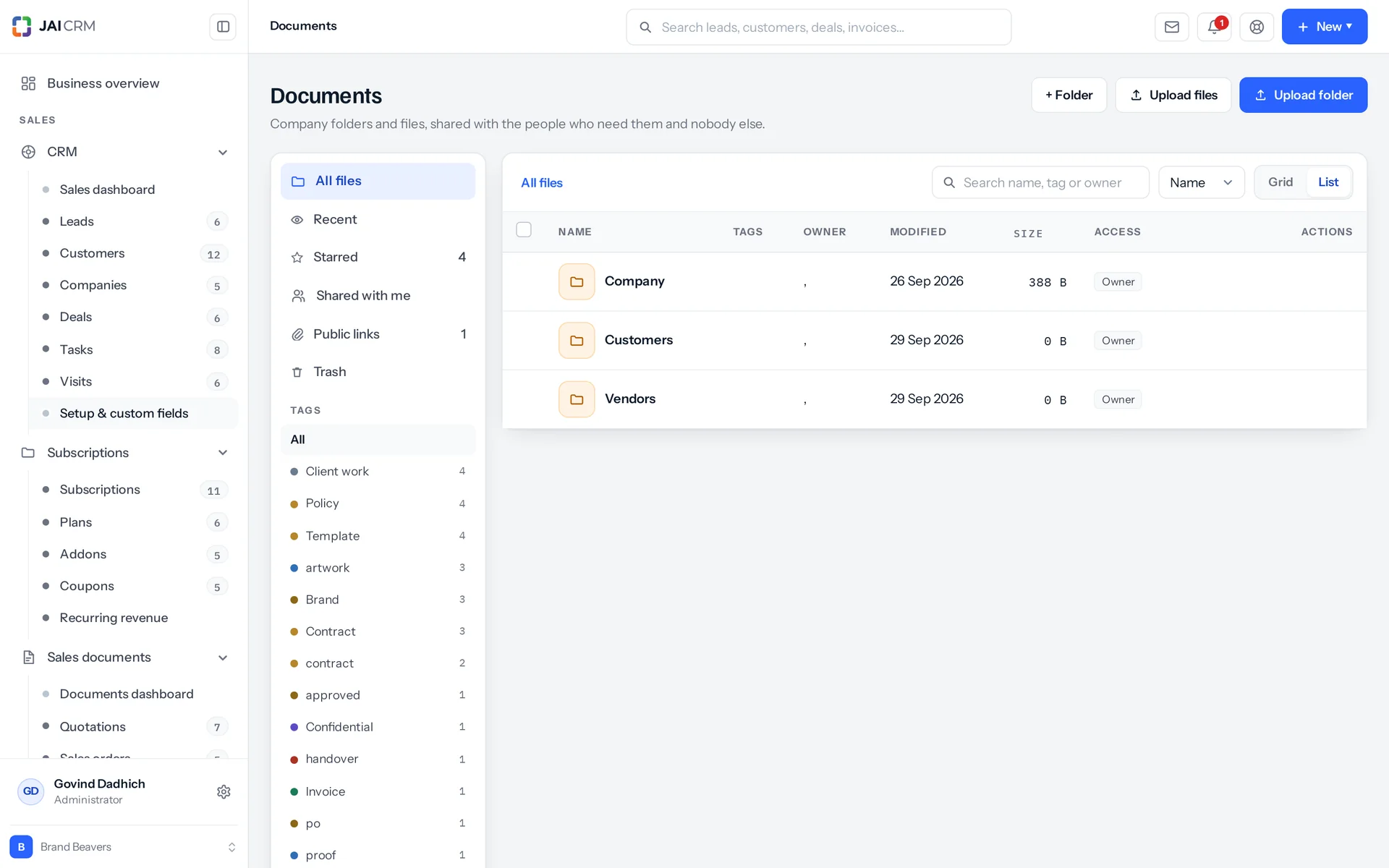
Documents in folders by customer and vendor, with who they are shared with.
8 things it doesEvery one in the product today

What is Documents in JAI CRM?

Documents in JAI CRM is the company file store and attachment system. Files sit in folders that pass their sharing rules down, each new upload keeps earlier versions whole, and scans attach to the business record they belong to. You can link Google Drive or Dropbox files without copying them. It starts from ₹149 per user per month.

Nobody meant to lose the file

Nobody was careless. This is what happens when the place your documents live has no rules of its own. Every answer has to be pieced together by asking people, and some of them may have left.

  • The folder somebody was added to in 2023

    One person worked on one project, so they were given the folder. They moved to another company two years ago. The folder kept collecting everything put into it since. No screen anywhere lists the people who can still reach it. Nobody broke in. The access was simply never taken back.

  • scan_0412.pdf

    The scanner names the file. The file lands in a folder called Scans, in a WhatsApp group, or on the desktop of whoever stood at the machine. Three weeks later a supplier disputes a bill. The signed delivery challan does exist. It is just not attached to anything that mentions the bill.

  • The drawing that only exists on one person's Drive

    It was never in the company file store, because there is no company file store. It sits in a personal Google Drive, shared by e-mail with three people. The marked-up copy is on a site engineer's laptop. When that person is on leave, the drawing is on leave too.

  • Final_v2_revised_FINAL

    Versions are kept by renaming. You end up with four nearly identical files, one of them signed. The only way to find the current one is to open all four and compare dates. The one you needed is usually the one somebody overwrote on Friday.

  • The storage is full and nobody can say why

    Somewhere a figure says 94 per cent. Nobody can tell you whose files, what kind of files, or which part of the business they belong to. So you either buy more space blind, or everybody spends a morning deleting at random and hoping.

What the document management software does, in plain words

Nothing below is on a roadmap. Every one is in the product today, and a 14-day trial is long enough to check any of it.

Access

One check decides who can open what, the same way every time

Every file action asks one access check the same question. Listing a folder, and opening, downloading, renaming, moving or deleting a file, all go through it. Once per request, it loads every folder in the workspace and every share rule that names you, your teams, your roles or everyone (up to 50,000 of each). Then it answers from memory.

The nearest rule wins, not the strongest one anywhere
To decide if you can open a folder, it walks up the tree and stops at the first parent folder with a rule that names you. If two rules sit on the same folder, they combine, and edit beats view. If you own the folder, you get edit straight away. An administrator gets edit without any walk at all.
A page of 200 files asks once, not 200 times
Each request starts with two database lookups: the folder tree, and the share rules that name you. Every row after that is answered from a map in memory. A file ten folders deep costs the same as one at the top. A listing does not get slower as the tree grows.
A rule on a file is read before the folder above it
So you can open one drawing to a supplier who cannot see the project folder it sits in, without moving it. This works in one direction only. A rule on a file adds somebody. It does not take away what the folder above already gives. So anything truly confidential belongs in its own folder, not hidden inside an open one.
A folder nobody shared with you does not exist for you
If you ask for it, you get "not found", not "forbidden". It never appears in a listing, because the folder list is built only from folders you can reach, not filtered afterwards. This matters because a folder's name is information, even when its contents are locked.

Sharing

Share with a person, a team, a role or everyone, with clients and suppliers kept apart

Every share names exactly one audience. The database enforces this, not just the screen. Anything else is refused with "Share with exactly one of a person, a team, a role or everyone". The share dialog has six tabs, because sharing a contract with a supplier and sharing it with the whole office are different decisions. They should not look the same.

Two levels, and no third
View or edit. Nothing in between, nothing above, and no grid of tick boxes to get wrong at two in the morning. Somebody with view can open a file and take a copy of it. Somebody with edit can replace it, rename it and move it. When you share something, you answer two questions: which of those two, and who.
Role and team shares follow their members
Share the Finance folder with the Finance role, and somebody who joins that role next month sees it next month. Nobody has to remember to add them. Better still, nobody has to remember to remove them. Leaving the role takes the access away with it.
Only circles are offered, never every group
A group can hold a client contact and a supplier. If groups were offered here, somebody could share the finance folder with a customer by picking one wrong row from a long list. So that list is not on the screen at all.
Taking a share away asks first
Four actions ask you to confirm first: removing a share, deleting a file, deleting a folder and emptying the trash. Each confirmation tells you in one sentence what confirming will do, for example that the folder and everything in it will move to the trash. Removing a share takes the access away immediately, so one extra click is worth it.

The store

Five views of your files, and folders that download as folders

Documents gives you five views of one set of files: All files, Recent, Starred, Shared with me and Trash. Recent is built from your own last 300 activity rows, not guessed. Starred is per person, so your star on a company document does not star it for anybody else. Choose grid or list (your browser remembers it) and sort by name, newest or largest.

Tags are whatever people use
Tags are free text on the file. The tag list is simply the tags people have typed, each shown with a count. Each tag gets a colour from its name, so the same tag is the same colour everywhere. You can add, remove or replace tags on one file or on a selection. A bulk move reports partial success honestly: "9 moved. 3 were left where they are because you only have view access to them."
A folder downloads as a zip, laid out like the folder
You get every file under it that you can see, streamed as a zip at compression level 9. The folder is the top of the zip, and each file sits under its real path. Files you are blocked from are left out, instead of the whole download being refused. So a partial folder still works, and the activity log records how many files went.
The details panel answers most questions in one go
One request returns the file, its owner, where it sits (the breadcrumb), your actual access, its tags, your star and its version count. It also shows the shares on the file and on the folder it sits in, each marked if it was inherited from above. And it lists the last 100 activity entries, with who did what and when.
Upload twelve files, get twelve notifications
Not one. Twelve files are twelve things somebody may be watching that folder for, and a single "12 files arrived" cannot link to any of them. The code loops over what was saved and sends one notification for each. That was done on purpose, not by accident.

History

Restoring version 2 creates version 5, so nothing is lost

When you upload a replacement, Documents saves a new version and keeps the old file whole on disk, not as a list of changes. Restoring an older version does not rewind. It copies that version forward as the newest one. So the history never gets shorter, and the log reads "Restored version 2 as version 5". Anything you could open before stays openable.

24 actions in each file's own history
Uploaded, downloaded, renamed, moved, tagged, starred, unstarred, shared, unshared, version uploaded, version restored, trashed, restored, linked from a drive, folder created, folder renamed, folder moved and the rest. Each entry stores the person's name on the row itself, so the history of somebody who has left still reads. The same actions reach the workspace audit trail as 8 types: create, update, move, delete, restore, purge, share and share removed.
Deleting tells you what will happen first
Before anything moves, a check counts what goes with the file, for example "2 shares on this file will be removed." Then the file goes to the trash. Delete forever is a second, separate action on something already in the trash. It clears the activity rows, the shares and the links first, then the file's record, and the record before the file itself.
A file cannot go back into a folder that is also in the trash
It tells you so, and tells you what to do instead: "The folder this file lived in is also in the trash. Restore the folder first, or move the file somewhere else." Quietly putting the file back at the top level would have been easy to build, and the wrong thing to do.
Emptying the trash only empties your part of it
It removes only what you personally have edit access to. If none of it qualifies, it says "Nothing in the trash was yours to remove." Older versions go with their files, bytes and all. A trashed folder is removed for good only when it has no files or subfolders left, so nothing is left orphaned under it.

Folders

A folder tree you can rename and move without breaking what is inside

Every folder stores its full path, not just a link to its parent folder. That makes "everything under Legal" one lookup instead of a walk through the tree. The cost is keeping those paths correct, and Documents pays it. Rename or move a folder, and every path under it is rewritten in the same database transaction, so it all changes together.

Only an administrator can add top-level folders
Everybody else must pick a folder: "Only an administrator can add a folder at the top level. Choose a folder to put it in." A file with no folder has no rule to inherit. So a stray upload at the top would end up either invisible or open to the whole company. Neither is what the person dragging it in meant.
A folder cannot be moved inside itself
Nor inside any folder below it. You are told that the destination sits inside the folder you are moving, and asked to choose another one. The check uses the folder tree already held in memory, so you get the answer before a single row is saved.
Each folder shows how much is in it
Every folder in the list shows its file count and total size. These are counted in one grouped lookup for the whole page, not one lookup per folder. You can also give a folder a colour, which is the simplest way to make a tree of twenty folders easy to read at a glance.
Deleting a folder takes everything under it, and restoring brings it all back
The folder and everything under it go to the trash together, and come back together. Before you confirm, you see how much that is: "12 files will be moved to the trash with it." and "3 folders inside it will go to the trash too." So you decide with a number in front of you, not blind.

Drives

Link a Google Drive or Dropbox file without copying it

A linked file is a pointer. The file itself stays on your drive. JAI CRM keeps its name, folder, tags and, most importantly, its sharing, so the same rules decide who sees it as for any other file. Copying was ruled out for a plain reason: two copies disagree as soon as somebody edits one, and the whole point of connecting a drive is that the drive stays the original. Google Drive and Dropbox are integrations, free on every plan with Documents: each person connects their own account in Settings, Integrations.

It asks for less access than it could
It asks for two permissions (called scopes): drive.file, which covers only the files you pick in Google's own picker, and your account's e-mail address. It does not ask for drive.readonly. Connecting your drive does not let a CRM see every document in it. You hand over only the four files you meant to share.
Drive connections belong to a person, not the company
A file Meera linked is opened using Meera's own access token. When she leaves, her links leave with her. No shared service account is left holding the whole document store open for years. Disconnecting revokes access, it does not delete anything, and it tells you the cost: "Disconnected. 7 linked files will not open until you reconnect."
Files pass through JAI CRM, never around it
A signed Drive or Dropbox web address handed to a browser would skip JAI CRM's sharing rules. Anyone who got hold of it could read the file for as long as the link lasted and pass it on, and JAI CRM would never know. So the server fetches the file and streams it through JAI CRM's own download route. It costs one extra hop and keeps one set of rules.
Read-only by design, and Google files convert
JAI CRM cannot rename, delete or upload anything back to your drive. The drive connection has no way to do any of these. Downloading a Google Doc gives you a .docx, Sheets an .xlsx, Slides a .pptx and Drawings a PDF. A Google Doc has no file of its own, and an export error is a strange thing to show somebody who has just clicked Download.

Attachments

The scan lives on the invoice and follows the invoice's permission

Attachments are the other half of Documents: files that hang off a business record instead of living in the folder tree. Any of the 82 record types in the suite can take attachments. Who may see one comes from that record's own permission, checked on all five actions: upload, list, download, rename and delete. So whoever may see an invoice's scan is exactly whoever may see the invoice.

A label in a person's own words
Every attachment has a label separate from its file name, because scans arrive called scan_0412.pdf and nobody will ever rename them one by one. "Signed delivery challan" is what somebody will look for six months later.
It follows the record, including the Indian ones
The file can go on a stock transfer carrying an e-way bill number (the permit for moving goods), an item with its HSN or SAC code (the GST code for goods or services), or a customer, company or vendor carrying a GSTIN (GST registration number). It inherits that record's permission. There is no second list of who may see what to keep in step with the first.
14 file types you can never attach
Uploads of .exe, .bat, .cmd, .sh, .com, .scr, .msi, .dll, .jar, .app, .deb, .rpm, .vbs and .ps1 are refused with the message "is a kind of file this suite will not store". When files come back out, only 8 types are ever shown inside the browser: PNG, JPEG, GIF, WebP, AVIF, PDF, plain text and CSV. Everything else downloads instead, with content sniffing (the browser guessing a file's type) switched off.
Attaching and removing are logged on the record
Entries like "Attached Signed delivery challan" and "Removed scan_0412.pdf" go into the parent record's own audit trail, beside changes to the record itself, because that is where people will look. Attachments do not keep versions. To replace one, remove it and attach the new one. Versions belong to the folder tree, so a document that really gets revised belongs there.

Storage

See where your storage went: by person, by file type and by area

The storage limit is checked inside the one function every upload in the product passes through. It is not checked at each of the eleven routes that upload files, because there are eleven of them and there will be a twelfth. So a workspace sold 5 GB cannot quietly end up holding 500.

The refusal shows the maths
"This file needs 2.1 GB and the workspace has 0.4 GB left of 100 GB. Delete something, or add storage under Settings → Subscription." The workspace limit and a person's own share are worded differently on purpose. You fix the first by buying storage, and the second by changing a number.
Your allowance grows with the business on its own
One allowance for the whole workspace (organisation), made of three things added together: the plan's own pool, the plan's per-user amount times the seats in use, and any extra storage bought as an add-on. A plan that says nothing at all about storage gets 5,120 MB. Nobody has to edit a number when the fifteenth person joins.
Three answers to "where did it go?"
By person: each user, with "(removed)" added for people who have left. Their files did not leave with them, and somebody hunting for 4 GB needs a name, not a blank. By file type: 9 families, not a list of forty technical file formats (MIME types). By area: documents, older versions, item photos, and which record type the attachments belong to. "CRM is using 4 GB" is something you can act on. "Attachments are using 4 GB" is not.
On the storage screen, the bar and the breakdown always agree
Both are counted from the same four tables: attachments, documents, older versions and item photos. This is deliberate. The total and its explanation are the same sum run twice, not two different queries that drift apart over a year.

Who opens Documents, and what for

Swipe through the people who use it every day.

The accountant who is not on your payroll

Make a Finance folder and share it once, at view, with your CA's login. Everything you put in it after today is shared too. No second message, no second folder, no monthly "did you get it?". When the work ends, you remove one share in one place, and access is gone for everything under that folder.

The fabrication shop sending drawings to site

Rev 3 replaces rev 2 as a new version of the same file, not as a second file with a longer name. The supervisor opens the current one because there is only one to open. If somebody needs rev 2 back, it comes forward as rev 4. The history still shows all four, with who uploaded each.

The agency handing work to a client

A customer portal login is a share audience of its own, on its own tab away from staff, so nobody picks it by mistake. Share the deliverables folder with it, and the client sees that folder and nothing above it. At handover at the end of a job, the folder downloads as a zip laid out just like the folder.

The purchase desk and a supplier's papers

The GST certificate, the MSME registration and the cancelled cheque go on the vendor record. Each is labelled in words, not left as scan_0412.pdf. Whoever may see the vendor may see them, and nobody else can. There was no separate permission to set. When the supplier needs a signed purchase order from you, a vendor portal login is a share audience of its own.

The administrator in renewal week

The bar says 94 per cent. The breakdown says which person, which kind of file and which part of the business. People who left two years ago are still listed, marked (removed). The choice is no longer "buy more or delete something". It becomes a specific decision about a specific 4 GB.

HR, and the letters nobody else should read

The appointment letter goes on the employee record in Finance. It is protected by whoever may see employee records, which in most businesses is two people. Anything that must live in the folder tree goes in a folder of its own, shared with the HR role rather than with named people. Then the list looks after itself when somebody joins or leaves that role.

What is different once you have it

"Who can open this?" finally has an answer

You do not have to check files one at a time. Rules sit on folders and pass downwards, and the nearest one wins. The details panel lists the shares on the file and on the folder it sits in, each marked if it came from above. Removing a share cuts the access at once, including to everything added to that folder since 2023.

Documents stop being a second system

The scan is on the record, and the record decides who sees it. There is no separate list of who may see what to keep in step with the first. There is no folder called Scans that is really an index nobody updates. And nobody has to remember to copy a permission change from one place to the other.

Somebody leaving is no longer a document emergency

Drive connections belong to people, not to a service account, so only that person's own links leave with them. Their name stays on the activity rows they wrote, because it is stored on the row, not looked up. They stay in the storage breakdown, marked (removed), so their files can be found, not just counted.

Storage becomes a number you can act on

The limit is checked inside the one function every upload passes through. An upload that would take the workspace over it is refused before a single byte is saved, and the refusal shows the maths. The breakdown shows it by person, by file type and by area. The allowance grows with the seats in use, so the talk about more space happens when the business really outgrows it, not on a random Tuesday.

What it works with

On its own it is a better spreadsheet. The value arrives when what it makes is what another part uses, with nobody typing it again.

Sales documents

The customer's signed copy of your quotation, and the purchase order they sent back, sit on the document they belong to instead of in an inbox. About Sales documents

Procurement

The supplier's bill as it arrived and the goods receipt note sit on the purchase order. So the three-way match (checking the order, the receipt and the bill agree) has its proof right beside it. About Procurement

Vendors

GST certificates, MSME registrations and bank letters sit on the vendor record, seen by whoever may see the vendor. A vendor portal login is a share audience of its own. About Vendors

Projects

Drawings and approvals are versions of one file, not four files with longer names. They sit in a folder the client's portal login can reach, without reaching anything above it. About Projects

Quality

Test certificates and inspection reports attach to the inspection they belong to, seen by whoever may see the inspection. Attaching one and removing one are both written to that record's own audit trail. About Quality

CRM

The customer's brief, their rate approval and the signed order sit on the lead or the deal. Exactly whoever may see that record can see them. About CRM

Accounting & finance

The supplier's bill as it was scanned, the bank advice behind a payment and the receipt behind an expense claim each sit on the record that carries the number. So the entry and its proof are not in two systems. About Accounting & finance

Notifications

Three of the notification templates belong to Documents: a file has been shared with you, a file was added to a record you own, and a document has been waiting two days for approval. About Notifications

Subscriptions

Extra storage is bought as a subscription add-on. It is read from the subscription, not from the plan's limits, because those get overwritten whenever the plan changes. About Subscriptions

Take Documents on its own, or take the lot

Priced per person, per month, in rupees, with GST shown separately. Every plan includes the basics of the whole product: custom fields, roles, reports, documents and notifications. Change plan whenever you like and nothing is typed again.

5 people

CRM + Sales Documents

Leads, customers and deals, with quotations and GST invoices

₹149 per person a month

For 5 people: ₹745 a month, billed as ₹8,940 a year. ₹10,549.20 with 18% GST.

  • Leads, customers, companies and deals
  • Quotations, sales orders and GST invoices
  • Your own mailbox, with replies filed against the record
  • Reports, dashboards and exports
  • 1 GB storage per workspace (organisation)
Start free

CRM + Sales Documents + Subscriptions + Warranty

For a business that bills on a cycle and stands behind what it sells

₹299 per person a month

For 5 people: ₹1,495 a month, billed as ₹17,940 a year. ₹21,169.20 with 18% GST.

  • Everything in CRM + Sales Documents
  • Recurring billing, plans, add-ons and coupons
  • Warranty registration and claims
  • Items and stock, which warranty is held against
  • 1 GB storage per workspace (organisation)
Start free

Every plan, and what is in each Prices in rupees, per person, per month. Parts can also be bought on their own.

Only want Documents?

Any single part is ₹149 per person a month on the yearly rate, with the settings, reports, documents and notifications that go with it. See every part’s price.

A part you do not buy

Is not in your menu. Not greyed out behind an upgrade message, just not there. That is why the product is sold in parts.

How many people, and can I change it?

You choose when you sign up and change it whenever you like, up or down. There is no minimum number of users and no penalty for going down.

Yearly or monthly?

Both. Yearly works out cheaper per month and is paid once at the start. Monthly costs a little more and stops at the end of any month.

Questions people ask about Documents

Answered in full. If yours is not here, ask us. A person replies.

Ask us something
What is document management software in JAI CRM?

It is Documents, the part of JAI CRM that stores your company files. Files sit in folders, and sharing passes down from the folder above. Uploading a new copy keeps earlier versions whole. Files can also attach straight to a business record, such as an invoice or a vendor, and follow that record's permission. Google Drive and Dropbox files can be linked in without being copied.

Who is the JAI CRM Documents module for?

It is for businesses that share files with staff, clients and suppliers and need to know who can open what. It suits professional services, agencies, construction and interiors, engineering and fabrication, manufacturing, pharmaceuticals, IT and software services, real estate, and logistics and transport. Clients and suppliers get access through portal logins, so you do not buy them a seat.

How much does document management in JAI CRM cost?

Documents starts from ₹149 per user per month. Your storage allowance is for the whole workspace (organisation), and adds up three things: your plan's own pool, the plan's per-user amount times the seats in use, and any extra storage bought as a subscription add-on. A plan that says nothing at all about storage gets 5,120 MB.

Can JAI CRM replace Google Drive for company files?

Yes, for company documents inside the business, which is what most people mean. If your work really lives in Google Docs, link the files instead. The files stay on your Drive. The name, folder, tags and, most importantly, the sharing live in JAI CRM, so one set of rules decides who can open them. What you cannot do is edit a document inside JAI CRM. There is no editor, and nothing is ever written back to your Drive.

Can a client or supplier see documents without a paid user seat?

Yes, through a portal login. Customer portal logins and vendor portal logins are share audiences in their own right, on their own tabs in the share dialog, listed apart from staff. Share a folder with one and they see that folder and nothing above it. A portal login only ever gets view access to files. There is no anonymous link for a stranger with no account anywhere. If a bank or a one-off buyer needs a document, send them the document.

How does JAI CRM stop staff sharing the wrong folder with a customer?

Three safeguards, all in the same share dialog. First, clients and suppliers sit on their own tabs, away from staff. Second, groups are not offered at all, only circles, because a group can hold a client contact and a supplier, and one wrong row from a long list is how the finance folder gets shared outside. Third, a share must name exactly one audience. Anything else is refused with "Share with exactly one of a person, a team, a role or everyone", so a half-filled form never saves something nobody meant.

What happens to our documents when an employee leaves?

Files they uploaded stay. Their name stays on the activity rows they wrote, because it is stored on the row, not looked up, so their history still reads afterwards. They stay in the storage breakdown too, marked (removed), because their files did not leave with them. Files they linked from their own Google Drive or Dropbox stop opening once the connection goes. The file then says why instead of coming back empty: "This file lives on Google Drive and the account that linked it has been disconnected. Reconnect it, or ask whoever linked it to."

How much storage do we get, and what happens when it is full?

Your allowance is for the whole workspace (organisation), and is three things added together: your plan's own pool, the plan's per-user amount times the seats in use, and any extra storage bought as an add-on. A plan that says nothing at all about storage gets 5,120 MB. The check runs inside the one function every upload in the product passes through, so it cannot be skipped. An upload that would take you over the limit is refused before a byte is saved, and the message shows both numbers.

Can I let someone view a file but not download it?

No. A share gives view or edit, and anybody who can view a file can download it. We would rather say that plainly than sell you a switch. A read-only viewer is beaten by a phone camera anyway, and the control that really works is who you shared it with. If a document must not leave the building, put it in a folder that only the people who need it can reach.

Can I search the text inside documents in JAI CRM?

No. There is no full-text search of what is inside a file. The search box on the files screen narrows what is already in front of you, by name, by tag and by owner. It does not search the whole store. To make a scan easy to find, give it tags or attach it to the record it belongs to. An attachment carries a label in your own words, separate from the file name, which is exactly what scan_0412.pdf needs.

Does connecting Google Drive give JAI CRM access to all my files?

No, and that was a deliberate choice, not an oversight. JAI CRM asks for two permissions (scopes): drive.file, which covers only the files you pick in Google's own picker, and your account's e-mail address. It does not ask for the wider drive.readonly. One result is that you cannot browse your Drive inside JAI CRM. You pick files in Google's picker, and the screen says so plainly instead of showing an empty list that makes you think your Drive is empty.

Can I set who sees what across the whole business, module by module?

Yes, there is such a layer, but Documents is deliberately not one of the modules it covers. For leads, invoices, purchase orders and the rest, each module gets a default: private, or public at read, read and write, or read, write and delete. Named rules sit on top. They share either by owner ("what this role and its subordinates own") or by criteria ("whatever matches this condition, whoever owns it"). A rule can only ever grant more, never less. So to know the least somebody can see, read the default and stop. The file store sits outside all of that. Its folders and shares, described on this page, are the only thing that decides who opens a file.

What happens when I delete a file in JAI CRM?

Deleting moves it to the trash. Delete forever is a separate action on something already in the trash. That runs in order: first the activity rows, the shares and the links, then the file's record, then the file itself. The record is the proof the file existed, so it goes before the thing it points to. Emptying the trash does the same for everything in it you have edit access to, earlier versions included. Deleting a folder trashes everything under it, and you are told how many files that is before you confirm.


Long enough to know, and it costs nothing to find out

Switch on documents, put a week of real work through it, and see whether it holds. If it does not, walk away. We did not ask for a card.