Skip to the content
JAI CRM

InventoryItems, batches, warehouses

Inventory management where every stock figure is built from real movements

Track items, warehouses, bins, batches, serial numbers, goods receipts, picking, packing, transfers and price lists in one stock ledger that you can only add to, never edit. So a balance can never disagree with the history that made it. From ₹149 per user per month.

No card needed. From ₹149 per person a month.

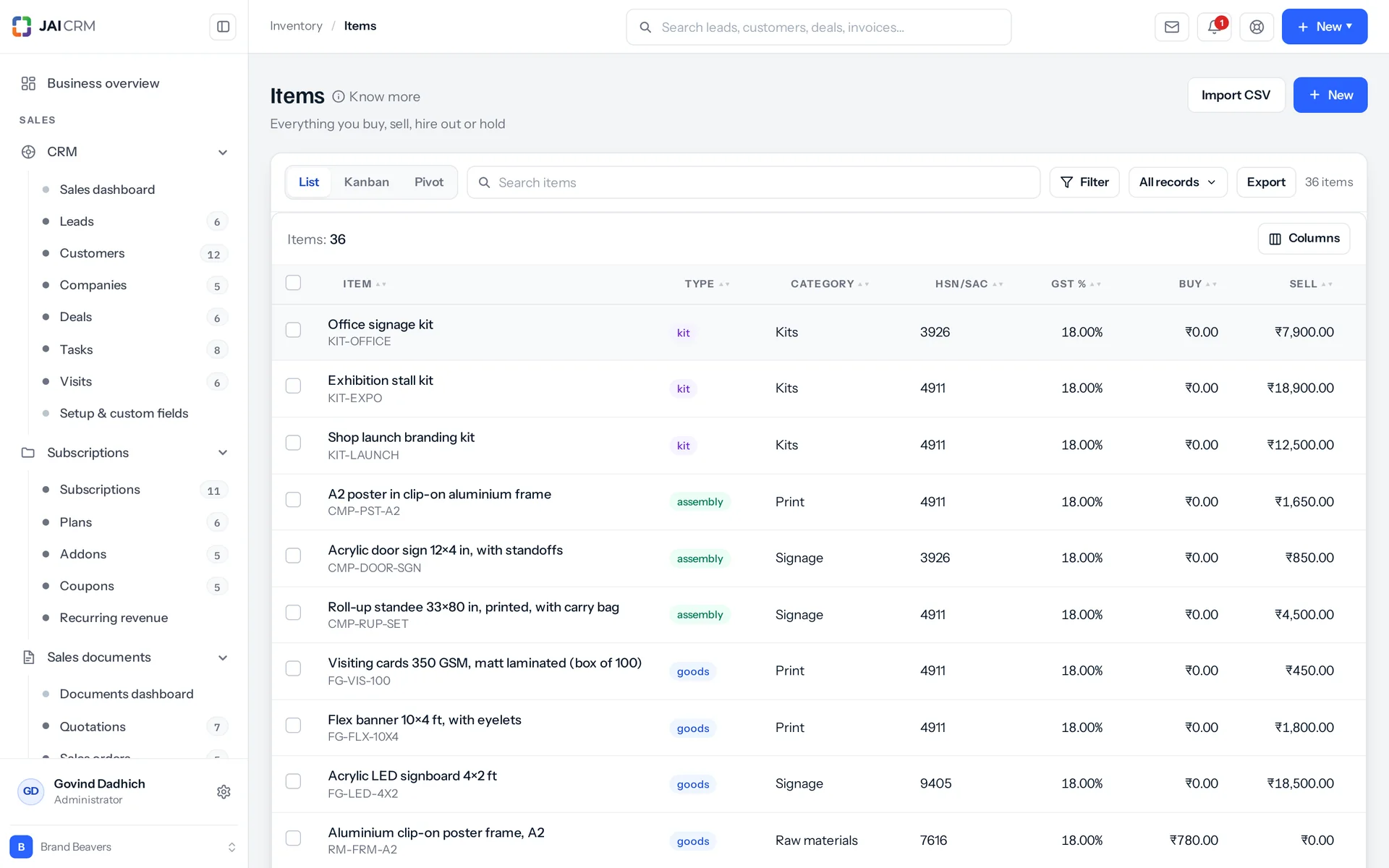
Items with SKU, HSN code, stock on hand and value.
7 things it doesEvery one in the product today

What is Inventory in JAI CRM?

Inventory in JAI CRM is the stock management module for Indian SMEs. It tracks items, warehouses, bins, batches, serial numbers, goods receipts, picking, packing, transfers and price lists. Nobody types a stock figure: every balance is the sum of movements in a ledger you can only add to, costed at weighted average. It starts at ₹149 per user per month.

Where does the stock figure stop being true?

None of this is carelessness. It happens when the stock figure is a number somebody types, instead of something the system works out from what actually happened.

  • The shelf says 40 and the sheet says 34

    Nobody was careless. The sheet cannot know that a challan (delivery note) went out on Saturday. So it drifts from the tenth of the month onwards. The fix is always the same: somebody types 40 over the 34. Next March the auditor asks where the six went, and there is nothing to look at. The correction erased the only evidence that anything had happened.

  • The transfer that has been "in transit" since March

    Forty cartons left the Bhiwandi godown. Thirty-eight reached Pune. The other two are out of the source but in no other warehouse. Their status says a lorry still has them. They will sit there for ever, because most systems have no way to say "it did not arrive and we have stopped waiting".

  • Four cartons that went out of date behind the door

    They were bought first and should have gone out first. But the newest pallet was nearest the door, so that is what got picked, month after month. Then somebody moved the old pallet and found the dates. The loss was not the picking. The loss was that nothing was watching a calendar.

  • Eleven parts used up and no table to show for it

    You start a batch of ten tables. Nine tops, forty legs, and the screws run out at table eight. The parts were already taken off the shelf by then. So the register now shows eight tables that do not exist. It is also short of parts that are lying half-assembled on a bench. Nobody notices until the next count, and by then it is too late to work out what happened.

  • Half the order arrived and nobody knows which box held what

    Six kettles went out in two cartons, packed by whoever was free on Tuesday. The customer got one carton. Which four do they have, and which two are with the courier? Only the person who taped the boxes shut knows, and they are on leave.

What the inventory management software does, in plain words

Nothing below is on a roadmap. Every one is in the product today, and a 14-day trial is long enough to check any of it.

The ledger

Every balance is the total of its own history

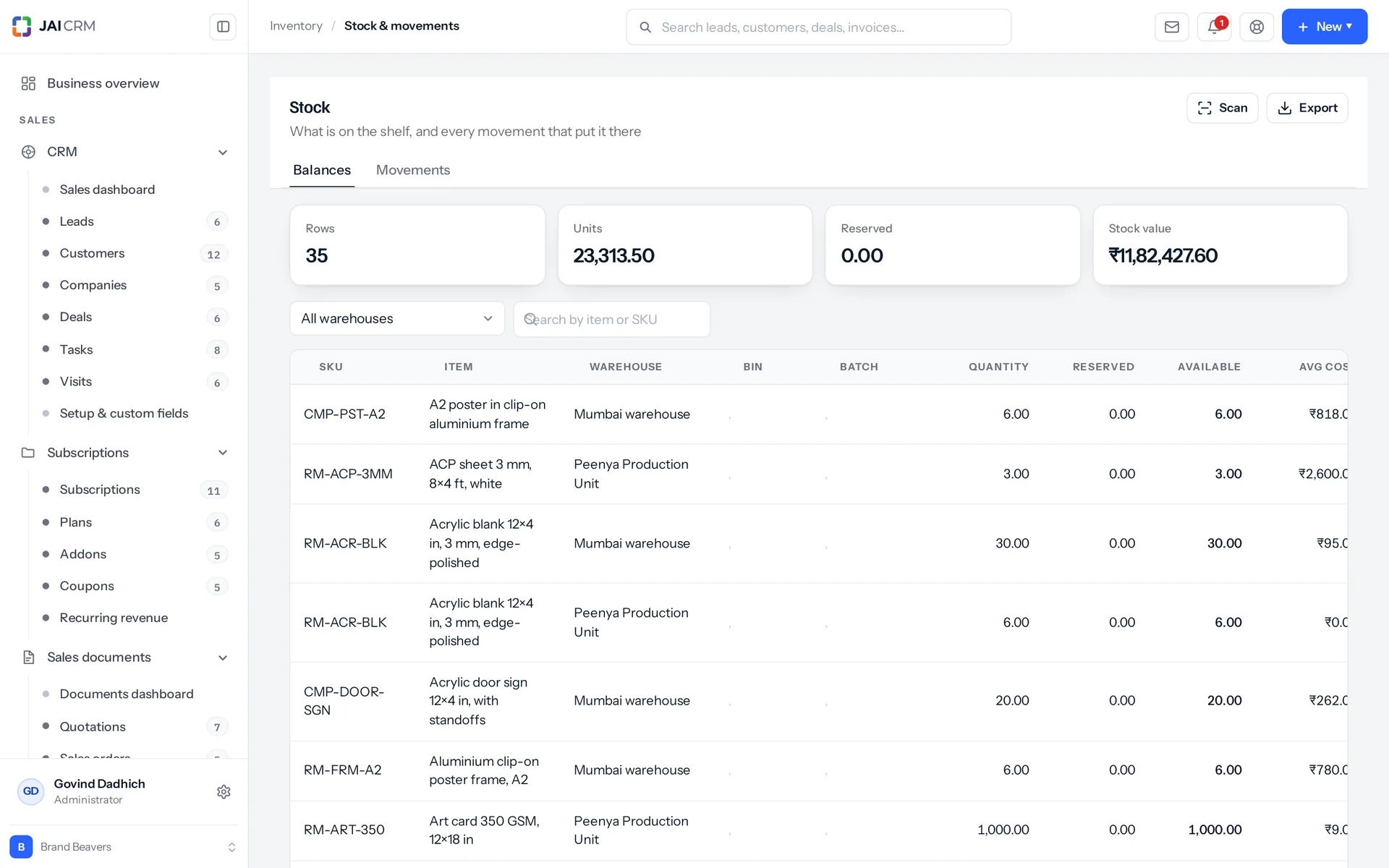
There is no stock quantity column on any item in this product. One function adds each movement and updates the balance in the same single step (one database transaction). No screen, import or report writes a stock figure of its own. The only other code that touches a balance row is bin deletion, and it only clears rows that already hold nothing. So a figure and its history cannot drift apart, because one is made from the other.

Stock by item, warehouse and bin, costed at weighted average.
Eleven kinds of movement: six in, five out
Going up: receipt, adjustment in, transfer in, return in, opening and assembly in. Going down: shipment, adjustment out, transfer out, return out and assembly out. Every row names what caused it, who posted it and when. It also stores the running balance after it. So the ledger reads like a bank passbook, not like a query somebody has to build.
Weighted average cost, worked out as stock moves
Receive ten at ₹100 and ten at ₹120, and you have twenty at ₹110. Issuing stock leaves the average alone. A movement with no cost on it takes the shelf's average, instead of dragging it towards zero. That same average feeds valuation, ageing and the dashboard. The item's purchase rate is used only where a row has never carried a cost at all.
Setting stock to 40 posts a movement of six
That is what people mean by a stock quantity, and it is how you set one here: the system posts the difference, with a reason attached to the six. The very first entry like this on an item is recorded as opening stock, not as an adjustment. The first count is not a correction of anything. A report that treated it as one would show shrinkage (lost stock) on day one.
A repair tool kept to prove the point
You can rebuild every balance for an item from its own movements, whenever you want. It is there to show that the ledger is the source of truth, not to assume it. Also, a shipment, a transfer or a build cannot take more than that exact warehouse, bin and batch holds. The check is against the slot, not the item total. A stock adjustment is the deliberate exception. Correcting history sometimes means taking a slot below zero on the way to getting it right.

Where

Stock sits on a named shelf, not in a company total

Each balance row belongs to one item, one warehouse, one bin (shelf) and one batch. Most of this module follows from that one choice. A picker can be told which shelf. A count can cover just one zone. A shortage names the slot it is short in, instead of shrugging at the item.

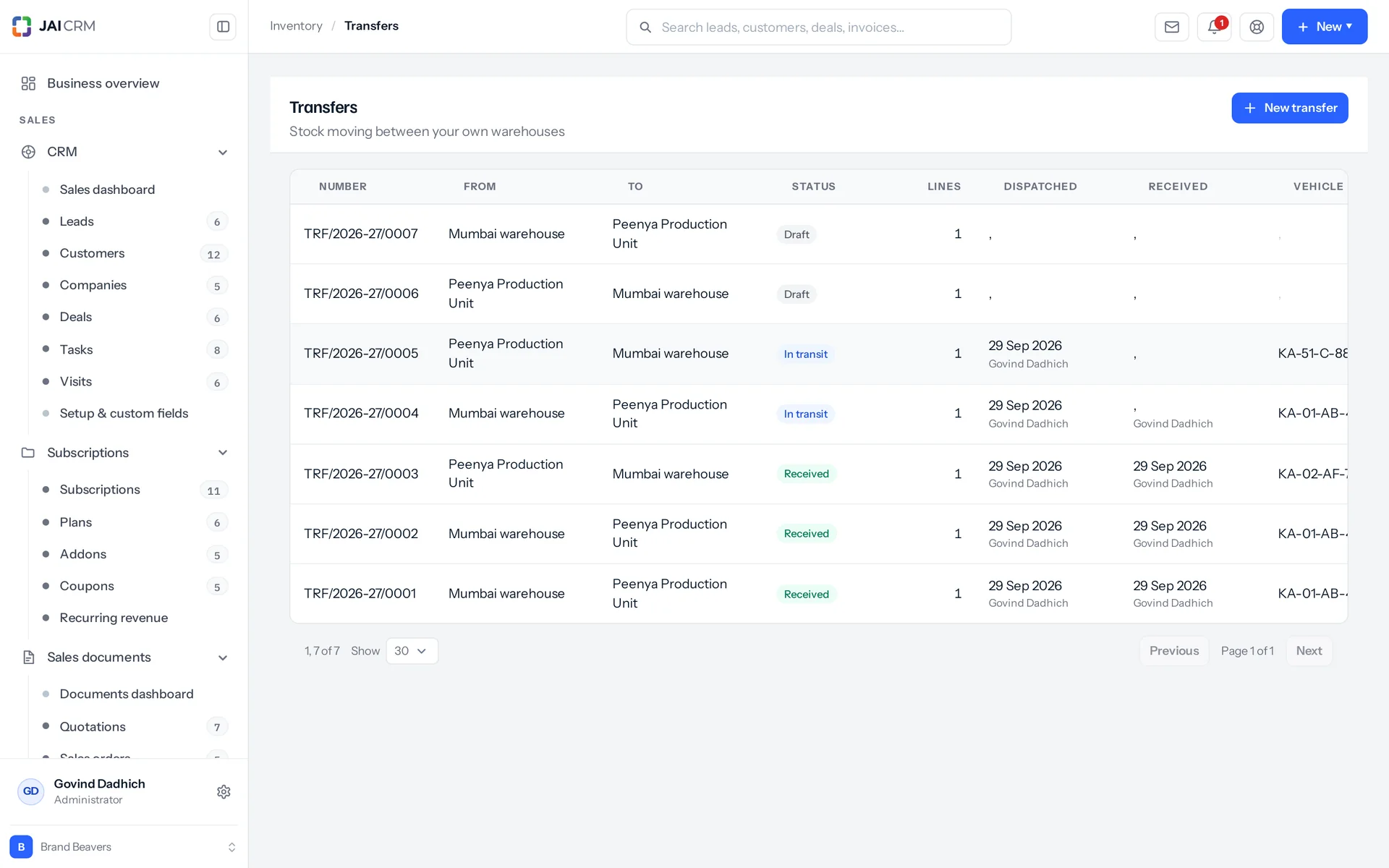
Stock transfers between warehouses, in transit and received.
Warehouses, zones and bins
A warehouse is a site, with its address and its GST state code. It is tied to a branch where you have one. A zone groups bins inside a warehouse. A bin is the actual shelf. It has one of six types (pick, bulk, receiving, staging, quarantine or returns) and a pick sequence. So a picklist walks the aisle in one pass, instead of criss-crossing the building.
Aisle A-01 to A-20 in one go
You can create bins as a run, up to 500 at a time, with the zero padding you want. Any code that already exists is skipped, not duplicated. Nobody has to type four hundred shelf codes by hand.
Reserved, without being moved
Reserving is its own step on a sales order. Confirming the order does not do it quietly: somebody decides to hold the goods. The reservation is written on the balance row, not in the ledger, because nothing has physically moved. The stock is still on the shelf, just spoken for. It takes from the largest rows first. If there is not enough free stock, it refuses and names what is short. It is given back when the order ships. Reserving a kit reserves the parts it is made of, not the kit.
A godown nobody can empty by accident
You cannot delete a warehouse that still holds stock, and the message says so plainly. The same goes for a bin with stock, and for a zone that still has bins in it. Where a role is limited by place, a person sees only the warehouses and branches they hold. A transfer shows up at both ends, because the in-charge sending it and the one receiving it both have a real reason to see it.

Traceability

Which lot it came from, and where each unit went

You choose tracking per item: none, batch or serial. Where you switch it on, the screens that set stock, move it between godowns and pack it make you follow it. Then two questions that are otherwise impossible become easy: what expires in six weeks, and where is the unit with this number stamped on it?

Oldest expiry leaves first
A picklist sorts by batch expiry, earliest first, then by bin sequence. A batch's status is worked out from the shelf and the clock, not stored. It is inactive if switched off, otherwise expired, otherwise empty, otherwise active. Each of the five filters shows a live count. You can create a lot (batch) empty when you know its number before the goods arrive.
The expiry watch
It lists batches expiring inside a window you set: ninety days by default, up to ten years. You see days left, what the stock is worth, and a flag on anything already expired. It shows only batches that actually hold stock. A page of empty expired lots is just noise between you and the four cartons that matter.
A serial number's history is read, never kept twice
The history is built from the movements that carry that serial: every touch, in or out, with the warehouse, the document and the reason. Whether the unit is here now comes from the direction of the last row, not from a status field, so the two cannot disagree. When a unit goes out, its status is honest. A transfer makes it in transit and in no warehouse at all. A build makes it consumed. A write-off makes it written off. Only a genuine shipment makes it sold.
And when it turns up behind a pallet
A unit written off as lost can be taken back in with one action. This is a real inbound movement, because the write-off really took the stock out. It refuses anything that was not given up on. A unit in stock is not lost. A unit in transit is on a lorry. A unit recorded as sold is a return, not a discovery.

In and out

What was ordered, what turned up, and what you kept

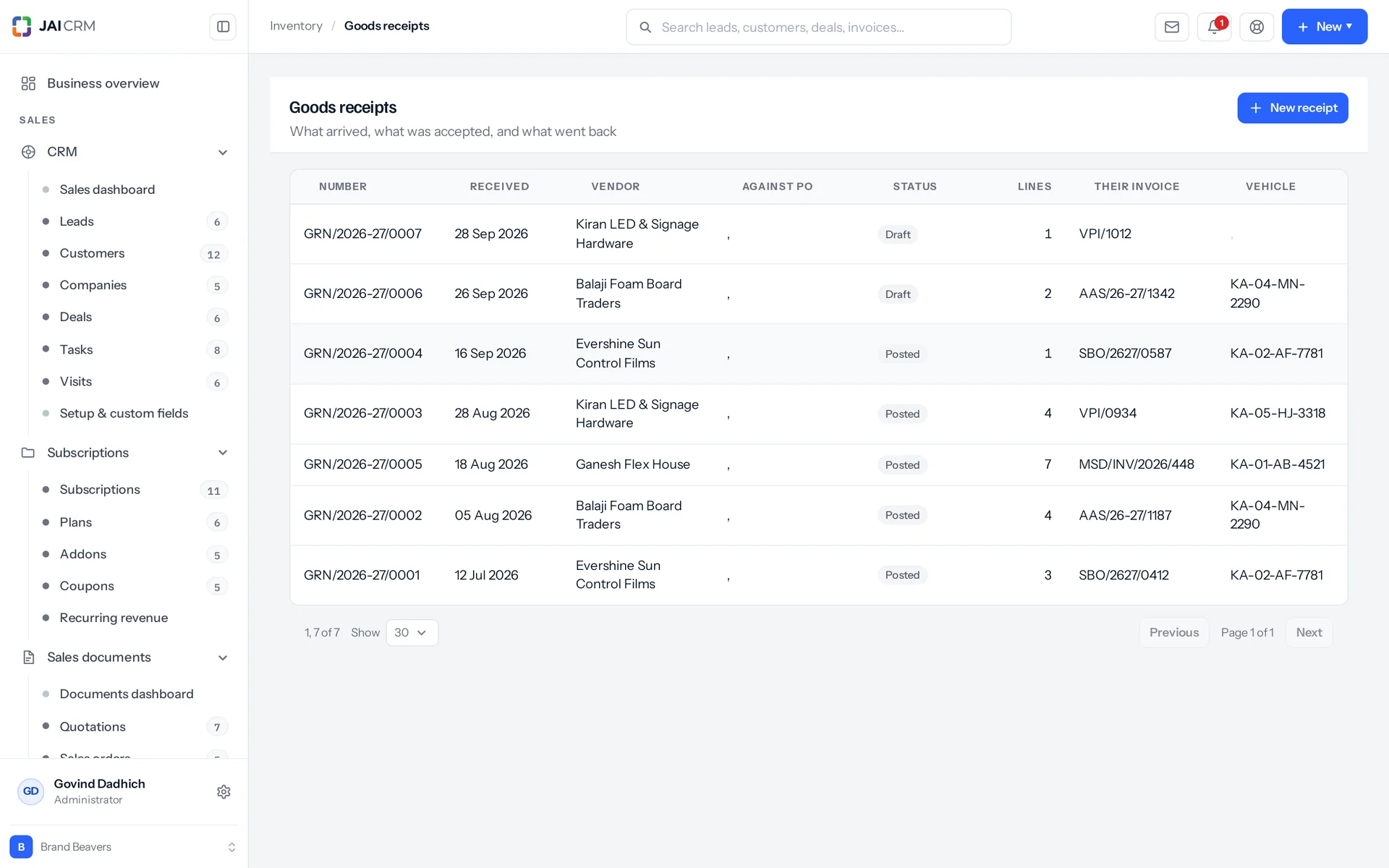
A goods receipt (the record of a delivery arriving) is first drafted and then posted. Stock moves only when it is posted. That gap is the whole point: you can fix a mis-typed line before it reaches a ledger that does not allow tidying up afterwards.

Goods receipts against purchase orders.
Four quantities at the gate
Line by line, you record ordered, received, accepted, and rejected with a reason. Accepted plus rejected cannot be more than received. The form refuses to save if it is. Only the accepted quantity goes onto a shelf. The batch is created from the number written on the line. The purchase order's received quantity goes up by itself. One tick raises the vendor bill in Finance from the same receipt. The vendor's GSTIN is pulled onto the record, so whoever checks the delivery can match it against the supplier's invoice right there.
Inspections raised without holding up the delivery
If an item has an active quality rule for purchase receipts, posting raises one inspection for it. On purpose, the inspection does not block the posting. Stock from a vendor is already in your building, good or not. Refusing to record it would leave the shelf and the register disagreeing. The inspection is the record of what was found, for a person to act on. The product does not raise anything against the supplier by itself.
Availability, then a picklist, then a shipment
For each order line you see ordered, delivered, outstanding, on hand, available, shortfall, and whether the whole thing can go today. Next comes a picklist: oldest batch first, bins in pick sequence. It splits one line across several bins and flags any short remainder. Then shipping. It posts the movements, gives the reservations back and counts up the delivered quantity. It also records a shipment with the carrier, tracking number, vehicle number and e-way bill number (the GST document for moving goods). The order goes to delivered, or to partly delivered if some is still to follow.
It will not ship what is not owed
Shipping more than is outstanding is refused, and the message names it. A serial-tracked item must say which units left, because that is how a warranty claim gets settled a year later. A serial-tracked part inside a kit cannot go out inside it. The line is refused with the reason. Otherwise a unit would leave with no record of where it went, which is the failure nobody notices.

Transfers

Moving your own stock between your own godowns

A stock transfer moves your own goods from one godown to another. Most systems treat it as one event. Every business lives it as three: it leaves, it sits on a lorry for two days, and it arrives, sometimes in two deliveries, sometimes short. All three are recorded here, including the last one.

A real in-transit state
Dispatch takes the stock out of the source. Receipt puts it into the destination, and can be partial and repeated. Each partial receipt keeps its own quantity, its own serials and the name of whoever took it in, on the line. A transfer received in two deliveries by two people cannot be described by one name. Vehicle number and e-way bill number are fields on the transfer, and you can search the e-way bill number on the list.
Signed for by people who do not work here
A signature pad captures a PNG image at dispatch and again at receipt. It is stored as a real attachment you can download, not hidden inside a database row. The typed name of whoever physically signed is kept separate from the login that held the tablet. A lorry driver and a storeman sign for a delivery, and neither of them has an account here. A signature for a handover that has not happened yet is refused.
Closing a transfer short
Stock that never arrived needs an ending. Otherwise the transfer stays in transit for ever, and so do the units on it. Closing short requires a written reason. It records the shortfall and the missing serials on each line. It marks those units lost, not returned, because putting them back on the source shelf would invent stock nobody can pick. It moves no stock at all, because the quantity already left when it was dispatched.
What it refuses, and why
The two warehouses must be different. The source must actually have the stock free before the draft will save. Only a draft can be dispatched. Only a transfer in transit can be received. A transfer whose stock has already moved cannot be deleted. A partial receipt of serial-tracked goods must say which units arrived, not just how many. Simply taking the first few still outstanding would be a guess dressed up as a fact.

Packing

Each box is its own record, before any courier arrives

Packing is the job between a customer ordering six kettles and a courier taking them away, and most systems do not record it. Somebody at a bench puts four in one carton and two in another, and writes a slip for each. Here, a box packed on Tuesday and collected on Thursday already exists as a record on Wednesday.

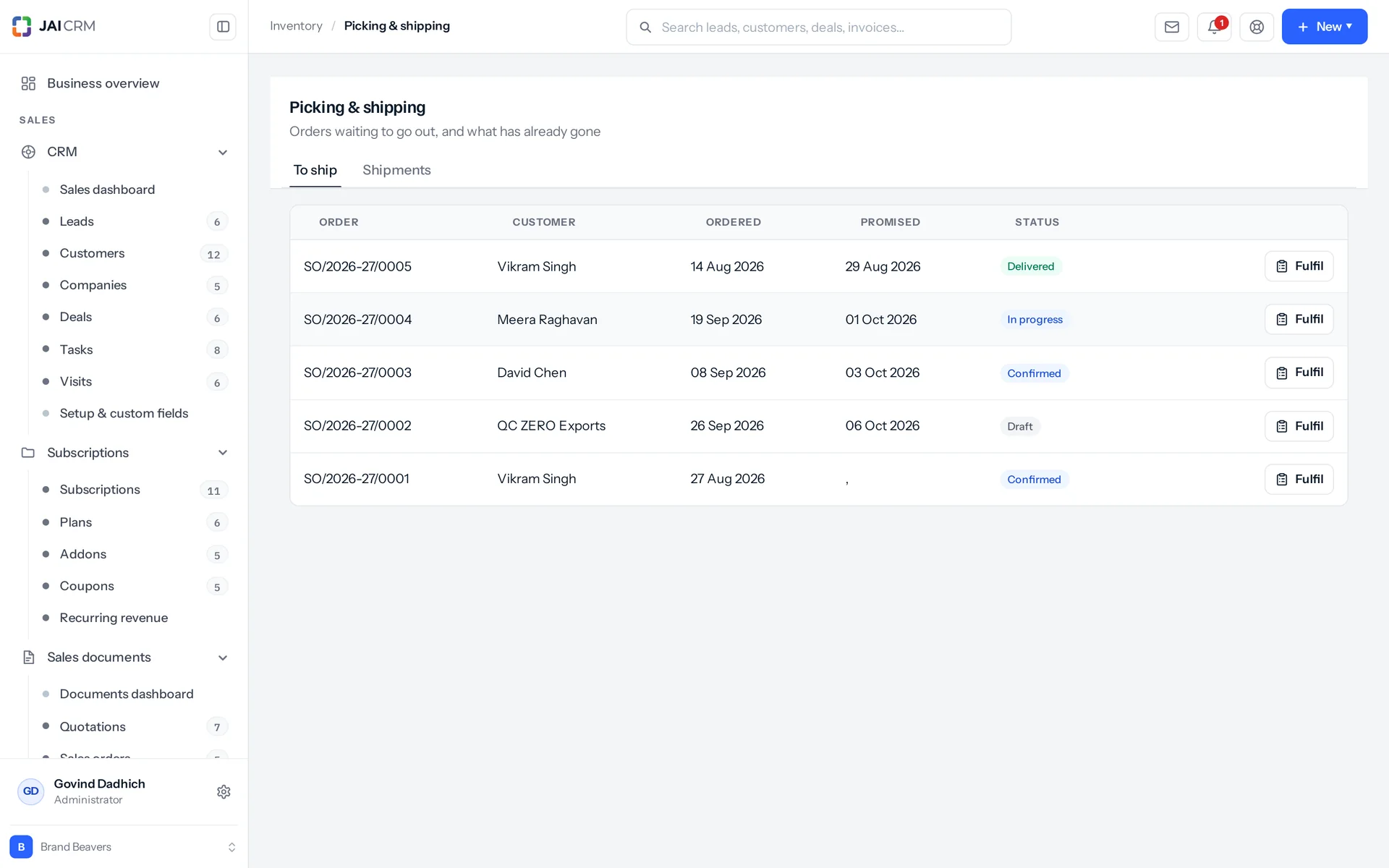
Picking and shipping: orders waiting to be picked, packed and sent.
One box, one slip, one order
Each box has the slip number that gets taped to the carton and a list of what is inside. Where the goods are tracked that closely, it also has the exact serials or batch. Every line points back to the order line it came from. That is how the database can answer "how much is still to pack". It adds this up from the packages every time you ask. A stored column would be faster, but it would eventually disagree with them.
Packing moves no stock, on purpose
The goods are still yours, just on a bench instead of a shelf. They leave the ledger at the shipment. Posting movements at packing as well would take the same units off twice, and there is no honest way to undo that afterwards.
Work out the cartons before taping one shut
Tell it the boxes you actually own. Give inside dimensions, because the inside decides what fits, and a carton's stated size is usually the outside. Also give the weight each box will carry before the bottom goes. It places the heaviest unit first (the bigger one, if two weigh the same) in the lowest spot that holds it, and tries all six orientations. Heaviest first is not about tidiness: it keeps a heavy thing off a light one. Nothing floats: seven tenths of a unit's base must rest on something. The box's weight limit is obeyed. It gives the same answer every time for the same input, so you can show a packer who disagrees exactly what it did. The layout is drawn in the browser, so you can turn it over and look inside.
It says no instead of guessing
You cannot pack more than was ordered, pack against a draft order, put the same unit in two boxes, or pack a unit recorded as in transit. A box that has shipped cannot be repacked or deleted. It has left the building, and deleting the slip would not bring it back. The carton planner stops at 300 units or 8 box types and says why. Items with no dimensions on file stop the run, and it names them. "Yards" is refused as a length, instead of quietly being treated as centimetres.

Kits and assemblies

A kit is not a thing. An assembly is.

A gift box of three cosmetics is a kit. A table built from four legs and a top is an assembly. Treat them the same and you count the table's legs twice: once when the table is built and again when it is sold. One rule runs all of this: expand kits, and stop at anything that holds stock.

The rule, and everything that follows from it
A kit holds no stock at all. Selling one takes its components off the shelf. An assembly is built, holds its own stock and is sold from that stock. So a kit inside a kit expands again. An assembly inside a kit does not, because it is a real thing on a shelf. A kit with a stock balance is a number that cannot be right, so this is not a default anybody can override. And a kit cannot be built, because there is nothing to build.
A build that refuses before anything moves
It checks every component's stock and every tracked serial first, and names every shortfall at once: three of four legs, no screws in stock. Posting as far as it can and then failing is the worst possible outcome, because nobody notices until a count. If a component is spread across several bins or batches, it asks which to take it from. It does not silently empty a bin somebody was keeping for a job.
March's table keeps March's timber cost
The assembly stores its unit cost instead of recalculating it. So a batch built in March keeps March's cost for ever, even as the components' averages change with later purchases. The slot each component came out of is written back onto the line, so undoing a batch returns the parts to where they came from. Undoing is refused once the finished goods have been sold, rather than making two numbers wrong to avoid admitting one.
Bills of materials, with operations as well as parts
A bill of materials (BOM) is the blueprint of parts and steps for making something. It is kept separate from the item's own recipe, because one item can be made more than one way. A sample run by hand and a production run on machines are two blueprints for one shirt. Operations have durations and say what they wait on. Components say which operation uses them. A loop is refused, with the loop spelled out (cut to stitch to cut), because that mistake looks like a hang, not an error. A cloned blueprint arrives switched off, so nobody picks the wrong one the moment Clone is pressed.

Who opens Inventory, and what for

Swipe through the people who use it every day.

The storeman at the gate

A vehicle arrives against a purchase order. He records what was ordered, what turned up, what he accepted, and what he sent back with a reason. He adds the vehicle number, the supplier's invoice number, and the batch and expiry from the cartons. The vendor's GSTIN is already on screen to check against the invoice in his hand. He posts it, and that is the moment the stock exists.

Whoever picks the orders

They get a picklist in bin order, oldest batch first, so the walk is one pass instead of four. A line that needs stock from two bins is split across both, and says so. Serials are recorded as they are pulled. Anything the shelf is short of is flagged on the sheet, not discovered at the packing bench.

The in-charge at the second godown

He sees his own warehouses and nothing else, except transfers, which he sees from either end. When the lorry comes in, he records what actually arrived, maybe in two goes, maybe short. He takes a signature on a tablet with the driver's name typed beside it. When two cartons never turn up, he closes the transfer short with a written reason.

Whoever does the physical count

They get a count sheet for one warehouse, or one zone, in bin order, with the expected figure hidden by default. They write down what is on the shelf. The software works out the difference, and that becomes the movement, so nobody counting does arithmetic. Once posted, it cannot be deleted. A wrong count is fixed with another one, which leaves both on the record.

The bench where things get built

Ask how many you can build, and it names the component holding you back. Open a batch and every component shows what is free at the warehouse it will come from. Short ones are flagged, with a plain yes or no on whether there is enough to build today. Draft and confirmed both mean nothing has moved yet. The only difference is whether somebody has agreed it. That matters in a workshop where one person plans a batch and another builds it.

The owner on the first of the month

Stock valuation at cost and at selling price. Ageing in five buckets, with the last date each item came in and the last date it went out. This is the report that usually surprises people. A reorder list with the suggested quantity, estimated cost, preferred vendor and lead time. Everything exports to CSV with a byte order mark (a small marker at the start of the file), so Excel shows the rupee sign instead of garbling it.

What is different once you have it

The stock figure stops being a matter of opinion

Every number in the module comes from one ledger that you can only add to. Every row names the document, the person and the moment. So "where did the six go?" is a list you open, not a conversation you have. When a figure is wrong, you fix it with a movement that carries a reason. So next March there is something to read, not a number somebody typed over another number.

Cash you did not know was sitting on a shelf

Ageing in five buckets shows what has sat there since it last came in. The expiry watch shows what is about to become worthless. The reorder list shows what to buy, how much, from whom and how long it takes. None of this is a prediction. It is arithmetic on movements you already have. For most businesses, the slow movers are not the ones anybody would have guessed.

A new person can pick an order on their first morning

That is because the system names the shelf. Bins have codes and a pick sequence. Batches have expiry dates. A scan of a barcode, an SKU, a UPC, an EAN or a GS1 string finds one item. What used to live in the head of the man who has worked there eleven years is now on the picklist. And he can go on leave.

Arguments end in a record, not in a row

A signature with the driver's name on it. A close-short with a written reason. A count that shows both the expected figure and what was found. Comments, attachments and a field-by-field audit trail (a history of every change) on the records people actually argue about: items, adjustments, transfers, assemblies and packages. A photo of the damaged pallet sits with the adjustment it explains, not in somebody's phone.

What it works with

On its own it is a better spreadsheet. The value arrives when what it makes is what another part uses, with nobody typing it again.

Procurement

A purchase order becomes a goods receipt. The receipt knows which order line each delivery answered, so the order's received quantities stay up to date without anybody editing them. One tick on the receipt raises the vendor bill in the same numbering series. About Procurement

Sales documents

Stock is reserved against a sales order while it stays on the shelf. Then it is picked from a picklist, then shipped. Shipping posts the movements, gives the reservation back and records the consignment with its vehicle and e-way bill number on it. The delivered quantity on the order counts up as shipments go out, so a half-sent order shows it. About Sales documents

Vendors

Each item carries a preferred vendor and a lead time. That is what lets you act on the reorder list, not just read it. The vendor supply report shows who supplies what, at what rate, and when you last ordered it. A vendor's service list syncs into the item master with its SAC code (the GST code for services) and GST rate. About Vendors

Manufacturing

Bills of materials live here, with their operations and dependencies. A manufacturing order takes a copy of the bill when it is raised, not a link to it. Every component out and every finished item in goes through the same stock ledger. So work in progress is not a second set of books. About Manufacturing

Quality

Posting a goods receipt raises an inspection for each item on it that has an active rule for purchase receipts. It does not hold up the receipt. The stock is in the building either way. The inspection records whether it is fit to sell. What to do about it is a decision a person makes, not one the software takes. About Quality

Warranty

Warranty terms sit on the item: a number and a unit, from days to years. Invoice a serial-tracked unit and the warranty clock starts with nothing typed. You get one warranty record per serial, with the invoice, the customer and the date cover ends. That is what somebody reads out when the customer rings a year later. About Warranty

Accounting & finance

Weighted average cost is worked out as stock moves. So stock valuation is one number with its movements behind it, not a figure pieced together at year end. Purchase bills are raised from goods receipts. Every item carries its HSN or SAC code (the GST codes for goods and services), GST rate and cess as proper fields of their own. About Accounting & finance

Take Inventory on its own, or take the lot

Priced per person, per month, in rupees, with GST shown separately. Every plan includes the basics of the whole product: custom fields, roles, reports, documents and notifications. Change plan whenever you like and nothing is typed again.

5 people

CRM + Sales Documents

Leads, customers and deals, with quotations and GST invoices

₹149 per person a month

For 5 people: ₹745 a month, billed as ₹8,940 a year. ₹10,549.20 with 18% GST.

  • Leads, customers, companies and deals
  • Quotations, sales orders and GST invoices
  • Your own mailbox, with replies filed against the record
  • Reports, dashboards and exports
  • 1 GB storage per workspace (organisation)
Start free

CRM + Sales Documents + Subscriptions + Warranty

For a business that bills on a cycle and stands behind what it sells

₹299 per person a month

For 5 people: ₹1,495 a month, billed as ₹17,940 a year. ₹21,169.20 with 18% GST.

  • Everything in CRM + Sales Documents
  • Recurring billing, plans, add-ons and coupons
  • Warranty registration and claims
  • Items and stock, which warranty is held against
  • 1 GB storage per workspace (organisation)
Start free

Every plan, and what is in each Prices in rupees, per person, per month. Parts can also be bought on their own.

Only want Inventory?

Any single part is ₹149 per person a month on the yearly rate, with the settings, reports, documents and notifications that go with it. See every part’s price.

A part you do not buy

Is not in your menu. Not greyed out behind an upgrade message, just not there. That is why the product is sold in parts.

How many people, and can I change it?

You choose when you sign up and change it whenever you like, up or down. There is no minimum number of users and no penalty for going down.

Yearly or monthly?

Both. Yearly works out cheaper per month and is paid once at the start. Monthly costs a little more and stops at the end of any month.

Questions people ask about Inventory

Answered in full. If yours is not here, ask us. A person replies.

Ask us something
What is the inventory module in JAI CRM?

It is inventory management software for Indian SMEs, built into JAI CRM. It covers items, warehouses, bins, batches, serial numbers, goods receipts, picking, packing, transfers and price lists. There is no stock column anyone can type into. Every balance is the sum of movements in a ledger you can only add to, so the figure on screen always matches the history behind it.

Who is JAI CRM inventory management software for?

It is for businesses that hold and move their own stock. That includes manufacturing, trading and distribution, retail, pharmaceuticals, textiles and apparel, engineering and fabrication, food and FMCG, printing and packaging, and construction and interiors. It is not for you if you store other people's goods for a fee, or if you want software that predicts what to buy next quarter. Its reorder list follows a rule you set, not a forecast.

How much does JAI CRM inventory software cost?

It starts from ₹149 per user per month.

Do I have to use batch and serial number tracking?

No. You set tracking per item, and there are three modes: none, batch or serial. Most catalogues are mostly "none", and batches and serials stay out of your way on those items. Where you do switch it on, the screens make you follow it. Setting stock on a batch-tracked item will not post until you say which lot. A serial-tracked adjustment must name the units, one per unit of the difference, before it will post. A transfer or a packing slip that gives serials to an item that is not serial-tracked is refused, because that is a mistake worth pointing out, not ignoring.

Can I give one customer their own prices?

Yes, with price lists. A list can be a percentage across the board, a set of typed item prices, or both. It can hold quantity breaks, so "100 each up to nine, 90 each from ten" is two rows on one item. There are selling lists and purchase lists, one default of each, with a valid-from and valid-to date. A price comes from four sources in a fixed order: a typed entry, then the quantity break, then the markup percentage, then the rate card. The answer always says which one it came from. That matters more than it sounds: "because they are on the Retainer list" ends an argument, and "the system said so" does not. The document editor uses the same function, so a quotation line and the price-list screen cannot disagree.

Does JAI CRM print barcode labels, and will they actually scan?

Yes. Labels are made as SVG images on the server, not drawn in the browser, because a barcode is an encoding, not a picture, and an encoder can be tested. The Code 128 encoder is written from scratch: 106 symbol patterns plus the stop symbol, the modulo-103 check character calculated, and quiet zones (blank margins) added. The pattern table is exported so tests can check its structure. A label trimmed too close is the most common reason a printed barcode will not scan, so the quiet zones are not optional. Nine fields can carry the code, including the serial and the batch number. There is a QR template as well. You can print up to 200 copies in one run, and a serial-tracked item gets one label per serial in a single request, not two hundred separate ones.

Can it read the barcode on a pharma or FMCG pack?

Yes. One scan lookup finds a plain barcode, an SKU, a UPC, EAN, MPN or ISBN, a serial, or a GS1 string (the standard barcode format that can carry several of these at once). Where that string names a lot, the batch comes back with the item. The GS1 parser reads 19 application identifiers: ten fixed-length and nine variable. It strips the scanner's symbology prefix. It handles codes with no FNC1 separator using the same look-ahead a real scanner uses. It pads GTINs to 14 digits, so a 13-digit shelf barcode matches its GS1 form. It applies the standard's century rule to a YYMMDD expiry date. When a serial matches more than one item, it says so and lists the options, instead of confidently handing the warehouse the wrong product.

Does JAI CRM record the e-way bill when I move my own stock between godowns?

Yes. The e-way bill number is a field on stock transfers as well as on shipments, and you can search it on the transfer list. That is on purpose. An inter-state movement of your own stock over ₹50,000 needs an e-way bill just as a sale does. A system that puts the field only on sales documents is quietly telling you the transfer does not count. Vehicle number is recorded on transfers, goods receipts and shipments alike, and every warehouse has its own GST state code with its address. The product records the number and keeps it findable. Deciding when a movement needs one is still up to you.

Can I stop one godown's staff from seeing another godown's stock?

Yes. You can mark a role as limited by place for this module. A user with that role then sees only records at the warehouses or branches they hold. A branch brings its warehouses with it automatically. That matters because a branch is a place the business trades from, with its own GSTIN and its own numbering series. Transfers are the one deliberate exception. They match on either end, so the in-charge at the sending site and the one at the receiving site both see the same transfer. The module has 14 permission keys (13 on the roles screen and one for its own settings), so "may view stock" and "may post an adjustment" are separate permissions.

How do I enter a physical stock count?

You get a count sheet per warehouse, and optionally per zone, in bin order. By default it hides the expected figure. This is a blind count, because a sheet that shows the answer gets the answer written back. The person counting records what is actually on the shelf. The difference from the system figure becomes the movement, so nobody counting does arithmetic. Posting writes one movement for each line that really differs, in or out, with the adjustment's reason attached. A posted adjustment cannot then be deleted. You post a correcting one instead, which leaves both on the record, each with its explanation.

What inventory reports does JAI CRM include?

Seven reports, plus a dashboard. Stock valuation at cost and at selling price. Stock ageing in five buckets (0 to 30, 31 to 60, 61 to 90, 91 to 180 and over 180 days), with the last date each item came in and went out. A movement summary split into received, issued, adjusted and transferred, with a net figure. A reorder list with the suggested quantity, estimated cost, preferred vendor and lead time. The expiry watch. Vendor supply. Packing history. Every report exports to CSV with a UTF-8 byte order mark, so Excel shows the rupee sign properly. The packing-history report tells you when it was cut short, because a report that quietly stops at five thousand rows and totals only what it kept is wrong without looking wrong.

I sell on Shopify. Will JAI CRM create a duplicate of every product?

No, and there is a deliberate guard against it. When a sync finds a shop product that matches nothing here, it creates the item but holds it as unconfirmed. An unconfirmed item cannot go on a sales or purchase document. The refusal names it and says what to do. A person then either confirms it as genuinely new, or links it to the item you already keep. Linking moves the shop's identifiers onto the real item and soft-deletes the duplicate (hides it without erasing it), instead of copying them. Two items with the same external reference would both match on the next sync, and which one won would be whichever the database happened to return first. Fulfilment is pushed back to Shopify only after the database save is complete, never during it, and a failed push never blocks a dispatch. The Shopify integration is free on every plan that has Inventory, and is set up in Settings, Integrations.

Can I track machines, property and services as well as goods?

Yes. There are six item kinds: goods, service, property, asset, assembly and kit. The kind decides whether the item has a shelf. They all share one catalogue, so an item you hire out and an item you sell are searched, filtered, priced and taxed the same way. Each item has six trade identifiers: SKU, barcode, UPC, EAN, MPN and ISBN. The SKU is unique across your catalogue, and the UPC, EAN, MPN and ISBN are each indexed for lookup. Then there is the HSN or SAC code, the GST rate, cess as its own rate, and MRP stored separately from your selling rate. The printed MRP (maximum retail price) is a legal figure, not the same number as what you charge.


Long enough to know, and it costs nothing to find out

Switch on inventory, put a week of real work through it, and see whether it holds. If it does not, walk away. We did not ask for a card.