Skip to the content
JAI CRM

Accounting & financeGST, TDS, banking, payroll

GST, TDS and payroll accounting software built from your invoices

Expenses, supplier bills, banking, GST, TDS and payroll for Indian businesses of five to two hundred people. It is all built from the documents you already raised, so month-end is checking, not typing. ₹149 per user per month billed annually, ₹199 month to month.

No card needed. From ₹149 per person a month.

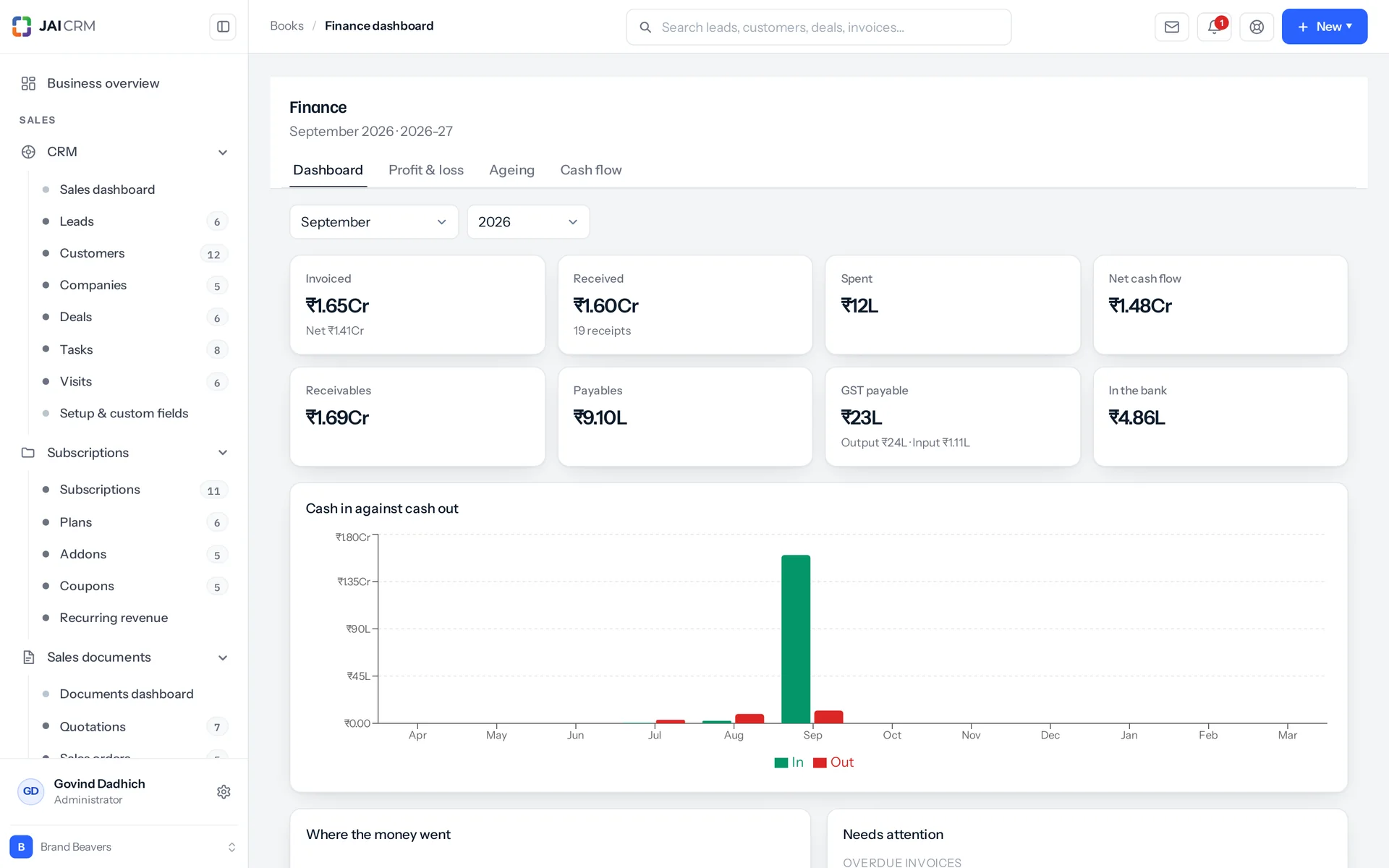
The finance dashboard: cash, bank balances, receivables and payables.
7 things it doesEvery one in the product today

What is Accounting & finance in JAI CRM?

Accounting & finance in JAI CRM is the module for expenses, supplier bills, banking, GST, TDS and payroll in Indian businesses of five to two hundred people. It builds GSTR-1 and GSTR-3B from invoices you already raised, keeps a TDS register tied to your bills, and runs payroll with PF and ESIC. You or your CA still file the returns.

Where do the first ten days of every month go?

In many small businesses, the GST return, the TDS register and the cash position are rebuilt by hand every month. Here is what that costs you.

  • The first ten days of every month

    Your GST return is not filed from your invoices. It is rebuilt from them. Someone opens a spreadsheet and sorts the month's sales by customer GSTIN (the customer's GST number). They work out which sales were inter-state. They hunt down the HSN codes (the product codes GST uses). Then they do it all again for purchases. Ten working days go on a figure that was already inside the invoices. By the time it is ready, the month is over and there is nothing left to act on.

  • Purchases entered properly, then lost

    One person raises supplier bills as real documents, which is the right way to do it. Another types the small costs straight into an expense sheet. But every report only ever reads one of the two lists. So your profit and loss shows no cost against the bills. Your GST return shows no input credit (GST you can claim back) against them. Payables shows nothing owing. The people who did it properly are the ones the numbers punish.

  • You edited the bill. The TDS register did not notice.

    A vendor re-raises a bill, and 1,00,000 is corrected down to 50,000. The TDS register (your record of tax deducted at source) still says 10,000 was deducted. Or someone adds a TDS section to a bill that had none, and no register row appears at all. Now the deduction is missing from the quarterly statement. Nobody finds out until the statement is being prepared and the two numbers will not match. That is a Saturday, in the week it is due.

  • A cash position that was never true

    A 4,00,000 bill is paid in four instalments across April, May, June and July. The software keeps one paid-to-date column and one date, so the whole 4,00,000 lands in April. Every month's cash figure after that is wrong. The bank balance on screen disagrees with the passbook. Within a quarter, nobody trusts either one enough to make a decision on it.

  • Giving your CA access means showing them everyone's salary

    You want someone outside, like your CA, to file the return and check the books. But the only role that reaches GST also reaches employees. Handing it over hands over CTC, PAN and Aadhaar for the whole company. So instead you export a spreadsheet every month and email it. That is slower, and it is not actually more private.

What the accounting software does, in plain words

Nothing below is on a roadmap. Every one is in the product today, and a 14-day trial is long enough to check any of it.

GST

Your GST return is built from your invoices, not typed

Your GST return is a view of your invoices, so nobody spends a fortnight typing it. GSTR-1 (the sales return) is your sales documents for the month, split into the seven sections the GST portal asks for. GSTR-3B (the summary return) is the same month laid out as the portal's own tables. If a figure is wrong, you fix the invoice and the return follows.

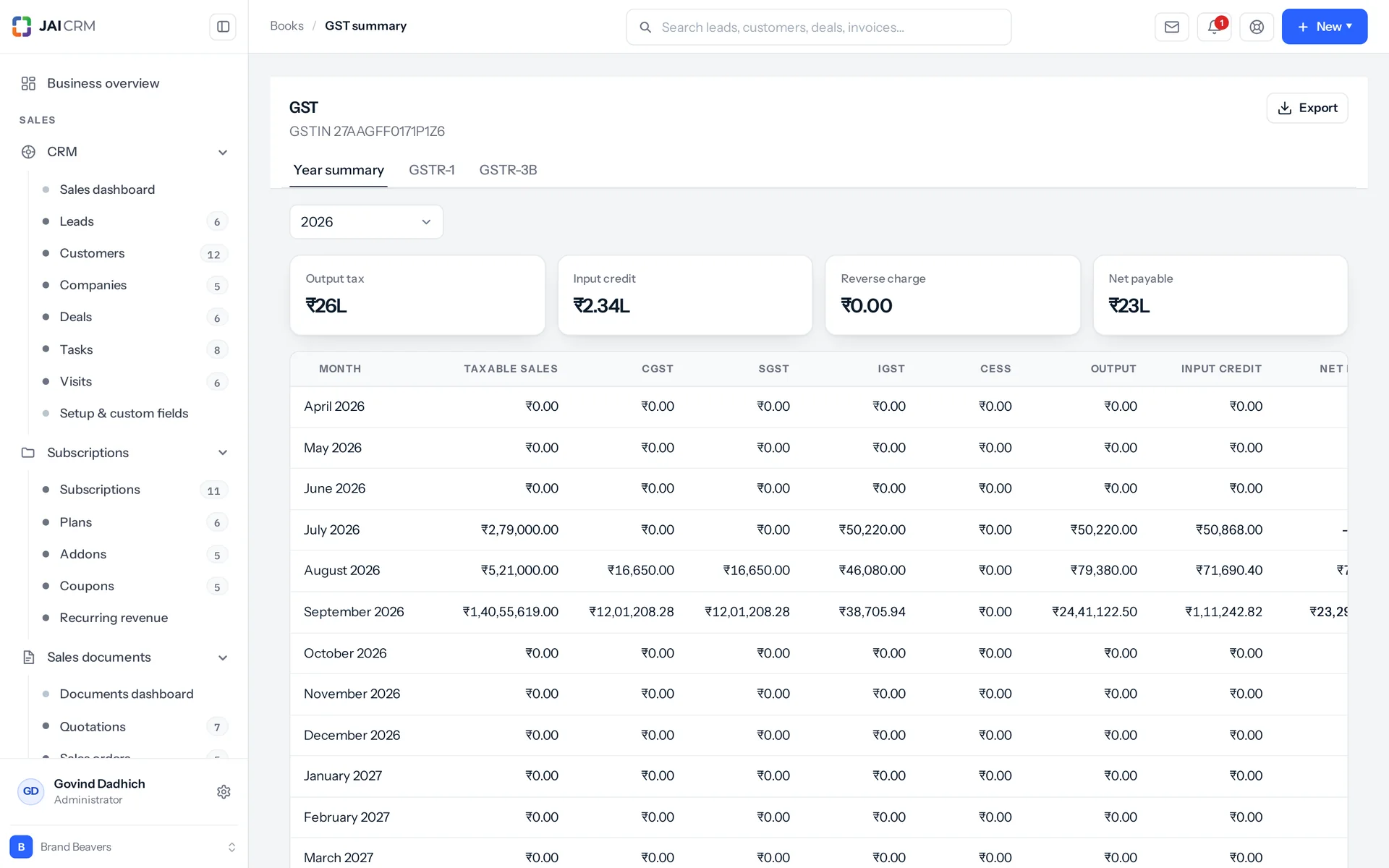
The GST summary: output tax, input credit and what is payable, built from invoices and bills.
Seven sections, shaped like the portal
The sections are: B2B (sales to GST-registered businesses), B2C large, B2C small (grouped by place of supply and rate), exports and SEZ with the LUT flag, credit notes, nil-rated and exempt, and an HSN summary. The HSN summary carries UQC (the unit of quantity) and signed quantities. It counts invoices and credit notes with opposite signs. A credit note goes out with the original invoice's own number and date. A return with an internal ID (a UUID) in that column fails validation at the portal.
3B laid out as the tables you actually fill
Table 3.1 covers: (a) outward taxable sales, split into IGST, CGST, SGST and cess; (b) zero-rated; (c) nil and exempt; (d) inward reverse charge. Table 4 then shows input credit as reverse charge, all other, and ineligible. After that come liability, credit, net payable and what carries forward. Reverse charge means you, the buyer, pay the GST instead of the supplier. The reverse-charge liability comes from every reverse-charge purchase, whether or not you can claim the credit back. The input credit line takes only the ones you can claim. These are two different numbers, and a register that merges them understates what you owe. Two portal lines come back as zero, and we would rather say so than pretend: 3.1(e) non-GST inward supplies, and import of services in table 4. Nothing in the product sorts a purchase into either yet.
The B2C-large limit follows the invoice's own date
B2C large is a big inter-state sale to a buyer with no GSTIN, which the return must name on its own. The limit is 2,50,000 before 1 August 2024 and 1,00,000 from that date, per Notification No. 12/2024-Central Tax dated 10 July 2024. If you apply today's rule to last year's invoice, everything between one lakh and two and a half lakh quietly lands in the B2CS totals instead of being named in Table 5. The code uses the date the rule takes effect, not the month the change was written about, and says so.
Twelve months at a glance, and a record of what you filed
You see the whole financial year month by month: taxable sales, exempt turnover (kept separate), CGST, SGST, IGST, cess, output tax, purchase taxable value, input credit, reverse charge and net payable. There are FY totals and a one-click CSV. Each filing is then recorded as a period of its own: GSTR-1, 3B, 9 or CMP-08, with its status (draft, filed, acknowledged). The record keeps output tax against input credit, the computed return exactly as it stood, the filing date and the portal's ARN (the acknowledgement number).

Purchases

Two purchase lists, added up as one

Quick expenses and supplier bills are counted together as one set of purchases. Money leaves a small business two ways: someone types an expense, or someone raises a supplier bill as a proper document. Both are purchases. One function reads both and gives back one result, and the GST return, profit and loss, payables, cash flow and the dashboard all go through it.

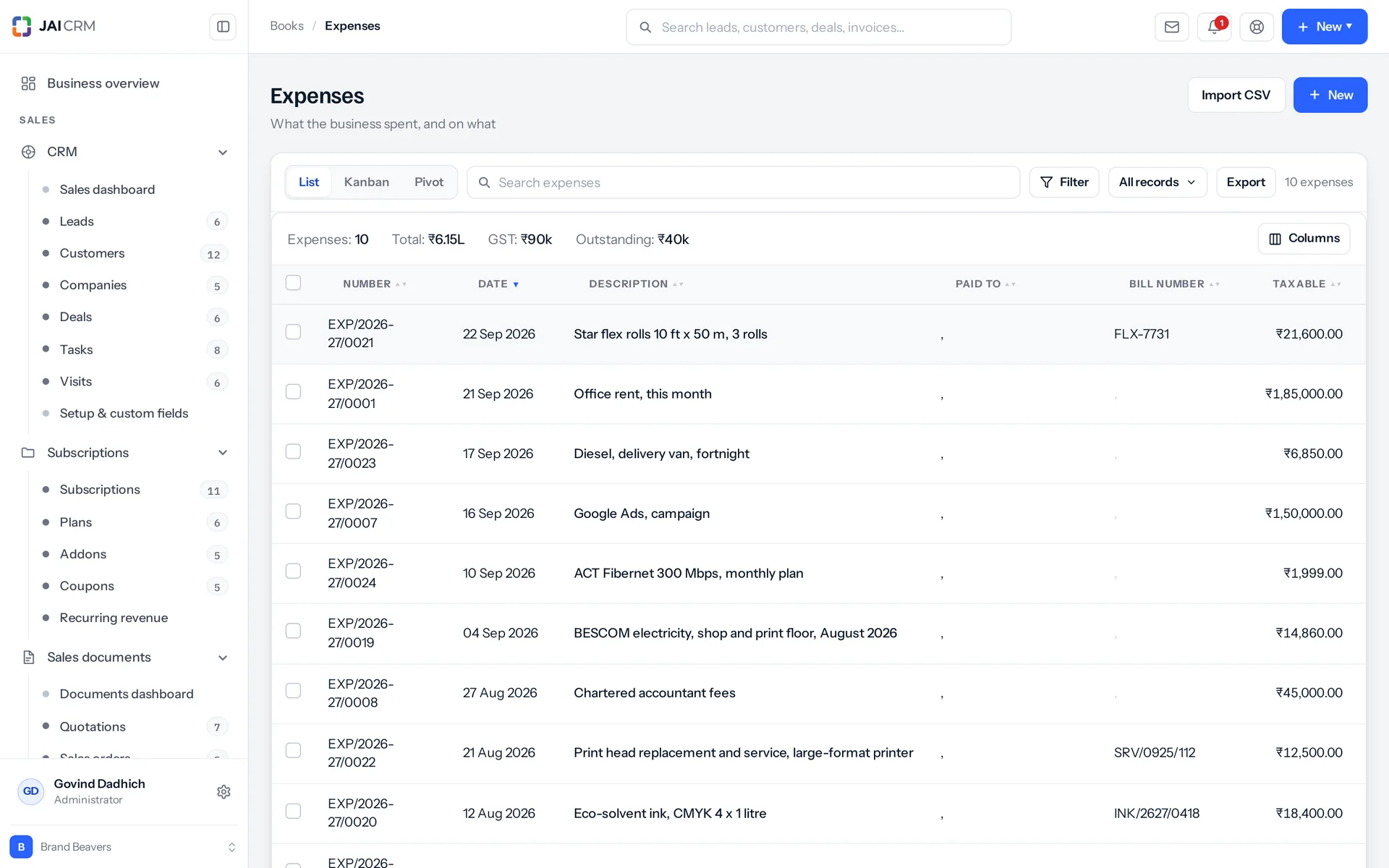
Expenses by category with GST, paid and unpaid.
One list of supplier bills, wherever you open it
A supplier bill is one record, listed once under Procurement, and under Books for a business without Procurement, so a bill the buyer enters and one the accountant enters land in one place. Each line is an item with its quantity, HSN and GST rate, or a plain description and amount for a service, filed under a category for profit and loss. The same supplier with the same vendor bill number is refused, because one invoice entered twice claims its input credit twice. Expenses stay for money already spent, with salary and statutory entries beside them.
GST you cannot claim back is a cost
GST you can claim back is left out of a purchase's cost. GST you cannot claim back is added into the cost. That covers blocked credit, a composition supplier, or a bill with no GSTIN on it. It is money gone like any other, and leaving it out made every such expense look smaller by the tax on it. The dashboard's input-tax tile counts only eligible spend. So the credit you will actually get is not inflated by the credit you will not.
Payables reads both lists, on the same age groups
Money owed on an expense claim and money owed on a supplier bill is the same debt to the same supplier. A payables report that reads only one of them is not a payables report. There are five ageing buckets (how long a bill has been unpaid): not yet due, 1 to 30, 31 to 60, 61 to 90, and over 90 days. Receivables and payables use the same fixed setting, so the two reports cannot disagree. A quotation, a sales order or a challan carries no balance at all. The debt starts at the invoice or the bill. That stops a closed purchase order and the bill raised from it counting the same money twice.
Undecided is not reverse charge
The reverse-charge flag tells "nobody said" apart from "somebody said no". A register that counts an undecided bill as reverse charge is claiming a tax liability nobody ever recorded. And it would do that silently, on every bill somebody left alone.

TDS

One TDS register for all four sides, cleared by a challan

The TDS register keeps four separate TDS figures in one place. TDS (tax deducted at source) is not one number. It is what you deducted from staff under section 192, and what you deducted from vendors under 194C, 194J or 194I. It is what you have actually deposited, and what your own clients withheld from your invoices. Two of these are liabilities, one clears them, and one is money you can claim back.

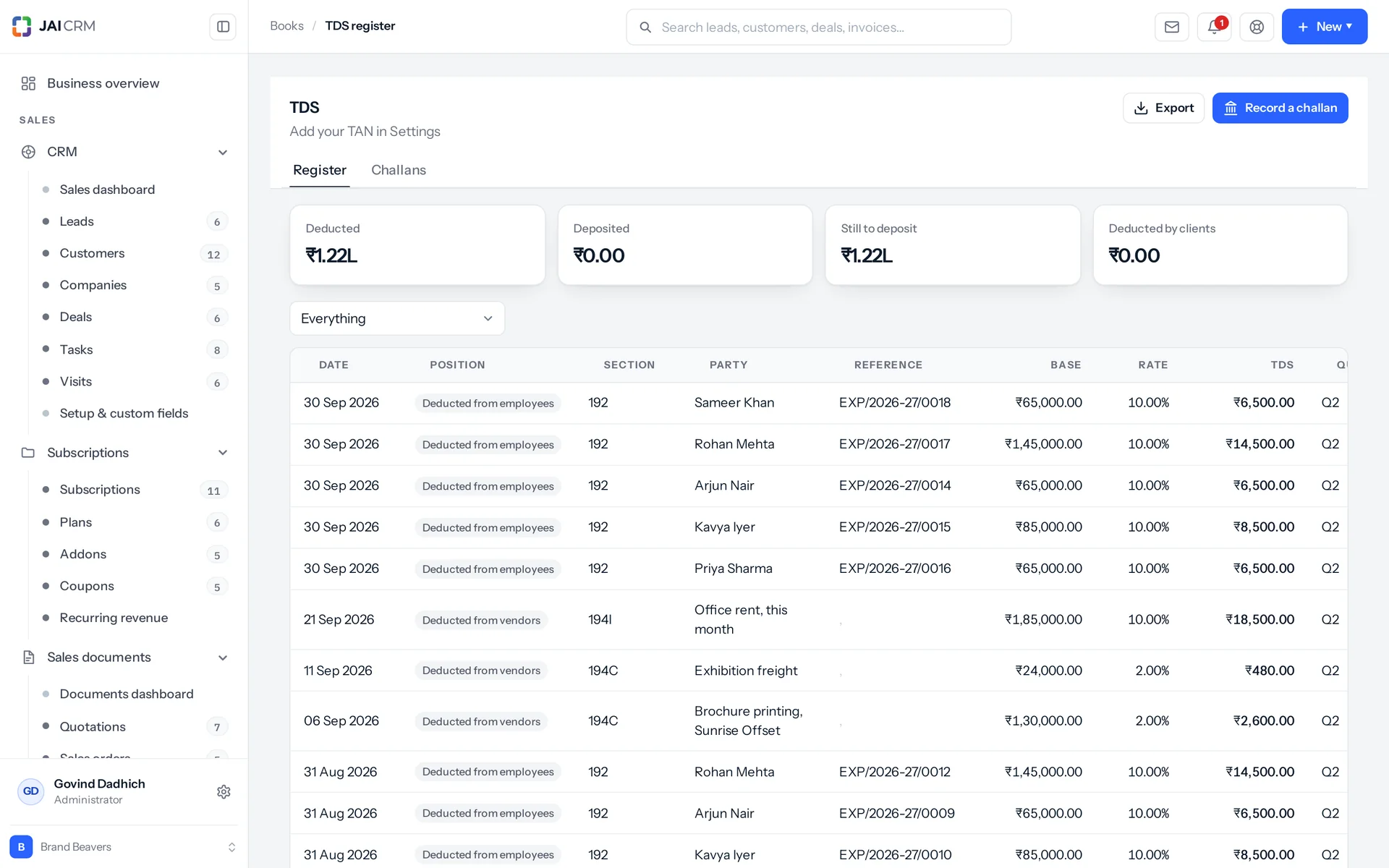
The TDS register: tax deducted on vendor payments, by section.
The register follows the record it came from
TDS on a supplier bill is booked when the bill is entered, on its taxable value, because the law asks for it at credit or payment, whichever comes first. Paying the bill settles that same TDS rather than deducting a second one. A debit note against the bill brings its TDS down with the taxable value it takes off, and cancelling or deleting the bill takes the entry out of the register. TDS on an expense is rewritten whenever the expense is created, edited or deleted: editing a 1,00,000 expense down to 50,000 cannot leave the register claiming 10,000 was deducted. An entry that came from an expense cannot be deleted by hand; change the TDS on the expense and the entry follows.
One challan, four results
A challan is the slip you use to pay deducted tax to the government. Recording one does four things. It attaches the deduction entries it clears. It writes its own "deposited" row in the register. It lowers the balance of the bank account it was paid from. And it leaves an audit line. Delete it and all four are undone: entries detached, deposit row removed, bank balance put back. You cannot record the same challan number twice: "Challan 0510123 is already recorded". Each record holds the challan number, BSR code, deposit date, section, quarter and financial year.
Your TDS sections, with the no-PAN rate
The withholding master is your list of TDS sections and rates. For each section it holds the normal rate and the higher rate for a party with no PAN on file. When a vendor whose PAN is blank sends a bill, the higher rate is applied, and a vendor with no rate of their own takes their section's. The master ships empty on purpose. 194C, 194J and 194I rates are ones you enter once for your own trade, not ones we guessed and left you to discover. TDS is withheld on the taxable value, which is how those sections are worked out in practice. Under reverse charge, the GST never reaches the total the vendor is paid.
Deposit dates, and one reminder a month
TDS must be deposited by the 7th of the next month. March is the yearly exception, due on 30 April, because the year closes and the government waits for the books. The reminder comes once a month, not once per entry. The deposit is one challan covering everything deducted that month, so fifty deductions are one job. The reminder also warns you about the thing people get wrong: interest on a late challan runs from the deduction date, not the due date.

Payroll

Payroll from employee list to salary register in one run

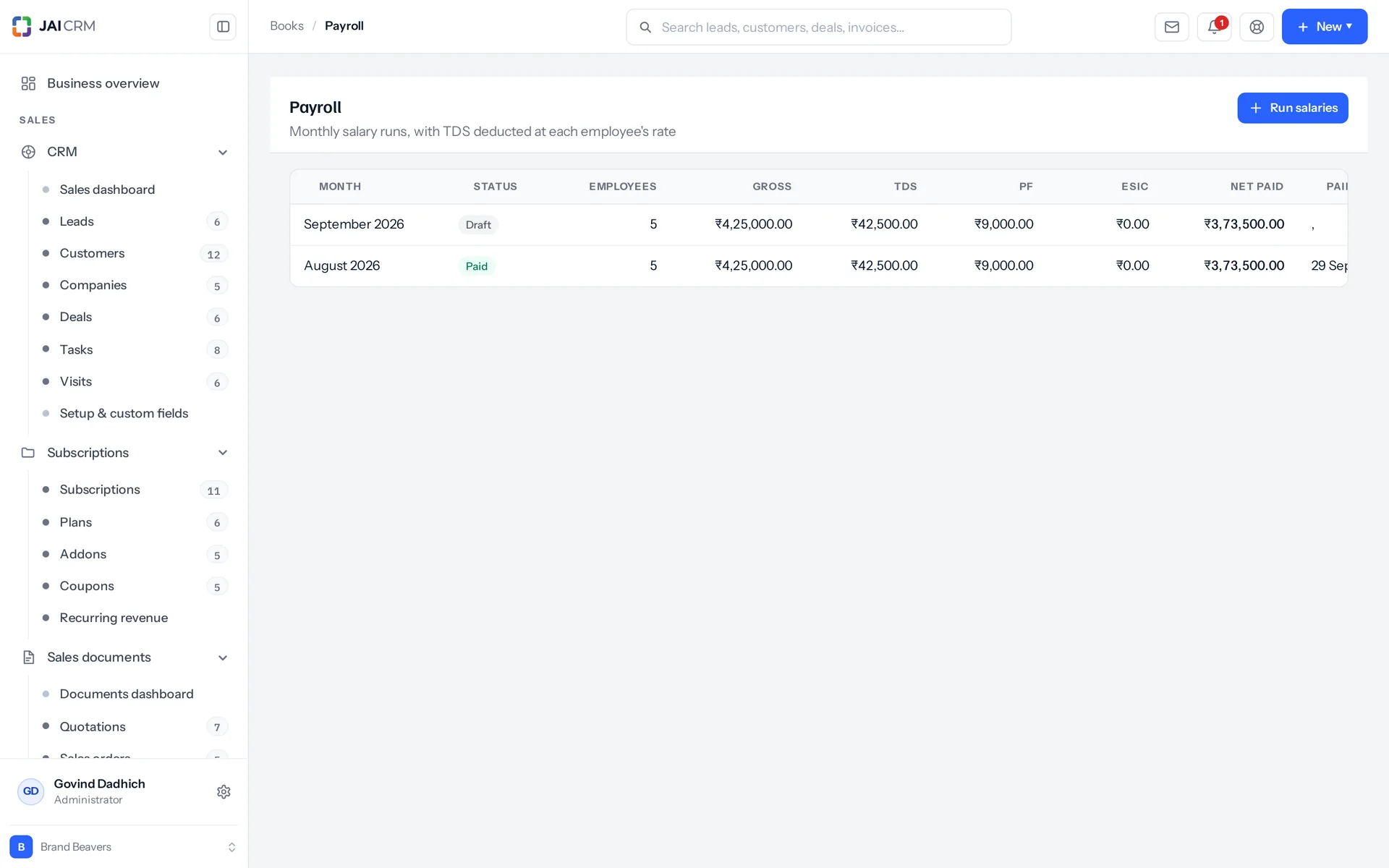
Payroll runs salaries once a month per business, with one line per employee. A preview shows what the month would cost without saving anything. Drafting the run writes a numbered salary expense per person, a payroll line with earnings and deductions, and a TDS register entry where tax was deducted. So payroll reaches the expense register, payables, the TDS register and the dashboard without anyone typing it again.

Payroll runs by month, with gross, deductions and net pay.
Indian salary maths built in
Salary comes from the employee's own salary structure if there is one, and from gross pay if not. Basic defaults to 50% of gross. HRA defaults to 40% of basic. The rest is special allowance. PF is 12% of basic, capped at the legal wage ceiling of 15,000. ESIC is 0.75% and applies only when gross is 21,000 or less. Net pay is gross minus PF, ESIC, TDS and anything else deducted. Paying the run marks every salary expense paid, stamps each line with the date, and lowers the balance of the bank account you chose.
A full employee record, not a payroll stub
Each employee has a code, designation, department, who they report to, joining and exit dates, employment type, gross, CTC and a salary structure. It holds the full Indian statutory set: PAN, Aadhaar, UAN, PF number, ESIC number, and a bank account with IFSC. One login links to one employee only. Linking a login that is already taken is refused: "That login is already linked to another employee". The database column is unique too, so an edit cannot get round it. There is a board view where each card has a fractional position, so moving one person writes one row instead of renumbering the whole column.
A paid run can be undone, never deleted
Deleting a draft run removes the salary expenses and TDS entries it created. A paid run cannot be deleted: "A paid salary run cannot be deleted. Undo its payment first, then delete the draft." Undo payment puts every salary back to unpaid, gives the bank account its money back and makes the run a draft again. Mark paid asks which bank account the salaries left. A run cannot be paid twice. You can run salaries only once for a month: "Salaries for March 2026 have already been run". A run with nobody to pay is refused, not created empty.
Who a run pays
Employees who are active, on notice or on leave. Someone who has exited is left out. That is the difference that matters in the month someone leaves.

Banking

Every account balance is added up from its movements

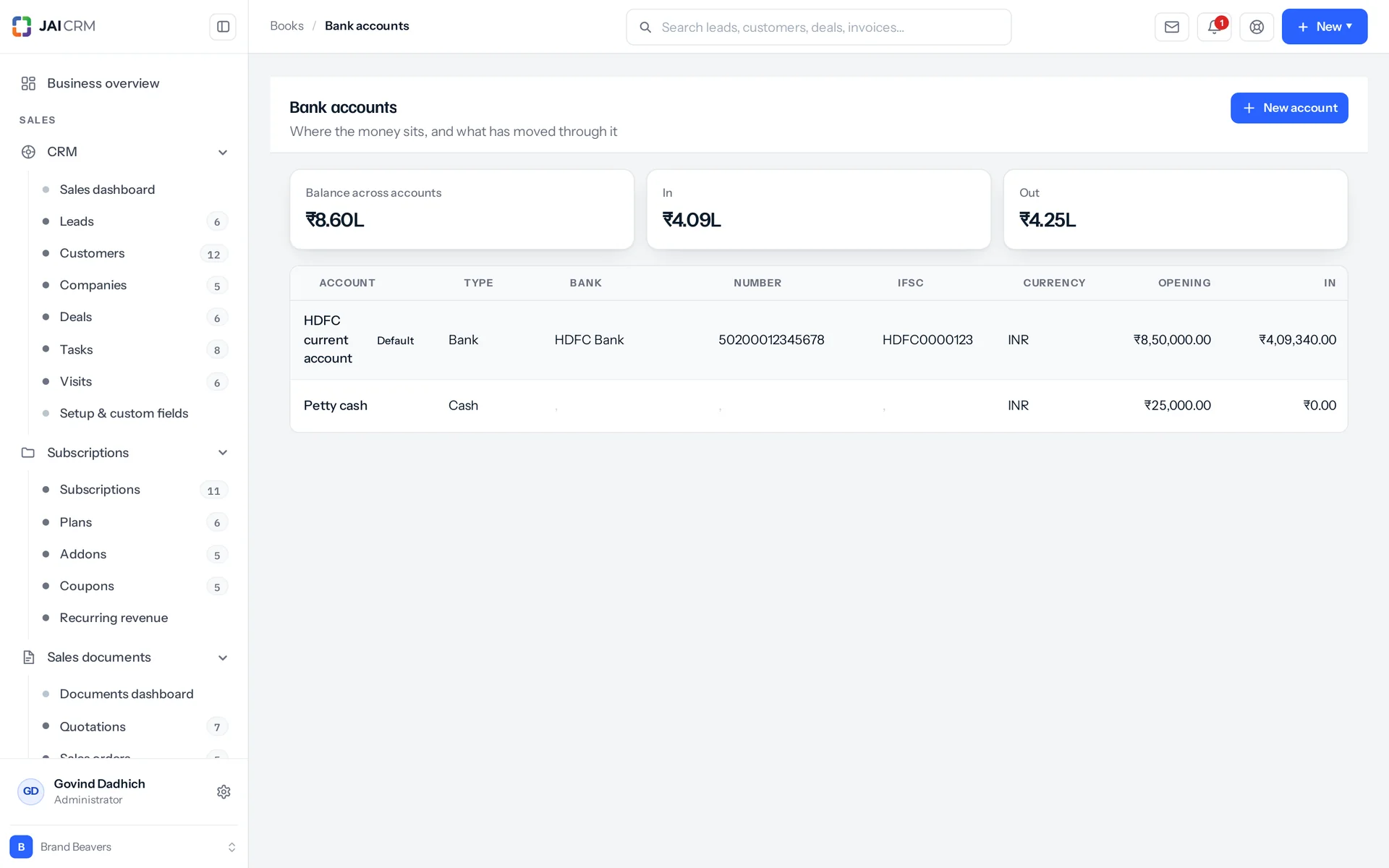
Each account's balance is worked out from the money that actually moved through it. Every account money moves through is here, not only banks: bank, cash, wallet, card and loan. On the account list and the statement, the balance is the opening balance plus every receipt, vendor payment and expense settlement since, added up the moment you look.

Bank accounts with their balances and recent transactions.
One statement from three sources
Customer receipts, vendor payments and expense settlements merge into one dated list per account, with a running balance. The opening balance for any date range is worked out by replaying everything before it, not read from a stored column. The whole statement exports to CSV. The account list and the statement come from the same two places, so they cannot tell two different stories.
An expense paid in four instalments is four dated payments
An expense has one bank column, but it is often paid in parts. Each payment is its own line: date, amount, the account it left, the mode, a reference, a note and who recorded it. Adding a payment lowers the bank balance. Removing one puts the money back. Cash-basis reports and the bank statement read those dates. Reading a single paid-to-date column instead once put a July payment in April and made every month's cash position wrong.
You cannot pay more than is owed
"Only 12450.00 is outstanding on this bill". And a bill with payments recorded against it cannot be deleted until those payments are removed first. That refusal stops a paid bill vanishing and taking a bank movement with it.
Indian and international bank details in one record
IFSC, branch and UPI ID sit alongside SWIFT and IBAN, so one account record works for a local transfer and an overseas one. A switch decides whether the account prints on your invoices. You can connect ten payment gateways with your own keys to collect from your own customers: Razorpay, Stripe, PayPal, Airpay, Instamojo, PayU, Cashfree, CCAvenue, PhonePe and Paytm. Each one sends the payer to the gateway's own page or its own widget. There is no card field anywhere in this software, and that is the whole basis of its compliance position.

Reports

Profit and loss on accrual and cash basis, worked out live

Every finance report is worked out from your real documents at the moment you open it. The profit and loss, the ageing reports, the GST summary and the cash-flow report all read the invoices, bills and payments that already exist. None of them is a stored total that can drift away from the documents. If a number looks wrong, the document behind it is one click away and still says the same thing.

Accrual and cash, each done properly
Accrual basis counts income when invoiced, with credit notes as negative. It counts cost as the real cost of the purchase. Bad debt counts in the month you gave up on it. So a written-off invoice is a sale that stands and money that will not arrive: it becomes an expense of that month, not a deletion. Without this, profit is overstated for ever by every rupee ever written off. Cash basis counts receipts on the day they arrived and payments on the day they left. Categories roll up into direct and indirect, so gross profit, net profit and margin are real figures. A supplier bill with no category shows as "Supplier bills", not "Uncategorised".
Overdue is worked out, not typed
Pending, partially paid, paid and overdue are worked out from what has been paid and when it was due. Overdue is the only status that changes just because time passes, not because someone saved something. So it is refreshed before the four screens that depend on it: the expenses and bills list, the payables register, the dashboard and the ageing report. This uses three set-based database statements, with no rows loaded. A second pass fixes any record whose stored status or amount due has drifted.
Export what you are looking at, at your real size
Expenses export with 18 columns and up to 50,000 rows, and purchase bills from their own list. The export follows your filters, the search box and your visibility scope, not just the 200-row page on screen. The TDS register and the payments list export up to 20,000 rows. Employees, the GST summary, ageing, profit and loss and the bank statement export too. Every file has a byte-order mark, so Excel shows the rupee symbol instead of a question mark. Cash flow covers a window you choose, from 3 to 36 past months, and defaults to 12.
Nine reminders that already know the dates
The nine are: expense submitted; still waiting after three days (its message says why it matters: people stop claiming when approvals drag); approved; GST return due in five days; TDS deposit due in three; a bank balance below its floor, 1,00,000 by default; weekly receivables and payables digests; and a month-end close checklist. The two legal ones work out their own due dates, for the GST period and the TDS deposit. They do not wait for someone to type a date nobody was ever going to type.

Refusals

What it will not let you do matters most

A finance module is judged by the mistakes it stops. Every refusal here tells you what is in the way, instead of just saying no. Every destructive action asks you to confirm before it acts. That covers expenses, bills, categories, bank accounts, employees, payroll runs, TDS entries and challans.

Compliance reports ignore your own visibility limits
A salesperson who can see only their own accounts still gets a GST return for the whole business. Filing your own slice of it is not a smaller return. It is a wrong one. The same rule applies to reports that read two registers. With one register limited and one not, the margin came from two different groups of records, which is worse than no margin.
A GST return cannot be edited by hand
The permissions are view, export and manage. There is no create and no edit, because a return is generated and filed, not typed by someone at the end of a long day. And where the type of period does not tell you when it falls due, the due date is left empty rather than guessed. A made-up date is worse than none.
Your accountant does not need everyone's CTC
The Accountant role deliberately leaves out payroll and employee data. The Bookkeeper role can read the chart of accounts and the journals but cannot post to either. Reading them is how you check your own work. Writing to them is the accountant's job. This was a real leak once. One module-wide line, written only to make a sidebar item appear, was merged into every related permission. So a role never given payroll could read CTC and PAN through it. The fix is written down in the source, next to the two permissions it leaves out, rather than quietly patched.
Things with history cannot just vanish
Try to delete a category with expenses in it, a bank account with payments through it, or an employee with salary entries. The delete is refused, and you see a list of what is in the way. Duplicates are refused by name, for example "There is already an account called HDFC Current", rather than created silently. Every rule ships switched on. Turning one off is a deliberate step in Settings, and that step is itself audited. So is everything else. Create, update, payment, payment removed, approve and delete each write an audit line with who did it and a readable summary. Updates also show which fields changed, using your own field labels, so the log reads in your words, not in database column names.

Who opens Accounting & finance, and what for

Swipe through the people who use it every day.

The one person who does the books

In a business this size, one person raises the invoices, enters the bills, chases what is owed and puts the return together. Finance deliberately lists Payments received and Payments made again, even though Sales and Procurement own those records. Closing a month means working through bills, then what was paid against them, then what came in. That is easier in one place than across three modules. That list opens with the Sales or Procurement payment permission, or with financial reports. There are fifteen screens in all across Finance and Accountant, and eight Finance permissions that each gate a route, if you want someone to reach only some of them.

The owner on the 18th of the month

Open the GST summary and see the month's net payable before the 20th, not after. You see output tax against input credit, with reverse charge shown separately. Exempt turnover is kept out of the taxable figure, so it does not overstate what you supplied at a GST rate. A twelve-month strip shows whether this month is out of line with the last eleven. Then check receivables and payables ageing on the same five buckets, with the document one click behind each figure.

Your CA, or the accountant who comes in on Saturdays

Two built-in roles cover this. Accounts reaches invoices, payments, expenses, bank accounts, GST, TDS and the financial reports. Accountant swaps invoicing for the chart of accounts, journals, budgets and fixed assets. It deliberately leaves out payroll, employees and anyone's CTC. The trial balance (the list of every account's balance) and the ledgers need a permission of their own that is in neither preset, so add it to whichever role you hand over. Your CA then checks a return already built section by section, and a TDS register already matched to the bills behind it. What they used to get as a shoebox and a WhatsApp thread now exports as CSV, at the size a real year of trading has.

The ops lead who approves expense claims

Claims come in with a category, amount, date and tax treatment: taxable value, GST rate, whether the credit is eligible, and a TDS section where one applies. The approver is told when a claim is submitted, and reminded after three days if nothing has moved. The person who claimed is told when it is approved. Approving something already approved sends nothing, because that is someone clicking twice, not news. Approved claims become payables like any other, paid in one go or in instalments, each with its own date.

A services firm whose clients deduct TDS from its invoices

Agencies, consultancies, IT firms and professional practices are usually paid after the client deducts TDS under 194J. That is the fourth side of the register: "deducted by client". It is recorded against the receipt it was taken from, with the section, the rate (worked back from the invoice it settled) and the quarter. So what you can claim back is a number you can see, not a reconciliation someone does in March. The other side of the same register holds what you deducted from your own vendors under 194C, 194J and 194I.

A trading business with sixty supplier bills a month

Those sixty bills sit in one list, whoever enters them, and every report adds them to the expense sheet without a second list to match. Each bill line keeps its category, so freight and printing land in their own rows of profit and loss. Input credit is tracked per bill, and a bill whose credit is blocked has its GST written into cost. Payables ageing reads the bills and the expense sheet on the same five buckets. A supplier invoice entered twice is refused, not paid twice.

What is different once you have it

Month-end becomes checking, not rebuilding

Your return already exists as a view of documents you raised during the month. What is left is reading it and questioning anything that looks odd. That is a much shorter job than putting it together, and it finishes before the due date, not on it. The same goes for the TDS register, the payables list and the bank position.

The margin you see is the margin you have

Both purchase registers are counted, not just one. Blocked credit sits in cost, where it belongs. Bad debt lands in the month you gave up on it, instead of disappearing along with the invoice. Cash basis reads dated instalments, not a paid-to-date column. None of this shows on a feature list. All of it is the difference between a profit figure you act on and one you argue about.

No TDS deduction is quietly forgotten

The TDS register is rewritten whenever the bill behind it changes. So it matches the bills by design, not because someone checked. Deposits clear the entries they cover, and deleting a challan undoes all four things it did. You get one reminder a month, three days before the 7th, for one challan. Interest on a late challan runs from the deduction date, which is exactly why paying early is the only safe choice.

One bill in rupees, for your books and the documents behind them

₹149 per user per month for this module paid annually, or ₹199 month to month. Or ₹499 per user per month for the full suite of seventeen modules, ₹599 month to month. The invoices, bills, vendors and projects behind these numbers are in the same product. So there is no export, no nightly sync and no second list of who owes what. A module you do not use is not in the menu at all, instead of sitting there greyed out on a plan you paid for.

What it works with

On its own it is a better spreadsheet. The value arrives when what it makes is what another part uses, with nobody typing it again.

Sales documents

This is where your output tax comes from. Invoices and credit notes feed GSTR-1 section by section. A credit note carries its original invoice's number and date into the return, not an internal ID. Receipts recorded against specific invoices feed the cash-basis profit and loss and the bank statement. TDS a customer withheld from one of those receipts goes straight into the register. About Sales documents

Procurement

The second purchase register. A supplier bill raised as a proper document and an expense typed by hand are read together everywhere: GST, profit and loss, payables ageing, cash flow and the dashboard. They are the same money leaving the business in two different ways. Recording a vendor payment there is also where the no-PAN TDS rate is applied. About Procurement

Vendors

The vendor is who a bill is from, and who a TDS deduction is against. A purchase bill will not save until it names its vendor. An expense claim does not need one. Whether a vendor has a PAN on file decides which TDS rate a payment to them takes. Payables by vendor is one of the built-in finance reports. About Vendors

Accountant

The other half of the books, switched on top of this module. It adds a 56-account Indian chart of accounts and double-entry journals (each entry records both sides of a transaction) with posting rules. It also has recurring journals, budgets compared with posted journals, fixed assets with depreciation, the trial balance and the balance sheet. It is also where you close a period: a lock date with a reason, after which a journal dated on or before that date cannot be posted, edited or reversed. About Accountant

Projects

An expense, a bill and a journal line can each carry a project. So what a job cost includes the vendor bills and salaries against it, not only the material. Budget against actual updates as those bills come in. About Projects

Reports & analytics

The report catalogue has nine finance report definitions: income against cost, payables ageing, payables by vendor, purchases over time, receivables by customer, payments in, payments out, TDS and activity. You can pivot each one and see the records behind every total. About Reports & analytics

Notifications

Ten built-in finance templates. They include the two legal ones that work out their own dates: GST return due in five days, and TDS deposit due in three. There are also templates for a bank balance below its floor, the expense approval chain, and weekly receivables and payables digests. About Notifications

Take Accounting & finance on its own, or take the lot

Priced per person, per month, in rupees, with GST shown separately. Every plan includes the basics of the whole product: custom fields, roles, reports, documents and notifications. Change plan whenever you like and nothing is typed again.

5 people

CRM + Sales Documents

Leads, customers and deals, with quotations and GST invoices

₹149 per person a month

For 5 people: ₹745 a month, billed as ₹8,940 a year. ₹10,549.20 with 18% GST.

  • Leads, customers, companies and deals
  • Quotations, sales orders and GST invoices
  • Your own mailbox, with replies filed against the record
  • Reports, dashboards and exports
  • 1 GB storage per workspace (organisation)
Start free

CRM + Sales Documents + Subscriptions + Warranty

For a business that bills on a cycle and stands behind what it sells

₹299 per person a month

For 5 people: ₹1,495 a month, billed as ₹17,940 a year. ₹21,169.20 with 18% GST.

  • Everything in CRM + Sales Documents
  • Recurring billing, plans, add-ons and coupons
  • Warranty registration and claims
  • Items and stock, which warranty is held against
  • 1 GB storage per workspace (organisation)
Start free

Every plan, and what is in each Prices in rupees, per person, per month. Parts can also be bought on their own.

Only want Accounting & finance?

Any single part is ₹149 per person a month on the yearly rate, with the settings, reports, documents and notifications that go with it. See every part’s price.

A part you do not buy

Is not in your menu. Not greyed out behind an upgrade message, just not there. That is why the product is sold in parts.

How many people, and can I change it?

You choose when you sign up and change it whenever you like, up or down. There is no minimum number of users and no penalty for going down.

Yearly or monthly?

Both. Yearly works out cheaper per month and is paid once at the start. Monthly costs a little more and stops at the end of any month.

Questions people ask about Accounting & finance

Answered in full. If yours is not here, ask us. A person replies.

Ask us something
What is the accounting and finance module in JAI CRM?

It is the accounting software inside JAI CRM. It handles expenses, supplier bills, banking, GST, TDS and payroll for Indian businesses of five to two hundred people. It builds GSTR-1 and GSTR-3B from the invoices you already raised. It keeps a TDS register that follows your bills, and runs payroll with PF and ESIC. Reports such as profit and loss and ageing are worked out from your documents when you open them.

How much does JAI CRM accounting software cost?

₹149 per user per month, billed annually, or ₹199 per user month to month. The full suite of seventeen modules is ₹499 per user per month on annual billing, or ₹599 month to month. The invoices, bills, vendors and projects behind your numbers are in the same product, so there is no sync to pay for. A module you do not use does not appear in your menu at all.

Who is this accounting software for?

Indian businesses of five to two hundred people. Often one person there raises the invoices, enters the bills, chases what is owed and puts the GST return together. It also suits the owner who checks GST before the 20th, a CA who needs access without seeing salaries, a services firm whose clients deduct TDS from its invoices, and a trading business with sixty supplier bills a month.

Does JAI CRM accounting software replace my CA?

No, and it is not trying to. It replaces the shoebox of papers you hand your CA, which is usually where their fee goes. What changes is what they get: a GSTR-1 already split into its seven sections, a 3B already laid out as the portal's tables, a TDS register that matches the bills it came from, and a chart of accounts and journals they can work in. You can also give them a login that reaches GST, TDS and the books without reaching payroll or anyone's salary.

Does it file my GST return on the GST portal?

No. We would rather say that plainly than suggest an integration we do not have. It builds GSTR-1 section by section and GSTR-3B as the portal's own tables. It works out output tax against input credit and what is net payable, and exports a twelve-month position as CSV. You or your CA file it. Then you record what happened: the return type, the period, the status (draft, filed or acknowledged) and the ARN the portal gave back. This is kept with the computed return as it stood at the time.

Can I enter some purchases as quick expenses and others as supplier bills?

Yes, and nothing breaks. That is the normal case, and it is the case most software handles badly. One function reads both registers and gives back one result. The GST return, the profit and loss, payables ageing, cash flow and the dashboard all go through it. This mattered enough to be written into the source as a note. Before, a business that recorded its purchases properly, as bills, saw no cost in its profit and loss, no input credit in its GST, and nothing in its payables.

Does it handle GST composition, exports and reverse charge?

Yes, all three are normal here. A bill of supply is a real document type. It is for exempt, nil-rated or composition turnover: a supply like any other that simply carries no GST. It is declared in 3B table 3.1(c) and in the HSN summary, and never counted as taxable turnover. Leaving it out used to mean a composition dealer's whole turnover was missing from the return. Exports and SEZ supplies carry an LUT flag and report as zero-rated in 3.1(b). Reverse charge is split properly: the liability comes from every reverse-charge purchase, the credit only from the ones you can claim. CMP-08 (the composition dealer's return) is a supported return type, due on the 18th of the month after the quarter closes.

Can I give my accountant access without showing them salaries?

Yes. The Accountant role ships without payroll and employee data. An accountant who files GST has no business reading everyone's CTC. The reason is written into the source next to the two permissions it leaves out, because an earlier preset granted them by accident through one module-wide line. Finance has eight permissions that each gate a route: expenses, purchase bills, bank accounts, GST summary, TDS register, employees, payroll and financial reports. So you grant exactly the ones you mean. The preset also carries the financial reports, the trial balance and ledgers, and transaction locking, so an accountant can read the books and close a period without anyone adding them.

Where are the trial balance and the chart of accounts?

In Accountant, which switches on on top of this module. That is where entries no document ever produced go: depreciation, accruals, opening balances and corrections. It has a 56-account Indian chart of accounts written for a small business here: 18 asset, 13 liability, 4 equity, 5 income and 16 expense accounts. 39 of them are the accounts the automatic postings look up. It also has manual and recurring journals, budgets compared with posted journals, fixed assets, the trial balance and the balance sheet. They are separate because most businesses need GST and payroll from day one. They need a trial balance the first time they face a bank, an auditor or an investor, which is not the same day.

Does JAI CRM payroll file PF and ESIC returns?

No. It works out PF and ESIC, deducts them on the run and totals them on it. PF is 12% of basic, capped at the 15,000 wage ceiling. ESIC is 0.75% of gross where gross is 21,000 or less. Provident fund payable, ESI payable and Professional tax payable come as accounts in the chart, under Salaries payable. The ECR (the PF return) and the ESIC return are still filed on their own portals. Section 192 TDS is different. The run writes a real register entry against each employee, so the quarterly picture is built, not pieced together later.

Can I lock a month so the books stop changing after I file a return?

Yes, with transaction locking in Accountant. A lock has a date, a reason and an area: Sales, Purchases, Banking, Accountant or Everything. Anything in that area dated on or before the date cannot be added, edited, cancelled or deleted. Instead you see why: "Everything is closed up to 2026-03-31 (FY closed and filed). Invoice INV/2025-26/0412 is dated 2026-03-28, on or before that, so it cannot be added, changed or removed. Move the lock date in Accountant, Transaction locking if that period really has to reopen." A payment dated after the lock can still settle an older invoice. Reopening is a deliberate step by someone who has the permission, and it is audited.

Can I export my accounting data to Excel or CSV?

Yes, everywhere, and at the size a real year of trading has. Expenses and bills export with 18 columns and up to 50,000 rows. The export follows your filters, the search box and your visibility scope, not just the 200-row page in front of you. The TDS register and the payments list export 20,000 rows. Employees, the GST summary, ageing, profit and loss and the bank statement all export too. Every file is written with a byte-order mark so Excel shows the rupee symbol instead of a question mark.

Which financial year does it use, and is Q1 April to June?

April to March by default. You set it once on the business profile, along with your GSTIN, PAN, TAN and state code. You can change the start month if yours is different. On the entries the books create themselves (payroll, vendor bills and challans), the quarter is worked out from that start month. So Q1 is the first quarter of your financial year, not of the calendar. Years are written the way people write them, 2025-26. Document numbers follow the Indian style and restart each financial year: EXP/2025-26/0042 for an expense, BILL for a purchase bill, JV for a journal.


Long enough to know, and it costs nothing to find out

Switch on accounting & finance, put a week of real work through it, and see whether it holds. If it does not, walk away. We did not ask for a card.