Skip to the content
JAI CRM

ProjectsTasks, milestones, timesheets

Project management software with timesheets that become GST invoices

Plan projects with budgets, milestones, tasks in five views and timesheets, then turn unbilled time into a draft GST (Goods and Services Tax) invoice in one action. A client and a supplier can work on the same job without learning each other's names. ₹149 per user per month, billed annually.

No card needed. From ₹149 per person a month.

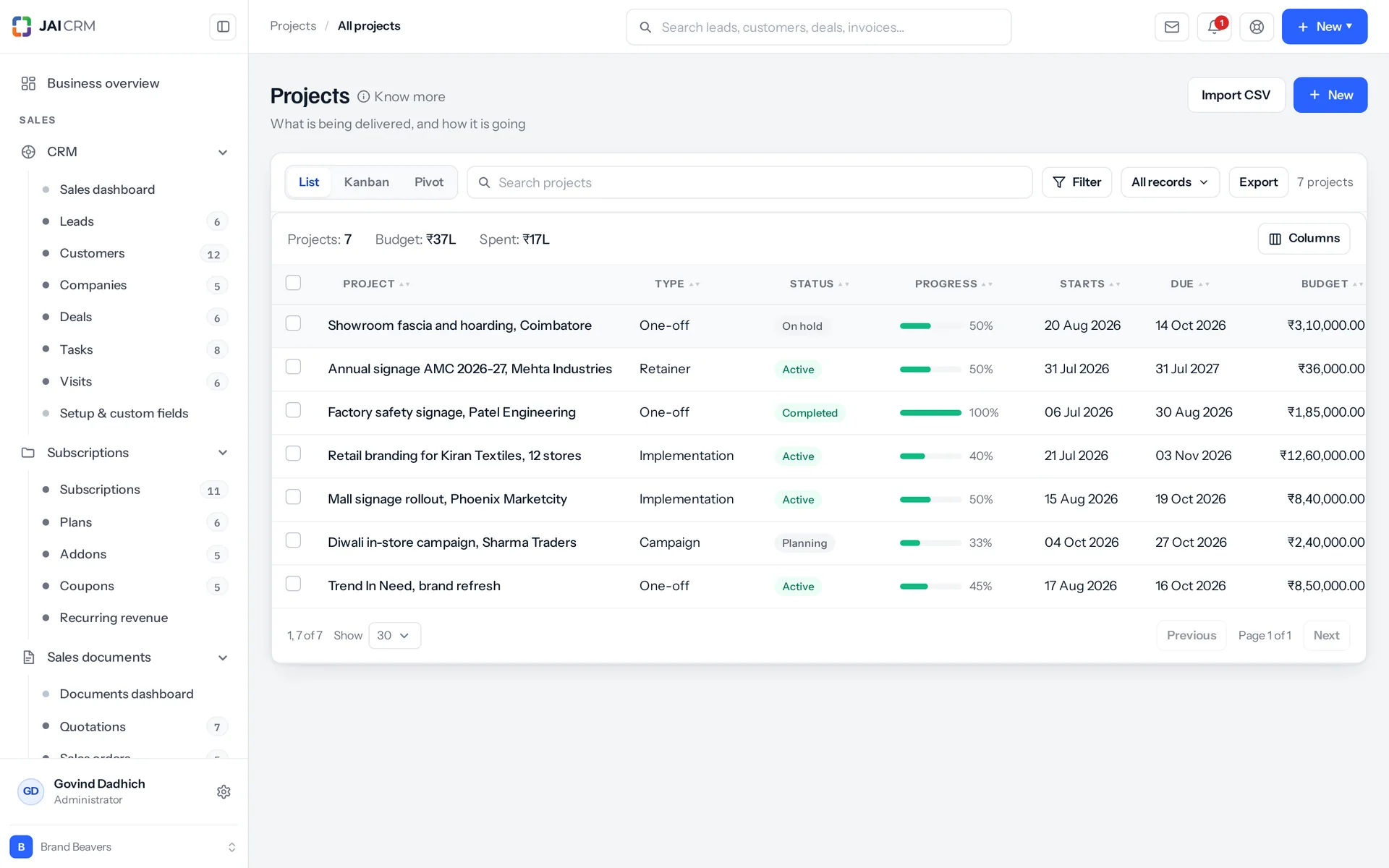
Projects with client, budget, progress and due date.
7 things it doesEvery one in the product today

What is Projects in JAI CRM?

Projects in JAI CRM is project management software with timesheets. You plan jobs with budgets, milestones and tasks in five views. Your team logs hours, and one action turns unbilled time into a draft GST invoice. A client and a supplier can be hidden from each other on one job. It costs ₹149 per user per month, billed annually.

Where does a project quietly lose money?

Here are five things that happen on a job nobody is watching closely enough. Each one is ordinary. Each one is expensive by the time anyone can see it.

  • The hours someone rebuilds from memory on Friday evening

    Three people worked on the job this week. On Friday, one of them goes back through a calendar and a chat history. They try to remember which Tuesday was for the client and which was internal rework. Whatever they cannot remember is not billed. Nobody ever finds out how much that was.

  • The project that was 80 per cent done for five weeks

    Someone typed 80 into a field in March because it felt about right. Nobody changed it. The number on the dashboard is now a guess, repeated so often that it looks like a fact. The first person to find out it is wrong is the client.

  • The milestone signed off in March and invoiced in June

    The stage was finished and everyone moved on to the next one. The invoice for it lived only in someone's head. For three months, cash you had earned sat inside a finished milestone that nobody in the business was chasing.

  • The freelancer who can see both of your clients

    You have a good contractor on three jobs. Two of them are for businesses that compete with each other. Today, the only thing keeping one from finding out about the other is that nobody has read the folder names carefully. That is not a control. It is luck, and it holds only until the week it does not.

  • The overspend that turns up at handover

    The budget was agreed at the start. Nobody added up the hours until the job closed. By then the overspend was real, the work was delivered, and you could not charge for it. A client will not sign a change order (a paid addition to the agreed work) for work they already have. A number that arrives at handover does not help you act. It only explains what went wrong.

What project management in JAI CRM does, in plain words

Nothing below is on a roadmap. Every one is in the product today, and a 14-day trial is long enough to check any of it.

Five views

One task list, five ways to see it, one filter bar

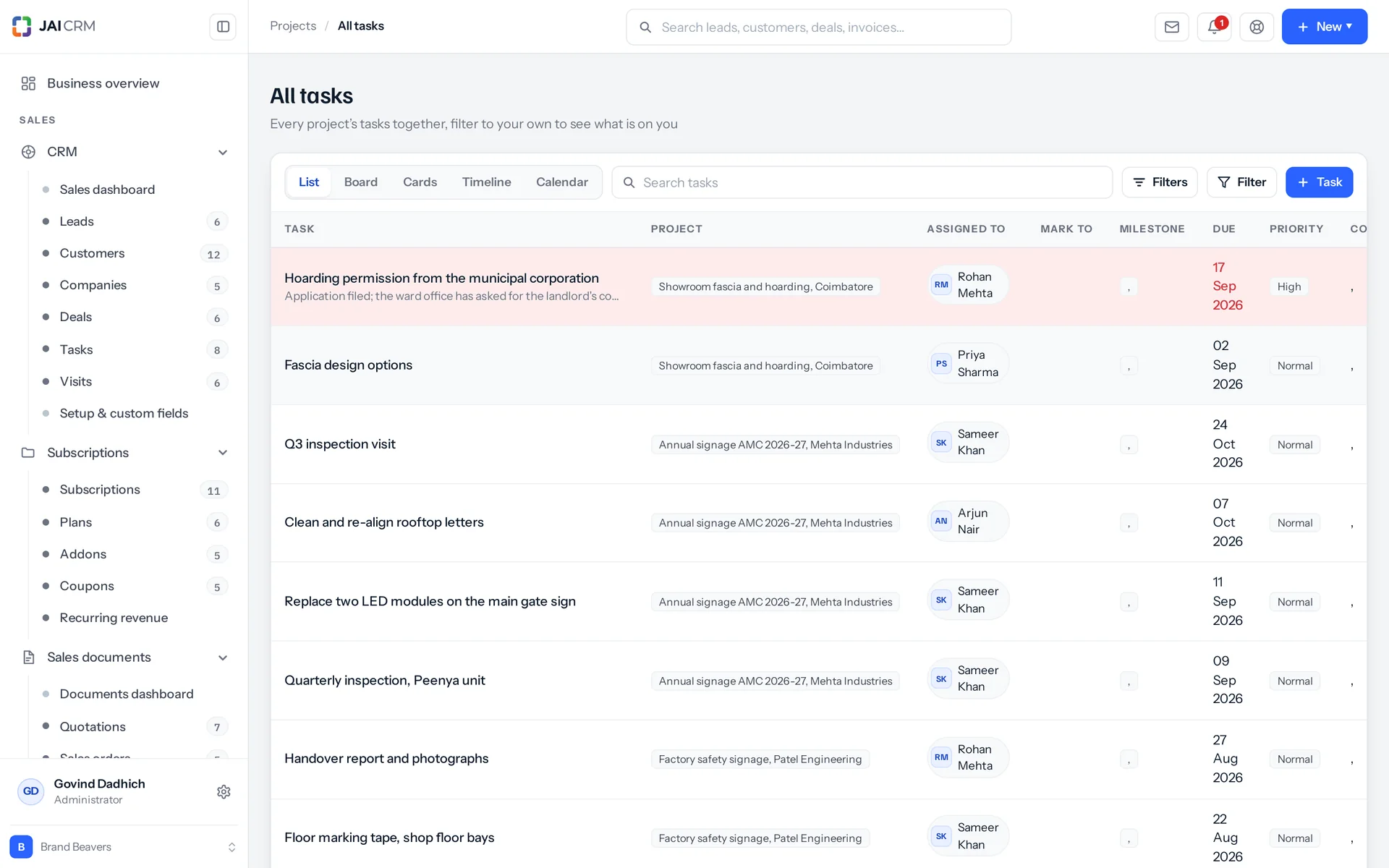
You can see your tasks as a list, cards, a board, a timeline or a calendar. All five use the same filter builder, so a filter means exactly the same thing in every view. The board, timeline and calendar show up to 2,000 tasks at a time.

Project tasks by status, with assignee and due date.
Fourteen filters and five due-date shortcuts
You can filter by project, search text, status, priority, assignee, milestone, parent task, due window, date from, date to, marked to me, mine, tag, and whether subtasks are included. Above every view sit five shortcuts: overdue, today, next 7 days, next 30 days, and work with no date on it at all. The calendar groups tasks by due day. It keeps undated work in a group of its own and flags the days that are already overdue.
Moving a card on the board changes only that card
When you drag a card, the board sends its new status and the spot where it landed. Only that one row is updated. The rest of the column is not renumbered behind it. The position is a whole number the board chooses, so the board sends the order it wants instead of asking the server to work one out. The project's progress is recalculated at the same moment and comes back in the same reply. So the percentage at the top moves as the card lands.
Five task statuses, and only one of them means closed
The statuses are To do, In progress, Blocked, In review and Done. Blocked is a real status, not a word someone adds to the task name. So finding "what is stuck" is a filter, not a reading exercise. Moving a task to Done sets its progress to 100 and records the completion date. Moving it back out of Done clears that date again, so a reopened task does not keep a finish date it did not earn.
An "All tasks" screen that shows what is on you
It has the same five views and the same filters, with the project filter taken off. "Mine" and "marked to me" are among them. Every row shows the project it belongs to, because a task called "Send the draft" means nothing on its own. The project names are fetched once for the whole page, not once per row.

The numbers

Progress comes from the tasks. Hours come from the timesheets.

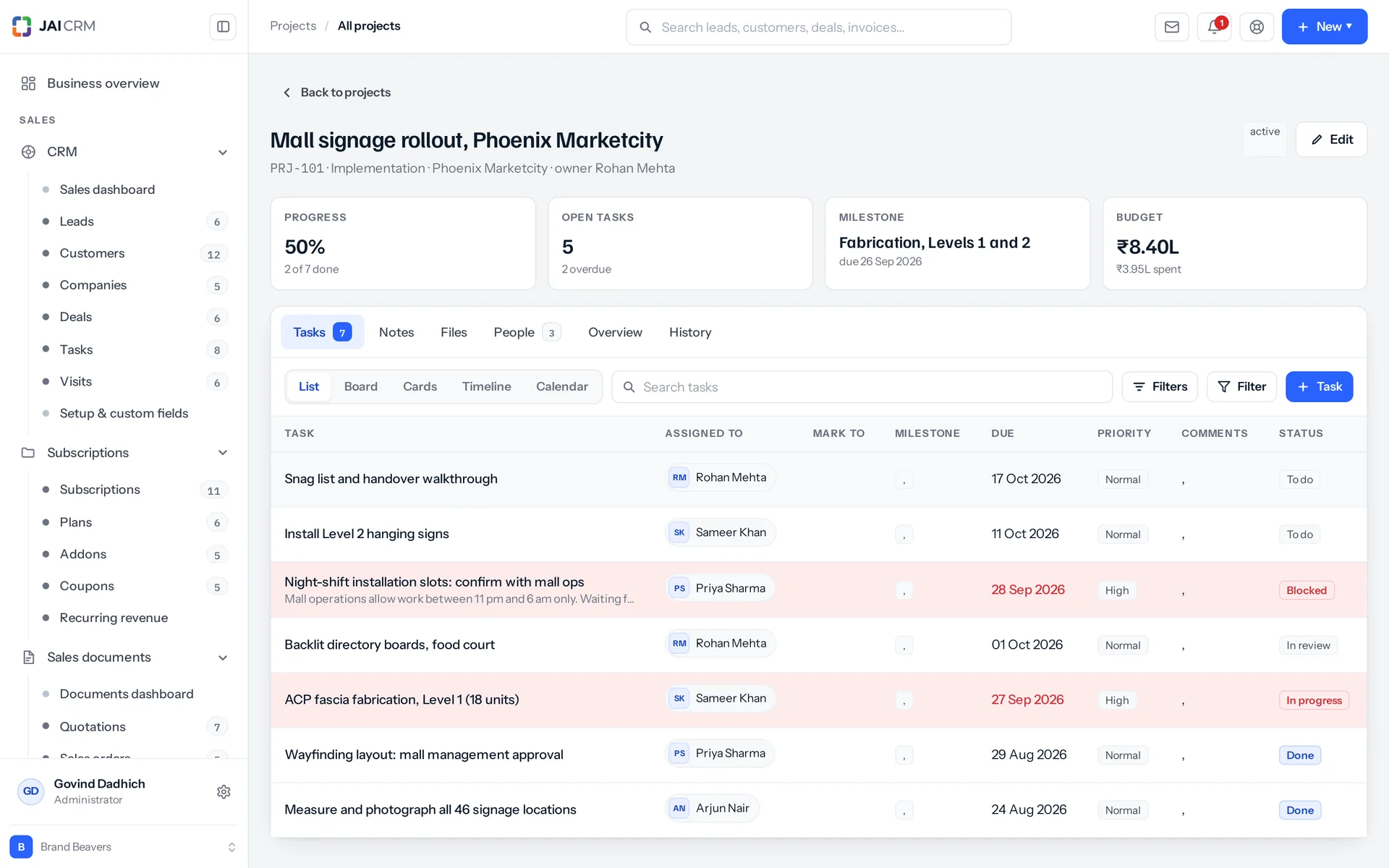
A project's progress is worked out from its tasks, and its hours are added up from timesheets. These are the two figures people usually type twice and then argue about. You can type progress, but it does not stay typed: the next task that changes replaces it with the average. Hours are never typed at all.

A project opened: milestones, tasks, timesheets and billing.
Project progress comes from the tasks
Every task that has not been deleted is averaged. A task marked Done counts as 100, whatever percentage was last typed on it. So ticking off the last card always brings the project to 100. The figure is worked out again when a task is created, updated, changes status or is deleted. The new figure comes back in the same reply as the change that caused it. A project with no tasks yet keeps whatever was set by hand. So does a project where nobody has touched a task since.
A task's spent hours come from the timesheets
Nobody enters spent hours. They are added up from the timesheet entries and written onto the task whenever an entry is created, edited or deleted. If an entry is moved from one task to another, both tasks are corrected, not only the one it landed on.
Budget spend is shown next to progress, not on its own
Spend is a figure you keep on the project. For every project that is in planning, active or on hold, the system works out what share of the budget has been spent. It sends an alert as spend crosses 80 per cent, and again at 100. Both alerts show the spend, the budget, the percentage and the completion figure together. The 80 per cent alert says to raise a change order now, not at the end. The 100 per cent alert says to stop, price the remaining work, and put a change order in front of the customer this week.
Eleven notifications that cover the whole job
They are: project assigned; task due today; task slipping on day two; task badly overdue on day ten, which also goes to the project owner by e-mail; milestone due in seven days; milestone completed, which goes to the customer; budget at 80 per cent; budget at 100 per cent; project past its end date; project completed; and a weekly digest of missing timesheets. The digest goes out on the day you set for weekly digests, which is Monday until you change it. Each alert has its own repeat window (the least time before the same alert can be sent again). It runs from 6 hours on the project handover alert to 336 hours, or fourteen days, on the two budget alerts.

The hours

Timesheets, with approval kept separate from billing

Timesheets in JAI CRM treat approving hours and billing hours as two separate steps. They are usually two decisions, made by two different people, often a week apart. You can approve hours without billing them, bill only approved hours, or bill unapproved ones. You can also withdraw an approval.

You log your own hours. Signing them off is a separate right.
You log, edit and delete your own entries. Each action needs the matching permission on timesheets, plus edit permission on the project the entry belongs to. Someone else's entry is not yours to touch. Only the account owner can reach those. Approving is a permission of its own, kept apart from all of these. So the person who records the work and the person who signs it off do not have to be the same.
The rate comes from the entry, or from the project
Each entry has its own rate and its own billable flag. If an entry has no rate, it uses the project's hourly rate. Time is logged against the project and, if you like, against a task. That task must actually belong to the project. If it does not, you get a plain refusal: that task is not in this project, pick one from the project.
A live answer to "how much of this have we not billed?"
The project shows total hours, billable hours, unbilled hours, the rupee value of those unbilled hours, and approved hours. Each entry is valued at its own rate or the project's rate, rounded to two decimals. This figure sits on the project record and has its own address (link). So it is a number you check on a Tuesday, not a report you run at month end.
Once billed, an entry stops moving
An entry that has been invoiced cannot be edited and cannot be deleted. The message says why and what to do instead: this entry has been invoiced, so it can no longer be changed, credit the invoice first. That is the only honest answer. The alternative is a timesheet that disagrees with a document the customer is holding.

Billing

Turn unbilled time into a correct draft GST invoice in one action

One action on the project collects all unbilled, billable time and creates a draft invoice from it. You can limit it to a cut-off date, to chosen tasks, or to approved entries only. What you get is a full Indian GST invoice, not a summary someone then retypes into the accounts.

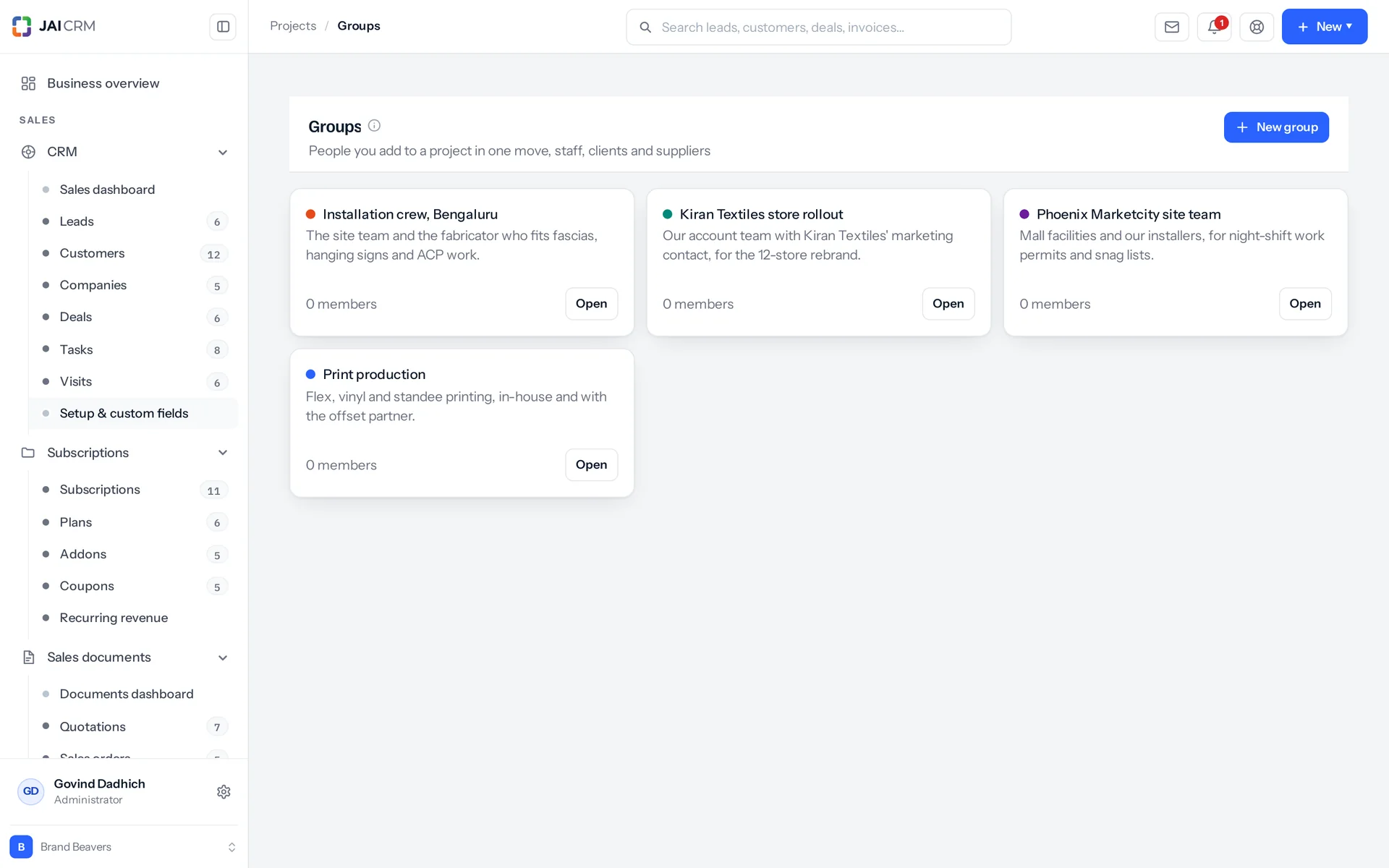
Project groups.
Four ways to group the lines, and rates are never mixed
Group the lines by task, by user, by date, or as one single line for everything. Whichever you pick, two entries at different rates stay on separate lines, because the rate is part of how lines are grouped. A senior's hour and a junior's hour never quietly average into one figure the client has no way of checking.
The same tax engine the sales module uses
The draft carries the tax regime, place of supply, supplier state, export and SEZ (special economic zone) flags, export under a letter of undertaking (LUT), reverse charge (where the buyer pays the tax) with its own total, cess kept apart from tax, round-off and net payable. Whether it charges CGST and SGST or IGST is decided by comparing your state code with the customer's place of supply. Nobody types it. The invoice number comes from the financial-year series. It is taken inside the same database step as the save, so two people pressing save at the same instant cannot get the same invoice number.
Everything it used is marked and tied to the invoice
Every entry that went in is marked as invoiced and linked to the invoice. The draft gets an audit entry (a permanent record of the action) naming the hours, the project and the number it was given. The project gets a line on its own timeline saying how many hours, across how many entries, were billed on which draft. The invoice takes the project's customer and the deal the project came from. So revenue traces back to the sales opportunity that won the work.
It stops with a clear message instead of making a wrong invoice
If the project has no customer, it stops: there is nobody to invoice, set the customer first. If there is nothing to bill, it says which kind of nothing: no unbilled billable time at all, or none that has been approved. The fix is in the same sentence. Raising the invoice also needs two permissions at once, one on timesheets and one on sales invoices. Having access to the project side is not a licence to create sales paperwork.

Confidentiality

A client and a supplier on the same job who never learn each other's names

You can switch on name hiding one party at a time: hide vendor (supplier) names from this client, or hide client names from this vendor. A hidden party is renamed, not removed, so the record still reads as a whole piece of work instead of a page of blanks. Your staff see everything, and you always see yourself.

Renamed, with three steps to fall back on
A hidden party is shown by the first of these that exists. First, their own nickname. Second, the nickname of a group they belong to, or the group's name if it has no nickname. Third, your own business name. A customer never sees another customer. A vendor never sees another vendor. A group is never named to an outsider, whatever the other settings say.
The project's own name is hidden too
This is because the real project name usually has the client's name in it. Where the client is hidden, the project shows its nickname. Where there is no nickname, a name is built from what that viewer is allowed to call the client plus the type of project it is. The record is flagged as an alias, so the screen can say so instead of pretending.
Contact details are left blank, not faked
A hidden party's e-mail and phone come back empty, not as a real-looking replacement. Renaming someone is a policy. A wrong phone number is a support ticket and someone's lost afternoon.
Check exactly what one named outsider would see
Pick a customer or a vendor. The preview replays your project list through their eyes. For each project it shows the real name, the name they would see, whether it is hidden, the client as they would read it, and up to six of the people on it. It reads the fifty most recent projects you can see and tells you how many of those that outsider would not see at all. The whole comparison is worked out on the server.

The roster

Staff, outside suppliers and client contacts on one project

A project team (the roster) can hold staff groups, whose members join the roster, the vendors working on the job, and the client contacts given access. One call sets all of it, and each person is an owner, assignee or watcher. Every name that comes back is already hidden or shown to suit whoever asked.

Two things the roster will not accept
A blocked vendor cannot be added, and the refusal quotes the reason recorded on that vendor. A blocked vendor is blocked everywhere, not only on payments. Adding one to a project is how they end up doing work that nobody can then raise a purchase order or pay a bill for. A circle cannot be added either. Circles are staff-only and are what a document share or an approval names. A project roster takes a group, and the message says so.
Work reaches you even on a project you cannot otherwise see
You can see a task if you can see its project, or you are its assignee, or you are marked on it, or you created it. Visibility follows the work, not the folder. So a job handed to you on a project you are not otherwise on still shows up in your list. The same goes for time: you can always read your own entries.
An @mention puts someone in the loop, not only in the text
Mention someone with @ in a task comment and they are added to the task's marked-to list and made a watcher. From then on they get the due-date and overdue reminders. Being named in a sentence nobody is subscribed to is how work goes quiet.
A new task is assigned to whoever created it
This is on purpose. A task with nobody on it is a task nobody is reminded about, because all the reminders go to the assignee. The person who raised it is the sensible first choice, and they can hand it on straight away.

Deleting

Before you delete, it tells you what will break, in sentences

Before you delete a project, a milestone, a task or a timesheet entry, a preview tells you what will happen. It uses plain English, not a count of affected rows. Deleting any of these four then needs a clear confirmation. If you try without one, the refusal already names the result, for example: the tasks under this milestone will stay in the project, or the subtasks go with this task.

Deleting a milestone does not delete its tasks
The tasks move back into the project, and you are told that before you press anything. A milestone that has been invoiced cannot be deleted at all, because the money has already gone out on a document. Credit the invoice first.
Deleting a task does not wipe out the hours logged on it
Time that has not been invoiced is unlinked from the task and stays on the project. The warning says exactly that: the logged hours will stay on the project but lose their task. Subtasks are deleted with the parent task, and the preview tells you how many before you confirm.
Deleted is not gone, and bulk delete tells you the truth
A deleted project is marked as deleted, not removed, and can be restored. The restore is recorded in the audit log. If you select fifty rows to delete, any that cannot go come back by name, each with the reason it is blocked. You do not just get a count of twelve and have to guess which thirty-eight are still there and why.
Every change to a task, in business language
The task history shows, page by page, each action with a summary, who did it, the fields that changed, and the whole record before and after. Fourteen fields are given readable names, such as assignee, estimate, marked to, parent task and order. A status change reads as "moved from In progress to In review", not as two status codes side by side.

Who opens Projects, and what for

Swipe through the people who use it every day.

An agency that bills by the hour

Your team logs time against the job and the task as the week goes on. On the first of the month, one action turns the unbilled billable hours into a draft invoice. You group it the way that client likes to read it: by person, by task, by date, or as a single line. Two rates on the same job stay on two lines, so nothing has to be explained twice.

A fit-out or fabrication firm that bills by stage

Each milestone has its own amount and its own invoiced flag. That is what makes stage billing real, not just a label on a task. Completing a milestone records the date, tells the project owner and tells the customer. The message to the customer openly offers the invoice for that stage, instead of waiting to be asked. Reopening a milestone tells nobody, because a correction is not news.

Anyone who subcontracts work they would rather keep private

For example, an agency using freelancers, or a contractor who subcontracts a trade. Switch on hiding for that client or that supplier, and the other side sees an alias (a stand-in name), even in the project name. Then open the preview, choose the actual person, and read their list back before you invite them to anything.

The delivery manager on a Monday morning

One screen answers what a delivery meeting needs: projects by status, with their budget, spend and average progress; tasks by status; how many are overdue; how many are due in the next seven days; how many are on the person asking; total unbilled hours; and the next ten milestones with their dates. All of it is limited to what that person is allowed to see.

Someone who only wants to know what is on them today

They open the All tasks screen, filtered to "mine" or "marked to me", in whichever of the five views suits them. It answers "what is on me?" rather than "what is left on this job?". That is a different question, and it is the one most people actually open the software to ask.

Whoever raises the invoices at month end

Every project shows its unbilled hours and their rupee value, so your list of what to chase is already made. If your rule is to bill only approved time, you can limit billing to that. Once an entry is on an invoice it stops moving. The only way back is a credit note, which is the correct answer, not an obstacle.

What is different once you have it

Bad news arrives while you can still act on it

Budget alerts at 80 and 100 per cent show the spend next to the completion figure. A milestone warning comes seven days before it is due. Overdue reminders nudge on day two and bring in the project owner by e-mail on day ten. None of this is new information at the end of the job. It is the same information, early enough to raise a change order, move someone, or have the conversation before the invoice.

The gap between work done and work billed closes

The weekly digest chases the timesheets nobody filled in, on Monday morning unless you move the day. It carries one line a finance director would underline: unbilled hours are the quietest way a project loses money. The unbilled total sits on the project all month. Billing takes one action, not an evening with a spreadsheet. So the small entries that used to be dropped for being too fiddly go on the invoice like everything else.

One pricing engine, so project billing is never a looser second copy

A project invoice is made by the same tax engine as a sales invoice. So the figure is exactly what sales would have produced for the same lines. It uses the same financial-year numbering, with no gaps, taken inside the same database step as the save. The bill-to details are frozen onto the invoice, so a printed GST invoice does not change when the customer's master record does. There is nothing to reconcile between what delivery raised and what sales raised, because there is only one kind of invoice.

You can take on work you would otherwise turn down

A client and a supplier can work on the same project without either learning the other's name, phone or e-mail. You can read back exactly what each of them sees before anyone is invited. Two competing clients can use the same contractor without relying on trust and careful folder names.

What it works with

On its own it is a better spreadsheet. The value arrives when what it makes is what another part uses, with nobody typing it again.

Sales documents

The draft invoice raised from time lands in Sales, and the message says so plainly: the draft invoice is ready for review, open it in Sales to send it. From there it is a normal document, with the same numbering series, the same tax engine, and the same rules on what may be cancelled and what must be credited. About Sales documents

CRM

A project keeps the deal that won it. An invoice raised from its time takes that deal as well as the customer. So revenue traces back to the sales opportunity, not just the company name. About CRM

Vendors

Outside suppliers are added to the project team from the vendor list. A blocked vendor is refused, and the reason recorded against them is read back to you. A vendor blocked on payments is blocked from the work too. About Vendors

Procurement

Purchase documents carry a project reference, so what you buy for a job counts against that job. Project cost is not limited to the hours somebody logged. About Procurement

Accounting & finance

Expense payments and manual journal lines (accounting entries made by hand) both carry a project reference. So costs that never went through a timesheet still land on the right job. About Accounting & finance

Notifications

The eleven project alerts live in the shared notification system. They use the same channels, the same repeat windows, the same digest day, and the same single place to turn one off when it is not for you. About Notifications

Take Projects on its own, or take the lot

Priced per person, per month, in rupees, with GST shown separately. Every plan includes the basics of the whole product: custom fields, roles, reports, documents and notifications. Change plan whenever you like and nothing is typed again.

5 people

CRM + Sales Documents

Leads, customers and deals, with quotations and GST invoices

₹149 per person a month

For 5 people: ₹745 a month, billed as ₹8,940 a year. ₹10,549.20 with 18% GST.

  • Leads, customers, companies and deals
  • Quotations, sales orders and GST invoices
  • Your own mailbox, with replies filed against the record
  • Reports, dashboards and exports
  • 1 GB storage per workspace (organisation)
Start free

CRM + Sales Documents + Subscriptions + Warranty

For a business that bills on a cycle and stands behind what it sells

₹299 per person a month

For 5 people: ₹1,495 a month, billed as ₹17,940 a year. ₹21,169.20 with 18% GST.

  • Everything in CRM + Sales Documents
  • Recurring billing, plans, add-ons and coupons
  • Warranty registration and claims
  • Items and stock, which warranty is held against
  • 1 GB storage per workspace (organisation)
Start free

Every plan, and what is in each Prices in rupees, per person, per month. Parts can also be bought on their own.

Only want Projects?

Any single part is ₹149 per person a month on the yearly rate, with the settings, reports, documents and notifications that go with it. See every part’s price.

A part you do not buy

Is not in your menu. Not greyed out behind an upgrade message, just not there. That is why the product is sold in parts.

How many people, and can I change it?

You choose when you sign up and change it whenever you like, up or down. There is no minimum number of users and no penalty for going down.

Yearly or monthly?

Both. Yearly works out cheaper per month and is paid once at the start. Monthly costs a little more and stops at the end of any month.

Questions people ask about Projects

Answered in full. If yours is not here, ask us. A person replies.

Ask us something
What is project management in JAI CRM?

It is the Projects module: project management software with timesheets and billing built in. You set up projects with budgets and milestones, and track tasks in five views: list, cards, board, timeline and calendar. Your team logs hours against each project. One action turns unbilled, billable time into a draft GST invoice. You can also hide a client and a supplier from each other on the same job.

Who is JAI CRM project management software for?

It suits businesses that deliver work in jobs and bill for it. Examples are agencies billing by the hour, fit-out and fabrication firms billing by stage, and firms that use freelancers or subcontractors. It also helps delivery managers and staff who just want to see what is on them today. It is not for plans built on linked Gantt bars: there are no task dependencies, no critical path and no resource levelling.

How much does project management in JAI CRM cost?

Projects costs ₹149 per user per month, billed annually.

Can I use it for fixed-price projects, or only hourly billing?

Both. Each project has one of four billing types: fixed, hourly, milestone or retainer. The project also has an hourly rate that time entries use when they have no rate of their own. It is still worth logging hours on a fixed-price job, because that is how you find out whether your price was right. You can simply mark those entries as not billable.

Can someone else log time for me or edit my timesheet?

No, unless they are the account owner. You create, edit and delete your own entries. Each action needs the matching permission on timesheets and edit permission on the project. Approving time is a separate permission again, kept apart from all of these. So recording the work and signing it off are two jobs, not one. An approval can be withdrawn.

We invoiced the wrong hours. How do we fix it?

Credit the invoice first. The entries are locked on purpose: an invoiced entry cannot be edited or deleted, and the message tells you to credit the invoice first. Once the credit note exists, the position is correct on both sides. Quietly retyping the timesheet would not do that, because the customer is holding a document that says otherwise.

Can a client see their own project?

Yes. Client contacts can be given a seat on the project team (the roster). Everything they see is hidden or shown according to your settings, including the project name. A hidden party's e-mail and phone come back empty, not replaced with something else. Before you invite anyone, the preview shows your project list the way that named outsider would see it.

Is the name hiding done on the server, or just in the browser?

On the server. The project list and the project's member list are both put through the hiding before they are sent. So a name the viewer may not see never reaches their browser to be hidden there. The directory behind it is also limited to the viewer's own customers and vendors. It once listed every customer and vendor by real name to anyone with view access. On a screen whose whole job is hiding who you work with, that was exactly backwards.

Does it send reminders automatically, or do I have to chase people?

It chases for you. A task due today goes to the assignee and anyone marked on it. On day two it goes again as a slipping task. On day ten it goes to the assignee, the marked people and the project owner, by e-mail as well as in the app. Once a week a digest chases missing timesheets, on the weekly digest day, which is Monday until you change it. Each alert has its own repeat window, from six hours to fourteen days. So a message repeats at the gap its template sets, not every time the system runs its checks.

Can I add custom fields to projects and tasks?

Yes, on both projects and tasks. On a project, the server also checks these fields when the record is created and when it is changed. So a required field there is truly required, not just asked for by the form. In both cases the field definitions come back with the record, so the form can draw itself. The project list has the same tools as every other list: kanban (board) and pivot (summary table) grouped by six fields with three measures, CSV import, CSV export in the column order you ticked, and bulk delete.

What happens to logged hours when a task is deleted?

They stay on the project. Entries that have not been invoiced are unlinked from the task, not deleted with it. The preview warns you before you confirm. Invoiced entries cannot be removed at all.

Can I use it for internal projects with no customer?

Yes. A project does not need a customer to hold tasks, milestones, time, a budget and a team. It needs a customer only to raise an invoice from its time. If there is none, the billing action stops and says so, instead of producing an invoice addressed to nobody.

Can an invoice raised from a project handle exports, SEZ and reverse charge?

Yes. It is the same kind of document as a sales invoice, built by the same tax engine. It handles SEZ (special economic zone) supplies, export, export under a letter of undertaking (LUT), reverse charge with its own total, cess (an extra levy) tracked apart from tax, and the rupee round-off stored as its own line. The bill-to details are frozen onto the invoice, so a printed invoice does not change when the customer's master record does.


Long enough to know, and it costs nothing to find out

Switch on projects, put a week of real work through it, and see whether it holds. If it does not, walk away. We did not ask for a card.