Skip to the content
JAI CRM

CalendarFollow-ups, visits, meetings, tax dates

One calendar for everything your team owes a customer

Follow-ups, calls, visits, meetings, tasks and project tasks from every module you use, on one calendar, with the invoices falling due, the cheques to deposit and the GST, TDS, PF and ESI dates beside them. Drag to move, click to add, and keep it in step with Google Calendar or Outlook. In early access: ask us to switch it on for your business.

No card needed. From ₹149 per person a month.

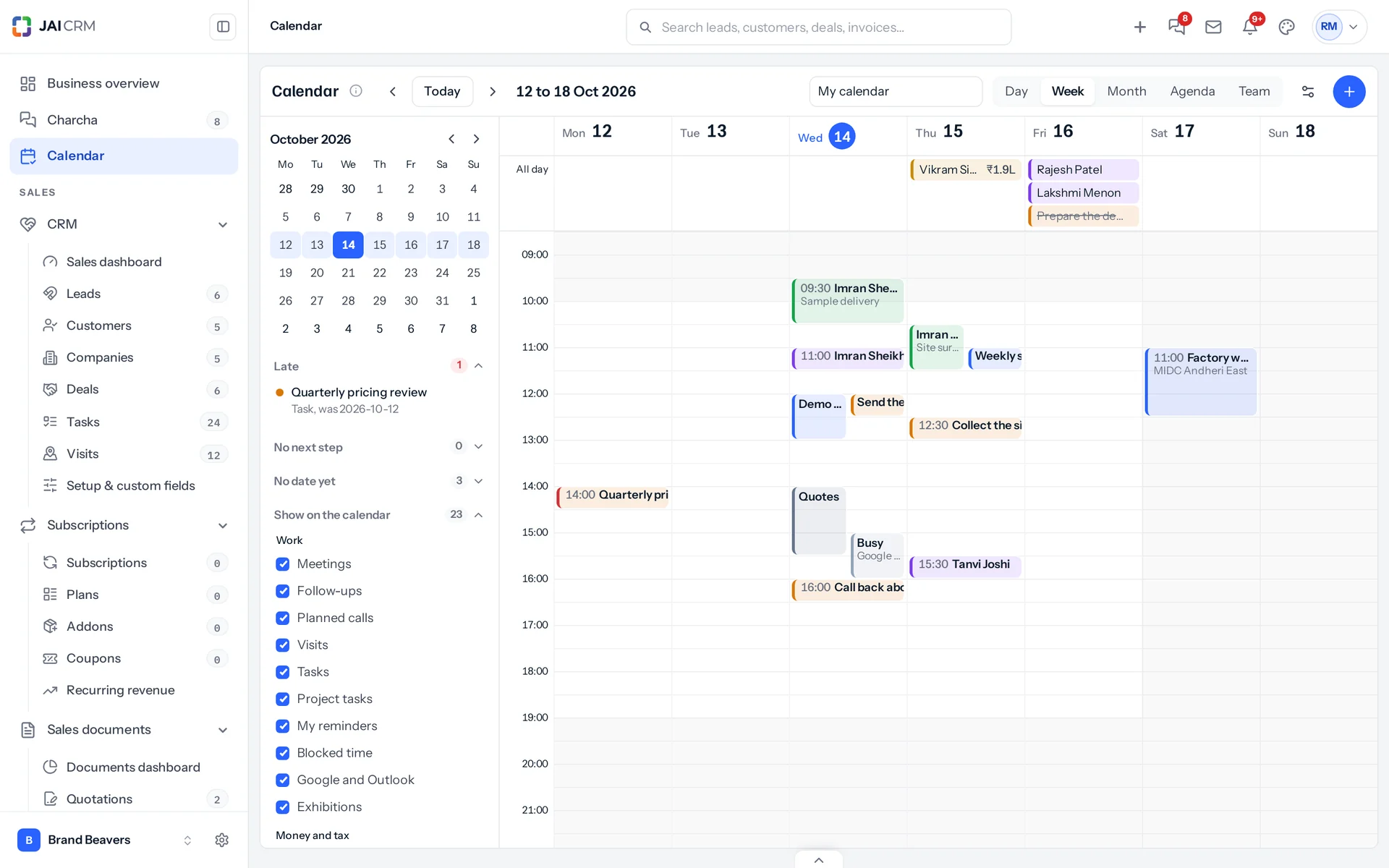
A week on the JAI CRM Calendar: visits, meetings, follow-ups, tasks and blocked time across the hours, with a small month and the kinds of item on the left.
5 things it doesEvery one in the product today

What is Calendar in JAI CRM?

The JAI CRM Calendar shows everything a person has to do from every module the business uses: lead follow-ups, planned calls, visits, meetings, tasks, project tasks and Charcha reminders, with exhibitions, deals expected to close, quotations expiring, invoices and bills falling due, cheques to deposit, promised payments, subscription renewals, warranties ending, salaries, birthdays, holidays, and the GST, TDS, PF and ESI dates with a filed mark. Items are dragged to a new time, made from an empty slot, and moved through the record's own rules. Fifteen minutes before a meeting about a customer it sends a briefing, and afterwards it asks how it went and books the next step. Each person can keep it in step with Google Calendar or Outlook, both ways; deleting an item there only removes it there.

Why do follow-ups still slip?

The follow-up is on the lead, the visit is in Visits, the meeting is in a chat, the task is in Tasks and the project deadline is in Projects. Your Google Calendar knows none of them. So each person keeps a list in their head, and the day is planned around whatever shouts loudest.

  • Five lists for one day

    Follow-ups on leads, visits, meetings, tasks and project deadlines each live on their own screen. Nobody opens all five every morning, so something is always found a day late.

  • The calendar that knows only the time

    Google Calendar says "Meeting, 4 pm". It does not say the customer owes ₹2.4 lakh, that you last spoke a week ago, or that a quotation is waiting for an answer.

  • A meeting with no next step

    The meeting happens, everybody goes back to work, and nothing is written down or booked. Two weeks later the lead has gone cold and nobody knows who was meant to call.

  • Tax dates on a sticky note

    GSTR-1, GSTR-3B, TDS, PF and ESI each have their day, and quarterly filers have different ones. They live on a note on the accountant's screen until a late fee reminds everyone.

  • Nobody knows who is free

    A manager wants a meeting with three people and has to ask each of them. Their personal calendars are on their phones, out of reach of the business software.

What the calendar does, in plain words

Nothing below is on a roadmap. Every one is in the product today, and a 14-day trial is long enough to check any of it.

Everything

Every kind of work, from every module, on one calendar

The calendar keeps almost nothing of its own. It reads follow-ups from leads, tasks from Tasks, visits from Visits, meetings from Charcha and project tasks from Projects, each under the same rules its own screen uses, so nobody sees anything they could not already open.

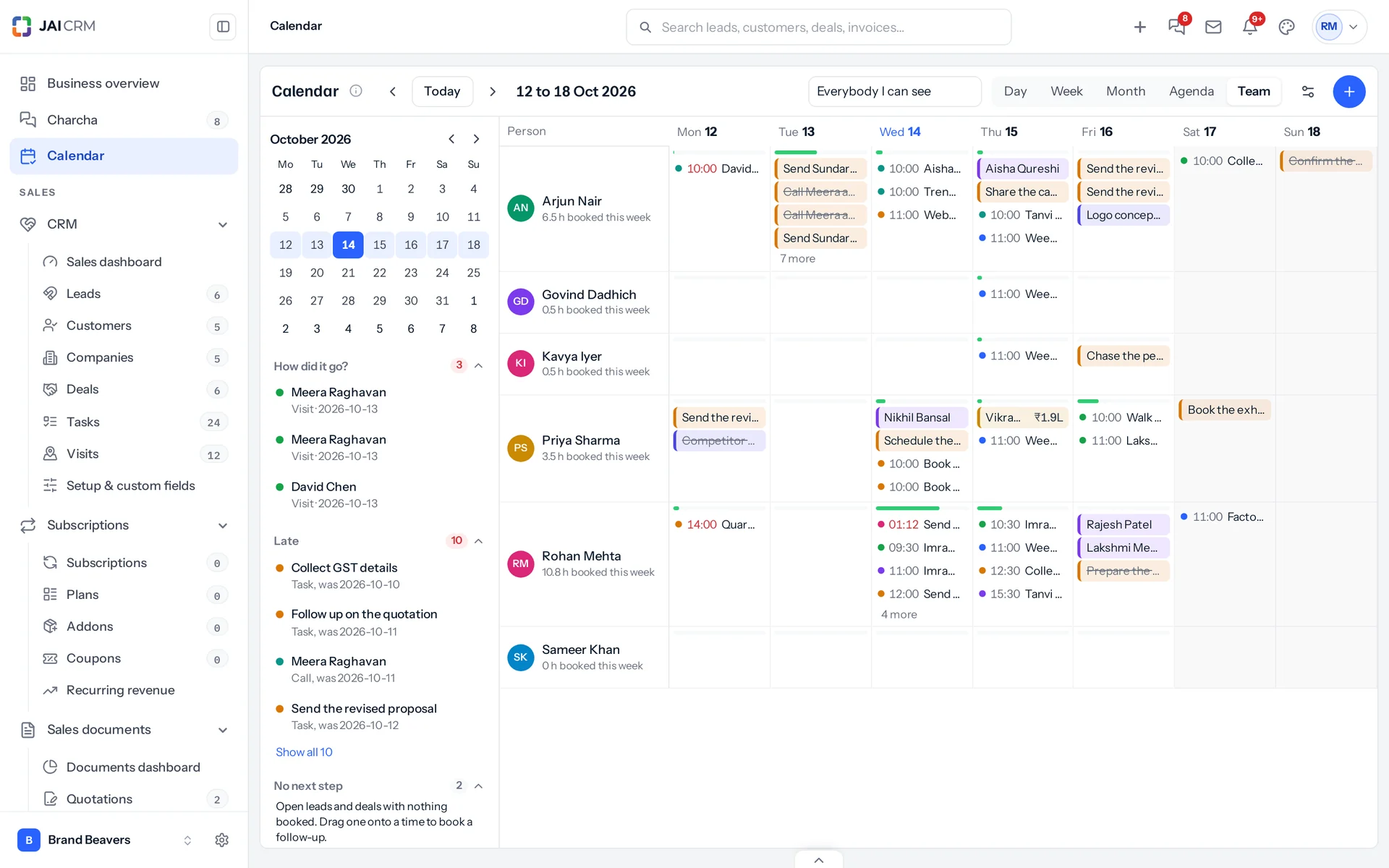
The team view: each person a row and each day a square showing how full it is, with their visits, meetings, follow-ups and tasks.
Day, week, month, agenda and team
A week of hours for planning, a month at a glance, an agenda for the phone, and, for managers, the whole team side by side with how full each day is.
Each kind in its own colour
Meetings, follow-ups, calls, visits, tasks, project tasks and reminders each have a colour, and any of them can be hidden. A layer whose module your business has not switched on says which module it needs.
Holidays and the working week
Add India's national holidays for the year in one press, then your own and each branch's. Days off and hours outside the working day are shaded.
A colleague's own time stays theirs
Blocked time, Charcha reminders and anything from a person's own Google Calendar or Outlook show to colleagues only as Busy.

Planning

Drag it, drop it, make it from an empty slot

Move a follow-up to Thursday, stretch a meeting by half an hour, or drag across an empty afternoon to plan a visit. Each change goes through the record's own rules, exactly as if it were made on its own screen.

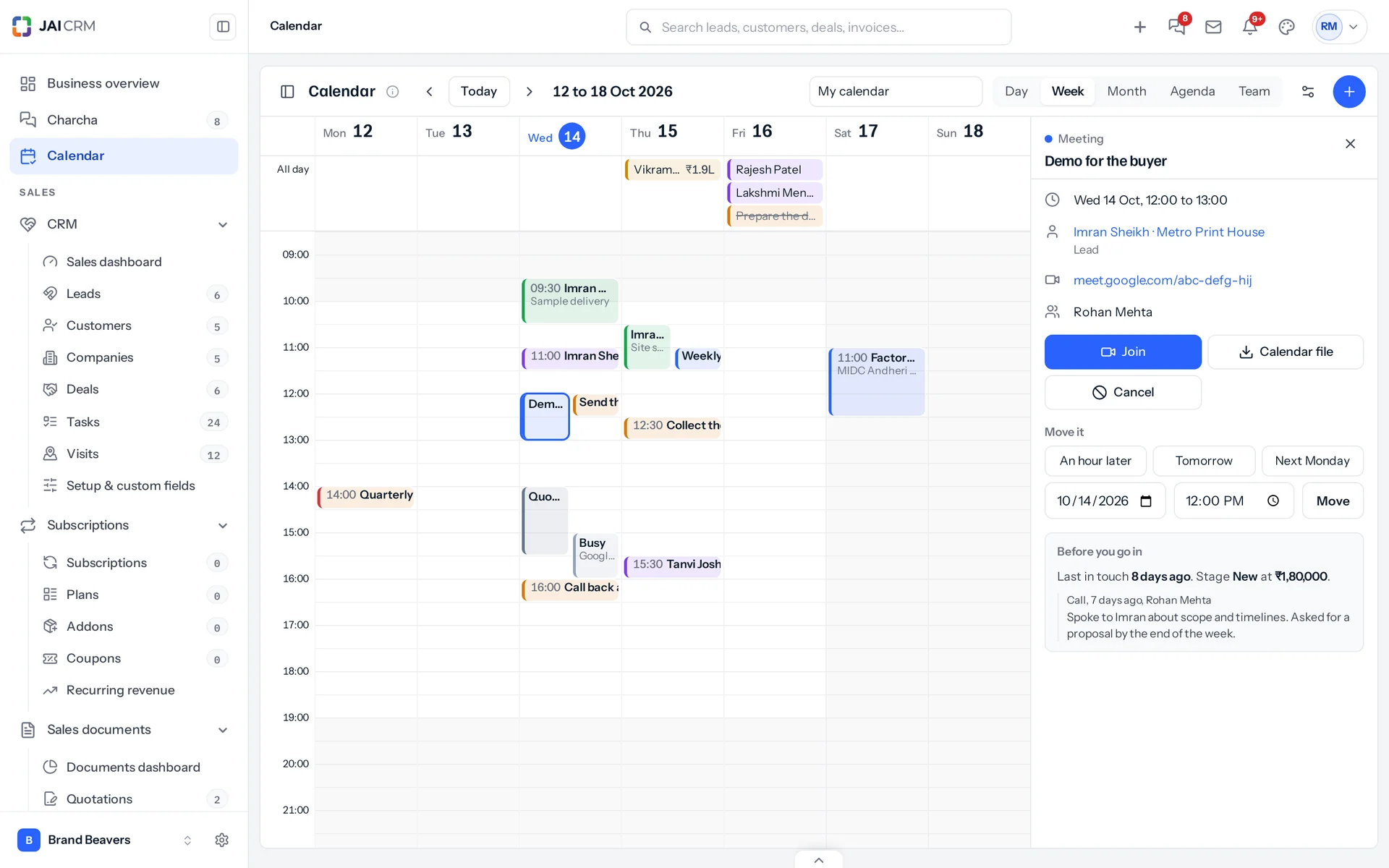
A meeting about the lead Imran Sheikh open beside the week, with Join, the quick moves and Before you go in: last in touch 8 days ago, stage New at 1,80,000 rupees, and the last call.
Purpose first
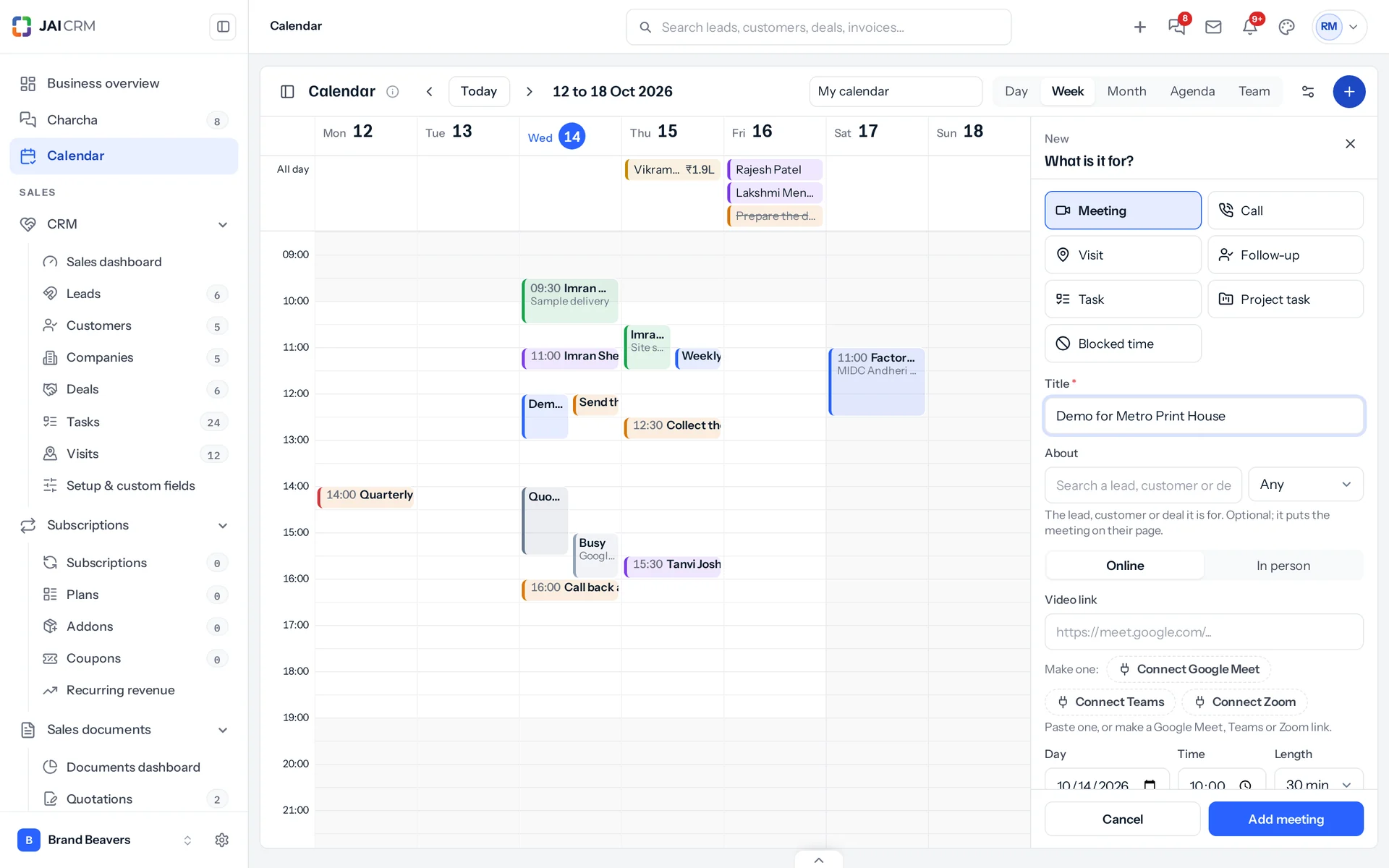
Press New and choose what it is for: a meeting, a call, a visit, a follow-up, a task, a project task or blocked time. Only the fields that kind needs appear.
One kind of meeting
A meeting can be about a lead, customer or deal, online with a Google Meet, Teams or Zoom link, or in person with a place. It goes on everyone's calendar, into Charcha and onto the record's page.
Customers invited by email
Add a customer's email and they get an invitation from your own connected mailbox, with a calendar file that opens in whatever calendar they use.
Work with no date
Tasks with no date, and leads and deals with nothing booked, sit at the side. Drag one onto a time and it is booked.

Meetings

A briefing before, and the next step after

A calendar that only knows the time cannot help you walk into a meeting prepared. This one knows the customer.

Making a meeting from the calendar: What is it for? with Meeting chosen, the lead it is about, Online or In person, a video link, the day, time and length.
Fifteen minutes before
For a meeting about a lead, customer or deal, everybody going gets a note: when you last spoke, what is unpaid and which quotations are open. The full briefing, with the last conversations, opens on the calendar.
How did it go?
When it ends, the person who set it is asked. One choice, a line of notes, and the next follow-up booked in the same step, with the note saved on the record.
Visits that did not happen
A visit still open an hour after its time asks whether it happened: mark it done with a note, move it, or cancel it.
Nothing left without a next step
Open leads and deals with no follow-up, task, call, visit or meeting booked are listed at the side, biggest first.

Money and tax

The days money moves, beside the days work happens

Invoices falling due, bills to pay, cheques to deposit, quotations expiring, subscriptions renewing and warranties ending sit in the top strip of each day, so the hours stay about work.

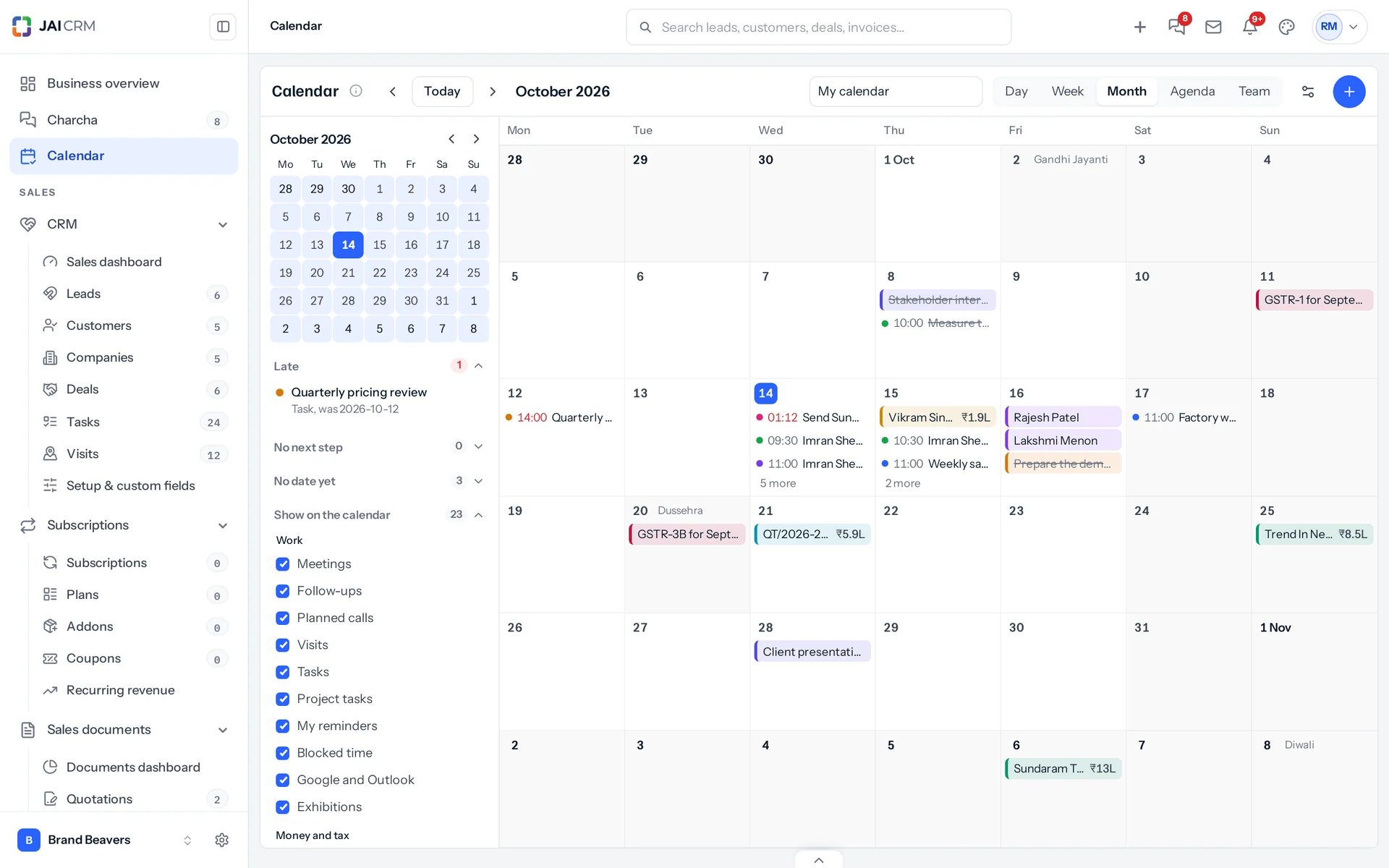
October 2026 on the calendar: follow-ups, visits and meetings beside the holidays, the GST dates, a quotation expiring and deals closing.
GST, TDS, PF and ESI
GSTR-1 and GSTR-3B on their days, monthly or quarterly under QRMP, with the quarterly GSTR-3B on the 22nd or the 24th by your state; TDS deposits on the 7th and March's on 30 April; PF and ESI on the 15th. Each has a filed mark.
A customer's promise to pay
Open an invoice that is due and note the day the customer promised to pay. It sits on that day until it is paid.
Only for the people who handle it
Tax dates show to whoever looks after GST, TDS or payroll; invoices to whoever can see them.

Your own calendar

Google Calendar and Outlook, kept in step both ways

Each person connects their own Google Calendar or Outlook once, by signing in on Google's or Microsoft's own page. Their JAI CRM items go into a calendar of its own named JAI CRM.

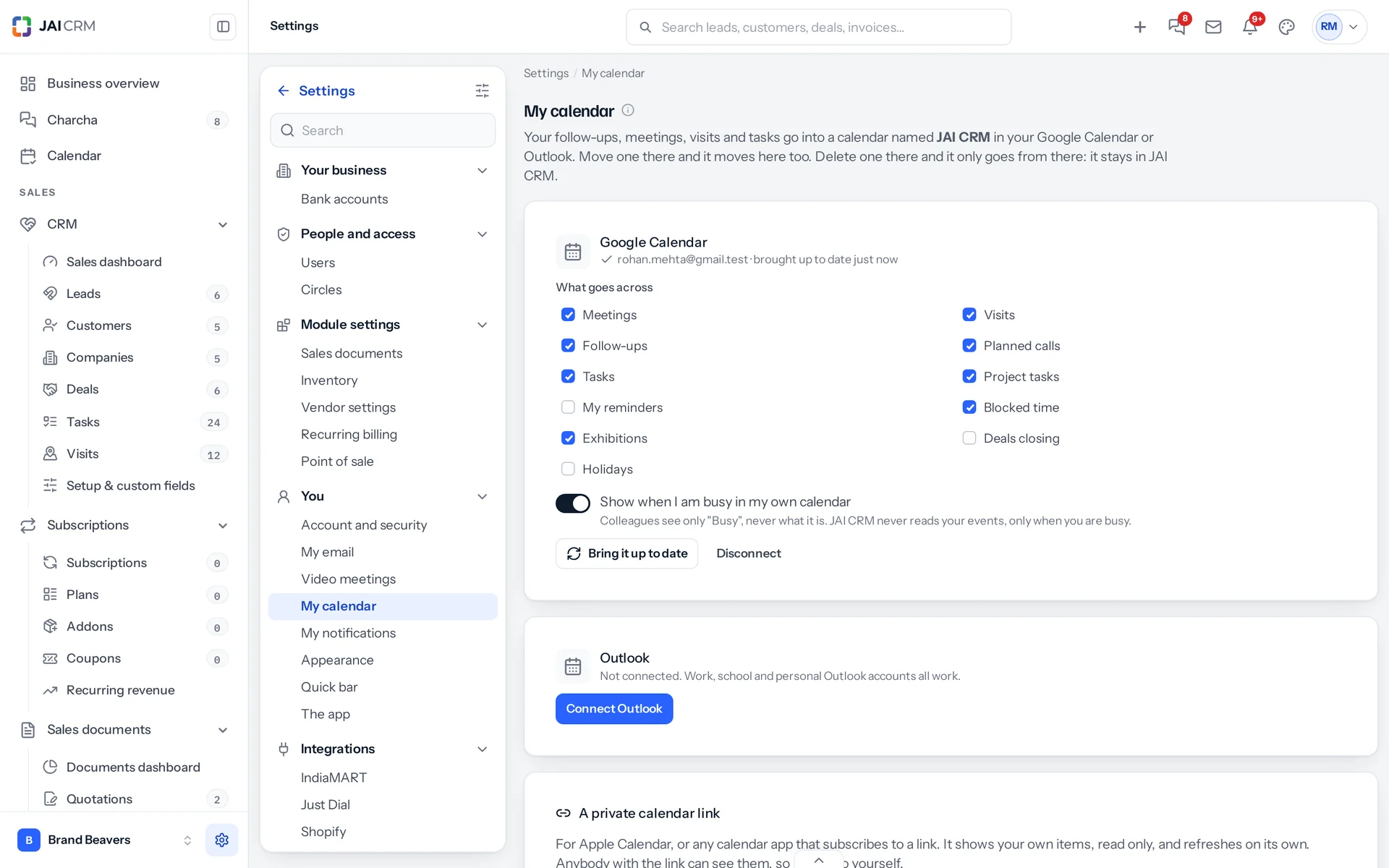
Settings, My calendar: Google Calendar connected, the kinds that go across, the busy time switch, and the private calendar link for any other calendar app.
Move it there, it moves here
Drag a follow-up to Friday in Google Calendar and it moves in JAI CRM too, under the same rules. A move JAI CRM would refuse goes back.
Delete it there, it stays here
Deleting an item in Google or Outlook only takes it out of that calendar. Nothing changes in JAI CRM, and the item offers to put it back.
Busy time, not your private life
JAI CRM asks Google only when you are busy, never what the event is. Colleagues see Busy; you can plan around it.
Any other calendar app
A private calendar link works with Apple Calendar or any app that subscribes to a link, read only.

What it works with

On its own it is a better spreadsheet. The value arrives when what it makes is what another part uses, with nobody typing it again.

CRM

Follow-ups, tasks, planned calls and visits are read from CRM, moved through its own rules, and a meeting about a lead or deal shows on its page. About CRM

Charcha

Every Charcha meeting and reminder is on the calendar, and a meeting card in a chat opens straight onto it. About Charcha

Projects

Project tasks sit on their due day for the person they are assigned to, and drag to a new day. About Projects

Sales documents

Invoices falling due, quotations expiring, cheques to deposit and promised payments sit on their days. About Sales documents

Accounting & finance

GST, TDS, PF and ESI dates, salaries, birthdays and work anniversaries come from Accounting and Payroll. About Accounting & finance

Calendar is in early access

The calendar is switched on for a business on request while it is in early access. Ask us and we will switch it on for yours.

5 people

CRM + Sales Documents

Leads, customers and deals, with quotations and GST invoices

₹149 per person a month

For 5 people: ₹745 a month, billed as ₹8,940 a year. ₹10,549.20 with 18% GST.

  • Leads, customers, companies and deals
  • Quotations, sales orders and GST invoices
  • Your own mailbox, with replies filed against the record
  • Reports, dashboards and exports
  • 1 GB storage per workspace (organisation)
Start free

CRM + Sales Documents + Subscriptions + Warranty

For a business that bills on a cycle and stands behind what it sells

₹299 per person a month

For 5 people: ₹1,495 a month, billed as ₹17,940 a year. ₹21,169.20 with 18% GST.

  • Everything in CRM + Sales Documents
  • Recurring billing, plans, add-ons and coupons
  • Warranty registration and claims
  • Items and stock, which warranty is held against
  • 1 GB storage per workspace (organisation)
Start free

Every plan, and what is in each Prices in rupees, per person, per month. Parts can also be bought on their own.

Already using JAI CRM?

Nothing changes until it is switched on. Then it appears just under Charcha in the sidebar, for every role on your team.

Does it change my data?

No. It reads what is already there. Moving something on the calendar is the same change as moving it on its own screen.

Google Calendar and Outlook?

They connect once Google and Microsoft approve the JAI CRM app. Until then, the private calendar link works with any calendar app.

Questions people ask about Calendar

Answered in full. If yours is not here, ask us. A person replies.

Ask us something
What does the JAI CRM calendar show?

Follow-ups, planned calls, visits, meetings, tasks, project tasks and your own Charcha reminders, with exhibitions, deals expected to close, quotations expiring, invoices and bills falling due, cheques to deposit, promised payments, renewals, warranties ending, salaries, birthdays, holidays and the GST, TDS, PF and ESI dates. Only what your business has switched on, and only what you can already open.

Can I move things by dragging?

Yes, on a computer: drag an item to a new time or day, or drag its bottom edge to change its length. On a phone, tap it and choose An hour later, Tomorrow, Next Monday or a time. Each move goes through the record's own rules.

Can I create a follow-up, visit or meeting from the calendar?

Yes. Click or drag across an empty slot, or press New, and choose what it is for: a meeting, a call, a visit, a follow-up, a task, a project task or blocked time.

What happens before and after a meeting?

Fifteen minutes before a meeting about a lead, customer or deal, everybody going gets a briefing: when you last spoke, what is unpaid and which quotations are open. When it ends, the person who set it is asked how it went and can book the next step at once.

Does it work with Google Calendar and Outlook?

Yes, both ways, once Google and Microsoft approve the JAI CRM app. Each person connects their own account by signing in on Google's or Microsoft's page. Their JAI CRM items go into a calendar named JAI CRM; a move made there comes back to JAI CRM, and a delete there only removes it there.

Can JAI CRM read my personal calendar events?

For Google, no: it asks only when you are busy, never what the event is. For Outlook it reads your own calendar so you see your own event names on your JAI CRM calendar. Colleagues only ever see Busy.

Can a manager see the team's calendars?

Yes, roles that already see a team's leads or tasks get the Team view: everybody side by side, how full each day is, and work handed from one person to another by dragging it onto their row.

Does it show GST and TDS due dates?

Yes. GSTR-1 and GSTR-3B monthly, or quarterly under QRMP with the GSTR-3B on the 22nd or 24th by state, CMP-08 for composition businesses, TDS deposits on the 7th (30 April for March), and PF and ESI on the 15th, each with a filed mark. Only to the people who look after them.

Can I add our holidays?

Yes. Add India's national holidays for the year in one press, then your own and each branch's.

Does it work on a phone?

Yes, in the browser and the Android app. The phone opens on the agenda; a day shows the week above it and swipes to the next day; the month shows a dot for each thing.

Can I use it with Apple Calendar?

Yes. Make your private calendar link in Settings, My calendar, and add it to Apple Calendar or any calendar app that subscribes to a link. It shows your own items, read only.

Is it included in my plan?

The calendar is in early access and switched on for a business on request. Ask us to switch it on for yours.

Long enough to know, and it costs nothing to find out

Start a trial and ask us to switch the calendar on. Plan one week of your team on it. If it does not help, walk away. We did not ask for a card.