Skip to the content
JAI CRM

CRMCRM: one of 17 modules, and you can buy it on its own

CRM software that gives every enquiry an owner and a date

Leads, deals, site visits (with the location captured on the spot) and every conversation, for Indian businesses of 5 to 200 people. A won deal becomes a GST (goods and services tax) invoice with nothing retyped. From ₹149 per user per month.

  • No card needed to start
  • From ₹149 per user per month
  • Android app included
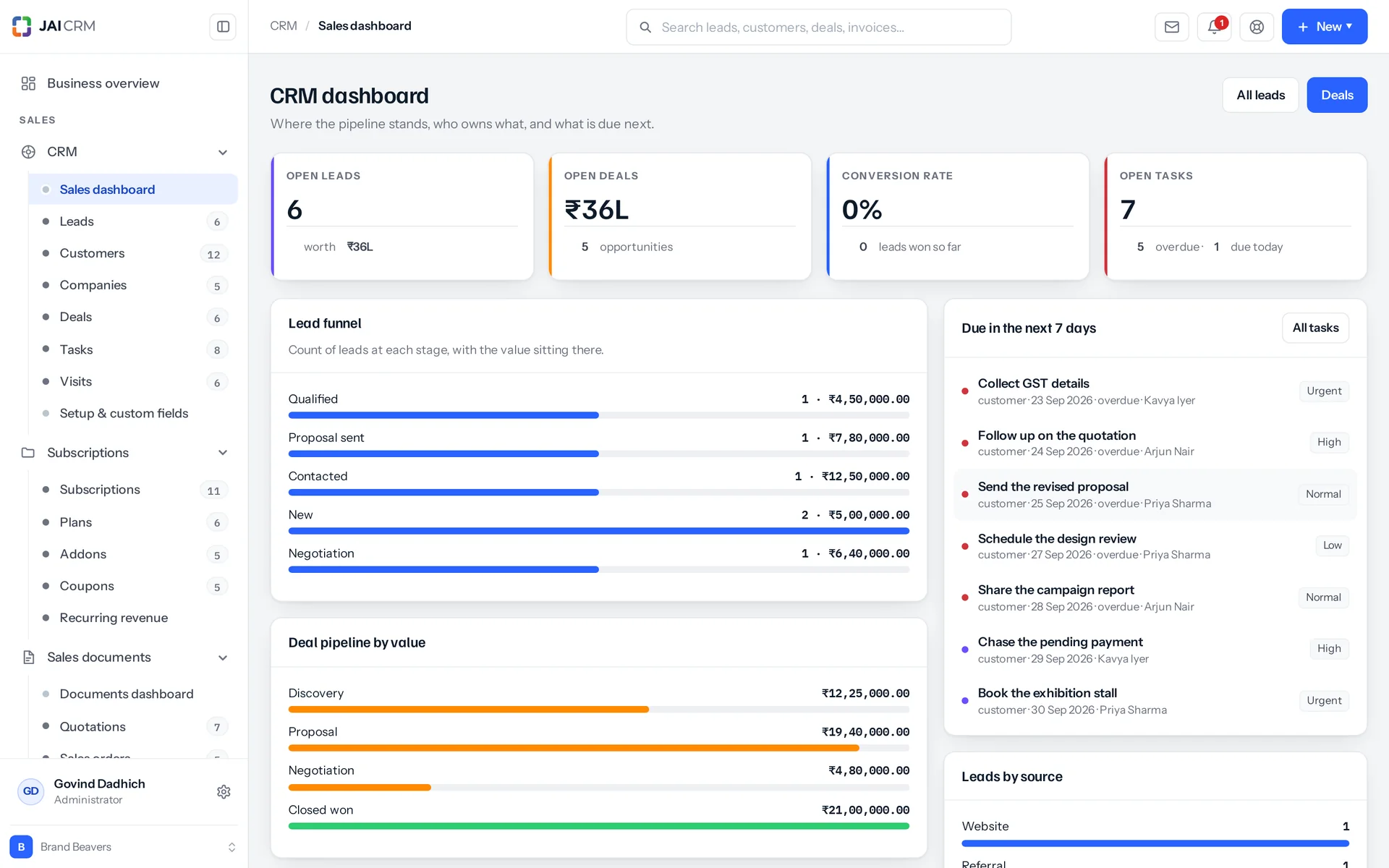
The CRM dashboard: open pipeline, deals by stage, follow-ups due and leads by source.
Owner: RehanaFollow up Wed
  • 17modules in the suiteCRM works with all of them
  • 34field types you can add yourselfFrom a rating to a formula
  • 4tax systemsIndian GST, VAT, sales tax, or none at all
  • ₹149per user per monthBilled annually. GST extra.

What is CRM in JAI CRM?

CRM in JAI CRM is sales software for Indian businesses of 5 to 200 people. It gives every enquiry an owner and a dated follow-up, catches duplicate customers as they are saved, and records site visits with the location taken from the phone. A won deal becomes a GST invoice with nothing retyped.

You do not lose the deals you can see. You lose the five you never noticed.

A messy sales desk does not cause complaints. It causes a sales rate a little lower than it should be, and everyone assumes that is normal for the industry. Here is where the sales actually go.

None of these is a software problem, until you try to fix them without software. Then all five turn out to be the same problem: nothing was written down in a way anything could count.

  • The enquiry nobody called back

    It came in on a busy Tuesday, in a group everyone thought someone else was reading. There is no record of it, so nobody even feels bad about losing it.

  • The same customer, entered twice

    Once from the website form, and once by phone on Thursday. Two people send them quotes, at two different prices. The customer decides you are not a serious business.

  • The quotation that went out four days late

    The rates were in one file and the letterhead was in another. The person who knows the discounts was travelling.

  • The visit nobody wrote up

    Four hours and a tank of diesel spent. What was discussed lives only in the head of the person who went, and only until Friday.

  • The salesperson who left

    They took eleven live conversations with them, on a personal number nobody else could ever see. The handover was a spreadsheet of names.

Follow one enquiry from a message to a tax invoice

This is not a tour of screens. It is one ordinary enquiry and what happens to it in a week. Everything it picks up along the way is a field the product really keeps.

  1. Monday 21 Sep, 09:14

    It arrives

    It comes from IndiaMART as four lines in someone else's format. This is what an enquiry really looks like when it lands.

  2. Monday 21 Sep, 11:02

    It gets an owner and a date

    One person's name goes on it, with one dated next step. From here nobody has to remember it, and nobody can quietly assume someone else is handling it.

  3. Tuesday 22 Sep

    The same business enquires again

    This time by phone, with the number written differently and “Pvt Ltd” left off. It is caught as it is saved, not found in a cleanup six months later.

  4. Thursday 24 Sep, 16:40

    Someone goes to see them

    The visit is written up at the gate, on a phone: who was met, what was said, and where it happened. The location is taken from the device, with its accuracy. That is the difference between a record and a claim.

  5. Friday 25 Sep

    It becomes a tax invoice

    The quotation is accepted, becomes an order, then becomes this. Place of supply comes from the two state codes. Nobody retyped a figure all week.

This is an example record, not a real customer's. Every field on it is one the product really keeps.

Six screens that run a business day

Every screenshot below is the working software running a demo business: real records, real rupee figures, real overdue dates. None of it is a mock-up, and nothing was tidied up for the picture.

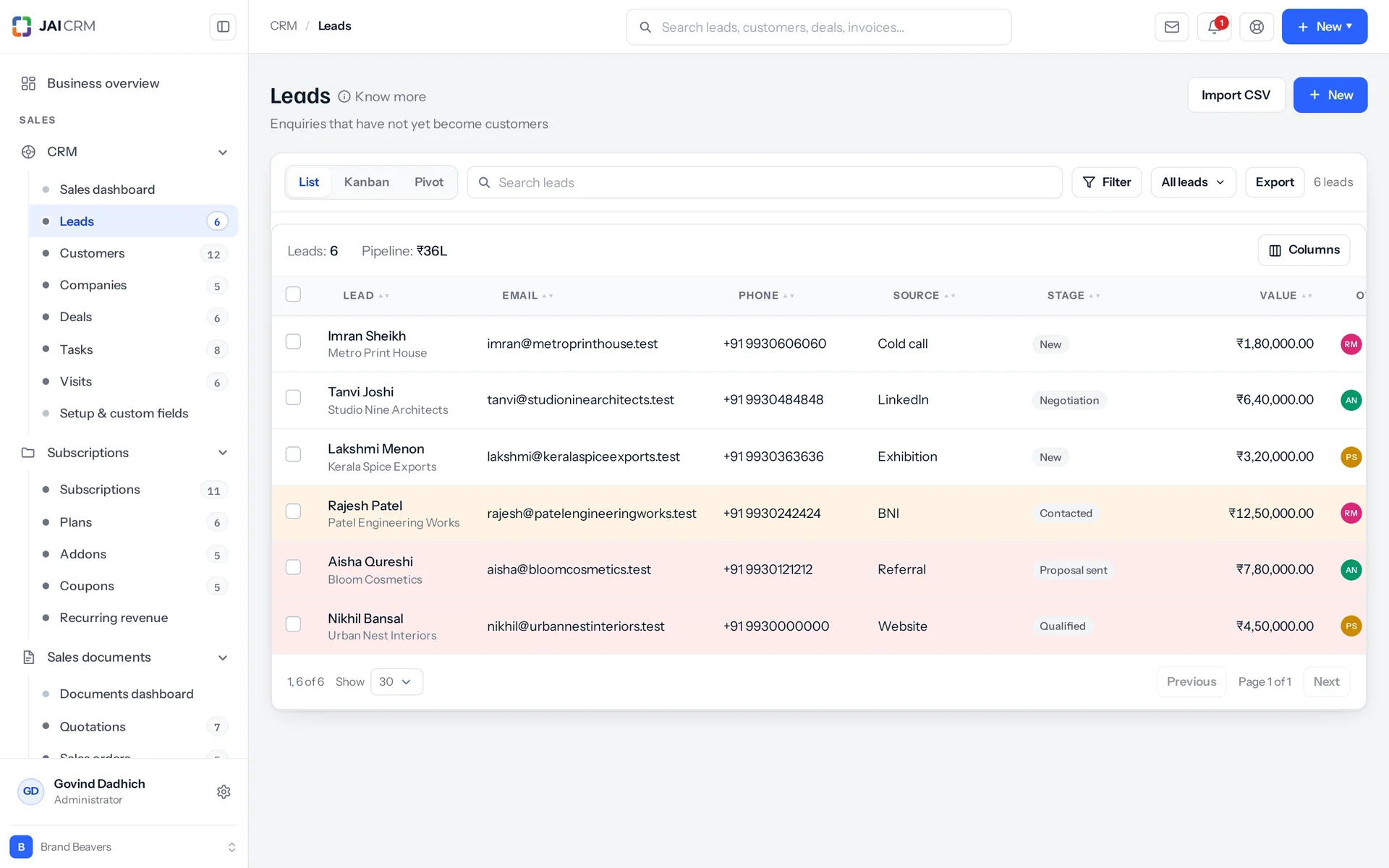
The leads list with each lead’s company, source, owner, stage and next follow-up.

The source is a column, not something to remember. Without it, nobody can ever say which spending brought in sales. So IndiaMART, JustDial, a Meta ad, the website form and a walk-in each arrive labelled.

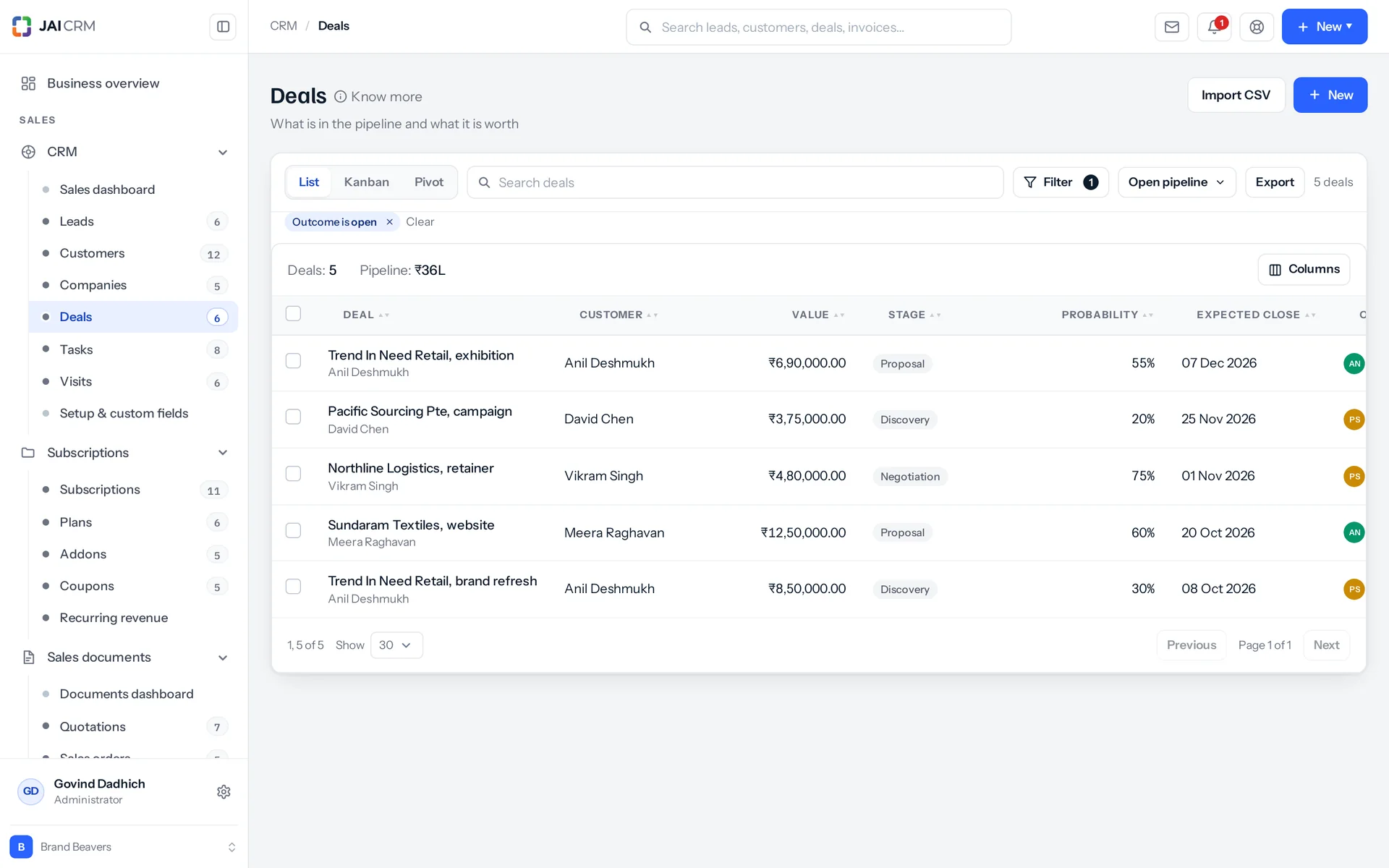
The deals board, with a column for each stage and the value of every deal in rupees.

Cards move between columns and within them, and they stay where you put them. Columns stay in place when a card leaves. People stop trusting a board that rearranges itself, and then they stop using it.

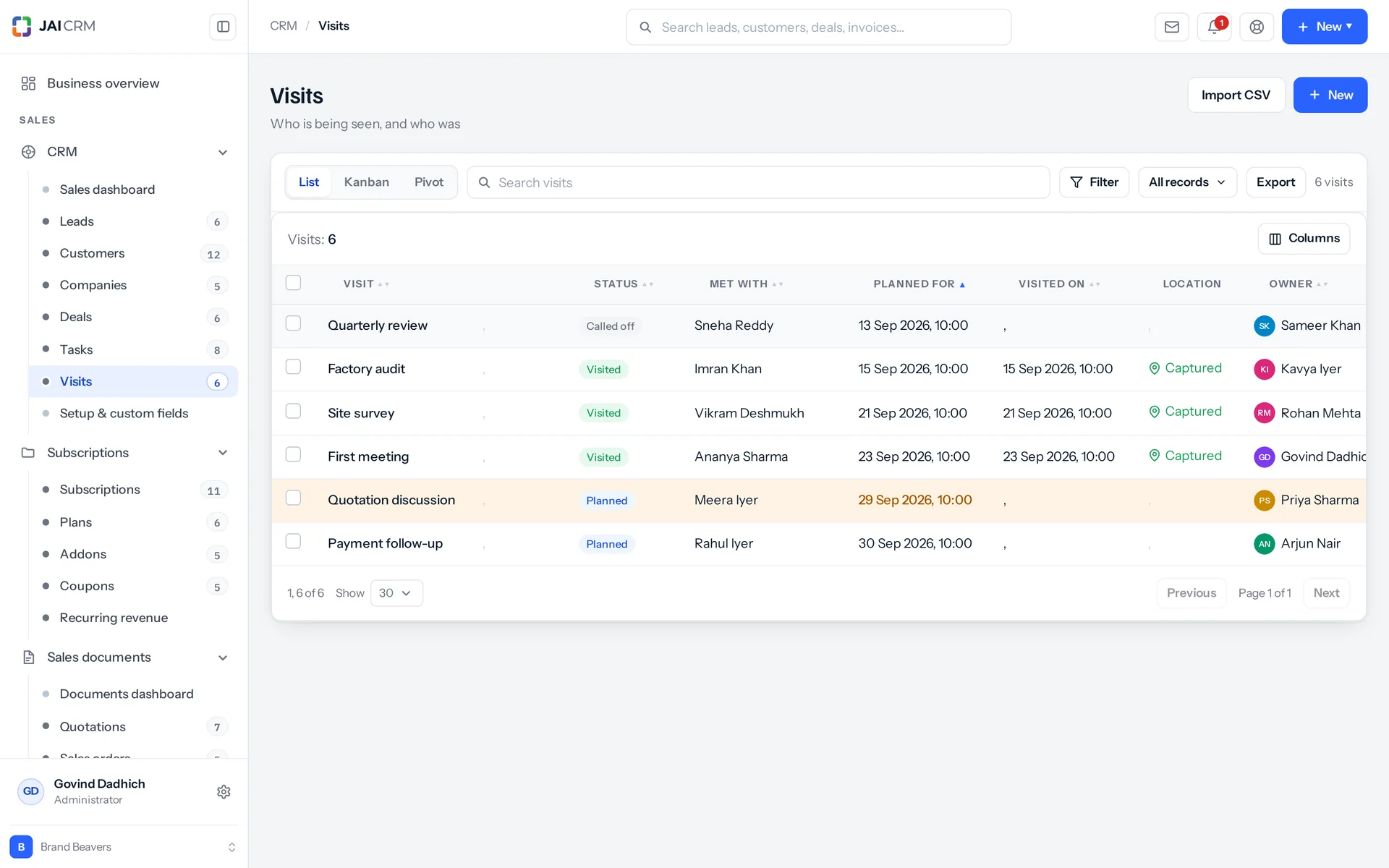
Field visits: who visited which customer, when, and what came of it.

A visit is a record, not a note. Planned or done, who was met, what was discussed. The location column says Captured, because the location came from the device, not from someone typing an address.

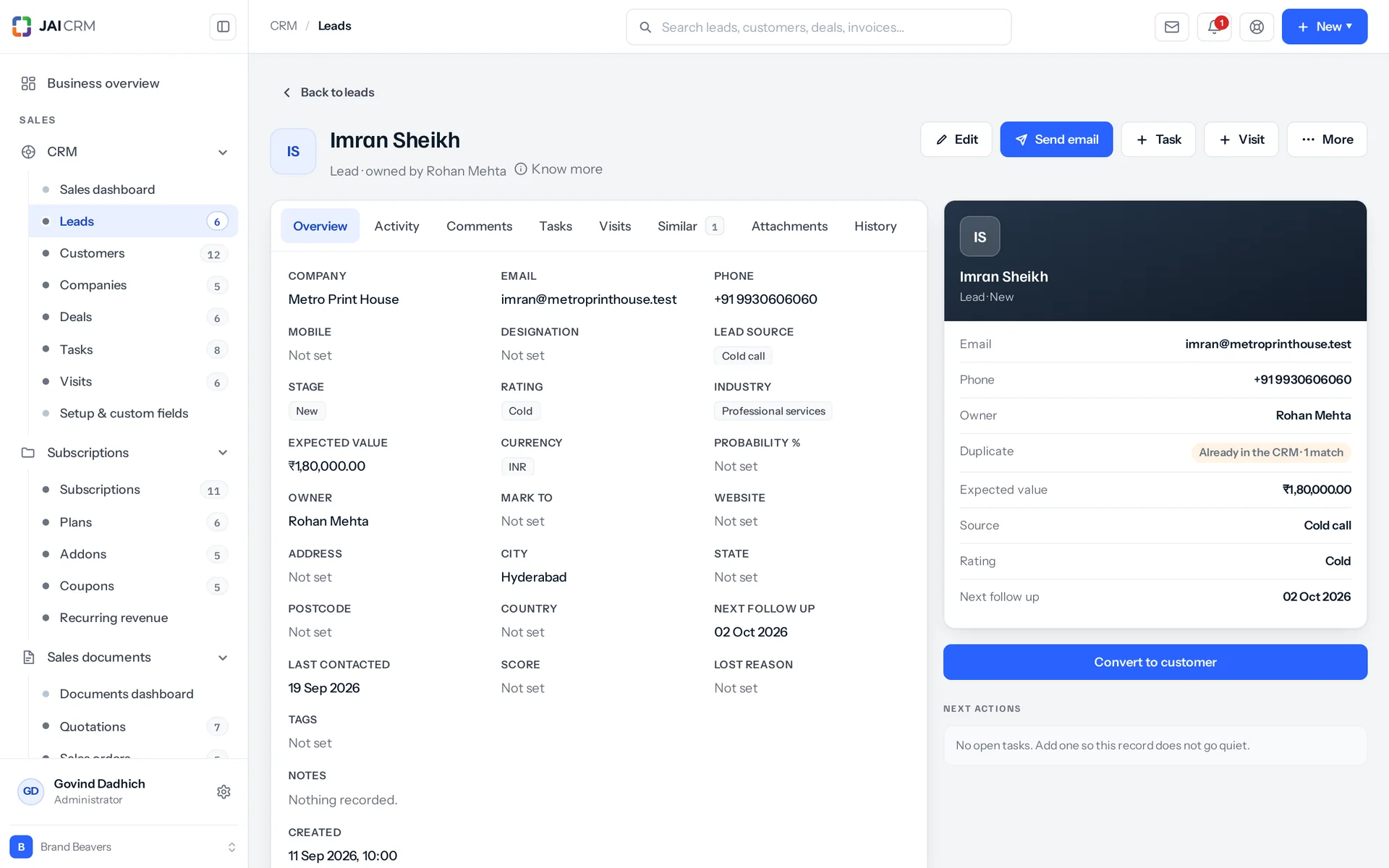
A lead record with its details, timeline of calls, notes and the next step.

Open a record and the whole story is there. What changed and when, who changed it, every note, every call with its direction and outcome, and every email. Emails go from your own address, so replies come back to you.

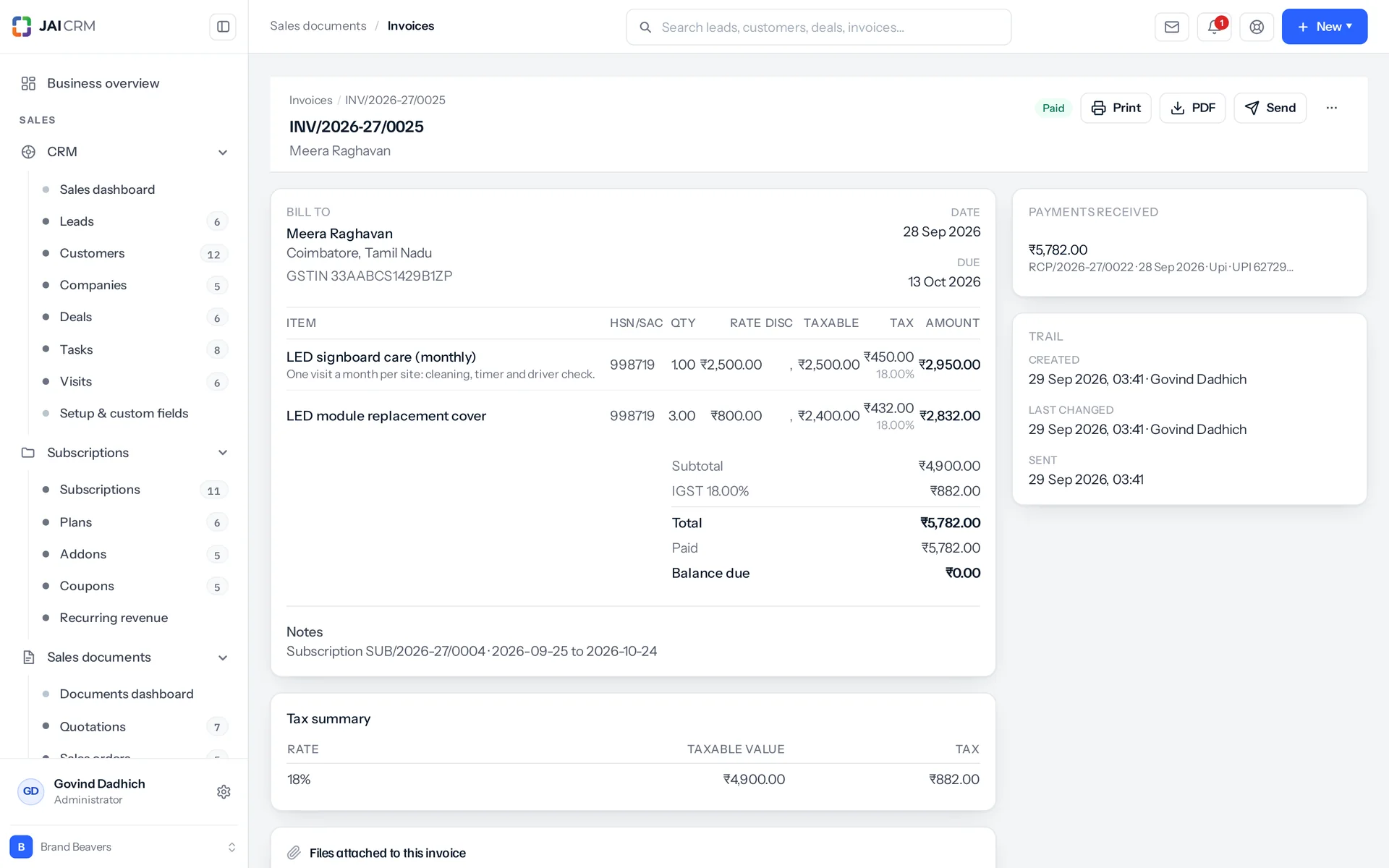
A GST invoice opened: lines with HSN, CGST and SGST split and the total in words.

This is where most CRMs send you back to your accounts software. Here, place of supply is worked out from the state codes of the two parties, not typed. The amount quoted is the amount billed.

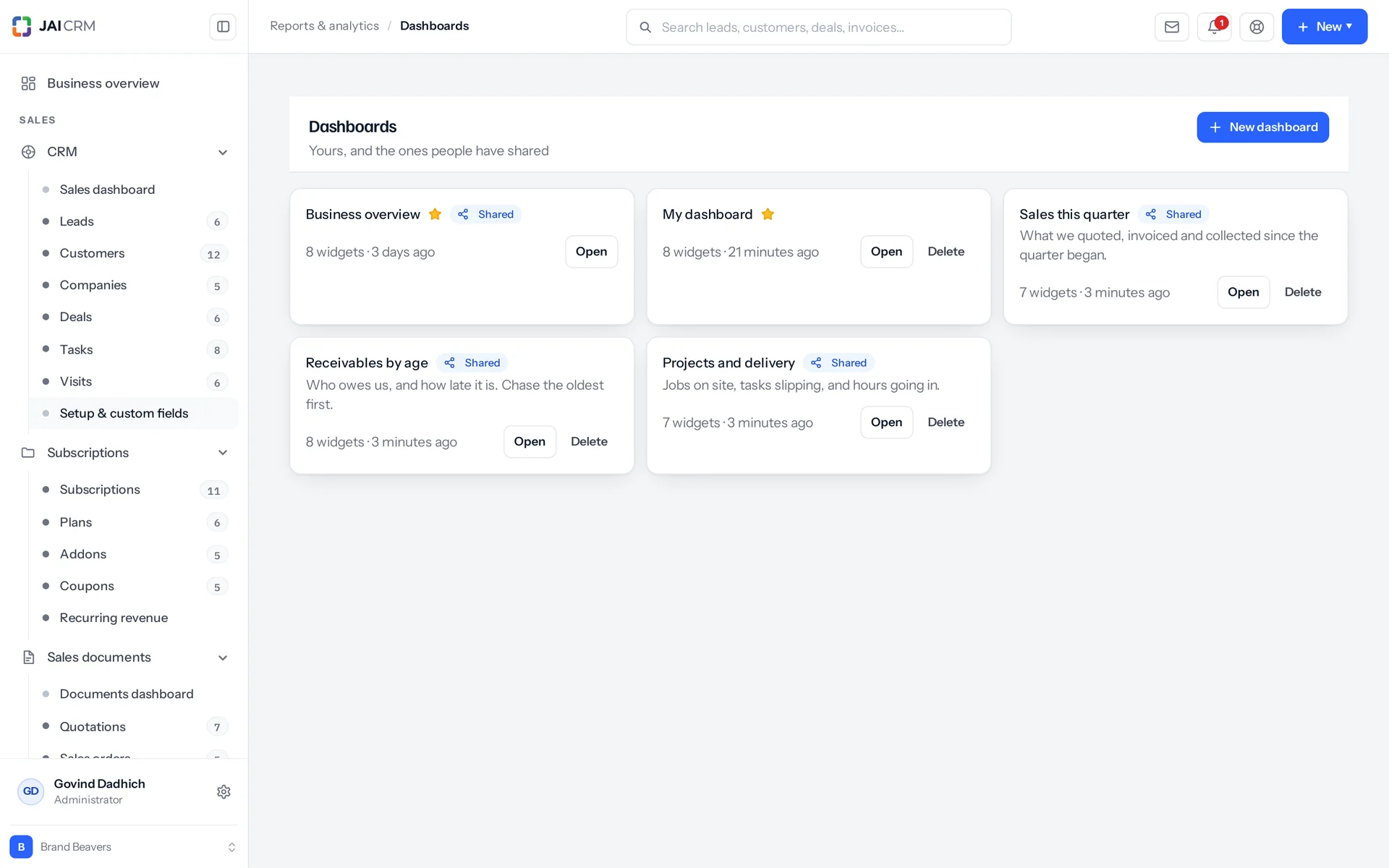
Dashboards with charts of sales, receivables and stock.

Every cell holds the records behind it. Click a total and the rows open. So a number you disagree with is something you can check, not something you argue about.

What the CRM software does: nine things you can check yourself

None of these is a plan for later, and none is on a roadmap. Every one is in the product today. A 14-day trial is long enough to prove any of it wrong.

Capture

Every enquiry in one list, wherever it came from

The CRM puts every enquiry in one list, whether it came in on WhatsApp or on IndiaMART. They are the same kind of enquiry. If they do not land in the same list, the list is not worth keeping.

The leads list with each lead’s company, source, owner, stage and next follow-up.
The source is recorded, not guessed
IndiaMART, JustDial, a Meta or Google ad, the form on your website, a phone call or a walk-in. The source stays on the record for as long as you have the customer. That is how you can still answer “which spending actually brought in sales?” a year later. IndiaMART and JustDial come in through integrations that cost nothing extra: both are on with CRM, on every plan, and are set up in Settings, Integrations.
Bring in what you already have
Upload a CSV file or paste straight from a spreadsheet, and match your columns to fields. Then choose what happens when a row already exists: skip it, update it, or stop the import so you can check. Every failed row is reported with the reason before a single record is saved.
Nothing gets typed twice
A lead becomes a customer, and a deal too if you want, and it keeps its history. The original lead stays as the record of where that customer came from.

Duplicates

The same customer, never entered twice

The CRM catches a duplicate customer while it is being saved, not months later. Most CRMs find duplicates in a cleanup nobody has time for. This one is also forgiving about the different ways people type.

A lead record with its details, timeline of calls, notes and the next step.
It matches the way a person would
It checks email, phone, mobile and company name. It compares them after tidying up how they were typed, not letter by letter. “+91 98200 00000” and “9820000000” are one number written by two people. “Kirti Engineering Pvt Ltd” and “Kirti Engineering” are one business.
It looks across all four lists
Leads, customers, companies and vendors. The enquiry that came in this morning may already be a customer you invoiced in March. A check that only looks at leads would never notice.
You decide what happens next
Block the second one outright, or let it in and flag it. Either way, a Similar tab on the record shows exactly what it matched and on which field. If it is a real coincidence, one click dismisses it.

Pipeline

A sales pipeline shaped like your business, not like a demo

You can set up a separate sales pipeline for each way you sell. A dealership selling new cars, used cars and servicing runs three sales processes. The early stages look alike, but the closing stages do not. Forcing all three through one set of columns tells you nothing about any of them.

The deals board, with a column for each stage and the value of every deal in rupees.
As many pipelines as you have processes
Each one has its own named stages, its own default starting column and its own order.
Each stage knows what it means
Every column has a probability, which is how likely a deal there is to close. It also says whether a deal there counts as open, won or lost. So if someone renames “Closed won” to “Order received”, the win-rate report keeps working instead of quietly dropping to zero.
Group the board however you think
Group it by stage, owner, source or pipeline, or by a dropdown field you made last week. The layout you choose becomes your own default, for each person, and it is still there tomorrow.
Saved views, filters and tags
There are 29 filter conditions, including the ones you need on a Monday: overdue, this week, next 30 days, and is empty. Save a set of filters, give it a name, and it becomes a tab from then on.

Field work

Built for sales work done in the field

The CRM keeps every site visit as its own record, with the location taken from the phone. For most businesses that sell physical goods, real selling means someone on a two-wheeler going to see a customer. Almost no CRM built abroad treats that as a proper part of the work. This one does.

Field visits: who visited which customer, when, and what came of it.
A visit is its own record
It is not a note on a timeline. It has a purpose, a planned date and a status. It clearly separates planning to go from having gone. That is what a field team's week is made of, so visits get a list of their own.
Who was met, typed at the door
The person who answers is very often not the person in the CRM. So you type the name of whoever you actually met, instead of picking from a list that does not have them yet.
The location is captured, not claimed
The visit stores latitude, longitude, accuracy and the moment the phone reported them. The accuracy is kept on purpose. “Somewhere within two kilometres” and “within eight metres” are not the same proof. Someone reading it in March could not tell them apart from a pin on a map.
Photos from the phone camera
The damaged shipment, the competitor's display, the site as it really is. The photos are attached to the visit, not left in someone's phone gallery.
Suppliers too
You visit a vendor as often as a buyer, and the same record covers it.

Conversation

The whole conversation stays on the record

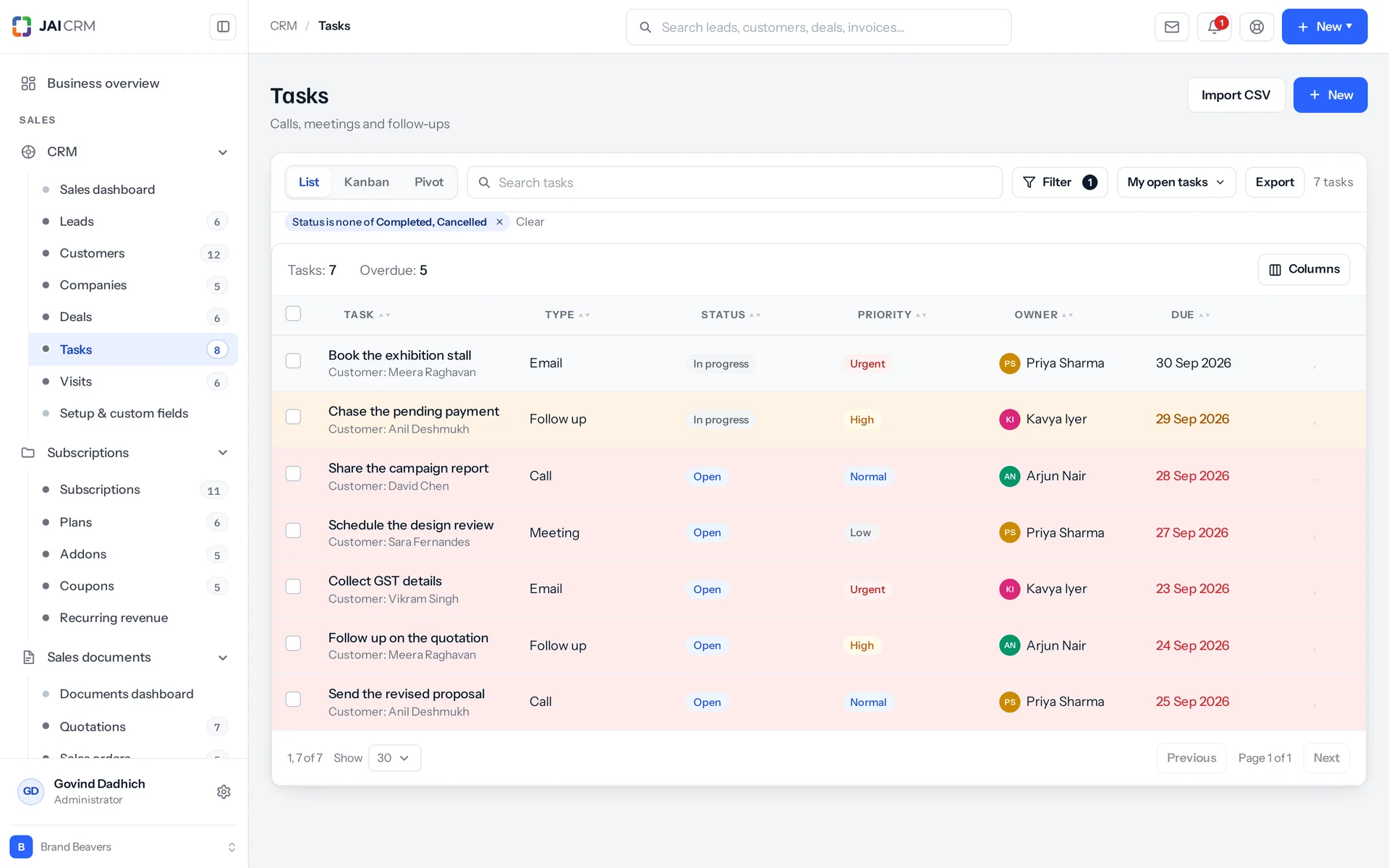
The CRM keeps every email, call, note and task on the record it belongs to. When someone is on leave, others can only cover if the story was written down. Everything below writes it down as part of doing the work, without asking anyone to keep a diary.

Tasks due today and overdue, each with an owner and a due date.
Your own mailbox, inside the CRM
Send email from your own address, with attachments, templates and scheduling. The reply comes back to you, not to a robot, and it is filed against the record it belongs to.
Calls, with what actually happened
Log the direction, duration, outcome and what was discussed. You can also put a call in the diary for Thursday. That makes it a promise, not something to remember.
One timeline, in the order it happened
Notes, emails, calls, meetings, status changes, documents and payments. Filter it by type when you only want the calls.
Tasks that belong to something
Due dates, priorities, reminders and repeats. Each task hangs off the lead, deal, customer or invoice it is actually about.

The handover

Where most CRMs stop, this one carries on

Here a won deal carries on into a quotation, an order and a GST tax invoice. A CRM that stops at the won deal has not removed the gap in your business. It has only moved it: to the point where someone retypes the customer into the accounts software, and two lists of who owes what start to disagree.

A GST invoice opened: lines with HSN, CGST and SGST split and the total in words.
Won deal to quotation to order to tax invoice
Each document knows the one it came from. So “how much of what we quoted last quarter turned into paid invoices?” is a report, not an afternoon's work.
GST worked out, not typed
Place of supply (the state a sale counts as made in) comes from the state codes of the two parties. Within one state, the tax splits into CGST and SGST. Between states, it charges IGST. Nobody has to remember which on a Friday evening.
The awkward cases are normal here
Reverse charge. Exports under LUT (letter of undertaking): zero-rated and in foreign currency. Composition dealers, who must not show tax. Rate-dependent slabs. Cess, per unit or as a percentage. E-invoicing and e-way bills.
Outside India too
The same documents work with VAT, with sales tax, or with no tax system at all. So a business selling into the Gulf, Africa, the UK or Australia does not need a second system to do it.

Customisation

Make it your own without hiring a consultant

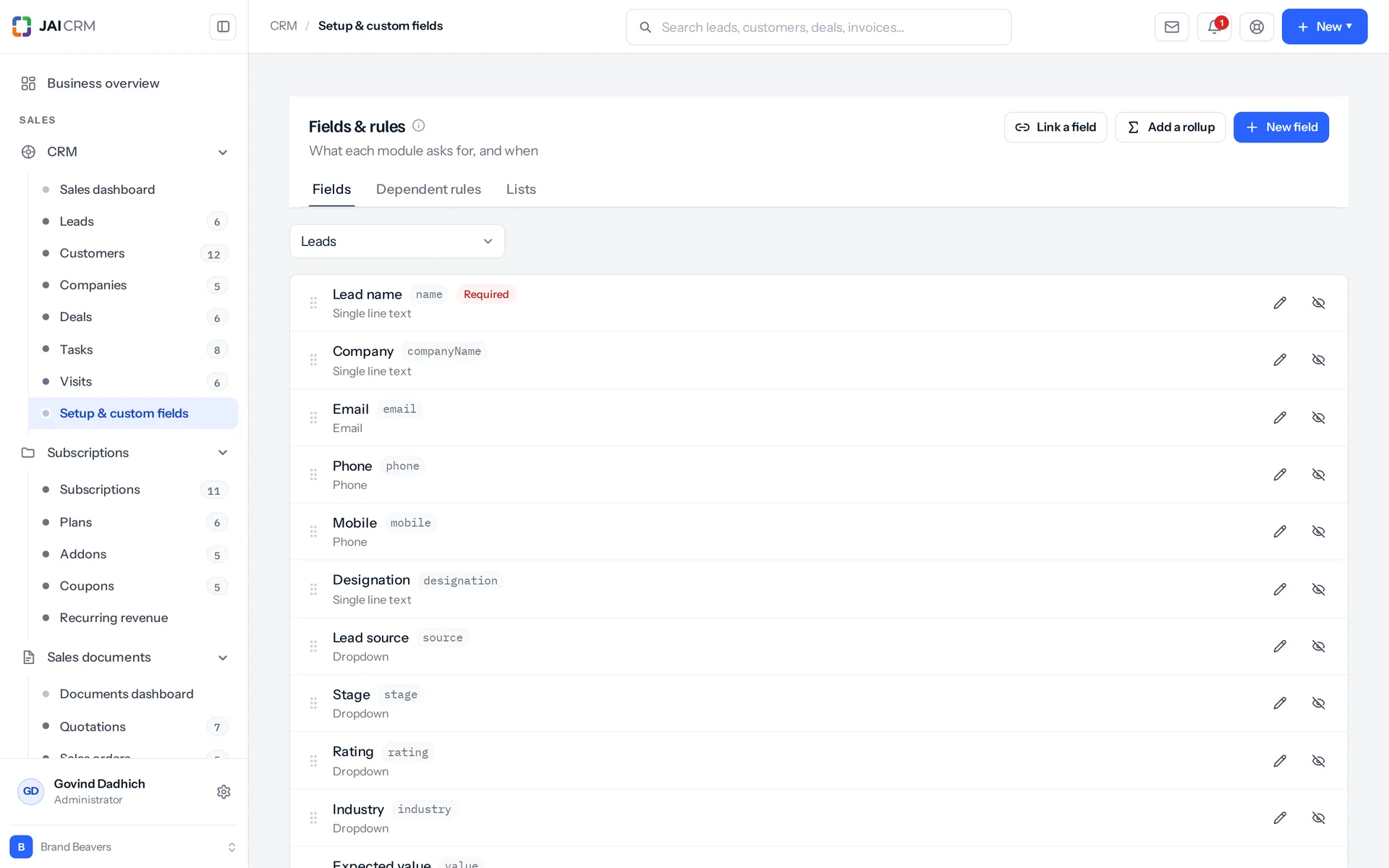
You can add your own fields and build your own modules in the CRM yourself. Every business has one list that no CRM comes with. Here you can build it in an afternoon, and it works like the rest of the product, not like a spreadsheet stuck on the side.

Fields and rules: custom fields, stages and required fields set up for the business.
Thirty-four field types
They include a plain text box, a paragraph, rich text, numbers, decimals, currency, percentages, dates, times, checkboxes, dropdowns, multi-selects, people, groups, links to other records, email, phone, website, file uploads, images, addresses, formulas, rollups, auto-numbers, ratings, tags, colours, signatures and a captured location.
Your own modules, with everything included
Site visits, sample requests, complaints, applications, inspections, AMC (annual maintenance contract) renewals. Name it, give it fields and choose where it sits in the sidebar. It comes with its own list, board, filters, saved views, import, export, permissions and audit trail (a log of every change).
Your own option lists
Stages, sources, ratings, industries, statuses. These are lists you edit, not fixed values you have to work around. Rename an option and every record that used it follows.
Alerts that notice for you
A lead going quiet, a follow-up falling due, a deal sitting in one column too long. You are told by email and in the app.

Control

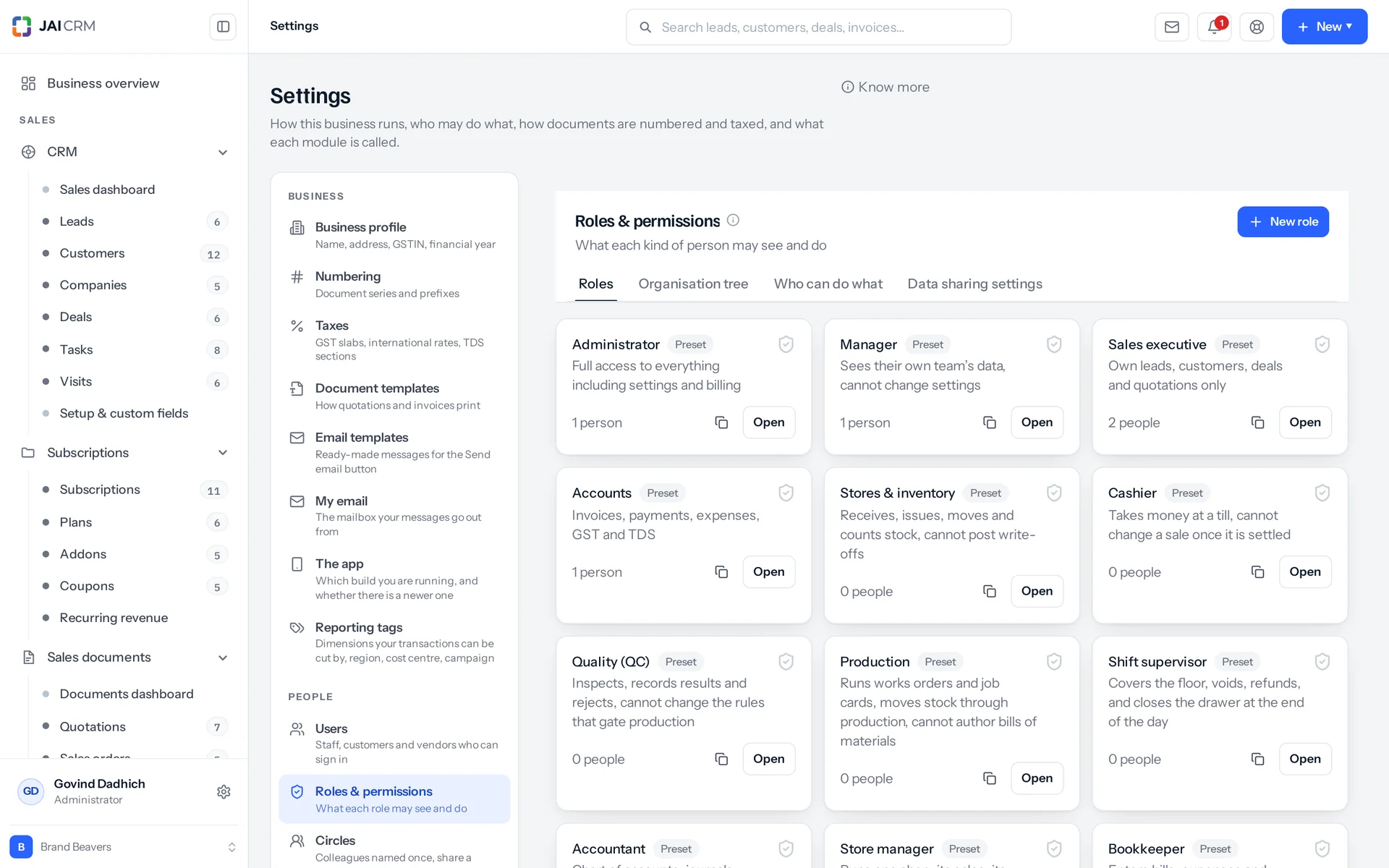
You decide who sees what, down to each record

You control who can see each record in the CRM. The question that stops most CRM rollouts is not the price. It is whether a junior on three months' probation can export the customer list on their last day.

Roles and permissions: who can see, edit, export and delete, record by record.
People see their own records by default
Everyone starts by seeing only what they own or are assigned to. You can widen that to their team or to everything by changing their role. That does not mean giving anyone access to the settings.
The widest access wins
When someone has more than one level of access, the widest one applies. That is how one manager can see the whole desk without changing anything for the six people who share their role.
Sharing rules on top
For the exceptions that always come up: a particular group, or a particular set of records, to view or to edit.
Every change is recorded
What changed, from what to what, when, and who did it. Nobody cares about this feature until the first time they need it.

Reporting

Reports with numbers you can click

Every figure in a CRM report opens the records that produced it. A report you cannot check is a report someone will argue with.

The CRM dashboard: open pipeline, deals by stage, follow-ups due and leads by source.
Group and total any list by any field
Pipeline by stage and owner. Conversion by source. Wins and losses by reason. Visits by person and by week.
Every cell keeps its records
Click a total and the rows behind it open. So a number that looks wrong is something you can check in one click, not an argument that lasts a week.
Export whatever you are looking at
Export the filtered list, with the columns you chose, as a CSV file. Someone senior will always want it in a spreadsheet, and refusing is not worth the fight.

Built around Indian GST, but not limited to it

Most CRMs that handle GST properly were built in India and stop at the border. Most that work everywhere treat Indian tax as a plugin someone else looks after. Here the tax system is a setting on your workspace. So the same product runs a factory in Rajkot, a trading company in Sharjah and a consultancy in Nairobi.

  • A currency for each customer

    Each customer can have their own currency.

  • A price list for each customer

    Each customer can have their own price list.

  • The registration number each country asks for

    Your documents carry whichever registration number the country asks for.

CRM for 16 trades, and what changes in each

“Works for any business” convinces nobody. Here is what really changes from trade to trade, with a page for each one if yours is on the list.

Not on the list? The modules are the same either way. What changes is which ones you switch on. Tell us what you do and we will tell you honestly whether it fits.

We are not Zoho, and we are not HubSpot

They are larger companies with more people, more integrations and more of everything. If you are a 200-person firm with an IT team and a budget for an implementation partner (an outside firm that sets the software up for you), buy theirs. This is built for businesses below that line. The difference is in how the product is built, not in a list of ticks.

How JAI CRM differs in how it is built from a spreadsheet, WhatsApp and the larger CRM suites
The questionA spreadsheetWhatsApp and an inboxA large CRM suiteJAI CRM
Who owns this enquiry?A column someone has to readWhoever's phone it arrived onAnswered properlyAnswered properly
Does the quotation become the invoice?RetypedRetypedUsually a second product you also buySame record, in the same price
Is Indian GST handled on the document?By handBy handDepends which of their products you boughtOn the document, worked out from the state codes
Are site visits a proper record of their own?NoA photo in a groupUsually an add-on or a custom moduleBuilt in, with the location captured
What does a module you do not use cost?Does not applyDoes not applyIt sits in the menu, on the plan you paid forNothing. It is not in the menu at all
What does it cost to get started?Nothing, and it works for a whileNothing, and it works for a whileOften an implementation partnerA signup, and the trial runs itself
Which currency is the bill in?Does not applyDoes not applyOften dollarsRupees, with the GST shown
Who answers when something breaks?NobodyNobodyA ticket queueThe people who wrote it

Two honest caveats, because a comparison with none is just marketing.

Their app stores are bigger than ours. If you need a hundred third-party integrations, that matters.

A very large enterprise rollout needs things we have not built.

For a business of under about 200 people that invoices under GST, we think this is the better buy. Fourteen days is enough for you to disagree.

What it looks like once it is running

These are examples, not customer quotes. We would rather show you the work than print a testimonial you have no way of checking. Every step below is something in the product now.

A 22-person fabrication shop

  1. An enquiry comes in from the website form. It is checked against the existing list before it saves. It has the same mobile number as a customer from 2024, so it is flagged, not blocked.

  2. It is assigned to the estimator, with a follow-up dated Wednesday. Nobody has to remember it.

  3. The site visit is logged from the phone, on the spot: two photos, who was met, and the location with its accuracy.

  4. A quotation is raised from the deal. The rates come from the price list attached to that customer.

  5. Accepted. A sales order, then a tax invoice, with the GST split worked out from the two state codes. Nothing retyped since Monday.

A pharma distributor with eight field staff

  1. Each person opens the visit list for their own beat. They see their own records and nothing else.

  2. Visits are completed from the phone. The location is captured at each one, so coverage is a report, not a conversation.

  3. A chemist asks for a rate. The deal is on the record with its history, so anyone covering can answer it.

  4. Visits by person and by week, and pipeline by source. Click any total and the records behind it open.

A six-person consultancy

  1. Enquiries arrive by email. Each consultant sends and replies from their own address, and the emails are filed against the record automatically.

  2. A custom module called Proposals, built in an afternoon, with its own fields, board and permissions.

  3. A won deal becomes a project with timesheets, and then a recurring monthly invoice.

  4. Nobody has opened the accounting software to answer “have they paid?”

Start with CRM. Add the rest later, or never.

Prices are per user, per month, in rupees, with GST shown separately. Every plan includes the basics of the whole product: custom fields, roles, reports, documents and notifications. Plans differ only in which modules are switched on. Change plan whenever you like. Nothing is re-entered and nothing is lost.

5 people

CRM + Sales Documents

Leads, customers and deals, with quotations and GST invoices

₹149 per person a month

For 5 people: ₹745 a month, billed as ₹8,940 a year. ₹10,549.20 with 18% GST.

  • Leads, customers, companies and deals
  • Quotations, sales orders and GST invoices
  • Your own mailbox, with replies filed against the record
  • Reports, dashboards and exports
  • 1 GB storage per workspace (organisation)
Start free

CRM + Sales Documents + Subscriptions + Warranty

For a business that bills on a cycle and stands behind what it sells

₹299 per person a month

For 5 people: ₹1,495 a month, billed as ₹17,940 a year. ₹21,169.20 with 18% GST.

  • Everything in CRM + Sales Documents
  • Recurring billing, plans, add-ons and coupons
  • Warranty registration and claims
  • Items and stock, which warranty is held against
  • 1 GB storage per workspace (organisation)
Start free

Every plan, and what is in each Prices in rupees, per person, per month. Parts can also be bought on their own.

Only want CRM, nothing else?

CRM on its own is ₹149 per user per month on the annual rate. That includes the settings, reports, documents and notifications that go with it. Every other module is sold the same way. So if you want CRM and Inventory and nothing else, you can have exactly that. See every module's price.

How many users, and can I change it?

You choose the number when you sign up, and change it whenever you like: up when someone joins, down when someone leaves. There is no minimum number of users to start, and no penalty for going down. A one-person business is a real customer here.

What about storage?

A single module includes 1 GB per workspace (organisation) and Full Suite includes 5 GB per workspace (organisation). That covers documents, attachments, file versions and site visit photos, all counted together for everyone in the workspace, not per user. You can add more in steps at any time. Nothing is ever deleted if you run low: new uploads are refused with a reason, and what you already have stays exactly where it is.

Annual or monthly?

Both. Annual works out cheaper per month and is charged once at the start. Monthly costs a little more and can be stopped at the end of any cycle. The price cards show the per-user, per-month price either way, so you can compare them at a glance, without any maths.

Questions people ask before they sign up

Each one answered in full, not in one line. If your question is not here, ask it. A real person replies.

Ask us something
What is the CRM in JAI CRM?

It is the part of JAI CRM that tracks your sales, from the first enquiry to the GST invoice. It is built for Indian businesses of about 5 to 200 people. It keeps leads, deals, site visits with the location captured, and the full history of what was said. A won deal becomes a quotation, an order and a tax invoice with nothing retyped. It is one of 17 modules, and you can buy it on its own.

How much does CRM cost in JAI CRM?

CRM on its own costs ₹149 per user per month, billed annually, plus GST. Monthly billing is also available and costs a little more. There is no minimum number of users. The price includes the settings, reports, documents and notifications that go with it, and 1 GB of storage per workspace (organisation). The 14-day trial does not ask for a card.

Is JAI CRM good for a small business?

Yes. Small businesses are what it was built for. It is aimed at businesses of about 5 to 200 people. There is no minimum number of users, and a one-person business is a normal customer. CRM starts at ₹149 per user per month on the annual plan, plus GST. The 14-day trial does not ask for a card.

Does JAI CRM handle GST properly, or is that an add-on?

GST is handled on the document itself. Place of supply comes from the state codes of the two parties. So a sale within one state splits into CGST and SGST, and a sale between states charges IGST, without anyone choosing. HSN and SAC codes (tax codes for goods and for services), the taxable value shown apart from the tax, reverse charge, exports under LUT, composition dealers, rate-dependent slabs and cess are all normal cases here. Invoices are ready for e-invoicing and e-way bills.

Can I use JAI CRM outside India?

Yes. The tax system is a setting on your workspace, not built into the core. You can choose Indian GST, VAT, sales tax or no tax system at all. Each customer can have their own currency and their own price list. So the same product can run a factory in Gujarat, a trading company in the Gulf and a consultancy in East Africa.

Does JAI CRM have a mobile app?

Yes, there is an Android app, and it is where the field features prove their worth. You can log a visit on the spot, with the location captured from the device: latitude, longitude, accuracy and the moment it was taken. You can add photos and the name of whoever actually answered the door.

How does JAI CRM stop the same customer being entered twice?

It checks while the record is being saved, across leads, customers, companies and vendors at once. It matches after tidying up how things were typed, not letter by letter. So “+91 98200 00000” and “9820000000” count as one number, and “Kirti Engineering Pvt Ltd” and “Kirti Engineering” as one business. You choose whether a match is blocked outright or allowed in and flagged. A Similar tab on the record shows exactly what it matched on.

Can I add my own fields and my own lists in JAI CRM?

Yes, without writing any code. There are 34 field types, from a plain text box to a formula, a rollup, a rating, a signature, an auto-number or a captured location. You can also create whole modules of your own, such as site visits, sample requests, complaints, inspections or AMC renewals. Each one comes with its own list, board, filters, saved views, import, export, permissions and audit trail.

Can I stop salespeople seeing each other's customers?

Yes, that is the default. Everyone sees the records they own or are assigned to, and nothing else. To widen that to their team or the whole workspace, you change their role. Because the widest access wins, you can give one manager the full view without changing anything for the six people who share their role. Sharing rules cover the exceptions, and every change is on the audit trail.

Can JAI CRM replace my accounting software?

It can. A won deal becomes a quotation, then a sales order, then a tax invoice and a receipt, and each document knows the one it came from. Full Suite adds books, GST returns, TDS (tax deducted at source) and payroll. You can keep your current accounts software if you prefer. But most people move because keeping two systems means matching up two lists of who owes what.

Can I import the data I already have into JAI CRM?

Yes. Upload a CSV file or paste straight from a spreadsheet, and match your columns to fields. Then decide what happens when a row already exists: skip it, update it, or stop the import so you can check. Everything is checked before a single row is saved, and any row that fails is reported with the reason.

What happens when my JAI CRM trial ends?

Nothing is deleted. The workspace stops accepting new work until you start a plan, and your data stays exactly where it is. When you pay, everything opens again: the same records, the same custom fields and the same history.

How is JAI CRM different from Zoho CRM or HubSpot?

They are larger companies with more integrations. For a 200-person firm with an IT team, they are a sensible buy. The differences here are in how the product is built. The CRM and GST invoicing are one product, not two you connect. Site visits with captured locations are built in, not added through customisation. A module you do not use is not in the menu at all, instead of sitting there greyed out. The bill is in rupees. And there is no implementation partner between you and getting started.

Can I change my JAI CRM plan or cancel later?

Yes, in either direction, whenever you like. Nothing is re-entered when you move between plans, and nothing is lost. Annual billing is charged once at the start and works out cheaper per month. Monthly billing can be stopped at the end of any cycle.


Long enough to know, and free to find out

Put last week's enquiries in it. Give one of them an owner and a date. Log one site visit from your phone. If it has not already paid for itself in work you found by Friday, walk away. We did not ask for a card.

  • No card
  • From ₹149 per user per month
  • Take your data out as a CSV file whenever you want