Skip to the content
JAI CRM

SubscriptionsPlans, renewals, recurring revenue

Subscription billing that raises every renewal invoice for you

Recurring billing for anything that repeats, like an AMC, a membership, a retainer or a delivery round. Plans, trials, fair part-month charges, pause and resume, and renewals billed as normal GST invoices in your own number series. From ₹149 per user per month.

No card needed. From ₹149 per person a month.

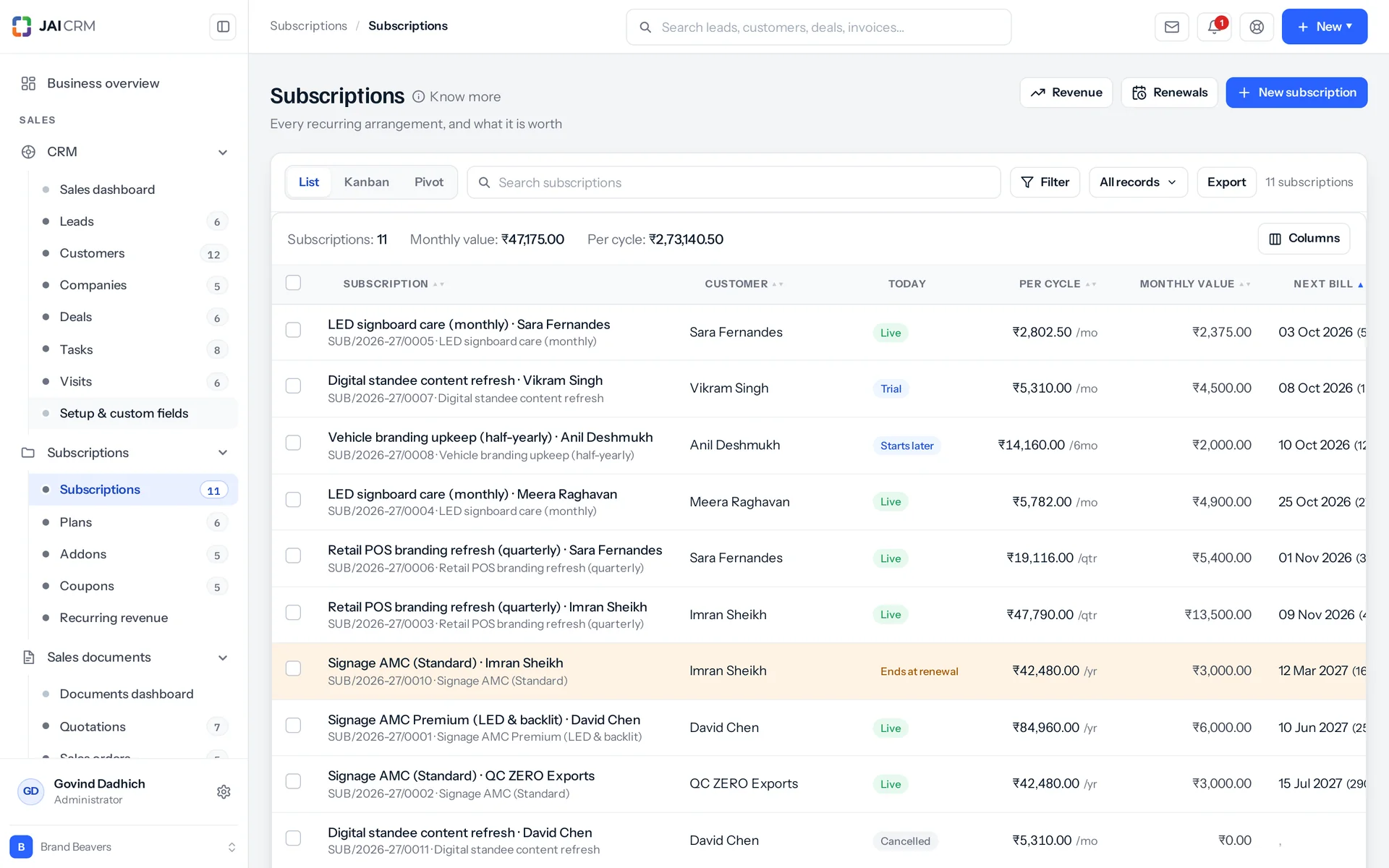
Subscriptions with customer, plan, next bill date and status.
7 things it doesEvery one in the product today

What is Subscriptions in JAI CRM?

Subscriptions in JAI CRM is recurring billing for arrangements that repeat, such as an AMC, a membership, a retainer or a delivery round. You set up plans, addons and coupons once. A job runs every night and raises each renewal as a normal GST invoice in your own number series. It also shows MRR and churn in rupees.

Recurring money goes missing quietly, one month at a time

None of this fails loudly. A missed invoice, a pause saved as a cancellation, a price that changed by itself. Each one is found months later, usually by the customer, and always at the worst time to bring it up.

  • The month nobody raised the invoice

    You sell an AMC (annual maintenance contract) in April. It is billed in May, June and July. Then March is missed, because the person who raises it was busy closing the year. Nobody complains, because customers do not ring up asking for a bill. You find it at year end, eleven months into a twelve-month contract. Now you must have an awkward talk about billing for work you already did.

  • The upgrade that turned into an argument

    A customer moves from ₹300 a month to ₹500 on the fifteenth. Someone works out one figure, types it on an invoice and emails it. Four days later the customer calls with a calculator and a different answer. Now two people are arguing about whether the month had thirty days.

  • The customer who asked you to stop, and got a bill

    They are away for three weeks and ask you to pause. There is nothing else to do with it, so the arrangement is cancelled. In June someone rebuilds it from memory, with a new price and a new start date. Your churn figure for May (churn means customers lost) now says you lost one customer and won a new one. Both halves of that are untrue.

  • The price that moved on its own

    Someone updates the plan in the price list because the list price went up. Every customer already on that plan renews at the new price. That includes the three sold at a negotiated rate and the one on a free pilot. You first hear about it when a customer forwards you their own invoice and asks what happened.

  • Two numbers, and nobody trusts either

    The register says 180 subscriptions. The revenue sheet shows a monthly figure that does not match it. Nothing anywhere says the difference is 22 trials, 9 paused and 6 not started yet. So the two numbers sit there disagreeing, and within a month people quietly stop quoting either of them.

What subscription billing in JAI CRM does, in plain words

Nothing below is on a roadmap. Every one is in the product today, and a 14-day trial is long enough to check any of it.

Catalogue

Set up what you sell once, then add customers to it

You set up plans, addons and coupons once. A plan is a price, how often it bills and for how long. An addon is something extra on top of a plan, and a coupon takes money off. All three are normal records in the suite, with lists, filters, imports, custom fields and permissions like everything else. They are not settings hidden inside a billing screen.

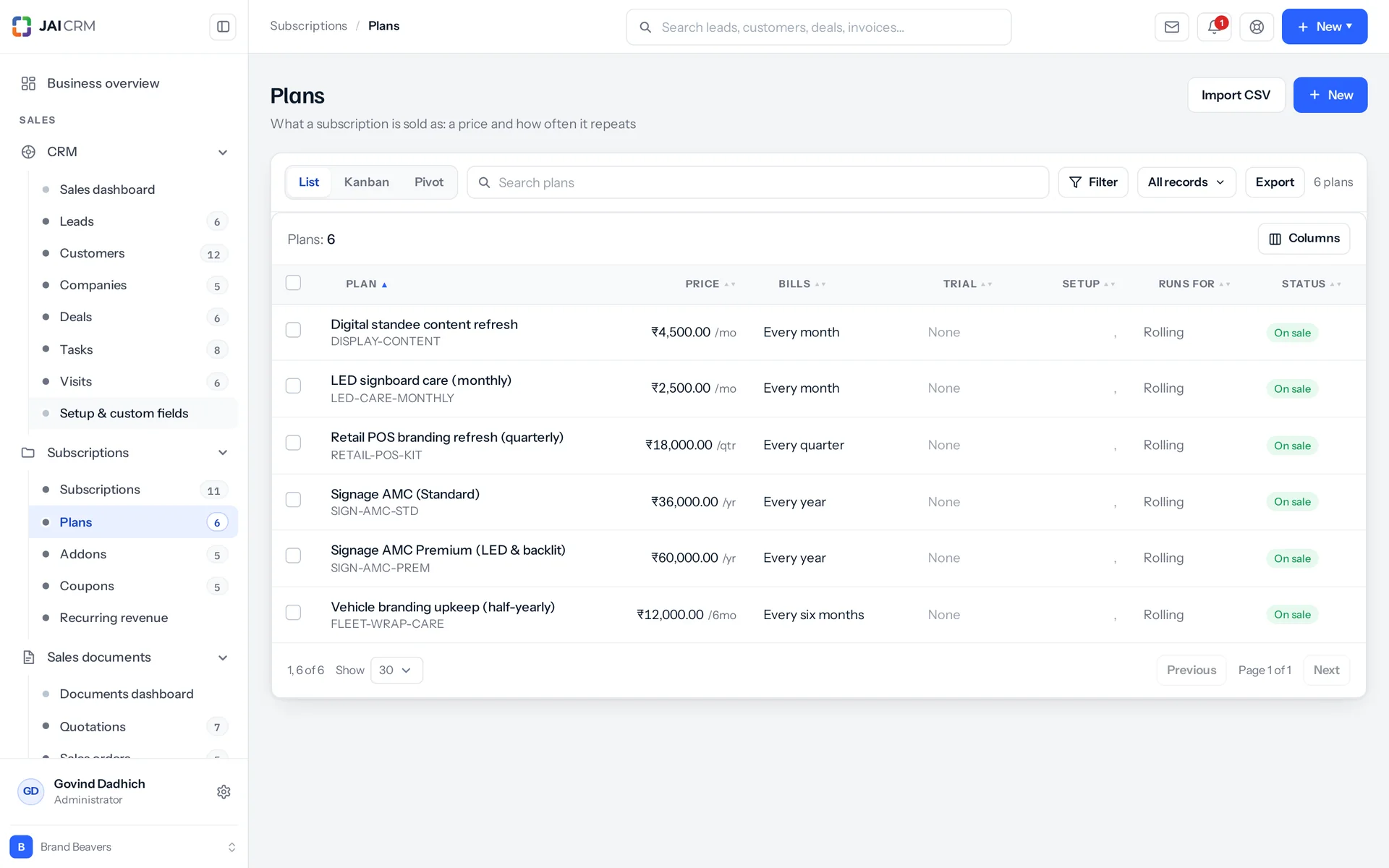
Subscription plans with price and billing cycle.
Seven billing frequencies, including every so many days
Weekly, fortnightly, monthly, quarterly, half-yearly, yearly, or every N days for arrangements that do not fit a calendar month. A plan can have a free trial of up to 3,650 days, a one-time setup fee, a GST rate, and an HSN or SAC code (the tax code for the goods or service). It can also end by itself after a set number of cycles. Or it can have no limit, which means it runs until someone cancels it.
Addons that cannot be sold on the wrong plan
An extra seat, a fourth visit, another twenty hours. A recurring addon joins every invoice. A one-time addon is billed once and then drops off. You can limit an addon to named plans. It is then refused on any other plan, both when a subscription is being created and when someone adds it to a running one. The refusal names the plan, so the addon is never silently left out of the order.
Coupons, and how their use is counted
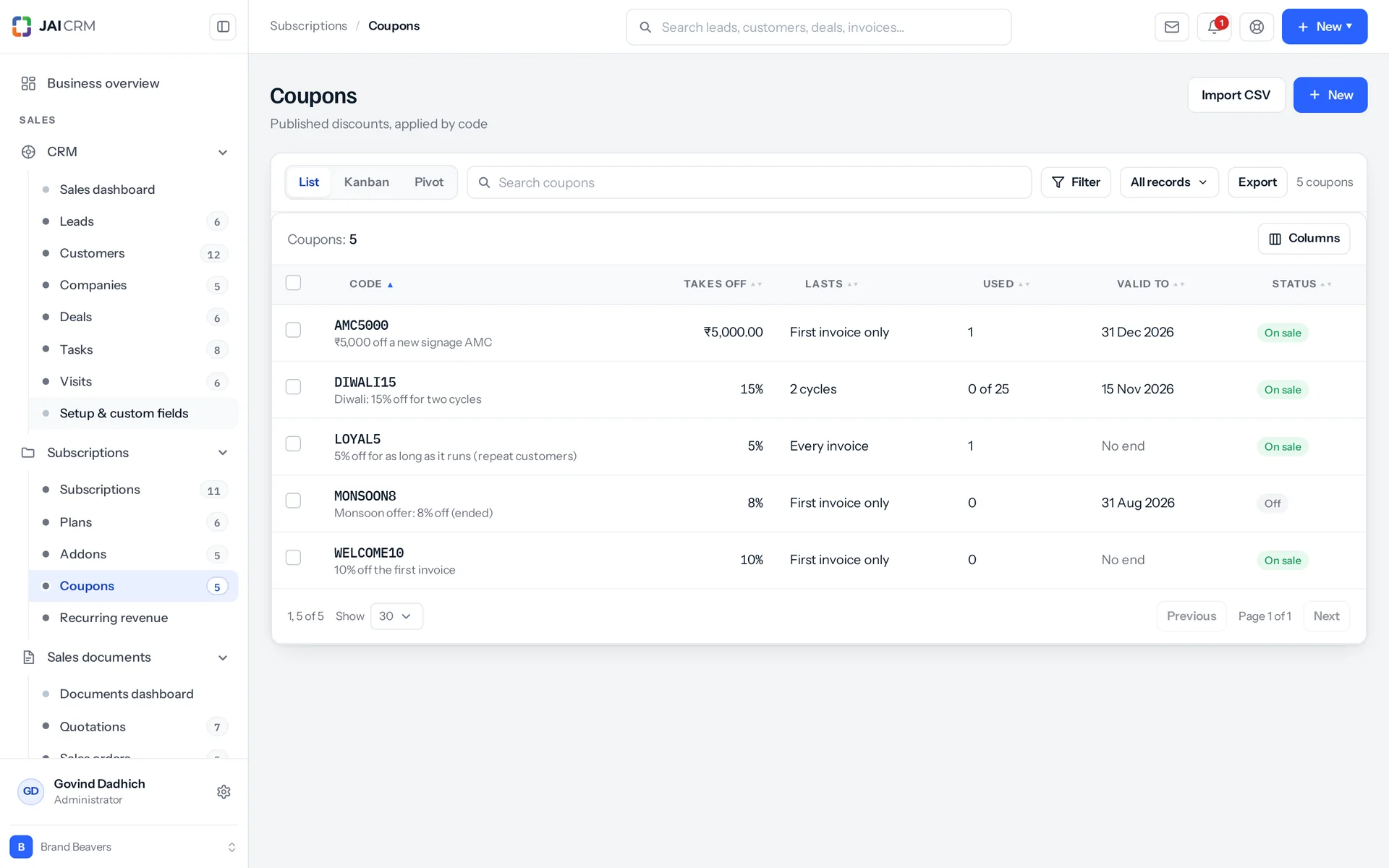
A coupon can be a flat amount or a percentage. It can apply to the first invoice, to a set number of cycles, or for as long as the subscription runs. The count uses the subscription's own cycle number. Cycle one is the first invoice it ever raised, not the first one after the coupon was added. So add a limited coupon on the day you sell the subscription. You can limit a coupon by date, by how many times it can be used, and to certain plans. Applying one adds to its used count, and removing one takes it back off. A percentage typed above 100 is saved as 100. A "next N cycles" coupon with no N is saved as 1, because with no N it would last no cycles at all.
Link a plan to an item you already sell
Link a plan or an addon to a normal item in your catalogue. What the subscription bills then shows in that item's own sales history, next to everything else you sold. The tax rate and the HSN or SAC do not come from the item. They are fields on the plan itself, typed once and copied onto every line it bills. Keep this in mind before someone fixes the code on the item and waits for it to show up on the invoices.

Selling

Four steps, and the review screen shows the exact invoice amount

Creating a subscription takes four steps: customer and plan, addons and discount, terms, then review. The review step does not guess. It asks the server to build the real draft and stops just before saving it. So what you read is what gets billed, to the paisa.

The preview is the real create, stopped before saving
The preview comes from the same function that creates the subscription. A separate estimate in the browser would be a second copy of the tax, proration (part-period charges) and coupon maths, and two copies start to disagree within a week. The preview runs on the review step, not on every keystroke, so nothing recalculates while someone is still typing.
The price is copied onto the subscription, not looked up
Price, tax rate, GST rate and HSN/SAC are written onto the subscription's own lines at the moment of sale. Editing the plan next year cannot change the price for last year's customers. A plan truly sold at zero, like a pilot or a free tier, stays at zero. It is not treated as "not set" and swapped for the catalogue price.
Start it today, next month, or last March
For a backdated subscription, the system finds which cycle today falls in by stepping forward through the calendar from the start date. It does not divide the days passed by a cycle length, which goes wrong for any frequency where months have different lengths. It then asks whether the cycle already running should be billed. The preview shows which way it will go before you confirm.
One subscription, one currency: the plan's
A subscription uses the currency of the plan it is sold on, and every line it raises is billed in that currency. A $100 addon on a rupee plan bills as ₹100, not converted. Nothing here applies an exchange rate. Otherwise the product would have to pick a date for the rate and defend it six months later. If a customer must be billed in another currency, set that on the plan.

Changes

Mid-month upgrades you can explain to someone with a calculator

Changing a subscription has its own step-by-step flow, not an edit form, because a change must work out the money, raise the documents and record why. The normal edit screen leaves out every field that describes the deal: what is on it, what it costs and when it renews. So nobody can quietly move a renewal date without going through all of that. A change also never charges again the setup fee you already charged in month one.

Two documents, never one netted-off figure
Say ten days are used and twenty are left. You get a credit note for the unused part of the old plan, and an invoice for the same twenty days on the new plan. Netting them into one number hides the working, and the working is exactly what gets questioned six months later. Days are counted from the calendar, including both the first and the last day. So a term from the 1st to the 31st is 31 days, not thirty. Each document carries the subscription number, and its line says which days it covers (twenty of thirty), so you can read the pair together.
Now, at the end of the term, or on a date you choose
A change agreed today for next month is saved in full, as the subscription should become. The night job then applies it using the same code as an immediate change. So it lands in October exactly as it would have landed in September. Changing the billing frequency does restart the cycle from today, because half a quarter is not a month.
Only one future change at a time
A new scheduled change replaces the earlier pending one instead of stacking on top of it. Two different futures for one subscription would make no sense to anyone. If a change is waiting for the end of the term and the subscription is paused first, the change is dropped. The reason is written on the record: the term it was waiting for will not end when it expected.
Adding something mid-cycle, and taking it off again
A one-time addon goes out on its own invoice straight away, with that addon's own GST rate and HSN. A recurring addon is added to the subscription's lines and billed in full at the next renewal. It is not reduced for the part-month, so think for a moment before adding an expensive one mid-cycle. A one-off charge can ride on the next invoice and drop off once it is billed, so nobody has to remember to remove it. Or it can be raised today on a document of its own. Removing a line is a separate action and is recorded as one.

Stopping

Pause, cancel and restart, each done properly

A customer away for three weeks, one leaving for good, and one coming back are three different events. A status column set by hand records none of them. Each one is its own action, with its own rules, its own documents and its own line in the history.

Pause now, on a date, or at the next renewal
You can add a reason if you want, and set the resume date at the same time. On resume, if the billing date passed during the pause, it bills for a cycle starting today and moves the dates forward with it. If the billing date did not pass, nothing was missed and the dates stay where they are. Getting this backwards would charge someone for a month they spent paused, which is exactly what pausing is meant to prevent.
What happens to the money during a pause
Whether paused days are credited back is one setting for the whole workspace, not a choice made for each pause. If it is on, resuming raises a credit note based on the pause date, not the whole term. Six days paused inside a month gets six days back, not a month. What you do decide when pausing is the charges already built up. Either raise them on the day you pause, or leave them for someone to raise by hand. A surprise invoice on the day a customer asked you to stop billing them is a bad way to honour their request.
Pausing is refused when it would hide a problem
Only a live or trial subscription can be paused. A past-due one has an unpaid invoice that a pause would bury, so it cannot be paused. The refusal names the actual state, instead of greying out a button with no reason. The rule is checked again on the night the pause is due, in case the subscription went past due in between. You can also switch pausing off for the whole workspace.
Cancel at renewal or now, and restart either
Cancel at renewal keeps it live until the end of the term, then closes it instead of raising one more invoice. Cancel now clears the next billing date, cancels every pending change and sets the monthly figure to zero. So a dead subscription stops counting in revenue for good. Reactivating one that has actually ended gives it a fresh term from today and adds a cycle to its limit. A subscription sold for twelve months and then reactivated is not still bound by the twelve it already used.

Nightly

Eight nightly steps, run in an order that matters

Every night the suite works through all your subscriptions in a fixed order. It starts what begins today, ends finished trials, applies scheduled pauses, applies scheduled resumes, applies scheduled changes, raises renewals, marks overdue ones, then reconciles the records. In the wrong order nothing fails. It just bills the wrong amount, quietly, once a month. Every step is safe to run twice, because the job runs nightly, restarts, and can be run by hand.

Coupons and discounts on subscriptions.
Four ways to price a renewal
Keep the price agreed at the start. This is the default and surprises nobody. Or use whatever the plan says today. Or raise it by a percentage at every renewal, or at every second or third one. That count starts from the cycle where the last increase actually landed. So pausing for four months does not fire four increases at once when it resumes. A one-time line is never repriced, because charging more for something already delivered is not a renewal.
Bill early, bill a year at once, or push a renewal back
Advance billing (raising the invoice before the renewal date) is set per frequency for the whole workspace. It is capped at what each frequency allows: 26 days on a monthly plan, 364 on a yearly one. The cap is printed beside each box, instead of silently changing what you typed. One subscription can have its own figure instead, including zero for a customer who asked not to be billed in advance. Bill now raises up to 24 cycles in one go, for a customer paying a year up front. Each cycle it raises moves the next billing date forward, so the night job finds nothing left to raise for terms already collected. You can also postpone a renewal, and the term end moves with it. The extra days are charged at that subscription's own daily rate, or simply given free.
A status worked out from dates, and a stored copy the nightly run keeps correct
Whether a subscription is future, on trial, live or finished is worked out from its dates every time a screen loads. So the register cannot show a green Live next to a trial that ended in March. Only human decisions are stored: paused, cancelled and past due. These win over the calendar, because they record a person's decision, not a date. The recurring revenue report groups on a stored copy of the status, because the database can group a stored value but not a worked-out one. The last nightly step brings that stored copy back into line with the calendar. That is why a trial that ended at midnight joins MRR (monthly recurring revenue) when the job runs, not the moment the date changed.
Unpaid invoices, and what happens when something fails
Past due is counted from the invoice's due date, so the subscription needs a payment term. The default is on receipt, which is no term at all. Set a term, and an invoice still unpaid after your grace period marks the subscription past due, on its record and in the register. The grace period is seven days by default and can be anything from none to 120. Recording the money clears it, but only after checking that nothing is still owing. A part payment against three months of arrears does not clear it. If a renewal fails, the subscription stays exactly where it was, so the next night tries again. The failure and its error are written into the subscription's own history, because a subscription that quietly stopped billing is the one mistake nobody catches for a quarter.

Invoices

Every renewal raises a normal GST invoice

A renewal raises a normal GST invoice, not a special subscription invoice with its own numbering and rules. The job writes a normal document, takes a number from your normal series, and runs it through the same recalculation as the manual editor. It leaves a link back to the subscription. Nothing later on, such as the GST return, the ledger or the customer's statement, needs to know a schedule made it.

Your series, your template, your return
It shows in your invoice list, your GST summary and your ledger next to every other invoice. It uses the same number series and is dated into the same financial year. The notes line says which period it covers, with the subscription number and the dates. "Invoice 0041" on its own tells a customer nothing about which month they are paying for. Give the subscription a payment term and its invoices join the receivables ageing (who owes you, and for how long) and the reminder steps, just like invoices raised by hand.
GST carried through, not typed again
The GST rate and the HSN or SAC on the plan are copied onto the subscription's lines at the moment of sale. From there they go onto the invoice line. You type them once, on the plan, and never into a billing screen at month end. The customer's GSTIN (their GST number), PAN and billing address are copied onto the invoice as it is raised, so it prints what they were on that day. Tax is worked out after every discount and split across the lines in proportion to each line's net amount. That is the only split a GST officer will accept. Prices that include tax are supported and carried through to every line.
Raise and send, or raise as a draft
Set this once for the workspace. You can set it differently for the one customer whose invoice should be read before it goes out. A subscription charged automatically cannot raise a draft, because there would be nothing to charge against. Drafts sit in your normal invoice list, filtered like any other draft, until someone sends them.
A schedule that is not a subscription
For a retainer, rent or maintenance contract that just repeats with nothing to prorate, use recurring invoice profiles. A profile is a saved invoice, a frequency, and an end date or a maximum count. The saved invoice is checked against the current document format on every run, not trusted as it is. So a field that changed fails once, loudly, instead of making an invoice that is quietly missing something. A profile that sends automatically still passes the same approval rules, tax treatment check and mandatory reporting tags as the Send button. If any of those checks refuses it, it stays a draft and the run records why.

Numbers

MRR, churn in rupees, and who renews this week

The recurring revenue screen shows the four or five figures a subscription business is run on. A spreadsheet gets these wrong in the same way every month. This screen works them out from your live subscriptions, and says clearly what it leaves out on purpose.

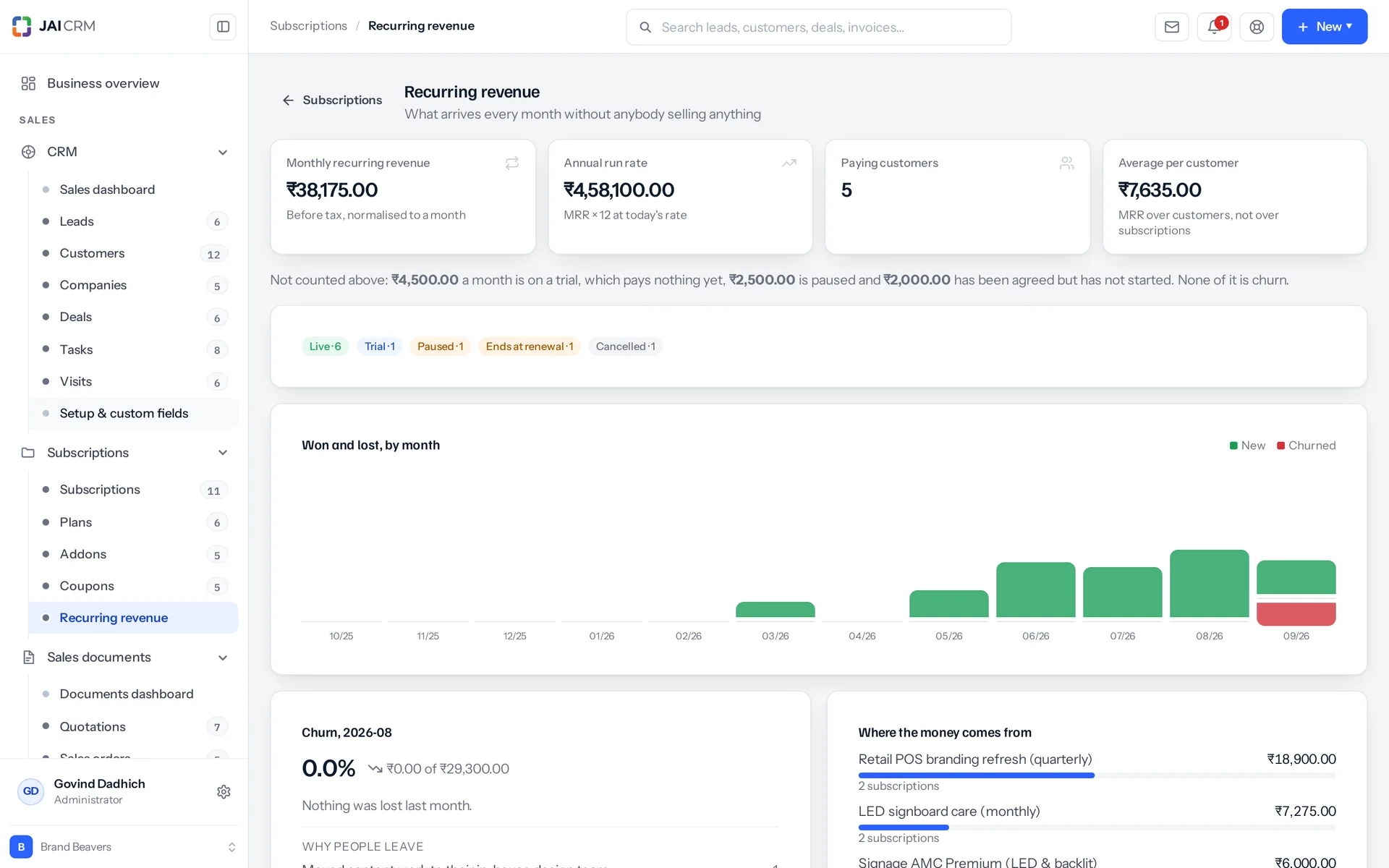
Recurring revenue: MRR, new, churned and renewing.
MRR before tax, recurring charges only
MRR means monthly recurring revenue. A yearly plan at ₹12,000 counts as ₹1,000 a month, whether or not it was invoiced this month. A setup fee is revenue but not recurring revenue, so it is left out. Tax is the government's money, not the business's, so that is left out too. Average revenue per account divides by paying customers, not by subscriptions, because one customer with three subscriptions is one account.
It lists what it is not counting
Trials, paused subscriptions and ones not started yet are shown separately. They are not left to explain the gap between the register total and the revenue figure. Two numbers that disagree with no explanation is how people end up trusting neither. Trials are left out on purpose. Counting a trial's plan price would push the figure up, then drop it when the trial does not convert, and that fall looks like churn but is not. Past-due subscriptions are counted, because the money is owed and the service is still being delivered. That is a collections problem, not a revenue one.
Churn in rupees, month by month
Churn is the business you lose. Losing ten customers at ₹500 is not the same as losing one at ₹50,000, but a simple count says it is. The chart draws new business above the line and lost business below it, on one scale, for the last twelve months. So a month where churn beat new business stands out as a shape, not two figures to compare. Cancelling asks for a reason from a list you edit. It is a list, not a text box, because four hundred different answers is not a report.
Who renews, and who should have
A follow-up list of renewals over the next 7, 30 or 90 days, grouped into late, this week, this month and later. Overdue comes first and is shown as a fault, not a diary entry. A renewal date that passed with no invoice means the job could not raise one. That needs a look today, not a reminder to call someone.

Who opens Subscriptions, and what for

Swipe through the people who use it every day.

The AMC desk at a machinery, lift or HVAC company

Contracts are sold in tiers, such as basic cover, parts included, or twenty-four-hour response. They renew yearly with a percentage increase at each renewal. A fourth visit is sold as an addon when a customer wants one. The renewals list shows who is due this month. The late group shows who was due last month and did not get an invoice, which is the one nobody was going to notice.

A gym, club or coaching centre

A joining fee is a one-time line that drops off by itself after the first invoice. Add a monthly or yearly membership, and personal training or an extra batch as a recurring addon. A member going home for a month is paused, not cancelled, and credited for the days if your settings say so. They are back on the same arrangement in June without anyone rebuilding it, and the month does not show as one customer lost and one won.

An agency or consultancy on retainers

A fixed monthly retainer, with extra work billed as a one-off charge that rides on the next invoice. Nobody has to remember to raise a separate document for it. A client moving up a tier mid-month gets a credit note and an invoice, both dated and both easy to explain. A retainer with nothing to prorate can use a recurring invoice profile instead and skip the full subscription setup.

Hosting, domains and managed IT

Billing per site, per mailbox or per device means one customer can hold nine subscriptions on five different cycles. Their record adds them into one monthly figure, with live ones above and finished ones below. So the account manager walking into a renewal call does not have to do that sum on scrap paper first.

A delivery round: water, milk, tiffin, laundry

Weekly, fortnightly, or every so many days for rounds that do not match a calendar month, with the delivery charge as a line on the invoice. Customers go away often, so pausing is common here, not rare. Book the pause for a date and set the resume date at the same time. Whether paused days come back as a credit is decided once in the workspace settings, not argued over each time.

Someone moving an existing set of customers off spreadsheets

Import the customers with their real start dates, and the term is filled in for each: when the current one ends and when it next bills. Without these, the renewal has nothing to read and the subscription never bills at all. The import works out weekly, monthly and yearly terms from the start date. Odd cycles, and anything backdated, are better created through the wizard. It steps forward through the calendar to the cycle today falls in, and asks whether that cycle should be billed. Either way, future renewals line up with the original date, not the day you moved your data.

What is different once you have it

Renewals stop depending on a person

Revenue you have already won arrives because a job raised the invoice, not because someone found time for it between two other jobs. When the job cannot raise it, that is written on the subscription's own history with the reason and the time. That covers a failed invoice, a subscription gone past due, or a scheduled change that would not apply. The silence that used to hide these problems is gone.

One figure for what the month is worth

You see monthly recurring revenue, what that comes to over a year, how many customers it comes from and what the average one is worth. It comes from your live subscriptions, before tax. Trials, paused and not-yet-started subscriptions are listed separately instead of being left to explain a gap. You no longer have a register total and a revenue figure that disagree with nobody able to say why.

Money arguments end with documents

Seventeen kinds of event are recorded on a subscription: created, activated, renewed, upgraded, paused, invoiced, cancelled, failed and the rest. Each has a plain sentence, the document it produced, and the name of who did it, or "Schedule" where a job did it. Six months later, "why was this customer credited ₹200 and billed ₹333.33 in the same week" has an answer on the screen, not in someone's memory.

Your accountant reads one ledger

Subscription invoices are the same invoices, in the same number series, on the same template, with the tax rate and HSN carried through from the plan. There is no second list of who owes what. There is no monthly matching between a billing tool and the books, and nothing to type in again at the end of a quarter.

What it works with

On its own it is a better spreadsheet. The value arrives when what it makes is what another part uses, with nobody typing it again.

Sales documents

Every invoice and credit note a subscription raises is a normal sales document, with your number series, your template and your GST treatment. It links back to the subscription that made it, so anyone asking what a charge was for knows where to look. About Sales documents

CRM

A customer's record gets a Subscriptions tab. It shows what they are on now, what they used to be on, and what they are worth per month across all of them, with live ones above and finished ones below. It sits on the customer, not the lead, because a lead has not been sold anything yet. About CRM

Inventory

Link a plan or an addon to a catalogue item, and what the subscription bills shows in that item's own sales history next to everything else sold. The tax rate and the HSN stay on the plan, where you typed them. About Inventory

Accounting & finance

Subscription invoices go into the GST return and the ledger with everything else. A payment recorded against a subscription settles the oldest invoice first and can update a bank balance at the same time. Give the subscription a payment term and its invoices join the receivables ageing too. About Accounting & finance

Reports & analytics

Beyond the recurring revenue screen, subscriptions, plans, addons and coupons are normal records. So they have filters, saved views, kanban boards and pivot tables like the rest of the suite. About Reports & analytics

Notifications

A subscription invoice is a normal invoice, so the payment reminders and the overdue follow-up steps pick it up like any other. They count from its due date, so the subscription needs a payment term before any of them will go out. About Notifications

Warranty

A warranty about to run out is the moment to sell an AMC. The expiry list sits on one side and the plan on the other, so the renewal talk happens before the cover ends, not after. About Warranty

Take Subscriptions on its own, or take the lot

Priced per person, per month, in rupees, with GST shown separately. Every plan includes the basics of the whole product: custom fields, roles, reports, documents and notifications. Change plan whenever you like and nothing is typed again.

5 people

CRM + Sales Documents

Leads, customers and deals, with quotations and GST invoices

₹149 per person a month

For 5 people: ₹745 a month, billed as ₹8,940 a year. ₹10,549.20 with 18% GST.

  • Leads, customers, companies and deals
  • Quotations, sales orders and GST invoices
  • Your own mailbox, with replies filed against the record
  • Reports, dashboards and exports
  • 1 GB storage per workspace (organisation)
Start free

CRM + Sales Documents + Subscriptions + Warranty

For a business that bills on a cycle and stands behind what it sells

₹299 per person a month

For 5 people: ₹1,495 a month, billed as ₹17,940 a year. ₹21,169.20 with 18% GST.

  • Everything in CRM + Sales Documents
  • Recurring billing, plans, add-ons and coupons
  • Warranty registration and claims
  • Items and stock, which warranty is held against
  • 1 GB storage per workspace (organisation)
Start free

Every plan, and what is in each Prices in rupees, per person, per month. Parts can also be bought on their own.

Only want Subscriptions?

Any single part is ₹149 per person a month on the yearly rate, with the settings, reports, documents and notifications that go with it. See every part’s price.

A part you do not buy

Is not in your menu. Not greyed out behind an upgrade message, just not there. That is why the product is sold in parts.

How many people, and can I change it?

You choose when you sign up and change it whenever you like, up or down. There is no minimum number of users and no penalty for going down.

Yearly or monthly?

Both. Yearly works out cheaper per month and is paid once at the start. Monthly costs a little more and stops at the end of any month.

Questions people ask about Subscriptions

Answered in full. If yours is not here, ask us. A person replies.

Ask us something
What is subscription billing in JAI CRM?

It is the Subscriptions module, for billing anything that repeats, like an AMC, a membership, a retainer or a delivery round. You set up plans, addons and coupons once. A job runs every night and raises each renewal as a normal GST invoice in your own number series. It also handles trials, part-month charges, pause and resume, and shows MRR and churn in rupees.

Who is JAI CRM subscription billing for?

It is for businesses that bill the same customers again and again. Examples are the AMC desk at a machinery, lift or HVAC company, a gym, club or coaching centre, an agency on retainers, hosting and managed IT firms, and delivery rounds for water, milk, tiffin or laundry. If what you sell is paid for once, you do not need this module at all.

How much does the JAI CRM Subscriptions module cost?

It starts from ₹149 per user per month. Renewal invoices are normal GST invoices in your own number series and on your own template. So there is no second billing tool to reconcile with your books at the end of each month.

Can one customer have more than one subscription?

Yes, as many as you like, on different plans and different cycles. Their record gets a Subscriptions tab, with live ones above and finished ones below, counted. It adds them all into one monthly figure. That is the number an account manager gets asked for, and would otherwise work out by hand before every call. The tab is on the customer record. A lead does not get one, because nothing has been sold to them yet.

Can I charge a customer a different price from the plan?

Yes, just type it. The plan is only a starting point. The price on the subscription is what gets billed, and it is copied onto that subscription's own lines, not read back from the catalogue. Editing the plan next year does not touch them, and by default renewals keep the price that was agreed. A price of zero, such as a pilot, a free tier or a goodwill month, stays zero. It is not treated as "not set" and replaced with the list price.

Can I import my existing subscriptions?

Yes. Send the real start date and the term is worked out for each one: when the current term ends and when it next bills. Without these, the renewal has nothing to read and the subscription silently never bills. The import handles weekly, monthly and yearly cycles. For other cycles, and anything backdated, use the wizard. It steps forward through the calendar from the start date to find the cycle today falls in, and asks whether that cycle should be billed. Either way, future renewals line up with the original date, not the day you migrated.

Can a coupon and a negotiated discount apply together?

No, and this is blocked in three separate places. A coupon is published and the same for everyone. A discount is what this one customer agreed. Fifty per cent off fifty per cent would bill nothing at all. If both somehow reach the calculation anyway, the negotiated discount wins over the coupon, instead of both being taken. A coupon can be refused for five plain reasons: switched off, not started yet, expired, used as many times as allowed, or not valid for this plan.

What happens when a subscription invoice goes unpaid?

The subscription is marked past due, but only if it has a payment term, because past due is counted from the invoice's due date. The default term is on receipt. Set a term, and after a grace period you choose (seven days by default, anywhere from none to 120) the subscription is marked past due, on its record and in the register. It keeps billing, because an unpaid invoice alone is not a reason to stop delivering, unless you decide it is. It still counts in your recurring revenue, because the money is owed and the service is still going out. Recording the payment clears it, but only after checking that nothing is still owing.

Can I bill a customer for a year in advance?

Yes. Bill now raises up to 24 cycles in one go. Each cycle it raises moves the next billing date forward, so the night job has nothing left to bill for the terms you already collected. Separately, you can have every renewal invoice raised a few days early. Set this per frequency for the whole workspace, or give one subscription its own figure. That includes zero, for a customer who asked not to be billed in advance.

I just need the same invoice every month. Is this overkill?

Probably, and the suite has a simpler tool for that. A recurring invoice profile raises a saved invoice again on a schedule, with an end date or a maximum count. It suits a retainer, rent or maintenance contract, and it can be paused and resumed. It does not do trials, upgrades, proration, coupons or renewal pricing. It gives no recurring revenue figures, because a schedule is not a subscription. Use it where it fits, and keep subscriptions for arrangements that change over their life.

How do I record one payment that covers three invoices?

Record it against the subscription and it is applied to the oldest invoice first. That is what a customer sending one transfer for three invoices means, and what every accountant does by hand anyway. Anything left over stays on the customer as money on account. It is not forced onto an invoice that does not owe it. The payment can add to a bank account balance at the same time. It clears past due only once nothing is still outstanding.

Can someone change subscriptions without being able to create new ones?

Yes. Pricing a change needs edit permission, and pricing a new subscription needs create permission. These are separate. So a role that can adjust what an existing customer is on cannot open a new subscription. Subscriptions has seven permission areas in all: the subscriptions themselves, plans, addons, coupons, products, the revenue report and the workspace preferences.

Does a subscription invoice look different to the customer?

No, it looks like your normal invoice. It uses the same template, number series and letterhead, and the same GST rate and HSN the plan was set up with. The only difference is a line in the notes. It names the subscription and the period it covers, from start date to end date, because an invoice number alone does not tell a customer which month they are paying for.


Long enough to know, and it costs nothing to find out

Switch on subscriptions, put a week of real work through it, and see whether it holds. If it does not, walk away. We did not ask for a card.