Skip to the content
JAI CRM

WarrantyWhat is still covered

Warranty management software that builds the register from your invoices

Send the invoice and every product on it with a warranty term gets its own row, dated from that invoice. Nobody types the end date, and one list shows whose cover runs out this week, with a number you can tap to call. From ₹149 per user per month.

No card needed. From ₹149 per person a month.

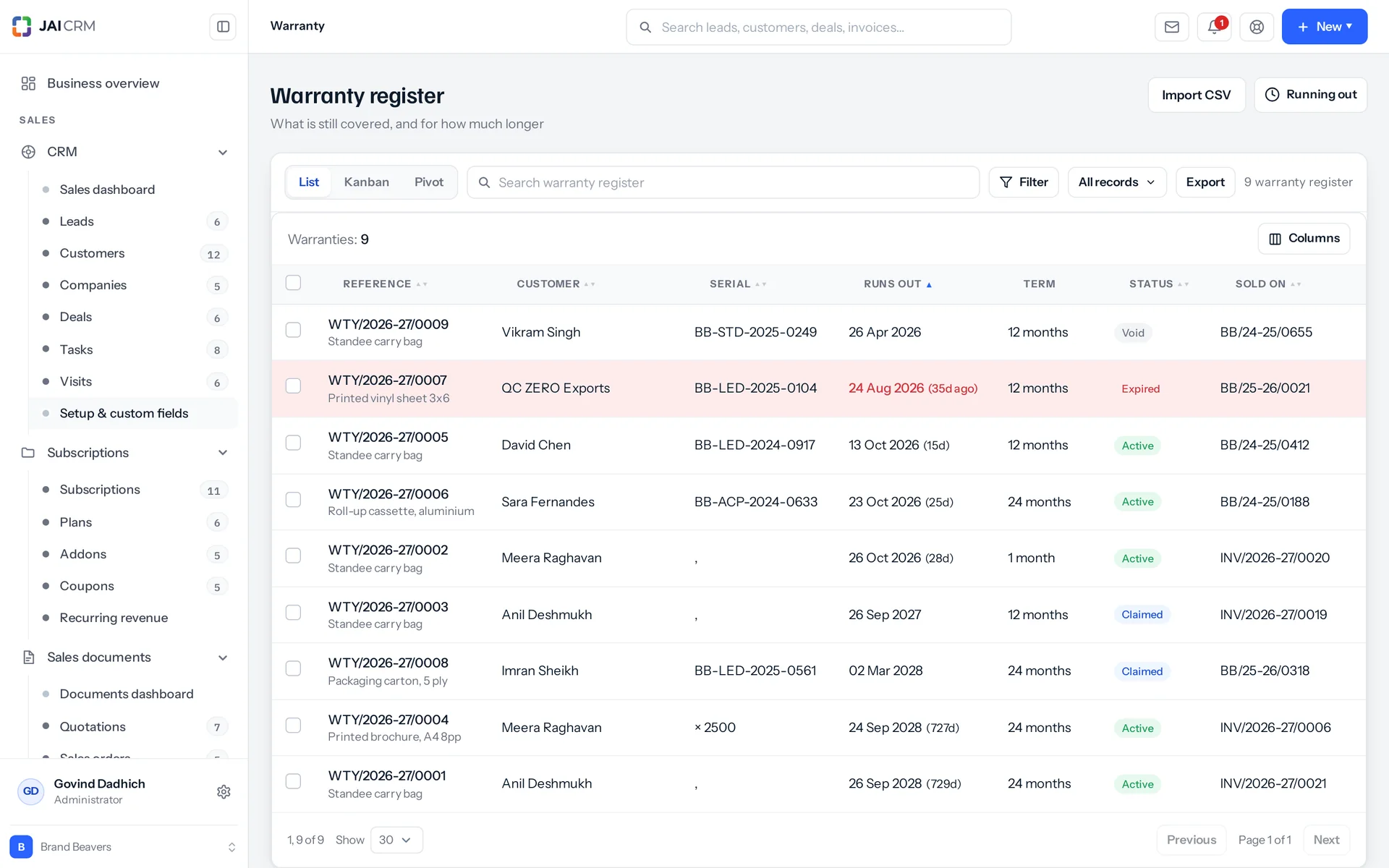
The warranty register: what is covered, for whom, and when it ends.
7 things it doesEvery one in the product today

What is Warranty in JAI CRM?

Warranty in JAI CRM is a warranty register that fills itself in. You set a warranty period on a product once. When you send a GST invoice, it creates a warranty for that product, dated from the invoice. The end date is worked out from the term, never typed. A Running out list shows whose cover ends soon.

Why does a warranty register go wrong?

Every business that sells goods with a promise attached keeps this record somewhere. Usually it is a spreadsheet, and usually it is kept badly. Nobody is careless. The problem is that keeping it by hand means retyping what the invoice already holds, after every sale, for ever.

  • The customer who rings eighteen months later

    The machine has stopped. Is it covered? Asking takes four seconds. Answering means finding the invoice, reading the date, working out what term that product had at the time, and counting months on a calendar. So somebody guesses. The guess goes wrong one of two ways: a free repair you never owed, or an argument with a customer who was right.

  • The register that is wrong by the second month

    There is a sheet: customer, product, sold on, expires on. Keeping it means somebody retypes four facts the invoice already holds, after every single sale. Then a busy fortnight comes. The sheet stops being a record of what was sold. It becomes a record of what somebody remembered to type.

  • Twelve months worked out as 365 days

    Somebody adds 365 to a date in a spreadsheet and calls it a year. Two years becomes 730. It is a day out whenever a 29 February falls inside the term. It is out again wherever month lengths do not line up: twelve months from the 31st is not 365 days from the 31st. A day matters exactly once, on the day the claim comes in.

  • The warranty period you changed last year

    You used to give twelve months on that machine. Since April you give twenty-four. The sheet only holds an end date. So for every row sold before the change, you cannot tell which promise was actually made. You only have a date somebody worked out, using rules nobody ever wrote down.

  • The cover that lapsed and nobody rang

    Nothing was watching the end dates, so nothing warned you. Those customers now pay for their own repairs, or put them off. The annual maintenance contract you would gladly have sold them was never offered. It was not turned down. It was never offered.

What the warranty register does, in plain words

Nothing below is on a roadmap. Every one is in the product today, and a 14-day trial is long enough to check any of it.

The sale

The invoice fills in the warranty register

Your warranty register fills itself in from your invoices. Two boxes on the product switch it on: a number and a unit. After that, sending an invoice creates a warranty for every product on it that has a term, dated from that invoice's issue date. A register kept by hand is wrong by the second month, so nobody keeps this one by hand.

Two boxes on the product, filled in once
A number and a unit: day, week, month or year. So you can enter 90 days, 18 months or 3 years without turning anything into days. Leave either box empty and that product is sold with no warranty. The system skips that line and says nothing, because nothing was promised.
Created when the goods go out, not when the money comes in
It happens when the invoice itself moves from draft to sent. Not on payment, and not on any later status change, because cover starts when the goods leave. If an invoice is withdrawn and sent again, the same goods are not warranted twice. Before each row, the system checks for a warranty already recorded against that invoice and that product.
One row per product, with the line quantity
A line for three presses becomes one warranty with a quantity of three. It is dated from the invoice and runs on that product's own term. Every row has its own serial box, and the search box reads the serial as one of four fields. Type it in where the unit matters and you can find it from then on. It also appears on the customer's expiry email.
Saved together with the invoice
The warranties are saved in the same step (the same database transaction) as the invoice. Either the invoice went out and its warranties exist, or neither happened. There is never a moment where the sale is on the books but the promise behind it is not.

Dates

The end date is worked out, not typed

The end date is the start date plus the term. It is worked out again every time a warranty is created or edited on its own record. Change the start or the term and the end moves with it. The form shows the end date but does not ask for it. A form that asks for all three will one day accept 13 September as the end of a twenty-four month warranty that began on the 14th.

Months follow the calendar, they do not add days
Twelve months from the 31st ends on the last day of the month it reaches. Two years from 29 February ends on 28 February. That is how a customer reads a warranty card, so that is what the register says.
A year is twelve months, on purpose
A year is counted as twelve months, not as a separate rule. So the leap year case is handled by the same month-end rule, and nobody has to remember a second rule exists. Days and weeks are simple counting, because they are simple.
You can still extend by agreement
Change the term on the warranty and the end date follows. The product's own warranty period stays exactly as it was. The register keeps what was promised at the moment of that sale, even if you change the item next year.
A term cannot be nonsense
The system only accepts a term from 1 to 999. Before the maths runs, it rounds the number and lifts anything below 1 up to 1. So a zero or a fraction can never give an end date that falls before the start.

Two columns

Standing is what you decided. Cover is what the calendar did.

The register keeps two different facts in two labelled columns. Standing is active, claimed or void: three things a person sets. Cover today says whether the warranty is live this morning. The end date decides that, and nobody sets it.

Expired is not in the dropdown
Nobody chooses expired. The help text on the field says so plainly: expired is not here, the end date says that. There are three statuses a person can set, and four states a screen can show.
Nothing is stored, so nothing goes out of date
A stored expired flag needs a nightly job to stay correct, and it is wrong between midnight and whenever that job runs. So each row is sent with its days left, whether it has run out, and one state word. These are worked out fresh on the list, the record, a create and an update alike.
A decision beats the clock
A warranty somebody voided or claimed against says so, whatever the date. Only a warranty that is otherwise active can ever show as expired.
The badge and the date come from the same number
The list colours what has run out and what ends within seven days. It shows the worked-out state, not the stored status. This fixed an old bug: a green Active badge next to a date that said 84d ago, and a grey filed-away badge next to a red one.

Running out

A list of who to ring, built for a phone

Running out is one screen that shows whose warranty cover is about to stop. It is built as a sales call list, not a compliance list, and you can see that in what sits at the top. Only warranties still standing as active appear. Anything you voided, or booked a claim against, is left off.

Four groups, and what has already run out comes first
Already run out, within a week, within a month, and further out, each with a count. What has already gone sits first and cannot be dismissed. Its hint on screen reads: the easiest conversation there is. A customer whose cover just lapsed is the easiest call of the week. Put it below the upcoming ones and it gets forgotten.
Four time windows to choose from
30 days, 90 days, six months or a year. 90 days is the default. Behind the screen, the report accepts anything from 1 to 730 days and returns up to 500 rows, soonest first.
Cards at every screen size, because it is read standing up
People read this between calls, on a phone. Eight columns is the wrong shape for that on any screen, so it uses cards everywhere, not a table that squashes on small screens. Each card shows the customer's name, the product, the serial (or the quantity if more than one), days left, the end date, the term as promised and the invoice number.
Tap the number on the card to call
On a phone, the customer's number is a link that dials. Their email address is a link that opens a new email. You act on the list right there, not somewhere else.

The customer

A Warranty tab on the customer, split in two on purpose

Open a customer and a tab shows what of theirs is still covered at the top, and what has lapsed underneath. It is two lists, not one list sorted by date, because people read them for opposite reasons.

Live answers one question, lapsed answers another
The live list answers: do we have to pay for this repair? The lapsed list answers: is there something to sell them? One mixed list makes somebody work out which row is which, every single time they open it.
The lapsed half says what it is for
It carries the line: worth a call, they own it and are no longer covered. That line is a prompt to act, not decoration.
Up to a hundred rows, each showing where it stands
Product name, the serial or the quantity, the invoice number, the term as promised, and either the days left or the day it ended. A claimed or voided row carries a badge. An expired row does not, because the column beside it already says so.
An empty tab explains itself
A customer with nothing covered sees a sentence, not an empty table. An empty table looks like something broke, when really nothing has happened yet. The sentence says nothing sold to them has a warranty, and that setting a warranty period on a product and selling it creates one by itself, dated from the invoice.

Alerts

Two warranty expiry alerts come built in, and one goes to the customer

Two expiry alerts come ready to use, and one of them reaches the customer. Both read the end date from the warranty, so nobody has to schedule or remember anything. A check runs once a day and picks up whatever has come into range. Both are normal templates you can edit.

A month before, to you
Warranty expires in a month appears in the app, for the owner, once the end date is within thirty days. There is still time to offer a renewal while the cover still means something.
A week before, to you and to the customer
Warranty expires this week goes in the app and by email, to the owner and to the customer. It names the product, the serial if the row has one, and the date cover ends. The message says: if anything needs looking at, tell us before then and it is covered. It is the last call before cover lapses, and it helps the customer more than it helps you.
The same alert cannot reach you twice in a week
Both alerts are held back for 168 hours (seven days) after sending. So one warranty cannot send the same alert twice within a week.
A row with no serial prints nothing there
The customer's email fills in the serial as a blank that disappears when empty, not as a fixed label. So a warranty with no serial prints nothing at all, rather than the word serial followed by a gap.

The record

It works like a full CRM record, not a flat list

Each warranty is a full CRM record, not a line in a flat list. Setting up the warranty record gives it twenty-three ready-made functions (endpoints) that nobody wrote by hand. These include a filtered list with counts, CSV export (a spreadsheet file) of what is on screen, a board, a pivot table, create, bulk edit, bulk delete, bulk assign, duplicate checks, delete checks, watchers, a timeline, notes and sending email from the record. The board groups by standing or by product. The pivot goes by standing, product or customer, with nothing to add up, because a register of promises has no money on it.

Numbered from your own series, and backdated correctly
The default prefix is WTY, the pattern is {PREFIX}/{FY}/{SEQ}, the number has four digits, and it restarts each financial year. So a reference reads WTY/2026-27/0001. A warranty from a backdated invoice takes its number from that invoice's financial year, not today's. The series is set up for every new business and sits under Settings → Numbering with the others.
Search finds it on four fields
Reference, serial, invoice number and notes. Notes are included on purpose. If somebody typed a claim reference into the notes box, the register's own search can find it.
Your own fields, and colleagues kept informed
You can add your own custom fields to the warranty record. Mark to adds watchers who can see a warranty without owning it. Marking somebody who is not allowed to open the module gives them nothing. All twenty-five routes, including the two reports, check the permission before they read anything.
One clickable link to the invoice, not a printed number
Sold on invoice is a read-only field that takes you to the invoice. A separate invoice-number text box used to sit beside it, printing the same INV/…/0010 twice. Only one of the two could ever be a link, so the other was removed.

Who opens Warranty, and what for

Swipe through the people who use it every day.

Whoever picks up the phone

A customer rings about a machine. Type the invoice number, the warranty reference or the serial into the register's search box and the row comes up. It shows the product, who bought it, which invoice, the day cover started, the term promised, and whether it is live this morning. That is the whole job. It used to mean searching a year of invoices and counting on a calendar.

The dealer whose products carry different terms

A press at twenty-four months, a guillotine at twelve, a laminator at thirty-six. Each term sits on its own product and is copied onto the warranty at the moment of sale. So changing what you offer next year does not quietly change what you promised last year. The row shows what was promised then, not what the price list says now.

Whoever sells the annual maintenance contract

Open Running out on a Monday. Start at the top with what has already lapsed, then work down through this week and this month. The customer's number is on the card and dials when tapped. An expiring warranty is the natural moment to sell extended cover or an AMC (annual maintenance contract). That is a subscription, on the same customer record, in a different module.

The owner asking what the business still has to cover

Use the pivot table on the register. Group by product to see how many rows of each are still under promise, or by customer to see who holds the most. There is nothing to add up, because a warranty carries no money. But a count by product tells you which machine you are most exposed on, before the service costs arrive.

Anybody covering for the person who knows everything

Every fact a warranty holds is on the row, not in somebody's memory: the invoice number, the invoice date, the serial if it was typed, and the term as promised at the sale. The invoice date is copied onto the warranty, not looked up from the invoice each time. So correcting the invoice later does not change the record of what was promised.

Moving an existing register in

Anything sold before the product had a warranty period has no row, so you add those by hand on the register's own form. They still cannot carry an end date that contradicts the term beside it, because the end date is worked out from the start and the term when you save. A warranty added by hand gets its number in the same step as saving, so two people adding one at the same moment do not clash.

What is different once you have it

"Is it covered?" becomes a lookup, not a guess

Neither wrong guess can happen any more: no free repair you did not owe, and no argument with a customer who turned out to be right. The answer is on a row the invoice wrote, with the date and the term that was actually promised at the time.

The register is right in the second month, and in the twelfth

Nothing depends on anybody remembering to keep it. Invoicing writes it, the end date is worked out rather than typed, and cover is worked out each time a screen opens. No nightly job has to run for the figures to be true, and there is no sheet to check against the invoices.

Expiring cover turns into calls instead of silence

A list of who is about to lose cover, with lapsed ones first and the phone number on the card, is a call list. The seven-day alert reaches the customer as well as you. So they hear about it before it lapses, not after. That is the difference between a renewal and a complaint.

One register, not a second system

The promise, the invoice that made it and the customer who holds it all sit in the same product, on the same customer record. Nothing is entered twice. There is no separate warranty tool to keep in step with your sales records every time an invoice is corrected.

What it works with

On its own it is a better spreadsheet. The value arrives when what it makes is what another part uses, with nobody typing it again.

Inventory

Required, not optional. The warranty period lives on the item, so Warranty depends on Inventory. Switching Warranty on without Inventory is refused with a plain message: Warranty needs inventory switched on first. And Inventory cannot be switched off while Warranty is still running. About Inventory

Sales documents

The GST invoice creates the warranty and dates it when it moves from draft to sent, in the same step as saving that invoice. Some documents do not create one. A bill of supply (the document used when no GST is charged) creates nothing, because only the invoice document type triggers it. Nor does an invoice sent for you by a recurring schedule or by a subscription. Add those to the register by hand. About Sales documents

CRM

The customer record gets a Warranty tab, with live cover at the top and lapsed below. The customer on the register is the customer on the invoice, entered once, not twice. Deleting a customer deletes their warranties too, which is worth knowing before anybody tidies up. About CRM

Subscriptions

An expiring warranty is the moment to sell an AMC (annual maintenance contract) or an extended cover plan. That is a subscription: it has a price, it renews, and it can include visits. A warranty has none of those, which is why they are two modules and not one. About Subscriptions

Notifications

The thirty-day and seven-day alerts read the end date from the warranty and go out in the daily check. The seven-day one is one of nineteen templates in the suite, out of ninety-seven, that send to the customer as well as to your own people. About Notifications

Take Warranty on its own, or take the lot

Priced per person, per month, in rupees, with GST shown separately. Every plan includes the basics of the whole product: custom fields, roles, reports, documents and notifications. Change plan whenever you like and nothing is typed again.

5 people

CRM + Sales Documents

Leads, customers and deals, with quotations and GST invoices

₹149 per person a month

For 5 people: ₹745 a month, billed as ₹8,940 a year. ₹10,549.20 with 18% GST.

  • Leads, customers, companies and deals
  • Quotations, sales orders and GST invoices
  • Your own mailbox, with replies filed against the record
  • Reports, dashboards and exports
  • 1 GB storage per workspace (organisation)
Start free

CRM + Sales Documents + Subscriptions + Warranty

For a business that bills on a cycle and stands behind what it sells

₹299 per person a month

For 5 people: ₹1,495 a month, billed as ₹17,940 a year. ₹21,169.20 with 18% GST.

  • Everything in CRM + Sales Documents
  • Recurring billing, plans, add-ons and coupons
  • Warranty registration and claims
  • Items and stock, which warranty is held against
  • 1 GB storage per workspace (organisation)
Start free

Every plan, and what is in each Prices in rupees, per person, per month. Parts can also be bought on their own.

Only want Warranty?

Any single part is ₹149 per person a month on the yearly rate, with the settings, reports, documents and notifications that go with it. See every part’s price.

A part you do not buy

Is not in your menu. Not greyed out behind an upgrade message, just not there. That is why the product is sold in parts.

How many people, and can I change it?

You choose when you sign up and change it whenever you like, up or down. There is no minimum number of users and no penalty for going down.

Yearly or monthly?

Both. Yearly works out cheaper per month and is paid once at the start. Monthly costs a little more and stops at the end of any month.

Questions people ask about Warranty

Answered in full. If yours is not here, ask us. A person replies.

Ask us something
What is warranty management software in JAI CRM?

It is a warranty register that fills itself in from your invoices. You put a warranty period on a product once: a number and a unit, such as 18 months. Sending a GST invoice then creates a warranty for that product, dated from the invoice, with the end date worked out for you. A Running out list and two alerts tell you whose cover is about to end.

Who is the Warranty module for?

Any business that sells goods with a warranty attached and wants to know, quickly, whether a customer is still covered. That includes dealers whose products carry different terms, the person who answers customer calls, and whoever sells annual maintenance contracts when cover runs out. It is a register and an expiry list, not a claims or repair system.

How much does warranty management in JAI CRM cost?

Warranty starts from ₹149 per user per month. You also need the Inventory module switched on, because the warranty period lives on the product in Inventory. Warranty cannot be turned on without it.

What about everything I sold before I started using it?

Those sales have no warranty record. The register starts from the day you put a warranty period on the product, so anything invoiced before that is not in it. You can add older ones by hand on the register's own form. They still cannot be entered wrongly: the end date is worked out from the start date and the term when you save, so nobody can save a warranty that ends before it begins.

Does the serial number get filled in automatically?

No, and it is worth saying plainly. The invoice creates the warranty and fills in the product, the customer, the dates and the term. You type the serial yourself. Once it is there, it is a full part of the record. The register has a column for it, the search box reads it as one of four fields, and it shows on the expiry card and the customer's tab. It also prints on the seven-day email to the customer. If the individual unit matters, typing that one box at the sale is all the work there is.

Which invoices create a warranty?

A GST invoice, when it moves from draft to sent on the invoice itself. Three things do not create one: a bill of supply, an invoice sent for you by a recurring schedule, and an invoice raised by the subscription biller. If you bill on a cycle and the goods carry cover, add those warranties on the register by hand. The end date is still worked out for you, so they cannot contradict themselves.

If I sell three machines on one invoice, do I get three warranty rows?

No. One invoice line creates one warranty with the line's quantity. So three presses become one row with a quantity of three and one end date. They were sold on the same day under the same term, so the dates match. If you need them separate, for example a different serial on each, or one claimed while the others carry on, add the extra rows on the register and type each serial on its own.

Can I extend a warranty?

Yes. Change the term or the start date on the warranty record and the end date follows, because it is worked out, not stored. Extending by agreement is a real need, so both stay editable. The product's own warranty period does not move. The register keeps what was promised at the moment of that sale, even if you change the item later.

Is this a warranty claims system?

No, and this is the limit to know before you pay. Claimed is just a standing somebody sets on a warranty. There is no claim record, no RMA number (return authorisation number), no repair job and no cost tracking behind it. What you get is the register and the expiry list, which is the part most businesses are actually missing. It is not a claims desk.

Is a warranty the same as a subscription or AMC?

No. They are deliberately separate modules. Nobody buys a warranty, it has no price, it never renews and it includes no visits. The only thing it shares with a subscription is that it ends on a date, and that is not enough to make them one thing. An extended warranty that you sell is different. That is a subscription, and it belongs in the Subscriptions module.

Do I need Inventory as well, or can I buy Warranty on its own?

You need Inventory. A warranty is a promise about goods, and the warranty period lives on the item, so there is nowhere else for it to sit. Turning Warranty on without Inventory is refused with the message: Warranty needs inventory switched on first. And Inventory cannot be turned off while Warranty is still running.

What if an invoice is withdrawn and sent again?

Nothing is duplicated. Before writing each row, the system checks for a warranty already recorded against that invoice and that product, and skips it if one exists. A warranty is created once per invoice, however many times the invoice is sent.

What does the customer actually receive?

One email, seven days before cover ends. It names the product, the serial if the row has one, and the date cover runs out. That is all, and it is worth saying plainly. There is no customer portal view of warranties, and there is no printable warranty certificate in the product today. The print permission exists, but there is no template behind it yet.

Can I try the warranty register with sample data first?

Yes. A sample-data script adds three pieces of equipment: a digital press, a guillotine cutter and a laminator. Each is named Sample and has an HSN code (the product classification code used for GST) and a GST rate. It also adds four warranties, one for each state the screens show: years left, weeks left, just ended and long ended. Each of the four rows carries the note Sample data, safe to delete, so you can find and remove them in one go. Running the script twice does no harm.

Can I stop some people from opening the warranty register?

Yes. There is one permission, the warranty register, with seven actions: view, create, edit, delete, export, import and print. Every route checks it before reading anything, including both custom reports. So marking a colleague on a warranty they are not allowed to open gives them nothing at all.

What happens if I delete a warranty or a customer?

Deleting a warranty takes two steps. The first is refused with a note to check what depends on it. The second runs a dependency check before anything is removed. Deleting a customer is different, and worth knowing about: the database deletes their warranties along with them. So removing a customer removes their part of the register too.


Long enough to know, and it costs nothing to find out

Switch on warranty, put a week of real work through it, and see whether it holds. If it does not, walk away. We did not ask for a card.