Skip to the content
JAI CRM

ManufacturingOrders, job cards, work centres

Manufacturing software that tracks each job from cutting table to shelf

Write your bills of materials, run production orders with a real work-in-progress stage, put job cards on real machines, and see what a run cost against what it should have cost. A run can be in six states, and only two of them mean the components have left the shelf.

No card needed. From ₹149 per person a month.

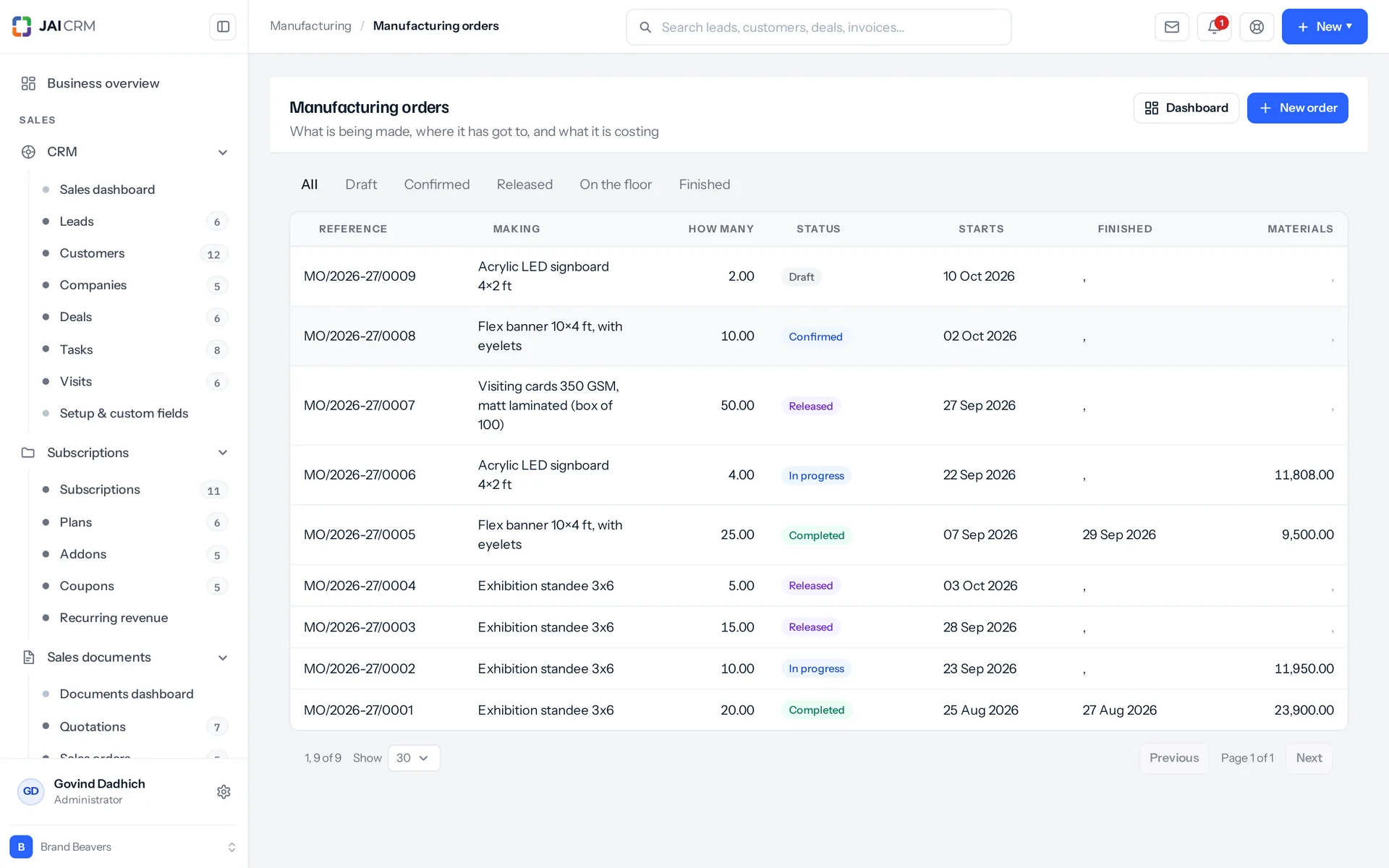
Manufacturing orders with product, quantity, status and due date.
7 things it doesEvery one in the product today

What is Manufacturing in JAI CRM?

Manufacturing in JAI CRM is the module for jobs that take time to make. You write a bill of materials (the parts and steps for one item) and raise a production run. The system then tracks work in progress, job cards on each machine, minutes worked, quality inspections and what the run actually cost against the estimate.

Why a job that takes two days breaks ordinary stock software

Here are five things that go wrong between the cutting table and the shelf. Not one of them can be shown by a single stock entry.

  • Halfway through, your stock figures are wrong

    Cutting happened on Monday. Stitching happens on Wednesday. Right now the cloth is no longer cloth, and the shirt does not exist yet. So every figure you have is wrong both ways. It shows fabric you no longer have, and none of the shirts you are halfway through. An assembly turns three things into one in a single instant. That is right for a gift box made up at the counter. It is no answer at all for the two days in between, and that is where a factory spends most of its life.

  • The order someone closed just to clear the list

    It looked finished on the screen, so someone marked it finished. But a job card under it still said "not started", because nobody had been near that station all week. Now the costing believes the order, not the floor. The shirt was sewn by a card that says it never ran. The labour cost against it is nothing. And that margin is the number someone will quote from next month.

  • Four sewing machines, and only one of them sewing

    Work goes to whoever is asked first, and that is whoever sits nearest the desk. Three machines stand idle while the order runs late. Nobody can point to the moment it went wrong, because nobody did anything unreasonable. There was simply never a record of what was already waiting at each machine.

  • A March shirt valued at June's cloth price

    Average cost changes with every purchase you make later. So a run finished in March, valued today, carries a cloth price it never paid. The job that made money sits next to the job that did not, and nothing tells them apart. Now add labour costed by whoever happened to be on the machine. Two identical shirts end up costing different amounts. That is a payroll question dressed up as a costing answer.

  • Faulty goods reach the customer before an inspector sees them

    The run finished and the stock went on the shelf. The shelf fed a delivery challan. The first person to find out the batch was wrong was the customer who paid for it. A dashboard cannot fix this afterwards. The check has to be a real step in the process: after the work is done, and before the goods count as stock.

What the manufacturing software does, in plain words

Nothing below is on a roadmap. Every one is in the product today, and a 14-day trial is long enough to check any of it.

Bills of materials

A bill of materials is its own record, not a field on the item

A bill of materials (BOM) is the recipe for one item: what a run uses, what is done to it, and in what order. The things done are called operations, like cutting or stitching. A BOM is its own record, not a field on the item. That is because one shirt can be made two ways: by hand for a sample, or on machines for production. Those are two BOMs for one item. Operation and component names are copied onto each line when it is saved. So if you rename "Cutting" next year, a shirt made under the old name keeps it.

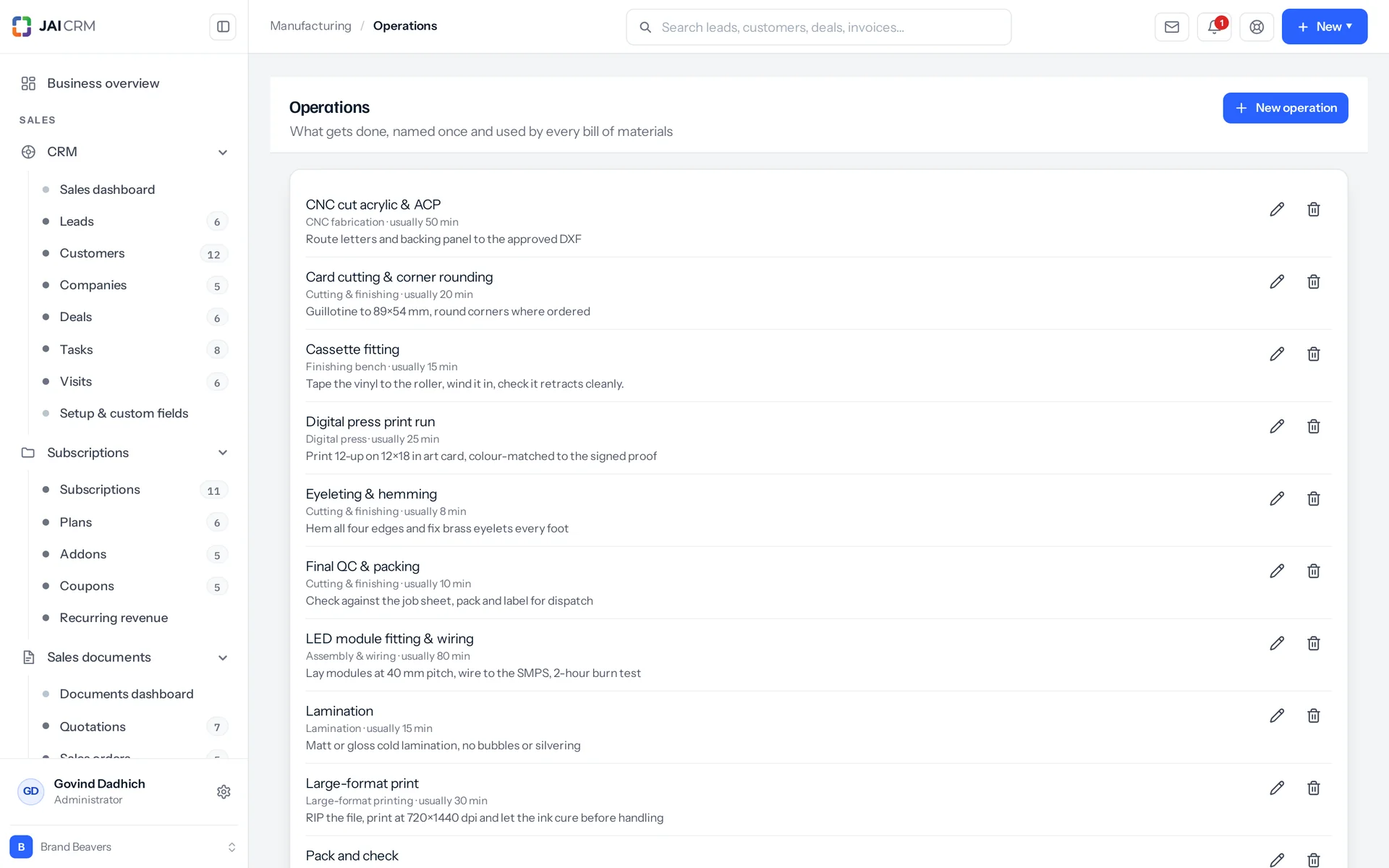
Operations such as printing, cutting and lamination, with their times.
Batches that make more than one
Each BOM says how many finished units one run makes. Ask for 60 from a BOM that makes 40, and that is one and a half runs. Every component quantity and every operation time scales by the same amount. A dough recipe that makes forty rolls stays written as forty rolls. Nobody has to write a fortieth of everything and then round it.
What a run copies, and when it stops following the BOM
When you raise a run, the BOM is copied onto it. That includes the operation names, their descriptions and the station type each one runs on. Operation times are scaled and rounded up to the next whole minute. Component quantities are scaled and kept to four decimal places. From then on the run is its own record. Editing the BOM next week does not change a run already raised, because that run was planned with the old numbers.
Loops are stopped when you save, not when the floor stops
Each operation says what it waits for. If operations wait on each other in a circle, the BOM is refused when you save it, and the loop is spelled out: cut, then sew, then cut. If it were allowed, you would get an order where every job refuses to start and no single job is at fault. The same check also refuses an item that is a component of itself, any BOM for a service, two operations sharing one handle (the tag an operation is known by), and an operation that waits on something not on the BOM.
A copy starts switched off
Clone copies every component and every operation, and rebuilds all the "waits for" links onto the new lines. Then it marks the copy inactive. A copy is a draft of a change someone is making. If a second live BOM appeared in the order screen's list the moment you pressed Clone, someone would end up using the wrong one.

The production run

Six states, and only two of them mean the components have gone

A manufacturing order is a period of time, not a single moment, and that is the whole reason this module exists. It has six states: draft, confirmed, released, in progress, completed and cancelled. There are nine allowed moves between them, and two of the states are final. Only two of the six mean even a gram has left a shelf. The order tells you what each state has done to your stock, so you never have to guess from a word.

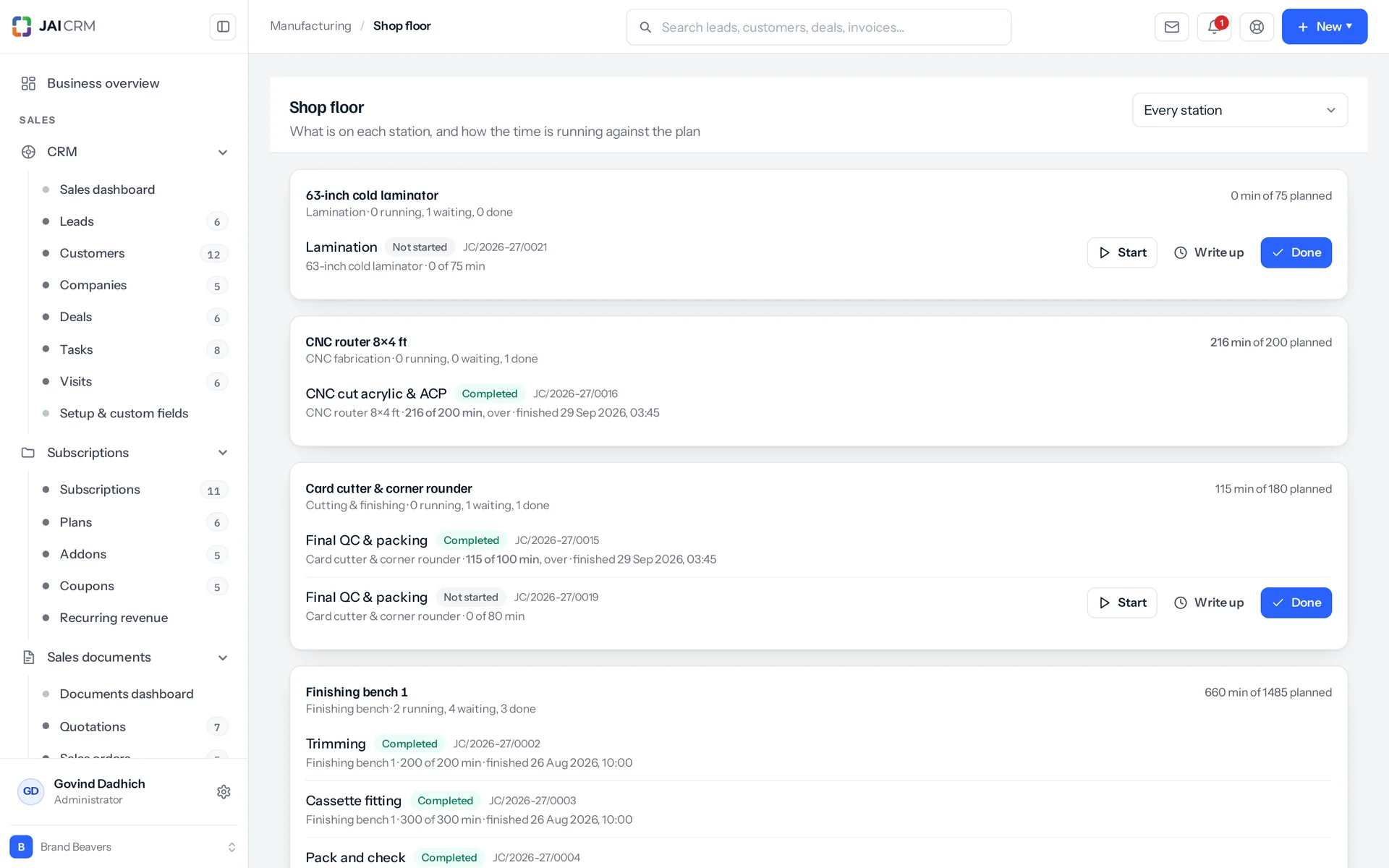
The shop floor view: work in progress at each work centre.
What each state means
Draft is a plan, and nothing has moved. Confirmed is an agreement, and still nothing has moved. Released means job cards exist, and a card is a piece of paper, not a stock movement. In progress is when the components come off the shelf and become work in progress (goods that are half made). Completed is when the finished item arrives on the shelf. Cancelled is the only other state that touches stock, and only if the run had started. Then every component goes back.
You cannot just change the status word
A run moves only when you confirm, release, start, complete or cancel it, because each of those does something to stock. Editing the status field directly is refused. Setting the word alone would leave your stock records describing a run that never happened. A completed order cannot be reopened either. The goods exist and may already be sold, and no status change turns a shirt back into cloth.
A run can include parts the BOM does not list
You can add extra components when you raise the run, like the extra metre this job needs because the roll was flawed. Each one is checked to exist before it goes on. The BOM is copied once and then held. The quantities on a raised run are fixed, and nothing on the order edits them later. So add what the BOM does not know about at the moment you raise the run, not the morning after.
Confirming raises the orders underneath
Any component that you make rather than buy gets its own run. It is raised already confirmed, takes the same warehouse, owner and start date, and is linked to its parent. A shirt and its cut panel become two orders that know about each other, so nobody has to keep them in step by hand. The parent link also answers "why does this order exist?" without relying on a comment someone may not have written. It goes one level down, and confirming again does not raise a second set.

The shop floor

Job cards on machines, with a clock on each

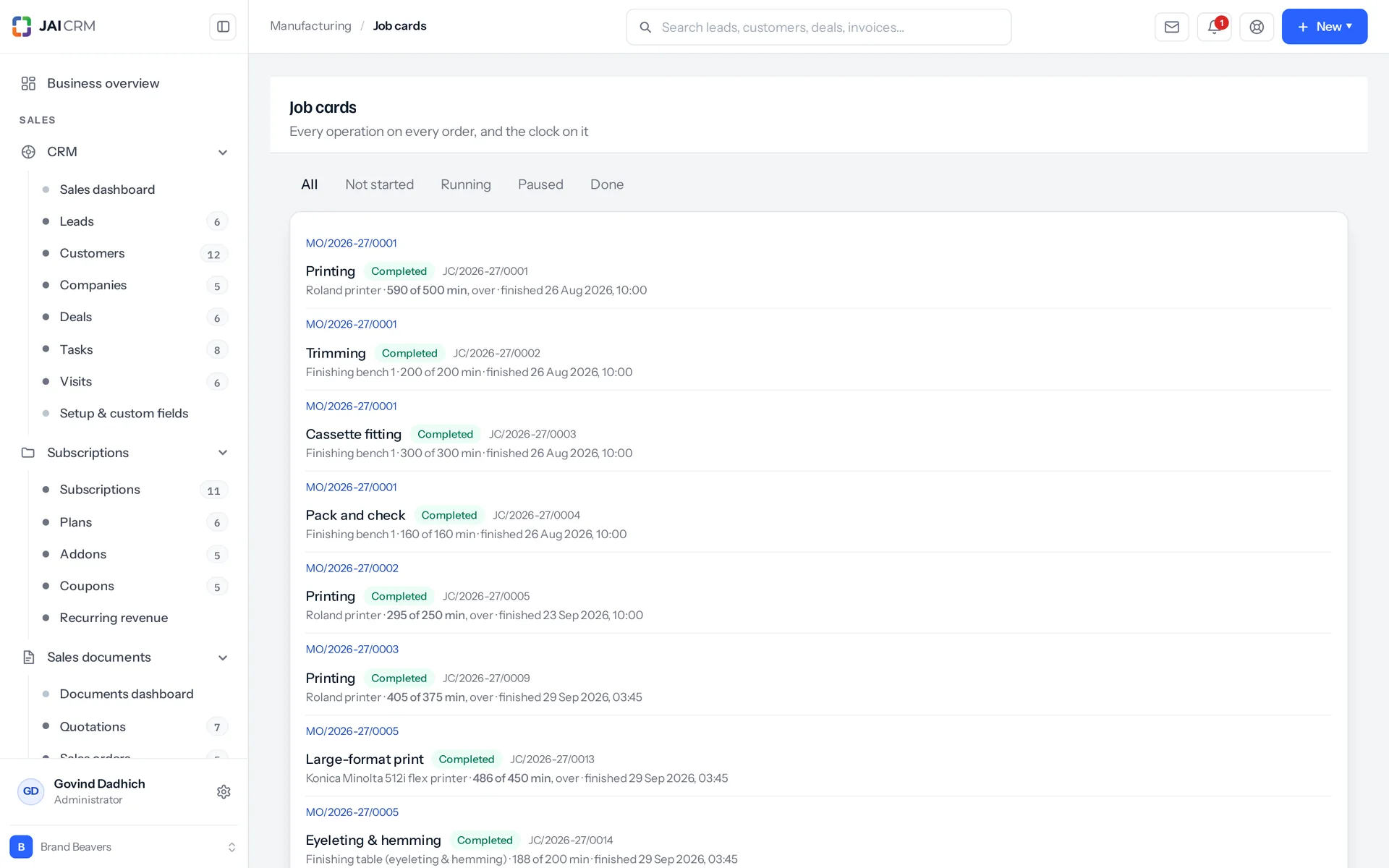
Releasing an order turns every operation into a job card. A job card is one operation, on one station (a machine or work centre), for someone to do. It has four states: not started, in progress, paused and completed. The minutes on a card are added up from its time logs, never typed, so the two cannot disagree. Time is in minutes everywhere, and hours are never offered. With two units for one quantity, someone types 2, meaning two hours, into a field counting minutes. Nothing looks wrong until the schedule is out by a whole shift.

Job cards for each operation on the shop floor, with station and status.
Sent to the machine with the least work on it
Each card goes to the station of the right type with the least work already waiting. That is measured as open cards divided by that station's capacity. It is deliberately not round-robin (taking turns). In a shop with one machine of each type, the two are the same thing. In a shop with four sewing machines, it is the difference between using all four and using only the first one.
A card with no station is still created, not refused
If no station exists for an operation, the card is still made. The release message names the gap, for example: three of them have no station, because no work centre exists for their operation. The shop floor lists these cards on their own. If you have written your operations but not yet your stations, you should see the work waiting, not a refusal that looks like a bug. A job nobody can see is the one that does not get done. You can move any card onto a station later, until it is finished.
A blocked job cannot be started or completed
Stitching cannot start until cutting is finished, and the message names what it is waiting for. This is not a warning. The cloth is not cut, so the work cannot be done. Recording that it was done is a lie the costing will believe later.
Two ways to record time, because there are two kinds of shop
One is a live timer at the bench that starts, pauses and resumes. Each pause closes a stretch and saves its minutes. The other is writing the times up at the end of the day, with a start and an end. That entry is refused only if the end is not after the start, which catches a wrong date as well as a wrong time. Offering only the timer makes the second kind of shop make up numbers. A job paused for lunch shows as two stretches, because that is what it was.

The views

A board for the supervisor, a dashboard for the owner

The supervisor and the owner get different screens, because they ask different questions. The supervisor wants to know what is waiting on machine two. The owner wants to know which five items are still owed and which five stations are overloaded. So each gets a screen of their own, not one list with a filter on it.

The shop floor board, arranged by station
It shows every active station with its jobs. Each station has four counts: not started, in progress, paused and completed. It also shows planned minutes against actual minutes. Cards sitting on no station appear in their own list beside it, instead of being quietly left out.
A production dashboard measured against the plan
It has five counters: orders in progress, orders pending, job cards running, job cards pending and job cards overdue. It also shows completed orders and cards over a period you choose (thirty days by default), the top five items still owed against what is in stock, and the top five stations by pending work. Overdue means a job has already taken longer than estimated and is still not finished. The time on a running timer is added in. Otherwise a job three hours over would show as on time until someone paused it. A card with no estimate cannot be overdue, and it is not counted either way.
Records your team can discuss, not just look up
Runs have a list you can filter by the six statuses, so you see what is on the floor now and what is waiting to go on it. BOMs have a list filtered by whether they are still in use. Each record has a comment feed and an audit history of every change, who made it and when. Deleting a record first checks what depends on it. Both have their own screens, not the standard list, because a shop asks different things of a list of runs than of a list of customers.
Three notifications, and only three
Run released to the floor: this one says clearly that nothing has left the shelf yet. Run finished: this says the goods went into stock at what the run actually cost. Run past its start date: this fires a day after the date and asks the owner to either move the date or release the run, so the floor works from something true.

Costing

What a run was meant to cost, and what it really cost

Production costing in JAI CRM shows estimated components, estimated labour, actual components and actual labour, line by line. Any overrun is flagged on each job card. Actual costs stay empty, not zero, until the run finishes. "Nothing yet" and "it cost nothing" are different facts, and a report that mixes them up is worse than one that says nothing.

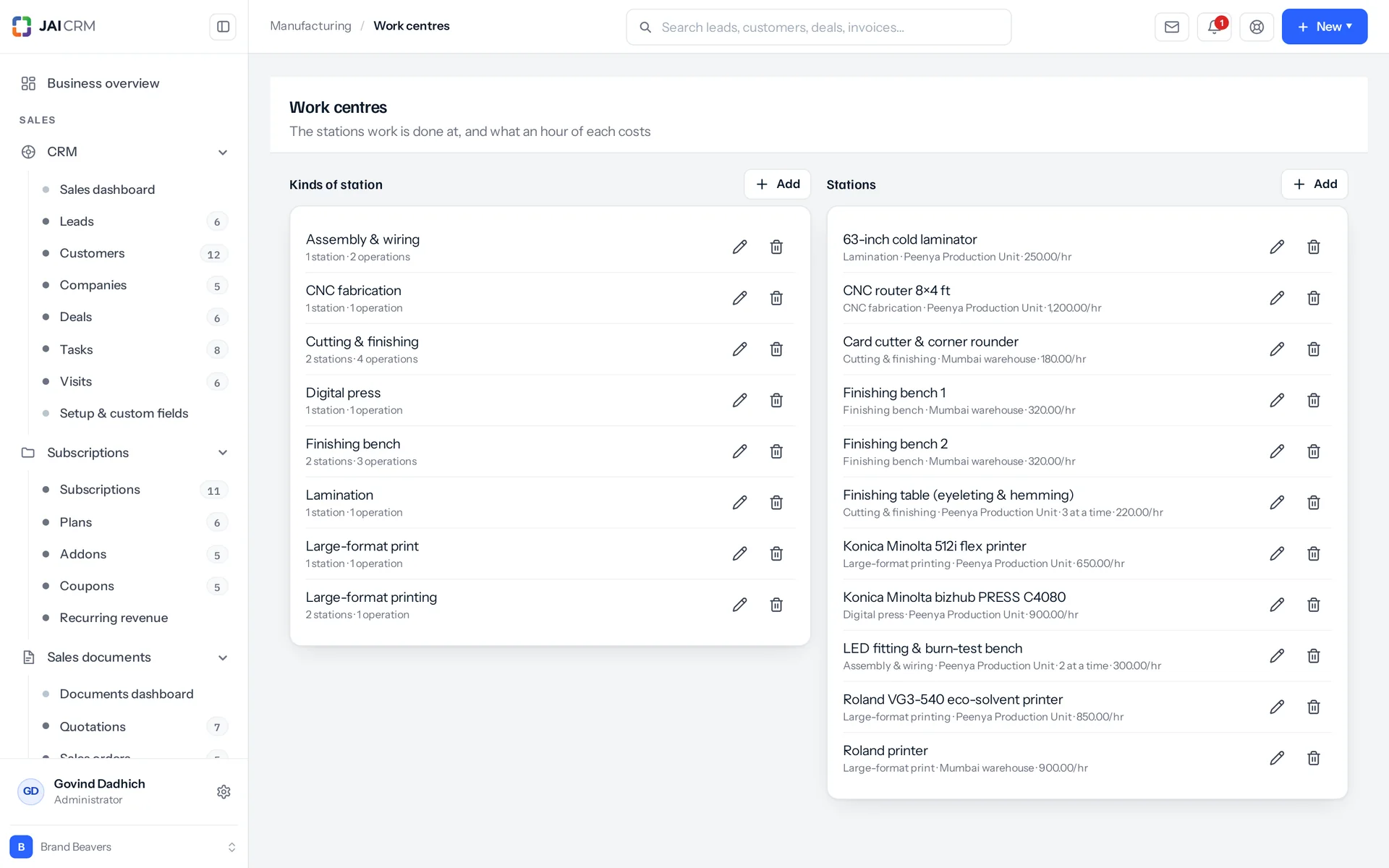
Work centres with their capacity and cost per hour.
Materials locked at their value when they left
Each component on a run carries the unit cost it had the moment it left the shelf. It does not use the average cost it drifted to three purchases later. A shirt made in March cost March's cloth. That figure never changes again, which is why two runs of the same item can be compared.
Labour is costed on the station, never on the person
The hourly rate sits on the work centre, and it covers the machine plus the person standing at it. Staff are recorded on the job card only to show who did the work. They add nothing to the cost, because costing a shirt by who happened to sew it makes two identical shirts cost different amounts. Minutes round up when a BOM is copied onto a run: half a minute on a sewing machine is still a minute of someone standing at it.
An estimate that tells you what it could not price
Components are priced at current average cost. Operations are priced at the hourly rate of the cheapest priced station of their type. That is because the system will use whichever machine is free, and an estimate that assumes the most expensive one is no use for planning. A station with no rate adds nothing, not a guess. The number of unpriced components and unpriced operations is shown on screen, so an estimated ₹0 of labour is never read as free.
Finished goods enter stock at what the run cost
The cost is actual components plus actual labour from the job card minutes, divided by the quantity made. It is not the selling price, and not the item's previous average. This batch cost what it cost, and that is the value your stock carries from the moment it arrives.

Stock

Every gram goes through the one stock ledger

Manufacturing records stock through the same ledger (the running record of every stock movement) that every other part of the system uses. So a stock balance is always the sum of its history, and manufacturing is no exception. Two movement types do the whole job: "assembly out" and "assembly in". They were reused, not invented, because they already mean "used up to make something" and "arrived from being made".

Stock is never left half used
Taking components for a run is all or nothing. A run that takes the fabric and then fails on the buttons takes neither. You also cannot issue what is not there. The message says only so many are in stock here and you cannot issue that many. The shelf never goes negative for people to argue about later.
Every movement names the run that caused it
When a component leaves the shelf, it is recorded against the order number, with the reason "consumed by MO/2026-27/0001". The finished goods arrive marked "made by" the same number. Anything handed back says "returned from cancelled". So an item's stock history reads like a sentence. A figure nobody can explain is one click away from the run that explains it.
Between the two entries, the goods are on no shelf
Components leave when the run starts. The finished item arrives when the run completes. In between, the value sits on the run, not anywhere in stock. The actual materials cost is written onto the run the moment they come off the shelf. That is what work in progress means here: not a flag on a record, but a gap between two stock entries that something accounts for.
A cancelled run puts back exactly what it took
If the run had started, every component goes back through the ledger against the same order. If it had not started, nothing is undone, because nothing had happened. Unfinished job cards are force-closed. The reason you give is added to the notes. The actual materials cost is cleared back to empty, not to zero.

The checks

The refusals are the point of the module

JAI CRM refuses work that could not have happened, at the moment you try to record it. A system that lets you record such work will cost it, report on it and quote from it, and the error shows up three steps away from its cause. Every refusal names what is in the way and what to do instead.

Quality inspection raised at release, required at completion
Releasing an order raises the inspection that its item's active quality rule asks for, with that rule's checklist under it. So the inspector sees what is coming, instead of finding out when someone wants the order closed. Completion is then refused while any inspection on the run has not passed, and the message names the inspection numbers. A failed inspection gets its own message: raise an adjustment for what is scrap, or re-inspect if the result was recorded by mistake. The sample rate and allowed failures are copied onto the inspection when it is raised. So editing the rule next month cannot change whether this batch passed.
Committing the floor needs more than the right to fix a typo
Confirming and releasing need the approve permission, not just edit. Otherwise anyone who can correct a spelling mistake on a draft could also commit the factory floor to building it. Creating an order with "confirm" already ticked checks for approve again, because creating and signing off in one step is still signing off.
A warehouse restriction applies to the buttons, not only the list
Every stock-moving action on an order checks again whether this user may touch this record. That covers detail, cost, confirm, release, start, complete, cancel and tracking, each checked for read or write as needed. A restriction that held on the list and the comment feed, but not on the button that moves stock, would not be a restriction.
What cannot be deleted, and what to do instead
A station type in use tells you how many stations and operations depend on it. A station with live work tells you how many jobs are on it. An operation used on two BOMs and eleven orders says so, and tells you to mark it inactive, because those records describe work that was planned or done. An order that has taken components off the shelf must be cancelled first, so they go back. Each refusal gives the real reason, not a database error, and offers the right next step.

Who opens Manufacturing, and what for

Swipe through the people who use it every day.

The planner raising next week's runs

You pick the item and choose which of its active BOMs applies. You type the quantity and let everything scale. You add the two components this run needs that the BOM does not know about. You save it as a draft and open the cost tab to see components, labour and how many lines could not be priced. Only then do you confirm it and commit anyone to it.

The supervisor at the start of the shift

You open the shop floor, not the order list, because your question is what is waiting on machine two, not what is outstanding on order forty-one. You see each station with its jobs, its four counts and its planned against actual minutes. The unallocated cards sit beside them, waiting for a station to exist.

The operator at the bench

You start a card, pause it for lunch, resume and finish. Or you skip all that and have the day's times entered afterwards with a start and an end. Either way, the minutes on the card are the sum of the stretches. Several people working on one job is normal, not a workaround.

The owner asking whether that job made money

You open the cost view on a finished run. It shows every component with the unit cost it had when it left the shelf. It shows every job card with its station, hourly rate, estimated minutes, actual minutes and whether it overran. Estimated against actual is shown line by line, not just as a total. That is the number you opened the page for.

The tailoring unit with four sewing machines and one cutting table

You write cutting and stitching once as operations. You set them against station types, not named machines, because cutting is cutting whether it is a shirt or a curtain. Every BOM reuses them. The actual machine is chosen at release, the only moment anyone knows what is free.

The bakery whose recipe makes forty rolls

You write the BOM the way the recipe is written: one batch of dough, forty rolls out. An order for sixty is one and a half batches, and every quantity and every time scales by the same amount. Nobody has to rewrite the recipe per roll and round a fortieth of a kilo.

What is different once you have it

A stock figure that is true on a Wednesday

The system has a name for work in progress. So half-made goods are counted neither as raw material you could issue nor as finished stock you could sell. Purchasing stops buying cloth you already cut. Sales stops promising shirts that are still on a bench.

Prices you can defend, one job at a time

Every run records what it actually used, at what those materials were actually worth. It adds the minutes recorded on stations that have rates. Two runs of the same item can be compared years apart. Quoting stops being a habit copied from the last quotation. It becomes arithmetic you can show a customer.

Every machine you already own gets used

Cards go to the station of the right type with the least work waiting, measured as open cards against how many that station can take at once. Cards that cannot be assigned are listed, not left out of every total. The fourth sewing machine gets work without anyone having to remember it is there.

Fewer arguments, because refusals come at the right moment

A loop in a BOM is caught when you write it, not when the floor stops. A released run cannot close while a job card is unfinished or an inspection has not passed. A cancelled run puts its components back, force-closes its open cards and clears its actual cost back to empty, not to zero. The records and the floor agree, so meetings are about what to do next, not whose number is right.

What it works with

On its own it is a better spreadsheet. The value arrives when what it makes is what another part uses, with nobody typing it again.

Inventory

Every component out and every finished item in goes through the same stock ledger as a delivery challan or a goods receipt. It uses two movement types that already existed. Bills of materials live in Inventory too, with their own list, record, comment feed and audit history. An active BOM has a "Make some" button that jumps straight to a new run, already filled in. This module requires Inventory. About Inventory

Quality

Inspections are raised when a run is released, so the inspector sees what is coming. They also control completion. A released run cannot finish while any inspection on it has not passed. A failed inspection is named, instead of a vague "checks outstanding". About Quality

Procurement

When a run is estimated, components are priced at current average cost. That is the figure purchasing has been keeping up all along. The link goes one way only. Nothing here works out a shortage or raises a purchase request (requisition). So what a run needs still has to be bought by someone who decided to buy it. About Procurement

Sales documents

The finished item enters stock at what the run cost and sells from there like anything else. It has its own HSN code (the product code used for GST) and GST rate, so what comes off the line is ready to invoice at the right rate. Tax is deliberately left off the run itself. Making something is a stock and cost event, not a tax document. About Sales documents

Accounting & finance

A completed run changes what your shelf is worth, at what the batch actually cost. It does not use a selling price or an old average. That is the figure stock valuation carries into your books. About Accounting & finance

Notifications

There are three built-in production messages: released, finished, and past its start date. All three go to the run's owner, not to everybody about everything. The owner is whoever raised the run, unless someone else is named on it. About Notifications

Take Manufacturing on its own, or take the lot

Priced per person, per month, in rupees, with GST shown separately. Every plan includes the basics of the whole product: custom fields, roles, reports, documents and notifications. Change plan whenever you like and nothing is typed again.

5 people

CRM + Sales Documents

Leads, customers and deals, with quotations and GST invoices

₹149 per person a month

For 5 people: ₹745 a month, billed as ₹8,940 a year. ₹10,549.20 with 18% GST.

  • Leads, customers, companies and deals
  • Quotations, sales orders and GST invoices
  • Your own mailbox, with replies filed against the record
  • Reports, dashboards and exports
  • 1 GB storage per workspace (organisation)
Start free

CRM + Sales Documents + Subscriptions + Warranty

For a business that bills on a cycle and stands behind what it sells

₹299 per person a month

For 5 people: ₹1,495 a month, billed as ₹17,940 a year. ₹21,169.20 with 18% GST.

  • Everything in CRM + Sales Documents
  • Recurring billing, plans, add-ons and coupons
  • Warranty registration and claims
  • Items and stock, which warranty is held against
  • 1 GB storage per workspace (organisation)
Start free

Every plan, and what is in each Prices in rupees, per person, per month. Parts can also be bought on their own.

Only want Manufacturing?

Any single part is ₹149 per person a month on the yearly rate, with the settings, reports, documents and notifications that go with it. See every part’s price.

A part you do not buy

Is not in your menu. Not greyed out behind an upgrade message, just not there. That is why the product is sold in parts.

How many people, and can I change it?

You choose when you sign up and change it whenever you like, up or down. There is no minimum number of users and no penalty for going down.

Yearly or monthly?

Both. Yearly works out cheaper per month and is paid once at the start. Monthly costs a little more and stops at the end of any month.

Questions people ask about Manufacturing

Answered in full. If yours is not here, ask us. A person replies.

Ask us something
What is manufacturing software in JAI CRM?

It is the JAI CRM module for making things when a job takes time. You write a bill of materials (the parts and steps for one item), raise a manufacturing order, and release it to the floor as job cards on stations. The system tracks work in progress, time in minutes, quality inspections where you have a rule, and what each run actually cost against the estimate.

Does the JAI CRM manufacturing module need Inventory?

Yes. The manufacturing module requires Inventory. Every component out and every finished item in goes through the Inventory stock ledger, the same one a delivery challan or goods receipt uses. Bills of materials live in Inventory too, and an active BOM has a "Make some" button that opens a new run, already filled in.

How does JAI CRM track work in progress (WIP)?

Work in progress is the gap between two stock entries. Components leave the shelf when a run starts. The finished item arrives when the run completes. In between, the value sits on the run itself, and the actual materials cost is written onto it as they come off. So half-made goods count neither as raw material you could issue nor as finished stock you could sell.

Do I need the manufacturing module if I already use Assemblies in Inventory?

Probably not, and we would rather tell you so. An assembly is one act in one stock entry: components out and finished item in, at the same moment. It is the right answer for a gift box made up at the counter, or a table put together in an afternoon. Assemblies stay exactly where they are and keep working. This module is for what an assembly cannot show: a job that takes long enough that someone has to answer where the goods are halfway through. If you never need to answer that, use assemblies and skip all of this.

Can one item have two different bills of materials?

Yes, and that is the normal case, not a special one. A hand-made sample run and a machine production run are two BOMs for one shirt. The order screen offers only active BOMs. So retiring a BOM stops it being chosen for new runs without deleting anything. Orders already raised from it are untouched, because they copied what they needed at the time. If someone tries to start a run from an inactive BOM, it is refused. The message tells you to mark it active again if it is still how the item is made.

What if one of my components is something we make ourselves?

Confirming an order raises a child run for every component that has its own active BOM. Each child run is already confirmed, takes the same warehouse, owner and start date, and is linked to the parent, so both ends show on the record. A shirt and its cut panel become two orders that know about each other, so nobody has to keep them in step by hand. It goes one level down only, not to the bottom of the tree. Confirming twice does not raise them twice.

Can I close a manufacturing order while a job card is still open?

No. The refusal tells you how many jobs have not finished and what they are called. Marking the order done anyway would say the shirt was sewn by a card that says it never started, and the costing would believe the order instead of the floor. Quality works the same way on a released run: completion is refused while any inspection on it has not passed.

Can workers enter job times at the end of the day instead of using a timer?

Yes, and it is a proper option, not a fallback. The worker gives a start and an end, and the minutes are saved. The only check is that the end is after the start, which catches a wrong date as well as a wrong time. Offering only a timer makes shops like this make up numbers, and made-up numbers are worse than none. Either way, a card's minutes are the sum of its time logs and are never typed in directly, so the card and the logs cannot disagree.

Can I stop just anyone from committing the factory floor to a run?

Yes. Confirming and releasing need the approve permission, which is separate from edit. So someone who can fix a typo on a draft cannot commit the floor to building it. Creating an order with "confirm" already ticked checks for approve too, because signing off while creating is still signing off. Permissions are set separately for orders, job cards, work centres and operations. The menu shows only the sections each person can actually use.

What happens if I cancel a production run halfway through?

Every component that left the shelf goes back through the stock ledger. All unfinished job cards are force-closed, and the reason you give is added to the notes. The actual component cost is cleared back to empty, not to zero, because "nothing yet" and "it cost nothing" are different facts. Cancelling a draft undoes nothing, because nothing was done. A cancelled run cannot be brought back. Raise a new one instead, so the abandoned run stays on record as abandoned.

Do I have to use quality inspections in manufacturing?

Only for items where you have written a quality rule. For those, releasing the run raises the inspection straight away, not when someone wants to close it, so the inspector gets notice. A released run cannot complete until it has passed. The order also names the rule that applies before any inspection exists, so the screen can say one is coming instead of implying there is nothing to do. Where there is no rule, nothing is in the way.

Can I restrict a user to one factory or warehouse?

Yes, by warehouse, and the restriction applies to the buttons, not just the list. Opening the record, opening the cost view, confirming, releasing, starting, completing, cancelling and setting tracking each check again whether that user may touch that record, for read or write as needed. A restriction that covered the list and the comment feed but not the button that moves stock would not be a real restriction.

How are manufacturing orders numbered, and does GST apply to them?

Numbers follow the Indian financial year, and GST does not attach to the run itself. BOMs, runs and job cards each have their own number series. A run raised today reads MO/2026-27/0001, with four digits, and the counter resets on 1 April, not 1 January. Making something is a stock and cost event, not a tax document. The HSN code (the product code used for GST) and the GST rate live on the item the run makes, so the finished goods invoice at the right rate the moment they are sold.


Long enough to know, and it costs nothing to find out

Switch on manufacturing, put a week of real work through it, and see whether it holds. If it does not, walk away. We did not ask for a card.