Skip to the content
JAI CRM

QualityRules, templates, inspections

Quality control software that holds each run until it passes inspection

The system raises inspections for you and judges them on what was measured, not on anyone's word. A manufacturing order cannot be marked complete until they pass. From ₹149 per user per month.

No card needed. From ₹149 per person a month.

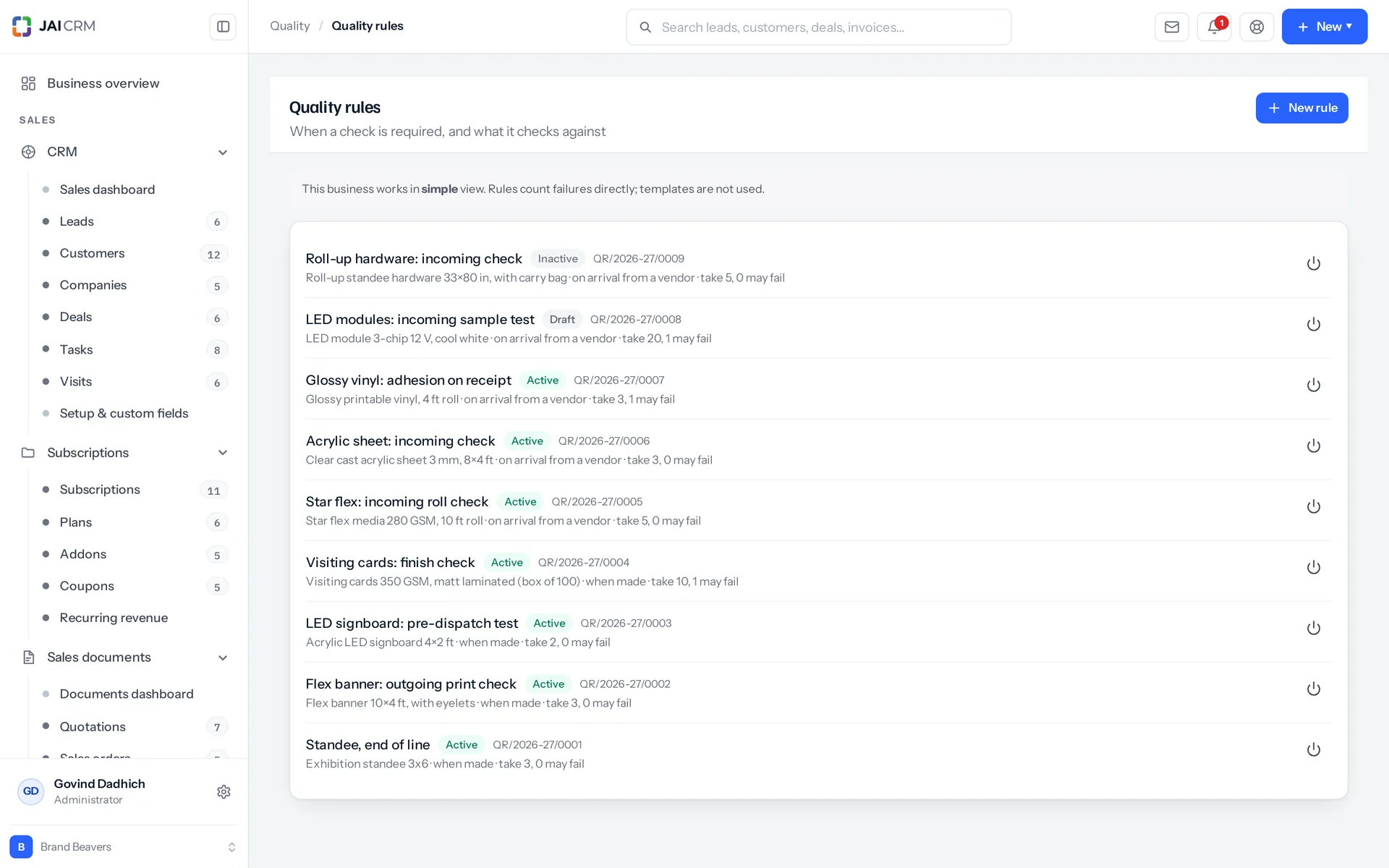
Quality rules that decide when an inspection is raised.
7 things it doesEvery one in the product today

What is Quality in JAI CRM?

Quality in JAI CRM is quality control software for businesses that make or buy stock. The system raises inspections on manufacturing orders and goods receipts, never by hand. Your team checks by eye or measures each unit, and the result comes from those readings. A manufacturing order cannot be marked complete until its inspections pass.

Nobody decides to skip the check. It just never happens.

Each of these is a quality problem that nobody ever decided on. A run was closed. A sheet was filled in after the stock had moved. Nobody was responsible for working out a percentage of a short run.

  • The batch that was fine until the customer opened it

    The run finished on Friday afternoon. Somebody was going to check it. The order was marked complete and the goods went into stock. They went out on Monday. The first real inspection was done by the customer's storeman. There is no record of a decision to skip the check, because nobody made one. The order simply closed, and closing an order is what puts stock on a shelf.

  • The sheet that was filled in after the stock had moved

    There is a clipboard by the machine. It is filled in honestly, at six o'clock, from memory. The stock moved at three. Whatever the sheet says, it could never have stopped anything. That is the difference between a record of the work and a control on it. Most small manufacturers have only ever had the record.

  • Five per cent of a run of seven

    Your sampling rule is written as a percentage, because that is how it was copied from the standard. So every short run turns into maths at the bench. Is it zero units or one, and who decides? The check that quietly gets skipped is almost always the one that started as a fraction.

  • The rejected goods you paid for in full

    Forty pieces arrive and six are wrong. Somebody writes "6 rej" in pen on the delivery note. The bill is passed for forty, because nothing in the system ever disagreed. The debit note (the document that claims money back from the vendor) never goes out. The loss is real, and nobody can point to the day it happened.

  • “It’s the finish”, and no two people mean the same thing

    In the improvement meeting, everybody knows what keeps going wrong, and everybody names something different. There is no number behind any of it. Failures were counted as rejected batches, not recorded as measurements. So the decision goes to whoever argues hardest, not to whatever actually fails most often.

What the quality control software does, in plain words

Nothing below is on a roadmap. Every one is in the product today, and a 14-day trial is long enough to check any of it.

The gate

A run that has not passed inspection cannot be marked complete

Quality stops a manufacturing order from being completed until its inspections pass. That is the whole module in one sentence. When you press Complete, the system asks quality first. If any inspection on that order has not passed, the press is refused. Without this, whatever came off the line goes into sellable stock, and the customer is the first to find out it was wrong.

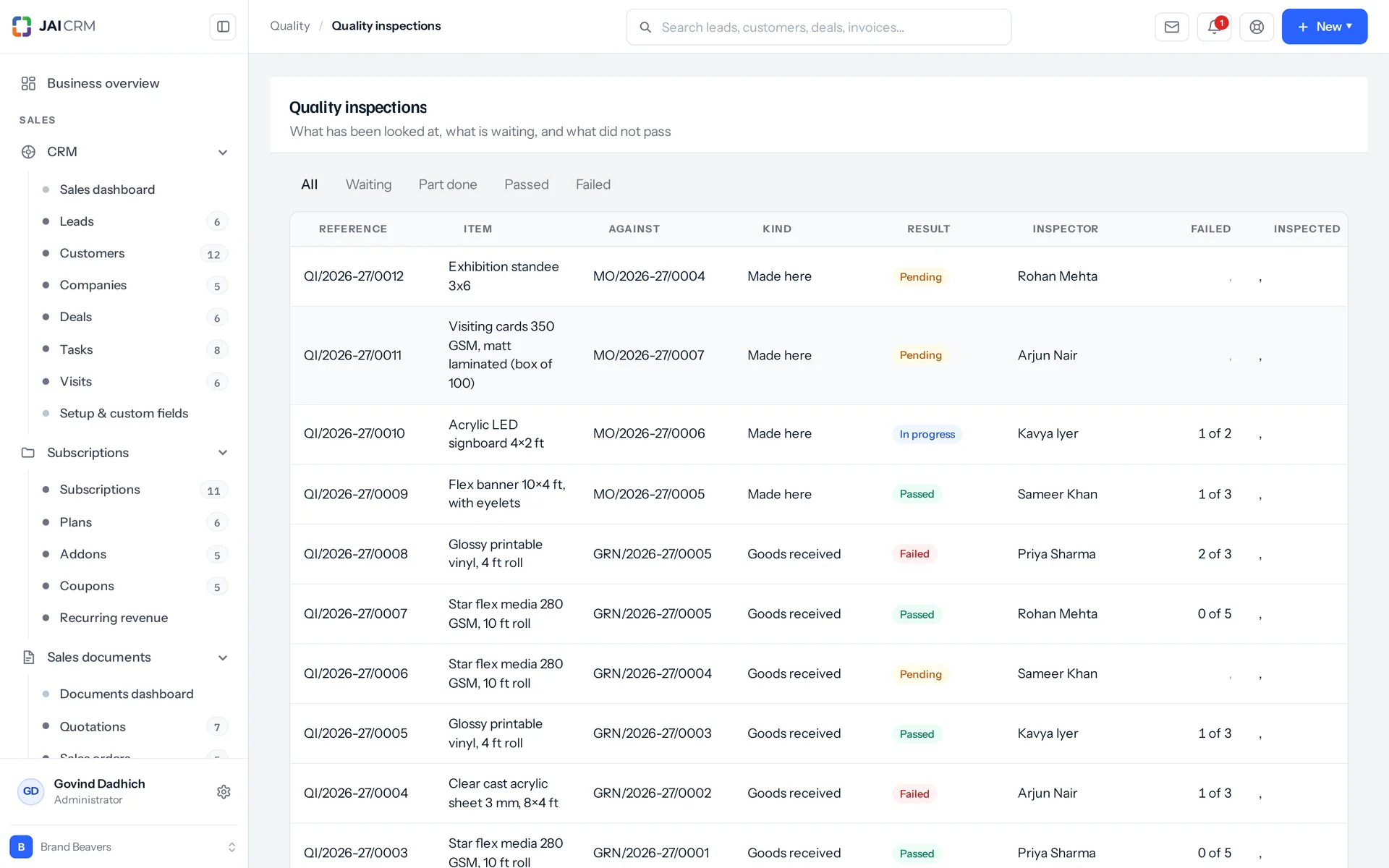
Quality inspections with pass, fail and pending results.
The refusal names the inspection
It does not just say "quality checks outstanding". The message gives the actual inspection numbers. So you spend the next five minutes finding a unit and measuring it, not working out which check was meant.
A failed check reads differently from a pending one
A pending inspection says it has not been done yet. A failed one says these goods cannot go into stock, and shows the way forward: an adjustment for what is scrap. A by-eye check entered wrongly can simply be recorded again. A measured check stands on the readings that were actually taken.
A goods receipt is not blocked, on purpose
A goods receipt is the record of stock arriving from a vendor. That stock is already in your building, good or not. Refusing to record it would leave the shelf and the register disagreeing, which is worse than recording it and flagging it. So the receipt posts, and the inspection is raised against it by number. A failure is a flagged document, not a rejected transaction.
Automated checks prove it, not just claim it
Two dozen automated checks build a run, release it, complete every job card and try to finish it. They count the stock on the warehouse shelf before and after. This shows that nothing which failed inspection reached the shelf.

Raising

Inspections appear when the work does, and nobody types one

The system raises every inspection itself, against a real order or a real receipt. There is no New Inspection button anywhere in the product, and no role can be given one. The permission registry (the list of what any role can be allowed to do) offers only view, edit and export on inspections. Every role is built from that list, including the Administrator preset.

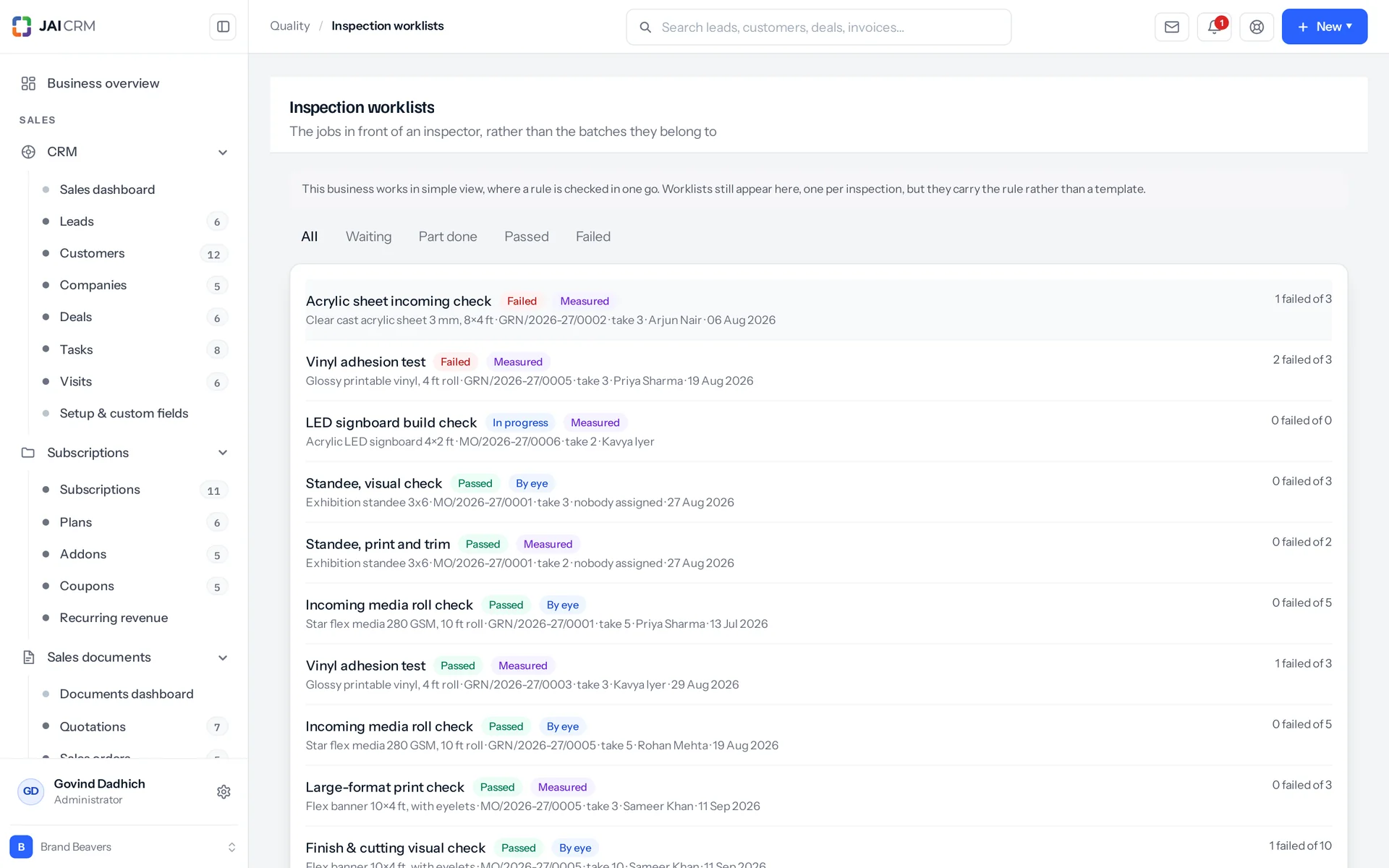
The inspection worklist: checks waiting for an inspector.
Raised on release, not on finish
A manufacturing order raises its inspections when it is released. So the inspector sees what is coming days ahead, not at the moment someone wants the order closed. If an inspection is still sitting there after two days, a reminder notification follows.
Raised on posting, not on draft
A goods receipt raises its inspections when it is posted, not when it is created. A draft receipt is just someone typing. There is nothing on a shelf to inspect yet.
Released, cancelled and released again is still one batch
Raising never makes a duplicate. If it is called twice for the same transaction, it hands back the inspection that already exists. That is one batch to look at, not two.
The order screen warns you before the inspection exists
A confirmed order that is not yet released checks separately whether an active rule covers the item. If one does, it says plainly that an inspection is raised on release, and the order cannot be finished until it passes. If no rule covers the item, the Quality tab is not shown at all. A tab that always says "nothing to check" teaches people to ignore it.

Templates and rules

What you measure and what it must be are two separate records

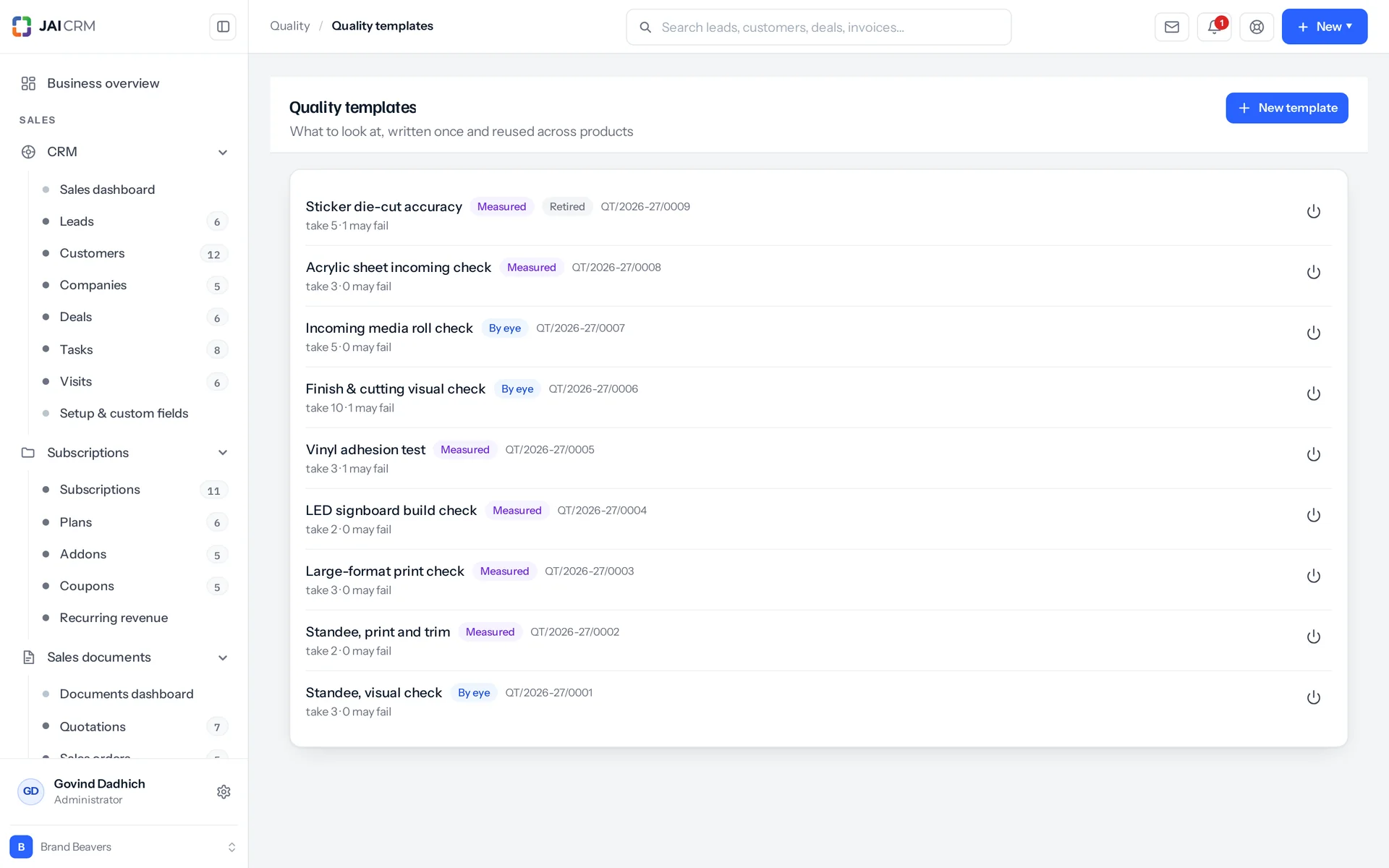
A template says what to measure. A rule says what the result must be for one item. For example, the template says there is a parameter (one thing you check) called shaft diameter, measured in millimetres and judged against a range. The rule says that for this motor the range is 24.9 to 25.1. This split is the whole point of templates: one template can serve forty products, instead of forty templates each serving one.

Quality templates listing the parameters to check and their limits.
Seven comparisons, three kinds of value
You can use equal to, not equal to, greater than, less than, greater or equal, less or equal, and between. They work on whole numbers, decimals and true/false. A range typed backwards still works, because the two ends are sorted before use. A "between" with only one end filled in is refused when you set it up. If one ever reaches judgement, it fails.
Six decimal places, on both sides
The limit on the rule and the reading taken at the bench are both kept to six decimal places. An instrument reading rounded to two places is a different measurement from the one actually taken.
Two rules can never apply to the same thing
You get one rule per item per transaction type. The system refuses a second one, and a unique index in the database blocks it again. If two rules both fired, there would be no honest answer to which one counts. So you edit the rule that exists.
Sample sizes are counts, not percentages
You say "take two units, allow one failure". Five per cent of a run of seven is a conversation nobody should have at a bench. Every sampling standard a small manufacturer actually follows is written in units anyway. Sample size can be 1 to 100,000. Allowed failures can be 0 to 100,000.

At the bench

Two ways to check, and one screen that knows which you chose

You can check by eye or by measuring, and both are judged just as strictly. A furniture shop looks at a chair and sees a scratch. A motor plant measures insulation resistance in megohms. Those are different jobs, so there are two modes. Both end with the same question: did more units fail than the allowance? The mode changes what you are asked for, not how strictly it is judged.

By eye is one number
Simple view asks for the count of units that were not good enough, the date of the check and a remark. Units passed is worked out from the sample size. "The chair was scratched" is a count. Dressing it up as a measurement helps nobody.
Measured is one unit at a time
Advanced view takes the readings for one unit and judges every parameter on the spot. It marks that unit passed or failed, stores the verdict for each reading and moves the worklist along. Your browser also judges it live, beside the box, as a courtesy. The browser does not make the decision.
The limit is shown where you type
Under each column, the limit is written in words, like "24.9 mm to 25.1 mm", "≥ 92 %" or "not yes". The rule's limits are fetched with the inspection and attached to it. So the inspector reads what a figure is judged against right beside the figure, not on another screen.
Each mode refuses the other's kind of input
A worklist is one checking job inside an inspection. You cannot close a measured worklist with just a count of failures, and a by-eye worklist will not take measurements. You also cannot finish a measured worklist before the sample has actually been taken. The screen tells you "1 of 2 units have been measured": finishing now would pass a batch on a sample that was never taken.

Judgement

Four simple pass rules, and a verdict nobody can type in

The pass or fail result is worked out in four steps. A reading passes when it meets its limit. A sample passes only when every reading on it passed. A batch passes when the failures are within the allowance. An inspection passes only when every worklist passed. All four are plain arithmetic in one file with no database behind it. That is why they can be tested, not just trusted.

One bad measurement makes a bad unit
It does not matter how good the rest of the unit was. A sample is not an average of its readings, and there is no weighting anywhere in it.
A blank allowance means zero, not unlimited
Most software reads an empty box as "no limit set". Here, if allowed failures is blank, one failure fails the batch. The screens print "none may fail" instead of showing you an empty box. This is the one module whose job is to refuse things. A blank that quietly allowed failures would be the worst possible default.
A reading nobody took does not pass
If a parameter is left blank on a unit, that unit is recorded as failed, not skipped. The dialog warns you before saving: it says how many parameters were not read, and that a unit with a missing reading counts as failed. Otherwise a batch could pass with a skipped parameter, and the inspection would certify something nobody looked at.
Nobody can set the verdict by hand
An inspection passes or fails because of what was measured, not because someone typed the word. The status field is declared in the editor on purpose, so any attempt to set it reaches the guard and is refused outright. An undeclared field would be silently dropped, and the caller would be told it worked. Also, an inspection with one worklist still pending has not passed. It has not finished, and those words mean different things for a reason.

Reports

Three quality reports, and one tells you what to fix

Quality gives you three reports: a register, a failure analysis, and a rejection rate for goods made here against goods bought in. Most quality software only gives you a register: what was checked and how it came out. Here that is the first of three, and the least interesting. The other two answer questions a register cannot answer at all.

The register
It covers ninety days by default, up to five thousand worklists. For each one you see the date, what it was raised against, the item, what it was checked against, the sample, how many failed, the inspector who signed for it and the result.
Which parameter keeps failing
Failure analysis reads up to twenty thousand individual readings. It ranks parameters by how often they fail, with the failure rate, the share of all failures and the item names it happened on. That is a list of what to fix, in order. It is a tool for improving your process, not a compliance log.
Made here against bought in
This shows the rejection rate per item per transaction type, worst first. The same item failing on your own floor and failing in a vendor's delivery are two different problems. Each needs a different conversation.
An empty report says why it is empty
If no readings exist, the failure report says so in words: no measurements have been recorded, and this report reads individual readings, which only advanced view collects. An empty report and a report of nothing look the same, but they mean opposite things.

Control

An inspector cannot switch off the check they are responsible for

The QC role lets inspectors do checks but not switch rules on. The module comes with a Quality (QC) role. A QC user gets view, edit and export on inspections, but only view on rules and templates. Activating a rule is what makes it block production. That needs edit on rules, which is exactly what the preset role does not grant.

The inspector is a person, not a login
An inspection is signed for by someone on the staff list, with a name and a ticket. The browser they used is not that. Bench staff who never log in can still be the named signatory. The bench screen records nothing at all until one is named.
Last year's result stays last year's result
Whether a reading passed is stored when it is taken, not recalculated later. The sample size and allowance are copied onto the inspection when it is raised. If you edit the rule's limits next year, nothing about last year moves. Whether a reading passed on the day is a fact about that day.
Used means frozen, not hidden
Once a template is attached to a rule, you cannot change what it measures or delete it. You can mark it inactive, or clone it and attach the copy. A rule with inspections against it cannot be re-scoped (changed to cover a different item or transaction type) or deleted either. Those inspections are records of checks that were really done.
On the record, in plain English
Actions are written to the record in plain words, for example: "QT-0007 written, quantitative, sample of 2", "QR-0003 marked active", "QI-0012: Standee, print and trim failed, 1 of 2 failed" and "QI-0012 assigned to a named inspector". There are three numbering series with prefixes you control, set up before anyone goes looking for them. All three record types work like everything else in the suite: filtered lists, CSV export, kanban, pivots, bulk edit, assignees, timelines and threaded notes. Custom fields go on templates and rules. An inspection does not take them, because every figure on it is either copied from the rule or measured at the bench.

Who opens Quality, and what for

Swipe through the people who use it every day.

The inspector at the bench

The inspector opens Worklists, not Inspections. Worklists is a queue of jobs across every inspection in the business, up to five hundred of them. Each shows the item, the transaction number, the sample to take and who it is assigned to. Filters show waiting, part done, passed and failed, so someone starting a shift can pull up the waiting ones. That is a different question from the inspections list, asked by a different person. An inspector wants the jobs in front of them, not the batches those jobs belong to.

The supervisor trying to close a run on a Friday

They press Complete. If a check is still outstanding, the refusal names the inspection, so there is nothing to work out. If the check failed, the message says these goods cannot go into stock and points to the fix: an adjustment for what is scrap. Nobody can wave it through from that screen. There is no override on the button, and no message in a group asking whether it is alright to ship.

The stores clerk posting a delivery

The receipt posts and the goods go on the shelf, because they are in the building either way. The inspection is raised at that same moment, carrying the receipt number. The accepted and rejected quantities the clerk typed when booking the delivery in are already on the line. The inspection is a second opinion on what was accepted. Together, the two are what your purchase team takes to the vendor before the bill is passed.

The quality manager setting up rules before they take effect

Rules start as drafts, and a draft enforces nothing. You can write every template, set every parameter, attach them to every item and fill in every limit while the shop carries on exactly as before. Then you switch rules on one at a time. A module that started refusing things the moment a row was saved would be unusable.

The owner who keeps being told “it’s the finish”

The failure report ranks parameters by how often they actually fail, across every product at once. It shows the failure rate, the share of all failures and the items it happened on. It ends the argument with a list instead of an opinion, and points to the one change worth making next.

The purchase team in a rate discussion

They get the rejection rate per item, made here against bought in, worst first. It is not a supplier scorecard and does not pretend to be one. It is the number you take into the meeting. What follows from it, such as a rate change or a supplier blocked with the reason written down, happens on the vendor record.

What is different once you have it

The complaint you never receive

The fault is found by someone holding the unit, before the run closes and before the stock exists. This is not because a policy says so. It is because the button that would put it on the shelf refuses, names the inspection and cannot be argued with. None of that depends on who is on shift.

An answer when someone asks what was actually measured

Every reading is kept against the unit it came from: its serial number if the item is serial-tracked, or its place in the sample if not. Readings are judged to six decimal places, and the verdict is stored beside each one, not worked out again later. The date of the check and the person who signed for it are on the inspection above. When a customer or an auditor asks what was measured, you have a chain to show them, not a cabinet to search.

Rejections that turn into money, not annoyance

A failed delivery is recorded and flagged, not refused. The receipt posts with the clerk's own accepted and rejected figures on the line, and the inspection is raised against that receipt. A failure sends an email the moment the result is settled. So the shortfall is a numbered document someone is looking at while the bill is still unpaid. It is not something noticed at year end by a person who cannot prove it. Raising the debit note is still a decision someone makes, in Purchase.

A list of what to fix, in order

Most quality systems tell you how much was wrong. This one tells you which parameter is causing it, on which items, and how often. So you choose your next process change from twenty thousand readings, not from whoever spoke last in the meeting.

What it works with

On its own it is a better spreadsheet. The value arrives when what it makes is what another part uses, with nobody typing it again.

Inventory

You cannot buy Quality without Inventory, and that is not a bundling trick. The two things Quality controls, a manufacturing order and a goods receipt, are both part of inventory. A quality module with nothing to inspect is just a filing cabinet. About Inventory

Manufacturing

Inspections are raised when an order is released, and the order cannot be marked complete until they pass. The order screen tells you an inspection is coming before one exists. It hides the Quality tab completely where no rule covers the item. About Manufacturing

Procurement

A posted goods receipt raises its own inspections: one for each received item that has an active rule for goods received. Each inspection carries the receipt number. The clerk's accepted and rejected figures are already on the receipt line. Neither of these writes the debit note for you. That is a purchase document a person raises. But together, they put two records behind the month-end argument, instead of a pen mark on a delivery note. About Procurement

Vendors

The by-transaction report gives a rejection rate per item for goods you buy in. What you do about it, such as a rate discussion or blocking a supplier with the reason written down, happens on the vendor record. That is where the next buyer will actually read it. About Vendors

Notifications

Three notification templates come with the module: an inspection waiting, an inspection failed, and an inspection still waiting after two days. When an inspection settles, only a failure sends a notification. A pass is the expected result, and the run carries on. A failure stops the run being completed, and nothing else on screen says so until somebody tries. About Notifications

Reports & analytics

Besides the three quality reports, all three record types can be pivoted and exported like everything else in the suite. For example, you can group inspections by status, transaction type or item, with units passed and units failed as the measures. About Reports & analytics

Take Quality on its own, or take the lot

Priced per person, per month, in rupees, with GST shown separately. Every plan includes the basics of the whole product: custom fields, roles, reports, documents and notifications. Change plan whenever you like and nothing is typed again.

5 people

CRM + Sales Documents

Leads, customers and deals, with quotations and GST invoices

₹149 per person a month

For 5 people: ₹745 a month, billed as ₹8,940 a year. ₹10,549.20 with 18% GST.

  • Leads, customers, companies and deals
  • Quotations, sales orders and GST invoices
  • Your own mailbox, with replies filed against the record
  • Reports, dashboards and exports
  • 1 GB storage per workspace (organisation)
Start free

CRM + Sales Documents + Subscriptions + Warranty

For a business that bills on a cycle and stands behind what it sells

₹299 per person a month

For 5 people: ₹1,495 a month, billed as ₹17,940 a year. ₹21,169.20 with 18% GST.

  • Everything in CRM + Sales Documents
  • Recurring billing, plans, add-ons and coupons
  • Warranty registration and claims
  • Items and stock, which warranty is held against
  • 1 GB storage per workspace (organisation)
Start free

Every plan, and what is in each Prices in rupees, per person, per month. Parts can also be bought on their own.

Only want Quality?

Any single part is ₹149 per person a month on the yearly rate, with the settings, reports, documents and notifications that go with it. See every part’s price.

A part you do not buy

Is not in your menu. Not greyed out behind an upgrade message, just not there. That is why the product is sold in parts.

How many people, and can I change it?

You choose when you sign up and change it whenever you like, up or down. There is no minimum number of users and no penalty for going down.

Yearly or monthly?

Both. Yearly works out cheaper per month and is paid once at the start. Monthly costs a little more and stops at the end of any month.

Questions people ask about Quality

Answered in full. If yours is not here, ask us. A person replies.

Ask us something
What is the Quality module in JAI CRM?

It is quality control software that holds back stock nobody has checked. The system raises inspections on manufacturing orders when they are released, and on goods receipts when they are posted. Your team checks by eye, or measures each unit in the sample. The pass or fail result comes from those readings, and a manufacturing order cannot be marked complete until its inspections pass.

Who is JAI CRM's quality control software for?

It is for businesses that make goods, buy stock in, or both, and want every batch checked on the record. If you only buy in, rules on goods received work on their own. It needs Inventory. It suits manufacturing, engineering and fabrication, pharmaceuticals, textiles and apparel, food and FMCG, printing and packaging, and trading and distribution.

How much does the Quality module cost?

Quality starts from ₹149 per user per month. You also need Inventory, because the two things Quality controls, a manufacturing order and a goods receipt, are both part of inventory.

Do I need to buy Inventory to use Quality?

Yes. Quality lists Inventory as a requirement, because the two transactions it controls, a manufacturing order and a goods receipt, are both inventory. A quality module with nothing to inspect is just a filing cabinet. Manufacturing is optional. If you only buy stock in, rules for goods received work perfectly well on their own.

Can an inspector just mark a batch as passed?

No. The result is worked out from what was measured against what was allowed, and setting the word directly is refused. The status field is declared in the editor on purpose, so the attempt reaches the guard and is turned down. If the field were simply left undeclared, the change would be quietly dropped and the caller told it had worked, which is worse. An inspection that could be passed by typing is not evidence of anything.

Is quality control software useful if we only buy goods and do not manufacture?

Yes. A rule is written for an item and a transaction type, and goods received is one of the two types. You do not need to switch on anything about manufacturing. Inspections are raised the moment a receipt is posted. You get the same templates and limits, the same bench screen and a rejection rate per item, without a single bill of materials (BOM, the list of parts that go into a product) in the system.

Does a failed delivery from a supplier get blocked?

No, and that is on purpose, not something missing. Stock from a vendor is already in your building, good or not. Refusing to record it would leave the shelf and the register disagreeing, which is worse than recording it and flagging it. So the receipt posts, the inspection is raised against that receipt number, and a failure is flagged on a document someone can act on. A person raises the debit note itself, in Purchase. A manufacturing order is the opposite case, because that stock does not exist yet. There, completion is refused outright.

We check things by eye, not with instruments. Does that count?

Yes. It is a proper mode, not a workaround. Simple view asks for one number: how many of the units you took were not good enough. It works out how many passed from the sample size. The allowance is judged the same way, and the run is blocked just as firmly. The two modes change what you are asked for, not how strictly it is judged.

If we change a quality limit next year, what happens to old inspections?

Nothing at all. Whether a reading passed is stored when it is taken, not recalculated on the way to the screen. The sample size and allowance are copied onto the inspection when it is raised. So changing a rule next month cannot rewrite whether last month's batch passed. In the same way, a template already attached to a rule cannot have what it measures changed. A rule with inspections against it cannot be re-scoped or have its limits edited at all. You clone it and attach the copy, so the old records still describe a check that was really set up.

Can someone without a login be the inspector?

Yes, and that is how it is meant to work. The inspector is an employee on the staff list, not a user account. An inspection is signed for by someone with a name and a ticket, and the browser they used is not that. Bench staff who never log in can still be the named signatory. The bench screen will not record anything until one is named.

What happens if the inspector skips a parameter?

The unit is recorded as failed, not skipped. Before saving, the measure dialog warns you how many parameters were not read, and that a unit with a missing reading counts as failed. Then it does exactly that. Otherwise a batch could pass with a skipped parameter, and the inspection would certify something nobody looked at.

Will quality checks start blocking orders the day we switch them on?

Only where you tell them to. Rules start as drafts, and a draft enforces nothing. You can write the whole set of rules while the shop carries on as before, then switch them on one rule at a time. In measured mode, a rule with no templates cannot be activated at all, because an active one with none would raise an empty inspection. Other mistakes are also refused when you write them, not found later at a bench. Two examples: a quantitative (measured) template with no parameters, and an allowance of five failures in a sample of two.

Can we trace a quality reading back to one particular unit?

Yes, where the item is tracked that way. Readings are stored against the sample they were taken from. For a serial-tracked item, that sample carries the serial number of the unit measured. There is one reading per parameter per unit, and duplicates are not possible. If the item is not serial-tracked, the sample is unit one, unit two and so on of what you took. The reading shows which parameter, what it read and what it was judged against. The inspection shows when the check was done and who signed for it.


Long enough to know, and it costs nothing to find out

Switch on quality, put a week of real work through it, and see whether it holds. If it does not, walk away. We did not ask for a card.