Skip to the content
JAI CRM

ExhibitionsVisiting cards, exhibition returns

Visiting card scanner that tells you what each exhibition earned

Scan every card at the stall, say ten seconds about the conversation, and file it as a lead, a customer or a supplier. Weeks later, one report shows what the fair cost and how much money it actually brought in. Included in every plan, from ₹149 per user per month.

No card needed. From ₹149 per person a month.

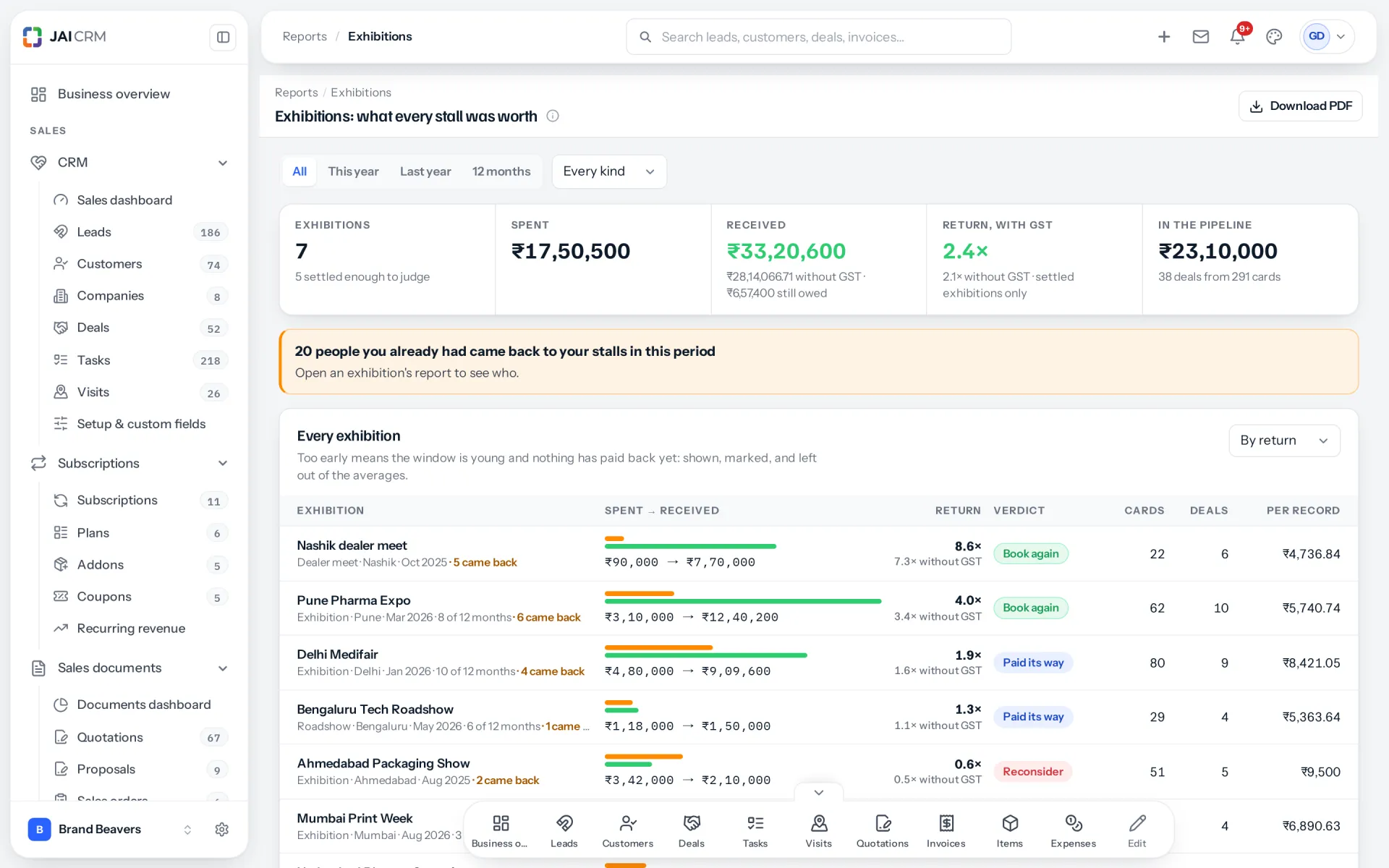
Every exhibition side by side: what each cost, the money it brought in and the return on each.
7 things it doesEvery one in the product today

What is Exhibitions in JAI CRM?

The Exhibitions module in JAI CRM is a visiting card scanner joined to your CRM. At a stall you photograph each card, add a short voice note and tag how warm the person is. Each card becomes a lead, a customer or a supplier with a follow-up task due in 48 hours. A report then shows what the exhibition cost and the money it actually brought in.

Why do exhibition leads go nowhere?

A fair costs lakhs and three days of your best people. You come back with a box of visiting cards and a feeling that it went well. Six months later nobody can say what it brought in, because the cards, the conversations and the sales that followed were never joined up.

  • The box of cards nobody types in

    Three hundred cards come back from the fair. Somebody is meant to type them into the CRM. It takes a week, it happens in pieces, and by the time the last card is in, the people on the first ones have forgotten your stall.

  • The conversation that is gone by Monday

    At the stall you heard exactly what each person needed. On Monday you have a name, a company and a mobile number. The part that would make the follow-up worth reading was never written down, so the message you send could have gone to anybody.

  • The follow-up that waits for a quiet day

    Back at the office there is a week of work waiting. The cards sit in a drawer until things calm down. Things do not calm down. The people who were keen at the stall buy from whoever rang first.

  • The fair that "went well"

    The stall cost space, a build, travel, and three people for four days. When somebody asks whether to book it again, the only answer is a feeling, or a pipeline figure full of quotes nobody has paid. Nobody can point to the money that came in from it.

  • The same customer, entered twice

    The person at your stall already buys from you, under a slightly different company name. Their card is typed in as a new lead. Now one customer has two records, two owners, and a salesperson chasing them as a stranger.

What Exhibitions does, in plain words

Nothing below is on a roadmap. Every one is in the product today, and a 14-day trial is long enough to check any of it.

At the stall

Scan a card in seconds, front and back

Open the scanner, point the phone at a visiting card and take the picture. The card goes into the exhibition that is happening now, and the camera is ready for the next visitor. Nothing is typed at the stall, because the stall is the worst place to type.

Each visiting card picture taken at the stall on the phone camera, kept in the exhibition and ready for the next visitor.
The back, added after the front
Many Indian cards carry the address, the GSTIN or a second number on the back. Add the back after the front and its details are merged in. Anything you have already corrected is left as you corrected it.
QR codes on the card are read too
A QR code holding a contact card is read straight into the fields. That is often more complete than the printed text, and it is exact.
Photographs of the stall, kept apart
A second camera mode keeps pictures of the stand, a product or a competitor's display on the exhibition itself. They never end up in the queue of cards to file.
Look up, without keeping anything
A third mode reads a card only to tell you whether you already know this person, then keeps nothing. Useful when an existing customer walks up and you want to know who looks after them.

Reading

Every field on the card lands in the right place

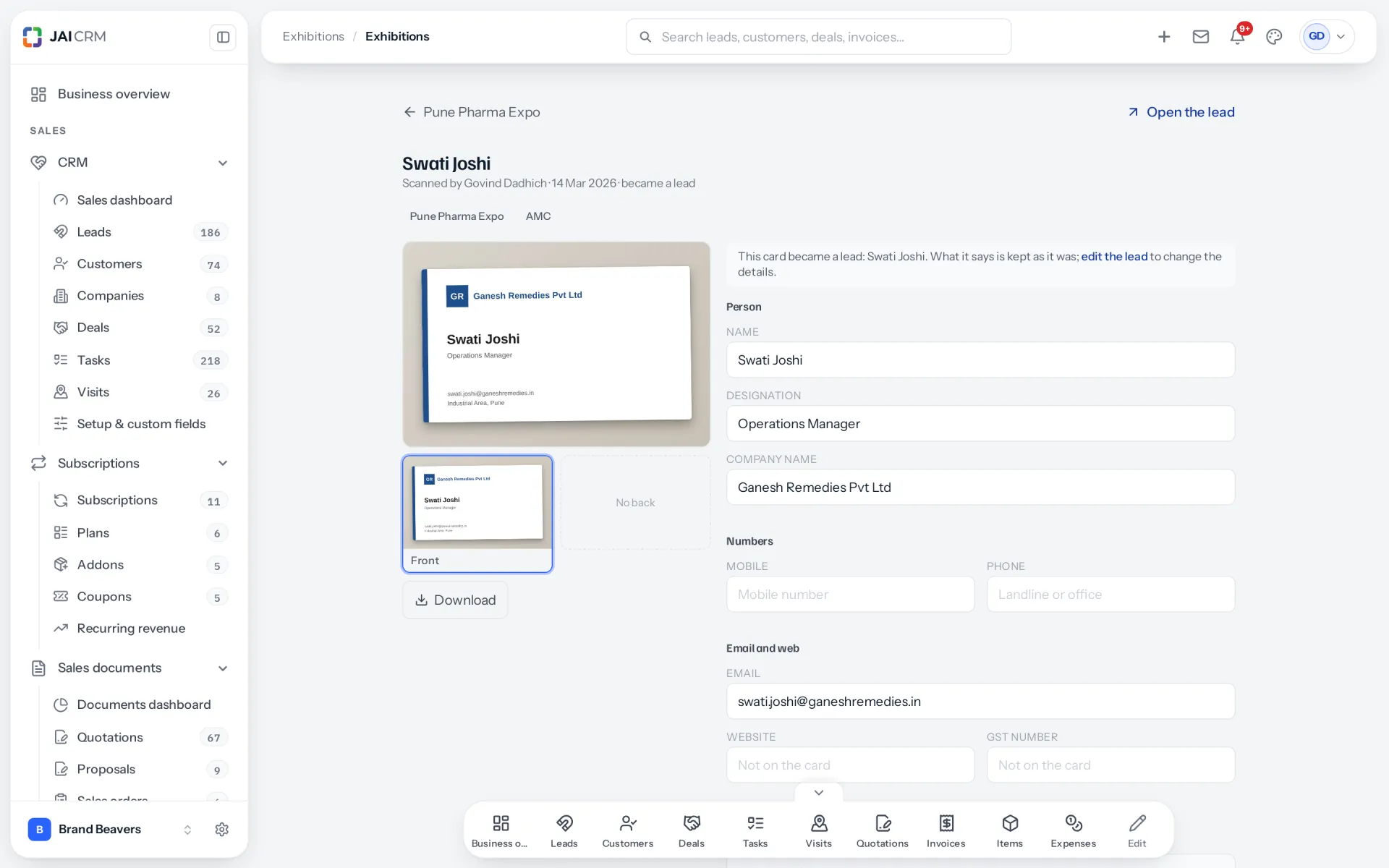
The card is read into name, designation, company, every phone and mobile number, every email, website, GSTIN and address. The address is split into street, city, state and PIN. It is read with AI where your workspace uses its own AI key, and by our own reader otherwise.

One visiting card read into every field: name, designation, company, email, address, city and state beside its photograph.
Several numbers, not one
Indian cards often carry two mobiles, a landline and a board number. Up to four mobiles, three phones and three emails are kept, each in its own field, rather than the first one found.
The PIN gives the state
Where a PIN code points to one state, the state is filled in from it. That matters for GST later, when this person becomes a customer you invoice.
Unsure fields are marked
A field the reader is not sure about is underlined on the review screen, so you check two fields rather than all twenty.
Your choice whether AI reads cards
Reading cards with AI is a switch under Settings, on by default for workspaces that have an AI key. Switch it off and cards are read on our own server only.

Voice notes

Ten seconds about the conversation, kept with the person

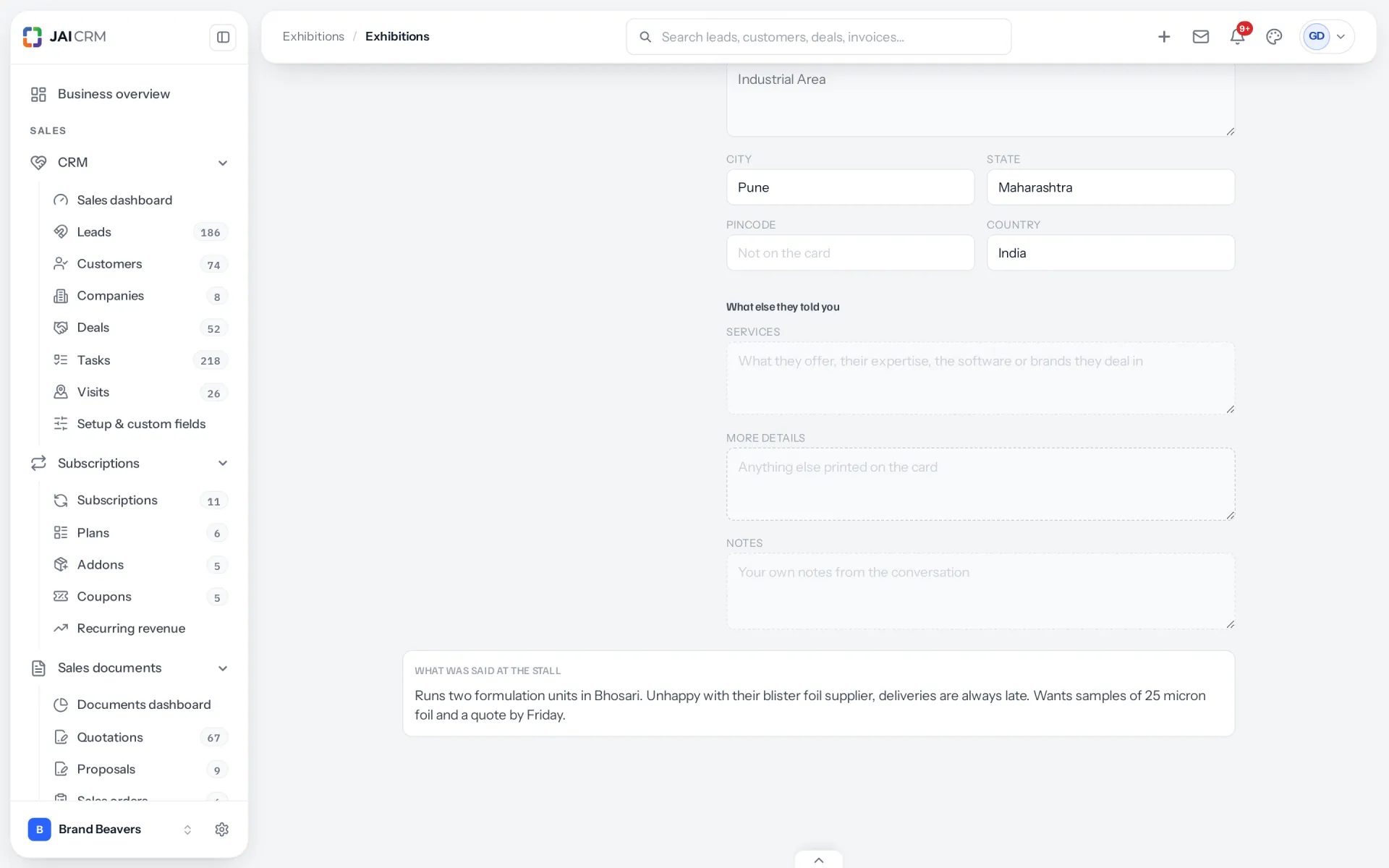
Hold the button and say what you just heard: what they make, what is wrong with their current supplier, when they want to decide. It is written out as text and attached to the person once the card is filed. The ten seconds you speak at the stall are the most useful thing on the card.

Voice notes from the stall, written out as text: the conversation with the person, kept on their card.
Faster than writing on the back of the card
A busy stall gives you seconds between visitors. Speaking takes less time than writing, and it keeps the person's own words.
Written out for you
The recording becomes text, with AI where your workspace chooses it and on our own server otherwise. The text is what your team reads.
It travels with the follow-up
The follow-up task carries the note. So the person who rings on Tuesday reads "runs three pharmacies in Pune, unhappy with delivery times", not just a name.
Hot, warm or cold
Tag each card as hot, warm or cold on the review screen, so the keenest people are rung first.

No signal

Keeps scanning when the exhibition hall has no network

Exhibition halls are full of phones and short of signal. Cards and voice notes are kept on the phone and sent by themselves once the connection returns. The scanner never waits for the network, so the queue at your stall keeps moving.

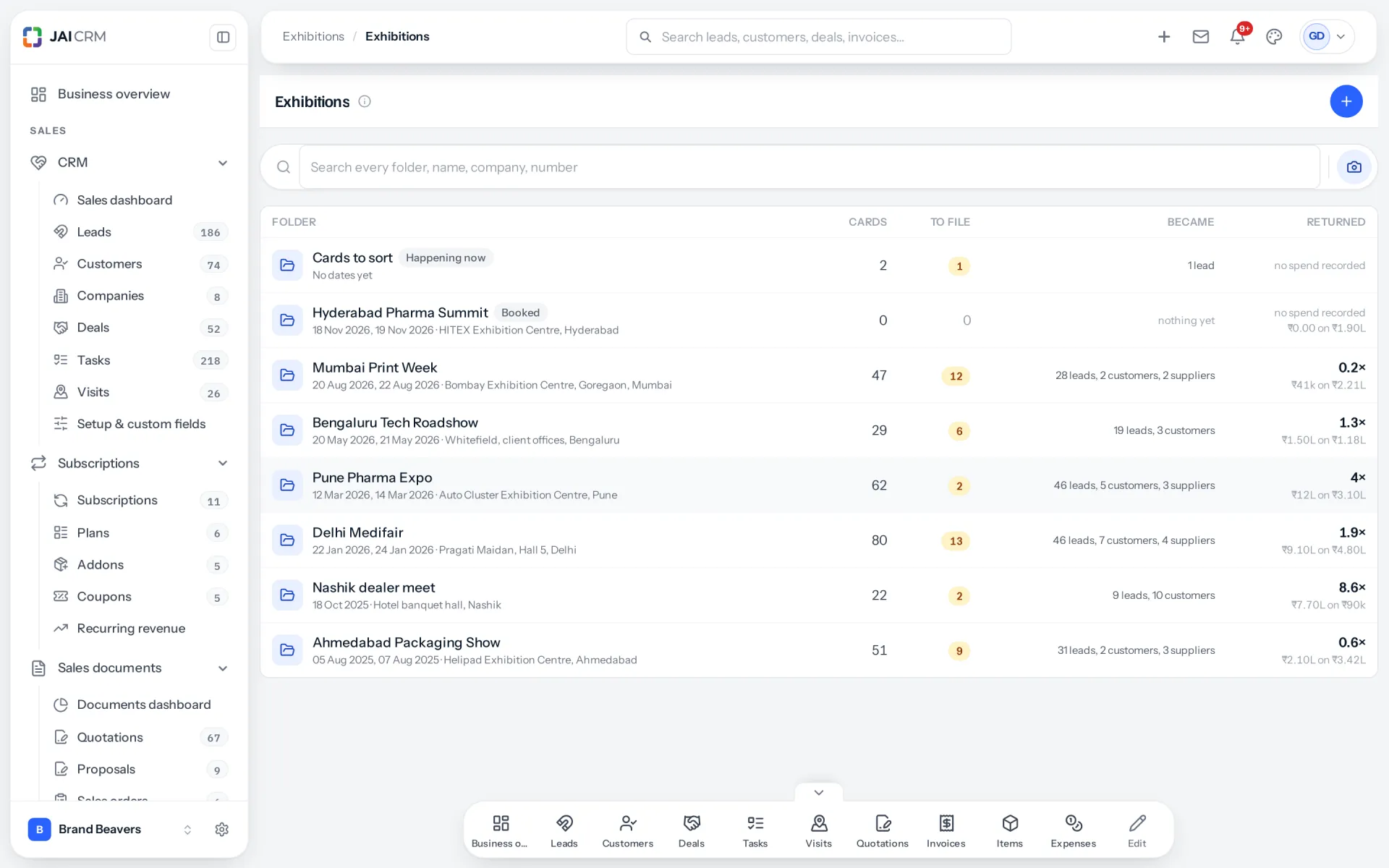
The exhibitions list: cards scanned at each exhibition, cards still to file, what they became and the money received.
Nothing lost if the app closes
A card waiting to send is stored on the phone, not held in memory. Close the app, or let the battery run down, and it is still there when you open it again.
It says so, rather than showing an error
With no signal, the scanner says the cards are kept on this phone and will send later. Nobody at the stall is left wondering whether a card was lost.
Lock a shared phone to the scanner
Stall mode keeps a shared phone on the scanning screen. Leaving it needs a staff PIN, so a phone handed around the stall cannot wander into the rest of your CRM.
Somebody who only scans
The right to scan is its own permission. A temporary hand at the stall can add cards and see their own, without reading or filing anybody else's.

Filing

Each card becomes a lead, a customer or a supplier

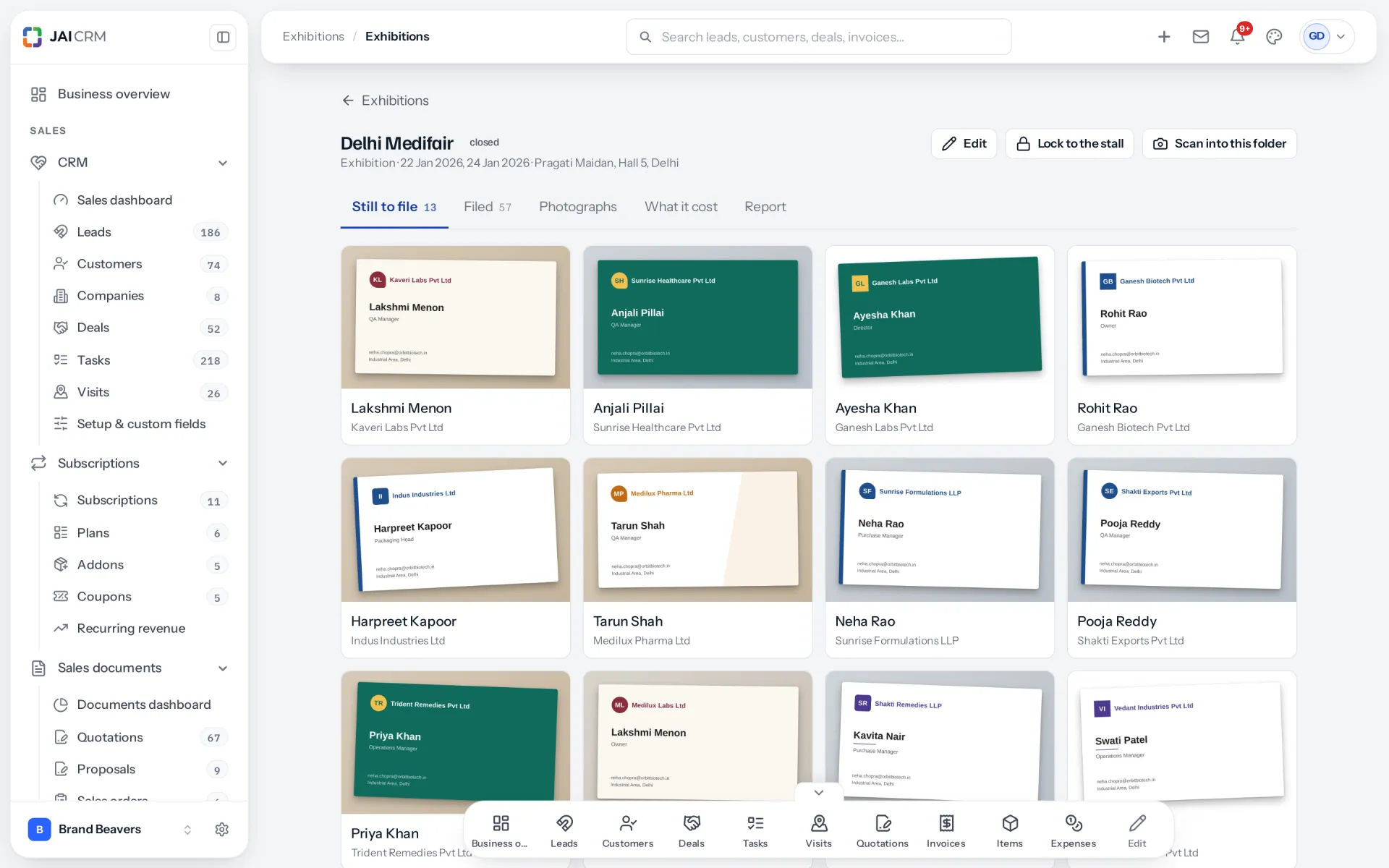
Back at the office, the exhibition's Still to file tab is the queue. Check each card, choose what it becomes, and file it. A lead or a customer gets an owner and a follow-up task due in 48 hours. A supplier you met at the fair waits for approval before anybody can order from them.

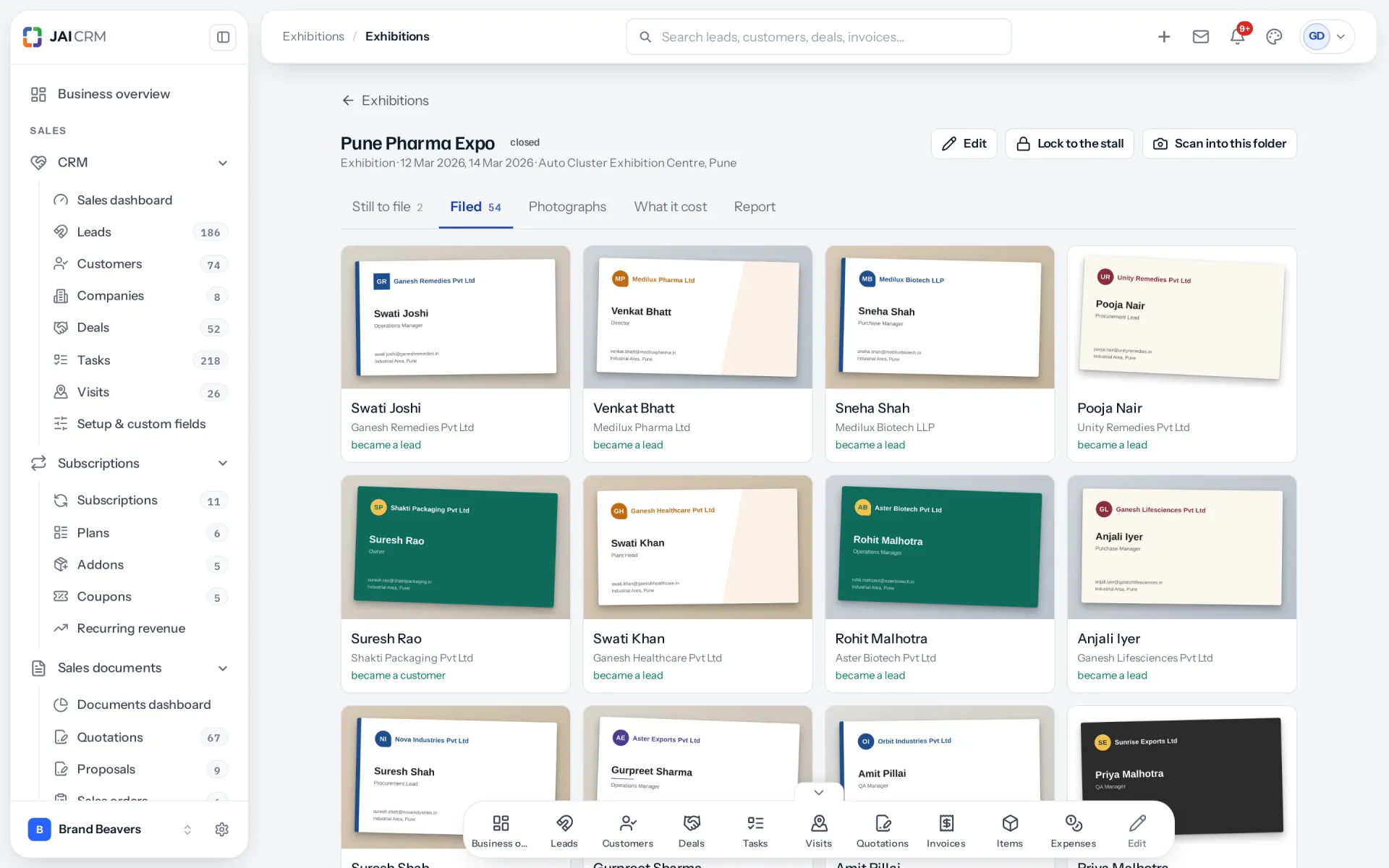
Cards filed from one exhibition, each showing whether it became a lead, a customer or a supplier.
People you already know are found first
Before filing, the card is matched against your customers, leads and suppliers: by GSTIN, by mobile number (the last ten digits), by email, and by company and city together. A match is shown, never forced, and you decide.
An existing customer is not entered twice
File the card against the match and the existing record is marked as met at this exhibition. The customer keeps one record, one owner and one history.
A follow-up task with a date
Filing a card raises a task for the record's owner, due 48 hours later and carrying the voice note. The card does not sit in a drawer, because it is now somebody's job with a date on it.
Suppliers wait for approval
A card filed as a supplier lands among suppliers waiting for approval, with no follow-up task. Somebody checks them before the first purchase order, which needs the Vendors module.

What it cost

Every rupee the fair took, including your people's days

Each exhibition keeps its own costs: stall space, the build, travel, printing, anything you spent. Against each you can put a budget and what was actually spent. Staff days count too, at a day rate, because three people at a stall for four days are three people not selling anywhere else.

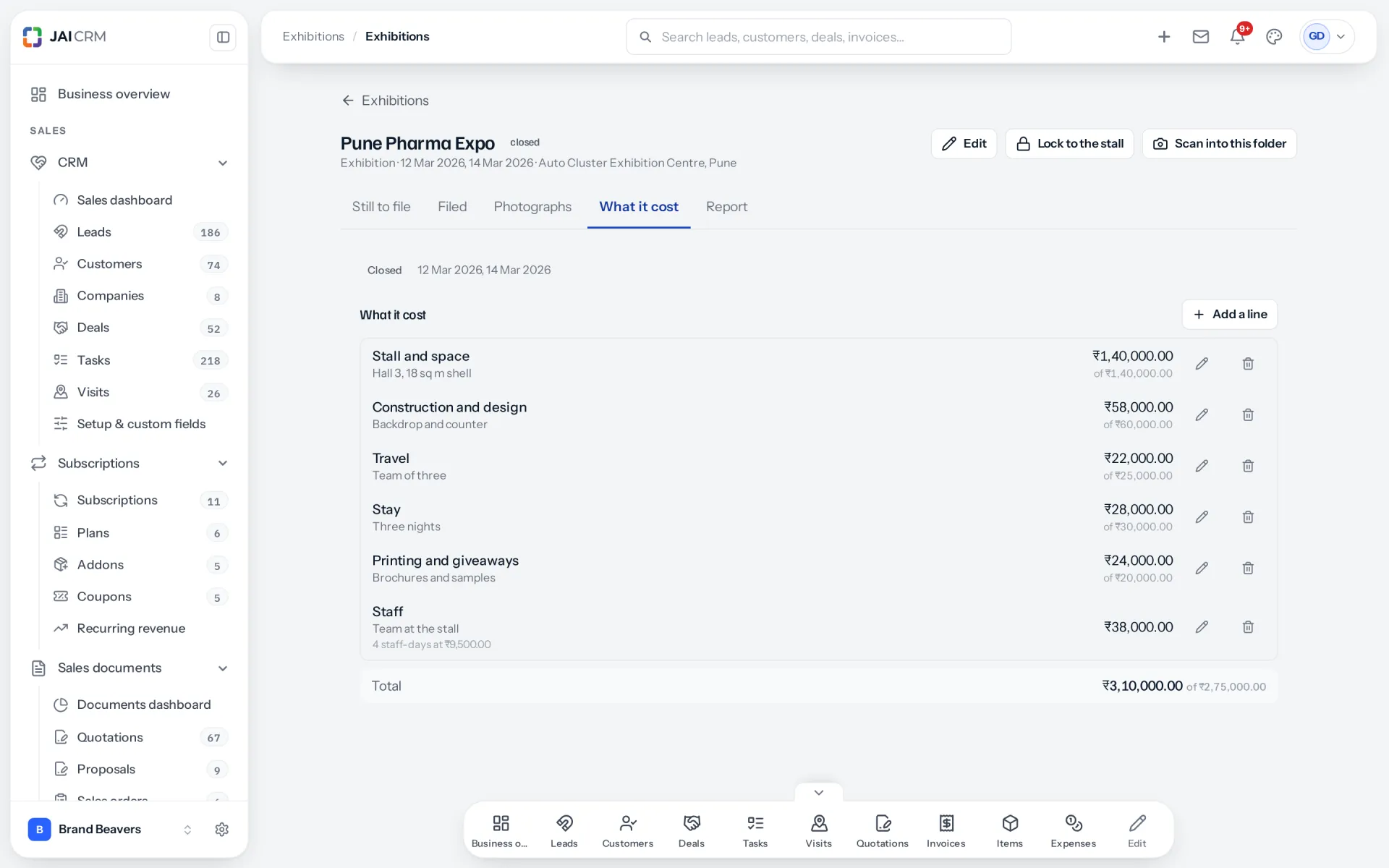
What an exhibition cost: stall space, build, travel and staff days at a day rate, budget against actual.
Budget, then actuals
Before the fair, the budget is the cost. Once actual amounts are entered, they replace it. So the report is honest before the bills arrive and exact after they do.
Staff days at a day rate
Enter the days and a day rate, and the time your people spent is added to the cost. Leave staff out and every fair looks better than it was.
A target for cards
Set how many cards you hope to collect, and the report says whether the stall met it. It is optional, and it is not the measure that matters most.
Fairs, meets and roadshows too
Exhibition, conference, roadshow, dealer meet or webinar, or a kind you name yourself. Each one is a folder with its own cards, photographs, costs and report.

The report

What the stall was worth, in money received

The report counts money that reached your bank from people you met at the fair, against everything the fair cost. Quotes and pipeline do not count. A stall that pays for itself on paper but not in the bank has not paid for itself, so won-but-unpaid sales are shown separately as owed.

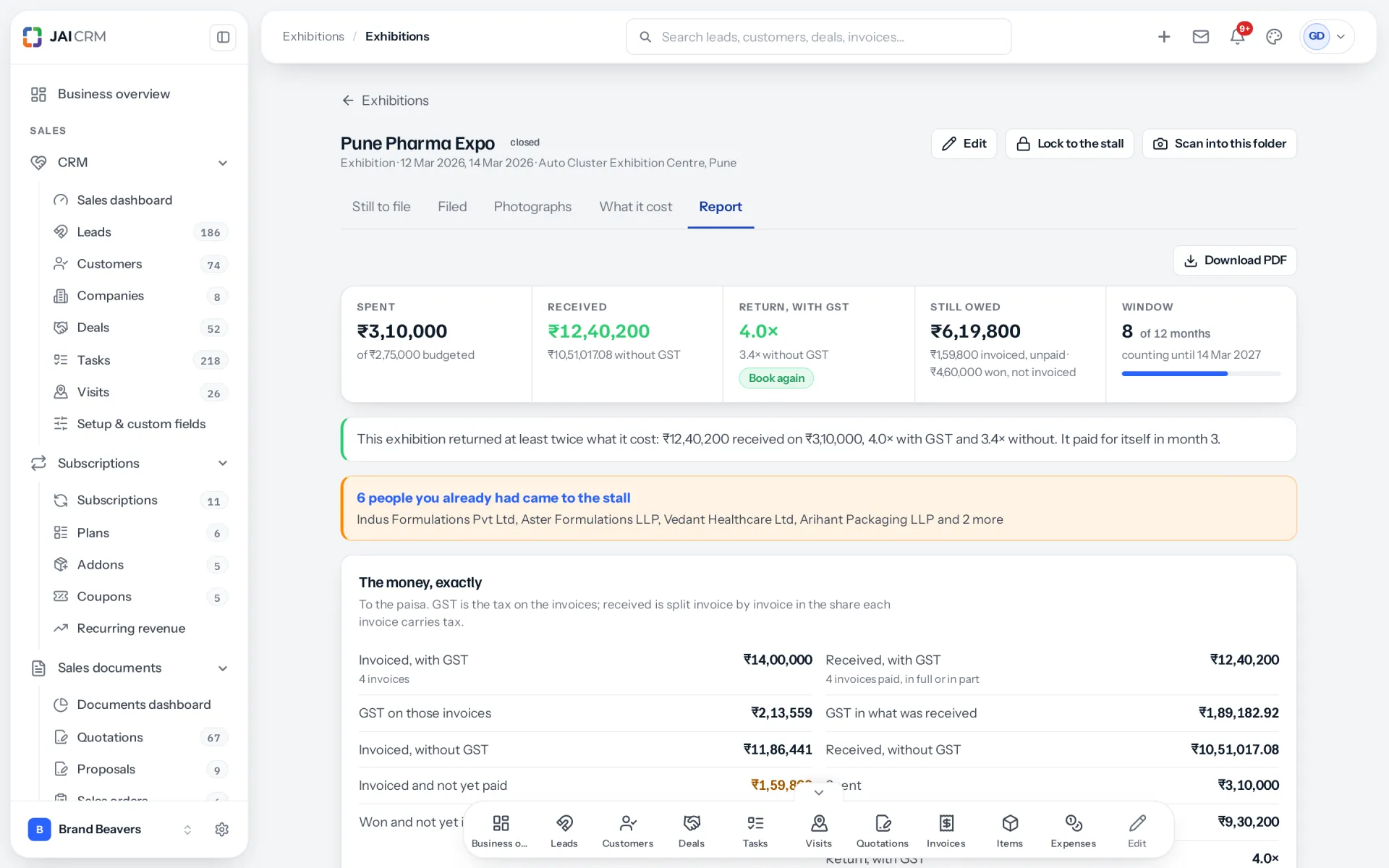
One exhibition’s report: money received against what it cost, the return, and what is still owed.
Traced from the card to the payment
A payment counts when its invoice traces back, through the deal or the customer, to a card scanned at this exhibition. It counts if it lands within the months you choose after the last day; twelve unless you change it.
No verdict before the fair has had time
Before the exhibition there is no verdict. Under four months with less earned than spent, the report says too early rather than failed. Business buyers met at a stall rarely pay sooner.
Who brought in the money
Each sale is credited to the person who scanned the card that started it. Business that did not come from a card is shown on its own line, not hidden.
Exact, and side by side
Amounts are exact to the paisa, with and without GST. Reports, Exhibitions puts every exhibition side by side, and either report downloads as a PDF.

Who opens Exhibitions, and what for

Swipe through the people who use it every day.

The owner deciding whether to book the fair again

Open the exhibition's report. It shows what the fair cost, staff days included, against the money received from people met there, and what is still owed. That is the answer to "was it worth it", in rupees, months later, without anybody digging through invoices.

The salesperson at the stall

Scan the card, hold the button and say ten seconds about the conversation, tag it hot, warm or cold, and look up for the next visitor. No typing, no waiting for signal, and nothing to remember on the train home.

The sales head on the Monday after

Open the exhibition's Still to file tab and work down it. Each card shows what was said, who it matches in your CRM, and a choice of lead, customer or supplier. Filing gives each one an owner and a follow-up due in 48 hours.

The purchase team at a trade fair

At a fair you meet suppliers as well as customers. File their cards as suppliers and they wait for approval, so nobody places a first order with a stand they liked before somebody has checked them.

Whoever plans next year's exhibitions

Reports, Exhibitions lists every fair side by side: what each cost and what each brought in. Each exhibition's own report also shows the people who came back to your stall from earlier exhibitions. Next year's budget follows the fairs that paid, not the ones that felt busy.

The temporary hand on a busy day

Give them only the right to scan, and lock the stall phone to the scanner. They can collect cards all day without seeing your customers, your prices or anybody else's work.

What is different once you have it

Every card is in the CRM before you leave the venue

Nothing waits to be typed. The card, its photograph and the voice note are in the exhibition's queue the moment they are taken, or the moment the phone finds signal.

The follow-up starts on time, and sounds personal

A dated task with the person's own words attached turns "follow up with everybody from the fair" into a list of named calls, each with something real to say.

One customer, one record

Matching on GSTIN, mobile and email means the customer who walked up to your stall stays one customer, with one owner, rather than becoming a new lead.

You know which fairs pay

Cost against money received, judged after enough months, tells you which exhibitions to book again and which to drop. The answer is a figure, not a feeling.

What it works with

On its own it is a better spreadsheet. The value arrives when what it makes is what another part uses, with nobody typing it again.

CRM

Required. A card becomes a lead or a customer, with an owner and a follow-up task. The voice note becomes a comment on the record, and the record remembers which exhibitions you met them at. About CRM

Sales documents

Required. What the stall was worth is counted from invoices: money received on invoices that trace back to a card. Without Sales documents there is nothing to count. About Sales documents

Vendors

Optional. With Vendors switched on, a card can be filed as a supplier, which waits for approval before anybody can order from them. About Vendors

Reports & analytics

The Exhibitions dashboard puts every exhibition side by side, and the reports library carries the exhibition reports. Both download as PDF. About Reports & analytics

Charcha

Included with every plan. Each exhibition gets a private channel for its stall team, in its own Charcha tab: a tally of cards that counts itself, a closing report at 19:00 each show day, and a follow-up list of hot visitors that ticks itself. About Charcha

Exhibitions comes with your plan

Exhibitions is included in every plan that has CRM and Sales Documents, starting with CRM + Sales Documents. Priced per person, per month, in rupees, with GST shown separately. There is nothing extra to pay for Exhibitions.

5 people

CRM + Sales Documents

Leads, customers and deals, with quotations and GST invoices

₹149 per person a month

For 5 people: ₹745 a month, billed as ₹8,940 a year. ₹10,549.20 with 18% GST.

  • Leads, customers, companies and deals
  • Quotations, sales orders and GST invoices
  • Your own mailbox, with replies filed against the record
  • Reports, dashboards and exports
  • 1 GB storage per workspace (organisation)
Start free

CRM + Sales Documents + Subscriptions + Warranty

For a business that bills on a cycle and stands behind what it sells

₹299 per person a month

For 5 people: ₹1,495 a month, billed as ₹17,940 a year. ₹21,169.20 with 18% GST.

  • Everything in CRM + Sales Documents
  • Recurring billing, plans, add-ons and coupons
  • Warranty registration and claims
  • Items and stock, which warranty is held against
  • 1 GB storage per workspace (organisation)
Start free

Every plan, and what is in each Prices in rupees, per person, per month. Parts can also be bought on their own.

Can I buy Exhibitions on its own?

No, and you do not need to. Exhibitions works with CRM and Sales Documents, so it comes inside every plan that has both, at no extra cost.

Already on one of these plans?

Then Exhibitions is already switched on. You will find it in the sidebar, and your roles already carry its permissions.

How many people, and can I change it?

You choose when you sign up and change it whenever you like, up or down. There is no minimum number of users and no penalty for going down.

Yearly or monthly?

Both. Yearly works out cheaper per month and is paid once at the start. Monthly costs a little more and stops at the end of any month.

Questions people ask about Exhibitions

Answered in full. If yours is not here, ask us. A person replies.

Ask us something
What is the Exhibitions module in JAI CRM?

The Exhibitions module is a visiting card scanner joined to your CRM. You scan cards at a stall, add a short voice note, and file each card as a lead, a customer or a supplier with a follow-up task. A report then shows what the exhibition cost against the money it actually brought in.

How much does Exhibitions cost?

Nothing extra. Exhibitions is included in every plan that has CRM and Sales Documents, starting with CRM + Sales Documents from ₹149 per user per month. If your business is on one of those plans, it is already switched on.

Which modules does Exhibitions need?

CRM and Sales Documents. A card becomes a lead or a customer in CRM, and what an exhibition earned is counted from invoices in Sales Documents. Vendors is optional: it lets you file a card as a supplier you met at the fair.

Can I scan visiting cards without internet at an exhibition?

Yes. Cards and voice notes are kept on the phone and sent by themselves when the connection returns. The scanner never waits for the network, and it tells you the cards are kept on the phone rather than showing an error.

Does it read both sides of a visiting card?

Yes. Scan the front, then add the back. The details on the back are merged in without overwriting anything you have already corrected. A QR code on the card is read too.

Does it use AI to read cards?

Where your workspace has its own AI key, cards can be read with AI, which is a switch under Settings, on by default. Otherwise they are read by our own reader on our own server. Either way, fields the reader is unsure about are underlined for you to check.

What happens to the voice note?

It is written out as text and attached to the person when the card is filed. The follow-up task carries it too, so whoever makes the call knows what was said at the stall.

Will it create a duplicate if the person is already a customer?

It checks first. Each card is matched against your customers, leads and suppliers by GSTIN, mobile number, email, and company with city. A match is shown for you to choose. File against it and the existing record is marked as met at the exhibition.

How is the return on an exhibition worked out?

Money received from people you met at the exhibition, divided by everything it cost, staff days included. Only payments count, not quotes or pipeline. Sales won but not yet paid are shown separately as owed.

How long after an exhibition are sales counted?

Twelve months after the last day, unless you choose a different period on the exhibition. Before four months, a low return is shown as too early rather than failed, because business buyers rarely pay within weeks of a fair.

Can I see which salesperson brought in the most from a fair?

Yes. The report credits each sale to the person who scanned the card that started it, and shows business that did not come from a card on its own line.

Can a temporary helper scan cards without seeing my CRM?

Yes. The right to scan is its own permission: they can add cards and see their own, and nothing else. Stall mode can also lock a shared phone to the scanner until somebody enters a staff PIN.

When is the follow-up task due?

Forty-eight hours after the card is filed, for every card, assigned to the record's owner. There is no screen yet to change that period.

Can I record a supplier I met at the fair?

Yes, with the Vendors module. A card filed as a supplier waits among suppliers to be approved, with no follow-up task, so nobody orders from them before they have been checked.

Does it record consent for marketing under the DPDP Act?

Not on screen yet. A card can store whether the person agreed, but no screen sets it today. Until it does, note consent yourself before adding anybody from a fair to newsletters or campaigns.

Does Exhibitions work for conferences and dealer meets too?

Yes. Despite the name, each one can be an exhibition, a conference, a roadshow, a dealer meet, a webinar, or a kind you name. Each has its own cards, photographs, costs and report.


Long enough to know, and it costs nothing to find out

Start a trial, scan the cards from your next fair, and see what the stall was worth. If it does not help, walk away. We did not ask for a card.