Skip to the content
JAI CRM

CharchaTeam chat, channels, meetings

Team chat inside your business software, so work is talked about where it is done

Direct chats, groups and channels for your own team, with threads, files, voice notes, polls, meetings by link and broadcasts down the reporting line. Turn a message into a task, a reminder or an approval without leaving the chat. Messages arrive the moment they are sent, with no refresh, and reach your browser even when JAI CRM is closed. Included in every plan, at no extra cost.

No card needed. From ₹149 per person a month.

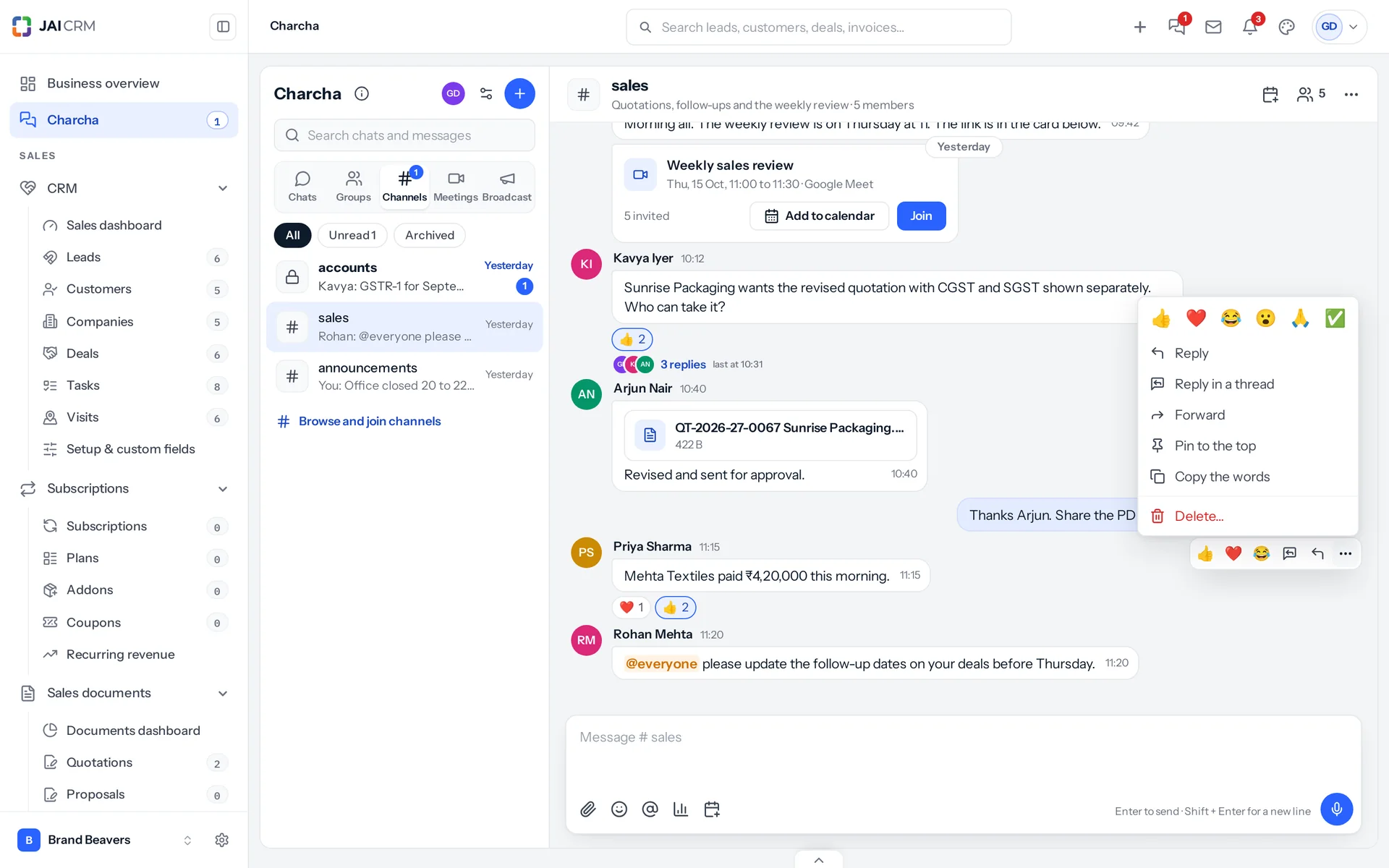
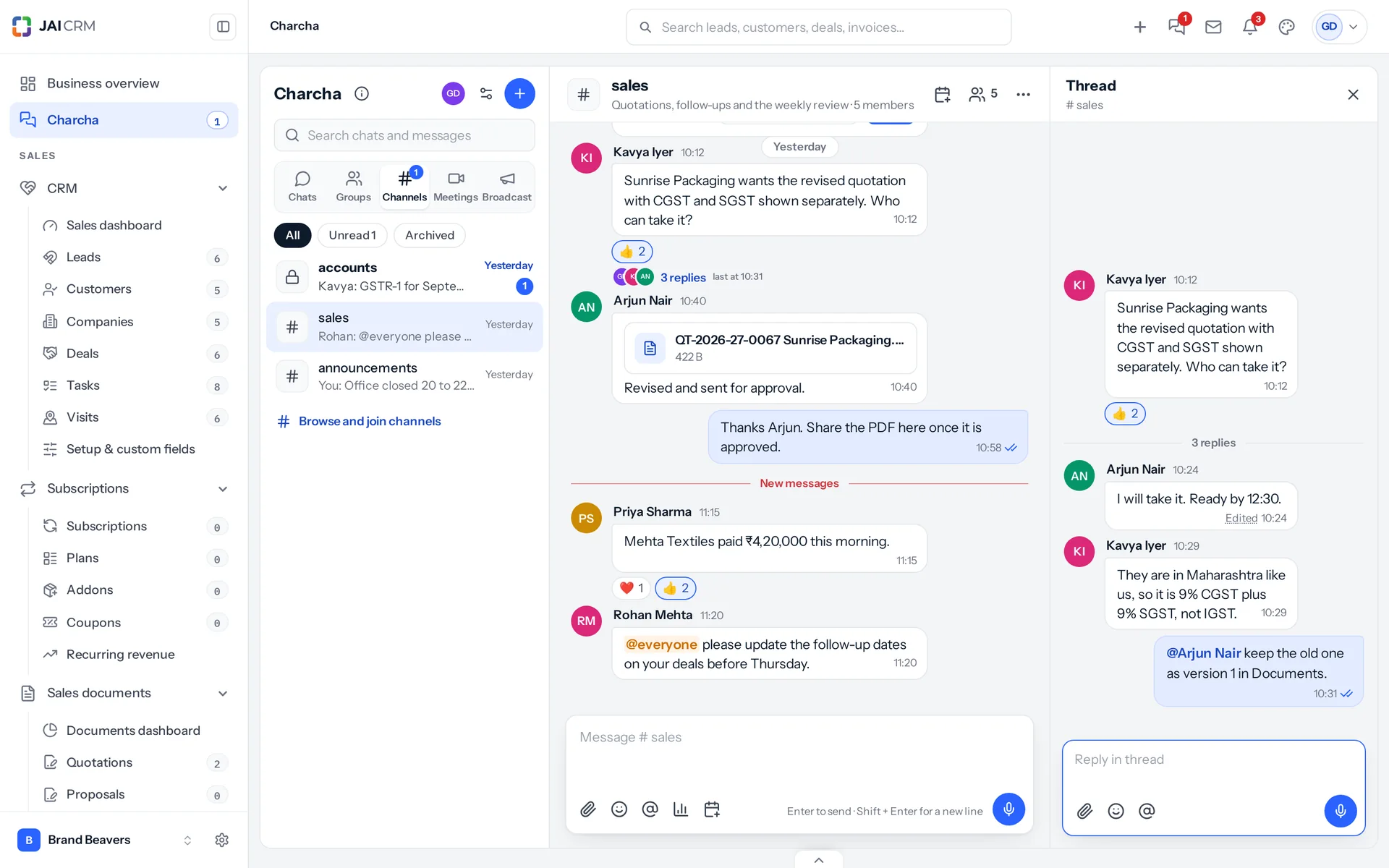
A Charcha channel for sales with a thread open beside it: a question, three replies, a quotation PDF, reactions and an @everyone reminder.
13 things it doesEvery one in the product today

What is Charcha in JAI CRM?

Charcha is the team chat inside JAI CRM. Your people talk in direct chats, private groups and open or private channels, reply in threads, share files from their computer, Documents, Google Drive or Dropbox, send voice notes and polls, schedule meetings with a Google Meet, Zoom or Teams link, and send broadcasts down the reporting line. A message can become a task, a reminder or a note on a lead or deal, and a quotation waiting on approval can be approved from its card. Checklists tick themselves from quotations, visits, tasks, deals and invoices, and can repeat every weekday. It rings before a visit with directions, takes visit notes by voice, and sends a day report to the manager. Messages, typing and read ticks arrive live. Direct chats are private, even from the owner. Charcha is included in every plan.

Why does work get lost in chat?

Your team already talks all day. It happens on personal WhatsApp, in a dozen groups nobody can find later, mixed with family photos, on phones that leave the company when the person does. The quotation, the payment and the customer live in one place; the conversation about them lives somewhere else entirely.

  • Work talk on personal phones

    Prices, customer numbers and complaints sit in personal WhatsApp chats. When somebody leaves, the conversation leaves with them, and nobody can look back at what was agreed.

  • The message that went to the wrong group

    Work groups sit between family groups. A rate meant for the sales team lands in the cousins' group, or a customer's complaint gets buried under forty good-morning messages.

  • Nobody knows who has read it

    You announce a price change. Some saw it, some did not, and there is no way to tell which. The first you hear of it is a quotation that went out at the old rate.

  • The manager's message that never reached the floor

    A target or a rule has to reach everybody under a manager. Forwarded from group to group, it changes on the way, arrives late, or reaches people it was never meant for.

  • Meetings arranged in five places

    The time is agreed in a chat, the link is in an email, the reminder is in somebody's head. Half the team joins late because nothing told them it was starting.

What Charcha does, in plain words

Nothing below is on a roadmap. Every one is in the product today, and a 14-day trial is long enough to check any of it.

Talking

Chats, groups and channels, each in its own section

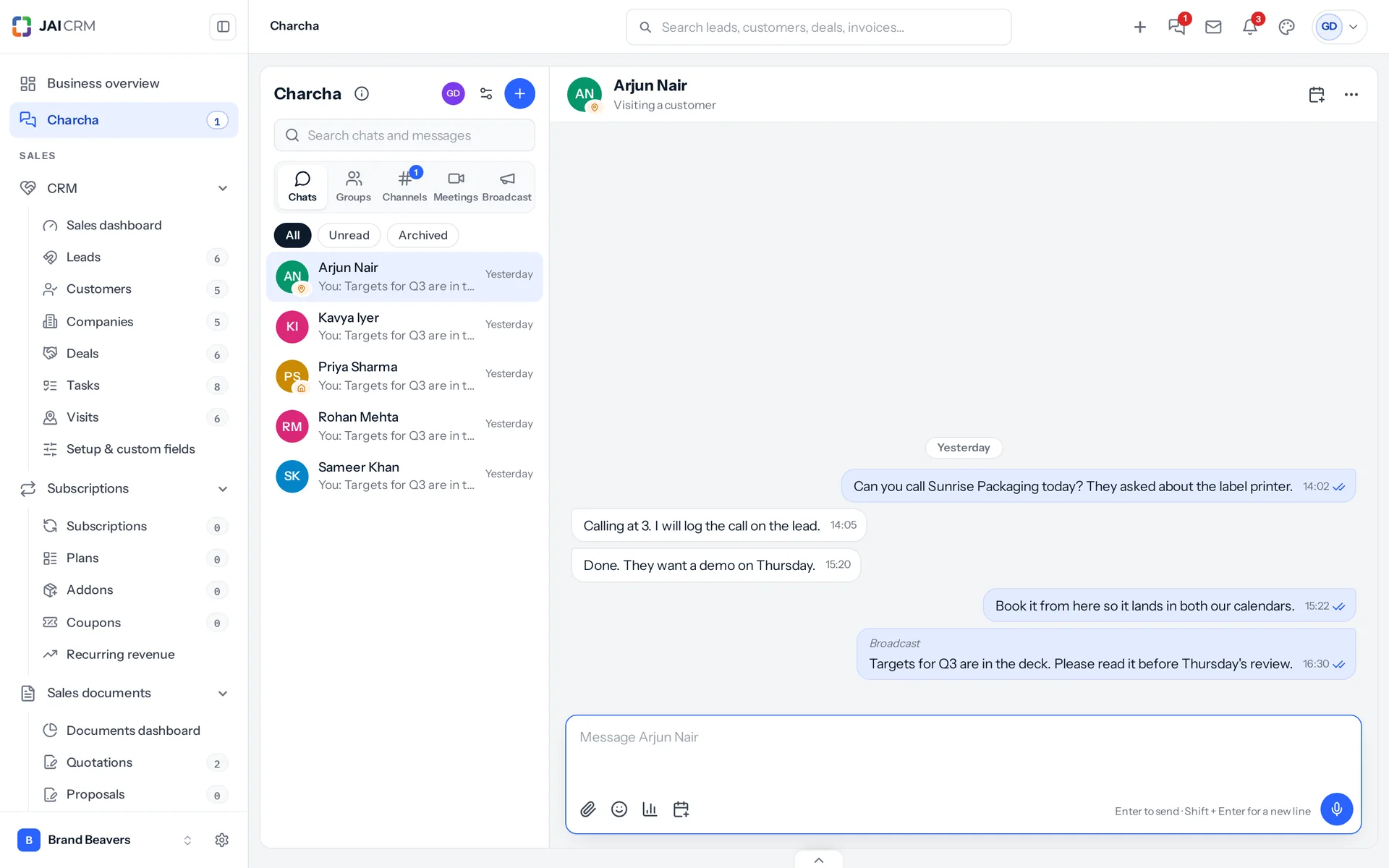
Charcha has five sections: Chats, Groups, Channels, Meetings and Broadcast, each with its own unread count. Your messages sit on the right in a light blue bubble and everyone else's on the left, as on WhatsApp, so nobody has to learn a new way to read.

A direct chat between the owner and a salesperson visiting a customer, with blue ticks on the messages that have been read.
Direct chats, private from everybody
A one-to-one chat is between two people. The owner of the business cannot read it, and neither can an administrator. Being in a conversation is the only way to see its messages.
Groups and channels
A group is private, for the people you choose. A channel is for a topic: open ones can be found and joined by anyone in the business, private ones are by invitation.
Announcement-only channels
In an announcement-only channel only its admins post. Everyone else can read, react and reply in a thread, so the main channel stays a list of announcements.
Make a one-to-one chat a group
Add someone to a direct chat and it becomes a group. A tickbox decides whether the person added sees what was said before they joined.

Live

Nothing to refresh, ever

What you send appears on the other person's screen the moment you send it, usually within a fifth of a second. So does everything around it: who is typing, the ticks, the unread counts and the bell.

Ticks, and the time each person read it
One tick when it is sent, two when it has reached the other screen, two blue when it has been read. Message info lists everybody in the conversation with the date and time they read it.
Who is typing, and who is online
You see "Arjun is typing" as he types. A green dot shows who has JAI CRM open right now.
A status beside your name
In a meeting, visiting a customer, working from home, on leave: pick one or write your own, choose when it clears, and pause your notifications until then. Somebody on leave in Payroll shows as on leave without setting anything.
A note in the corner
A direct message or a mention that arrives while you are on another page shows as a small note in the corner. Click it and you are in the chat.

Messages

Everything you expect from a messaging app

Reply to a message with a quote, or start a thread so a side conversation does not bury the channel. React, forward, pin and mention, the way your team already does on their phones.

A message’s menu: reactions, reply, reply in a thread, forward, pin, copy, message info and delete.
Edit any time, with the history kept
Edit a message whenever you need to. It shows Edited, and a click on that shows every version with the date and time, and the words that changed.
Delete for me, or for everyone
Anyone can delete a message for themselves. Deleting for everyone is allowed within a window the business sets, two days unless it chooses otherwise, and each group or channel admin can set their own, or keep it to admins.
@everyone, and who may use it
Name a colleague with @ and they are notified. @everyone or @all reaches everybody in a group or channel; in a big channel its admins can keep that to themselves.
Mute, pin, mark unread, archive
Mute a chat for 8 hours, a week or always. Pin the chats you use most to the top, mark one unread to come back to it, or archive it out of the way. An archived chat comes back when somebody writes, unless it is muted too.

Files and meetings

Files from anywhere, and meetings that remind everyone

Attach up to 20 files at a time from your computer, or choose them from Documents, Google Drive or Dropbox. A copy goes into the chat, so it opens for everyone there even if the original is moved or unshared.

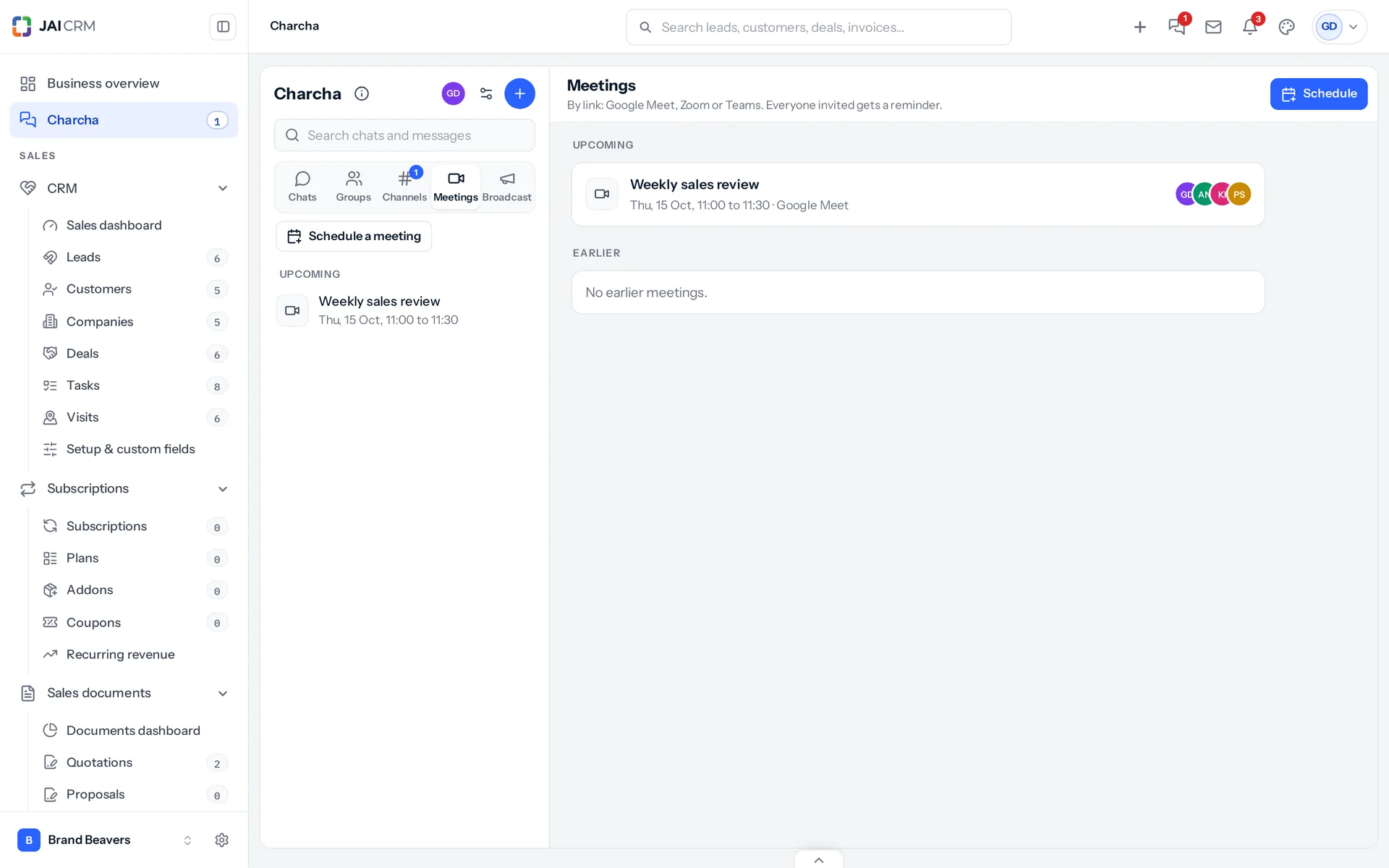
Meetings in Charcha: the weekly sales review on Google Meet with the people invited.
Only for the people in the chat
A file sent in a chat opens for the people in that chat and nobody else. It counts towards your business's storage like any other attachment.
Meetings with a link
Schedule a meeting from any chat, paste the Google Meet, Zoom or Teams link, and a card with a Join button appears in the chat for everyone invited.
A reminder that rings
Ten minutes before (or when you choose), everyone invited gets a reminder in the bell, and an open JAI CRM tab plays a short ring with a Join button.
Into any calendar
Add to calendar downloads the meeting for Google Calendar, Outlook or a phone, with the link and the reminder already in it.

More than words

Polls, voice notes, and notifications when JAI CRM is closed

Ask the group a question with choices and watch the votes come in, or say it instead of typing it. And when JAI CRM is closed, the browser still tells you that somebody needs you.

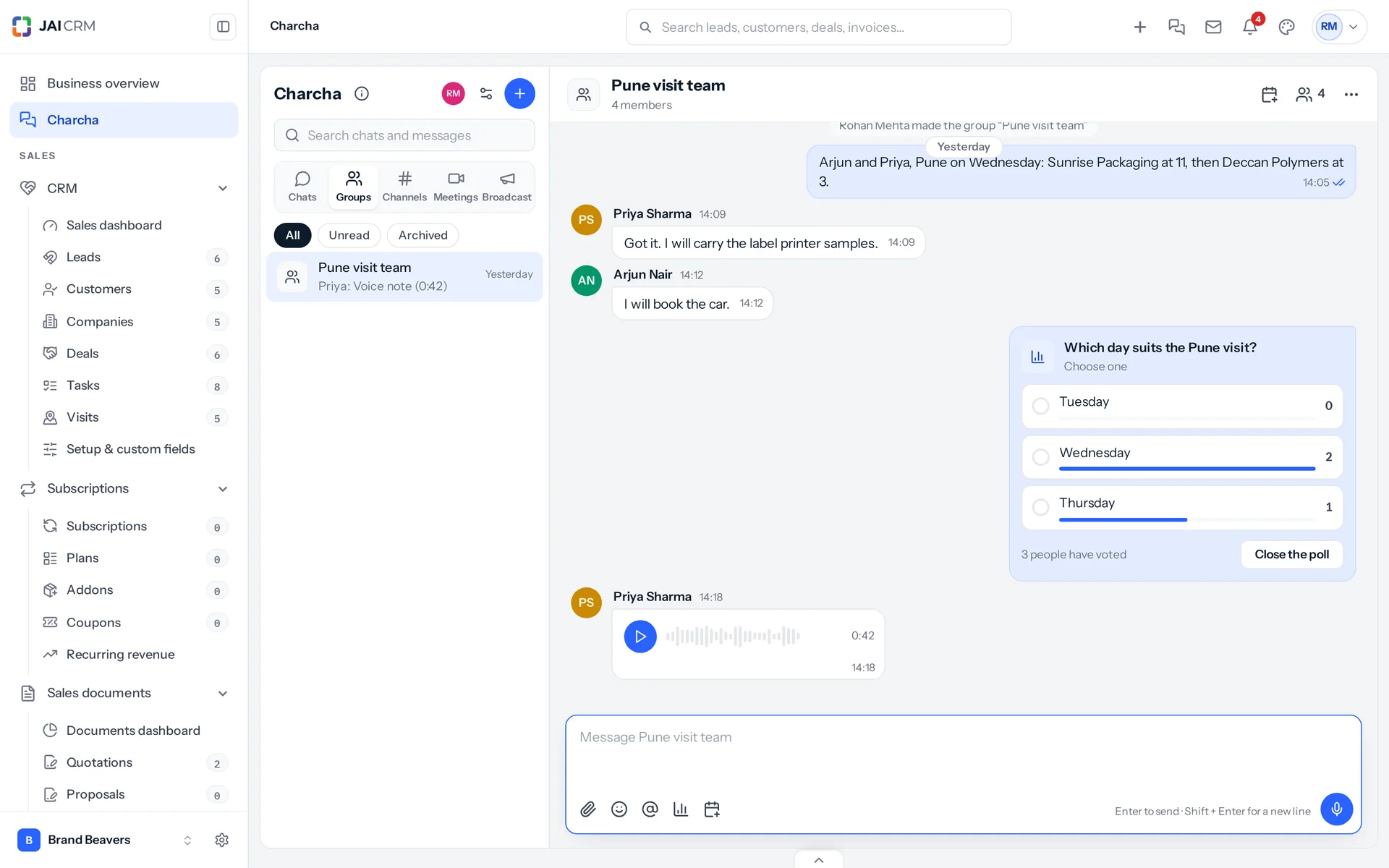
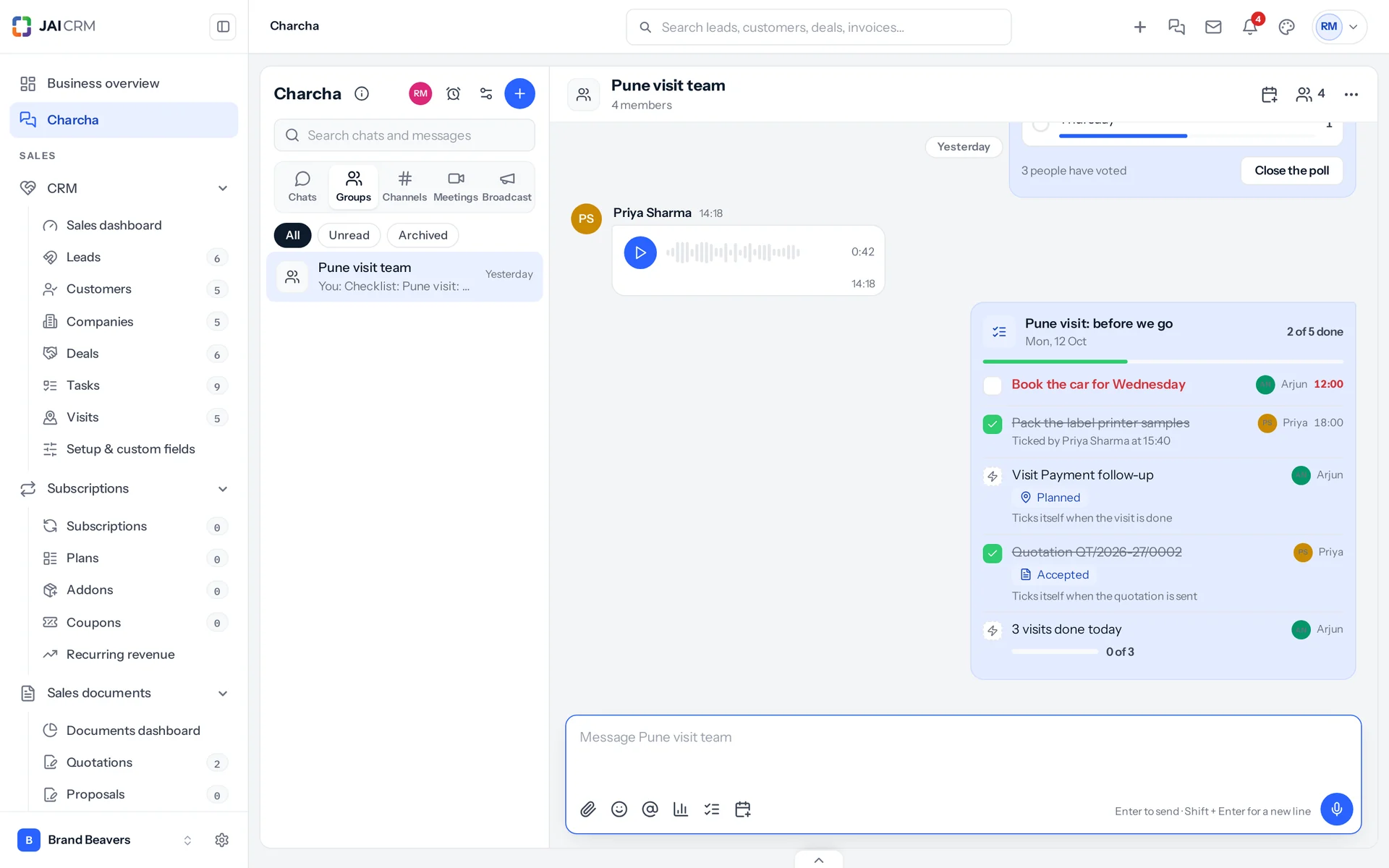
A Charcha group for a Pune visit: a poll on which day suits, with Wednesday winning two votes to one, and a voice note of 42 seconds from Priya.
Polls
A question with up to ten options, one answer or several. Everyone sees the counts move as people vote, and whoever started it can close it with the result kept.
Voice notes
Press the microphone, speak for up to five minutes, send. It plays in the chat on a computer or a phone, and opens only for the people in the chat.
Notifications in the browser
Turn on Push to this browser once, and a direct message, a mention, a broadcast or a meeting reminder reaches you while JAI CRM is closed or behind another tab.
Who wrote, not what
A notification says who wrote and where, unless you choose to see the words: a lock screen is not private. A muted chat stays quiet, and a status that pauses notifications pauses them all.

Work from a message

A message becomes a task, a note on a record, or an approval

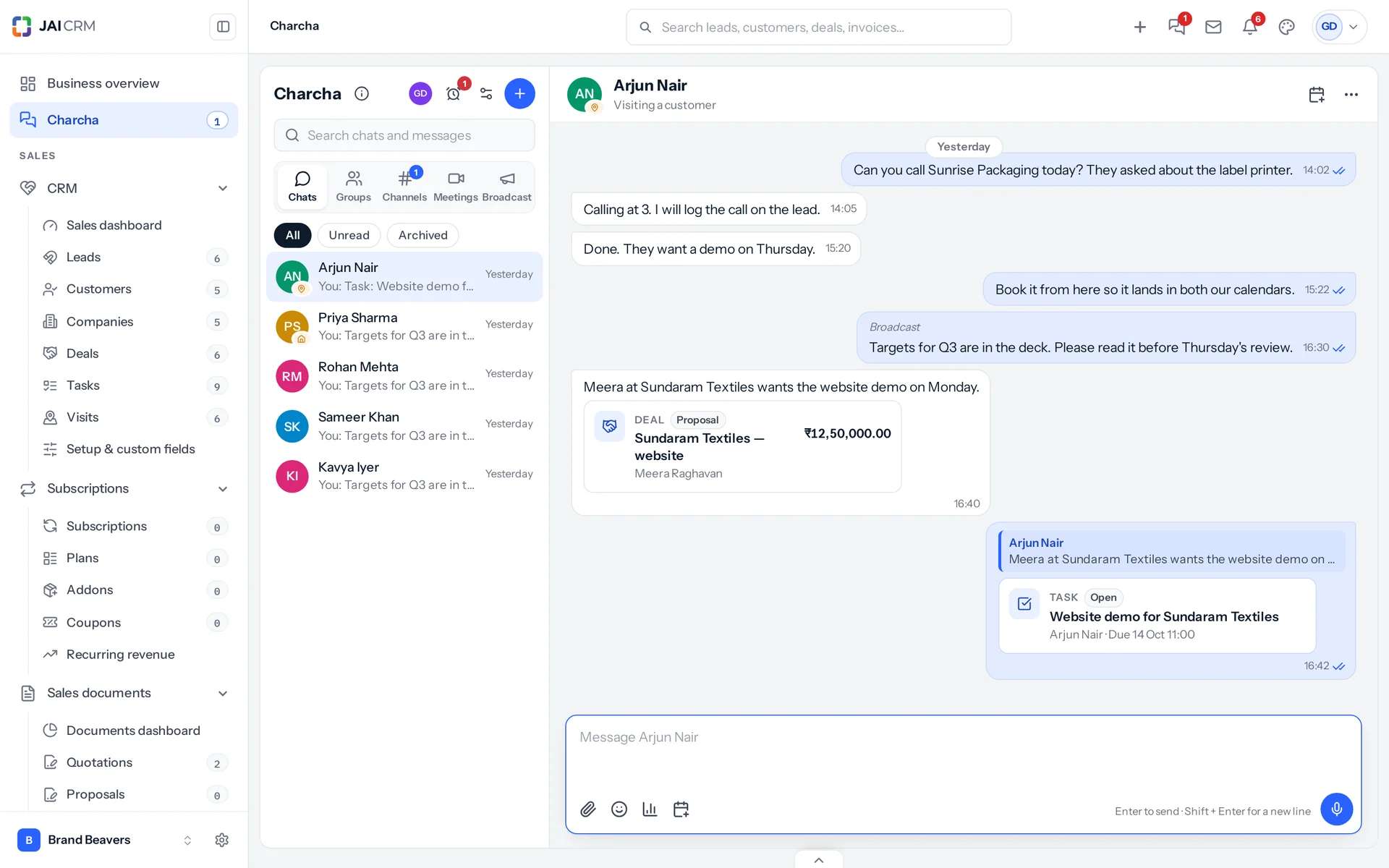
Make a task from any message, linked to the lead or deal it is about, and its card lands in the chat. Type # to show a lead, deal, quotation or invoice as a card that stays current. Approve a quotation from its card, and keep a message as a note on the record.

Arjun shares the Sundaram Textiles website deal as a card, and Govind makes a task from it; the task card shows who does it and when it is due.
Make a task
More, then Make a task: the words become the task, whoever wrote them is chosen to do it, and the lead or deal in the message is linked. Its card goes into the chat, so everyone sees it was picked up.
Type # to link a record
Leads, customers, deals, tasks, quotations, orders, invoices and projects show as cards with their status and amount, read fresh every time. You can share only what you can open yourself.
Approve from the card
A quotation waiting on you shows Approve and Reject on its card. Everyone looking at it sees it change, with no refresh.
Remind me
In 20 minutes, an hour, three hours, tomorrow at 9:00 or a time you pick. It rings in JAI CRM and notifies a closed browser; snooze it for 5 to 40 minutes or pick a new time right in the note. An alarm clock beside the message shows it is set.

Checklists

Checklists that tick themselves

Post a checklist in any chat. Tick items by hand, let a record tick one for you, or set a target for the day counted from your own work, and watch "3 of 7 done" move for everyone.

A Pune visit checklist, 2 of 5 done: an item late in red, one ticked by Priya, a planned visit and an accepted quotation that tick themselves, and a target of 3 visits today.
Ticked by a record
An item can follow a quotation, visit, task, deal or invoice and tick itself when it is sent, done, reaches its stage or is paid.
Targets for the day
"3 visits done today: 1 of 3", counted from the person's own visits, calls, quotations, tasks or new leads that day.
Late turns red, and rings
Give an item a person and an hour. Once it is late it turns red and its person gets a reminder that rings.
Repeats, and Tasks in step
Repeat it every weekday at 9:30 for a stand-up, and add the items to Tasks so ticking one side ticks the other.

Out on visits

A ring before every visit, notes you can speak, and a day report that writes itself

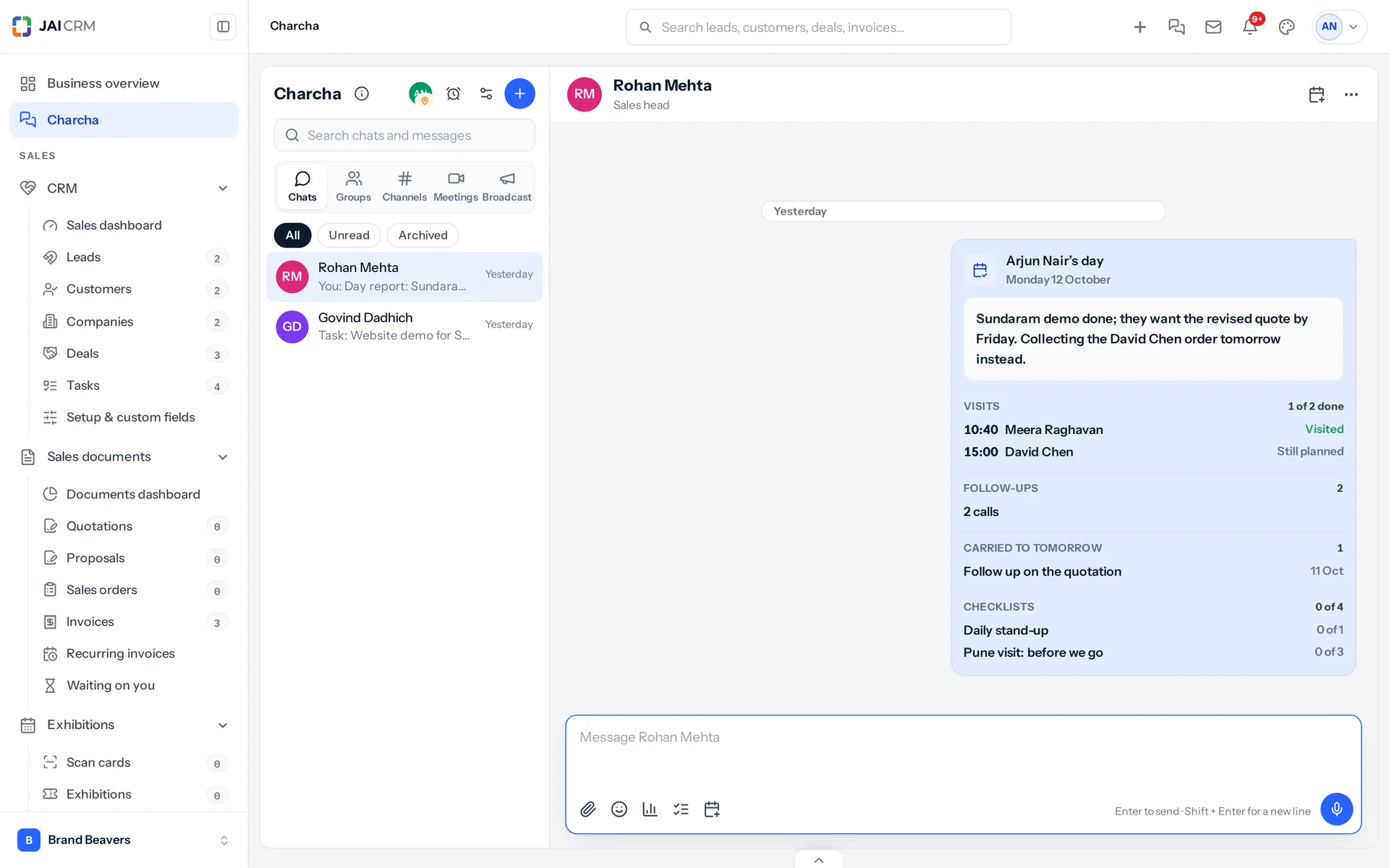
Charcha rings before a visit you are down for, with where to go and a Navigate button. Speak the visit notes instead of typing them. At the end of the day, Send my day puts your visits, calls, quotations and tasks into one report for your manager.

Arjun Nair's day report to Rohan Mehta: two visits with their times, two calls, a task carried over and his note.
Navigate, from the reminder
Directions in Google Maps to the customer's or lead's address, from a plain link that costs nothing.
Notes you can speak
Say how it went. The recording stays on the visit and the words are written into its notes.
Send my day
Visits, follow-ups, quotations sent, deals moved, tasks done and carried over, and checklist progress, with your note.
By itself, every weekday
It can go on its own at the hour you choose, to your manager one level up the reporting line, with a reminder fifteen minutes before.

At exhibitions

A channel for every stall team, with a tally that counts itself

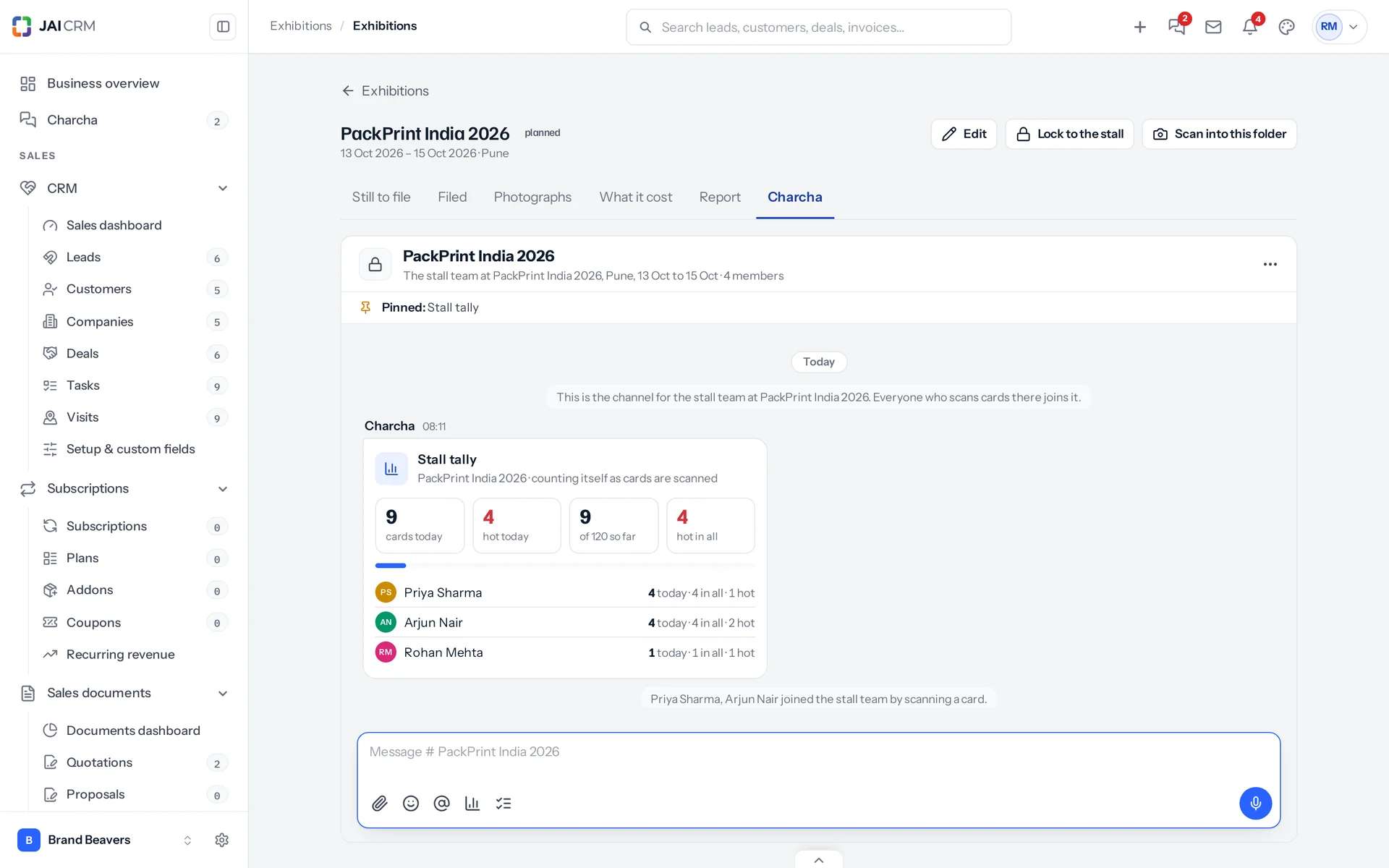
A fortnight before each exhibition, Charcha makes a private channel for the stall team, inside the exhibition's own page. A pinned tally counts the cards as they are scanned, a closing report goes out at 19:00, and after the show a list of every hot visitor ticks itself as each one is followed up.

The stall team channel inside the PackPrint India 2026 exhibition, with its pinned tally counting the cards scanned today and the hot visitors among them.
Join by scanning
Whoever scans a card at the show is added to its channel, with a line to say so. Nobody has to be invited.
The 19:00 closing report
Cards and hot visitors for the day, quotations raised and visits planned, each person's count and what visitors asked about most, to the channel and to the manager of whoever runs the show.
Follow-ups that tick themselves
The day after the show, one line per hot visitor, given to the person who owns them and grouped by person. Log the call and the line ticks itself.
Archived after thirty days
The channel stays readable but closes to new posts thirty days after the last day of the show.

On every record

A conversation on every lead, deal, task and invoice

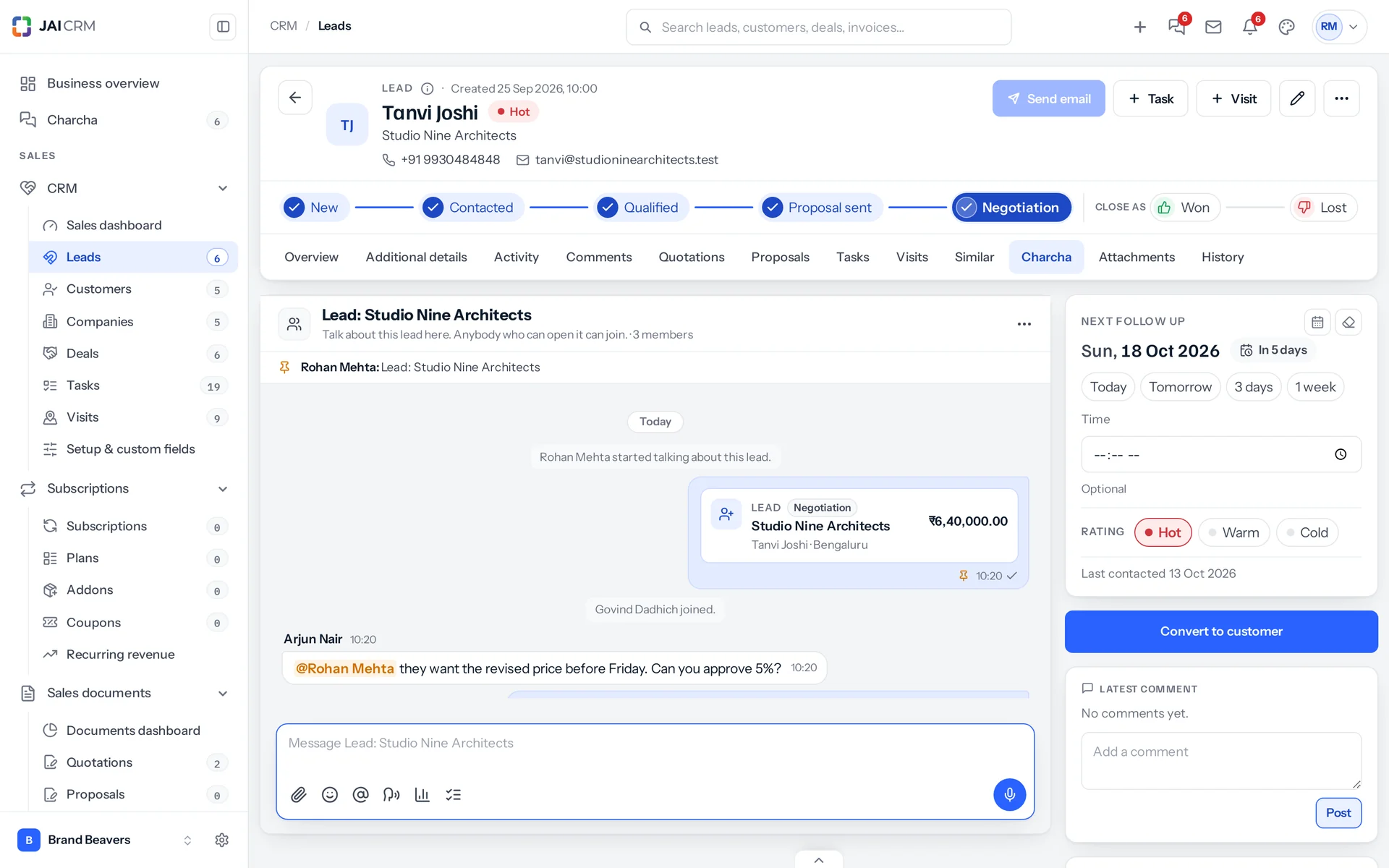
Talk about a customer where the customer is. Each lead, deal, task and invoice can have one Charcha conversation of its own, in its Charcha tab, with the record's card pinned at the top so it leads back to the record.

A lead's own conversation in its Charcha tab: the lead's card pinned at the top, a colleague @mentioned about a discount, and the approval.
@mention a colleague
Ask the person who owns the lead, or the accountant about an invoice, right there on the record.
Only for those who can open it
Anybody who can open the record can join. Somebody who cannot is never added, whoever asks.
Back to the record
The conversation is in Charcha too, named after the record, and its pinned card opens it.

With AI

Catch up in one press, and let AI do the typing

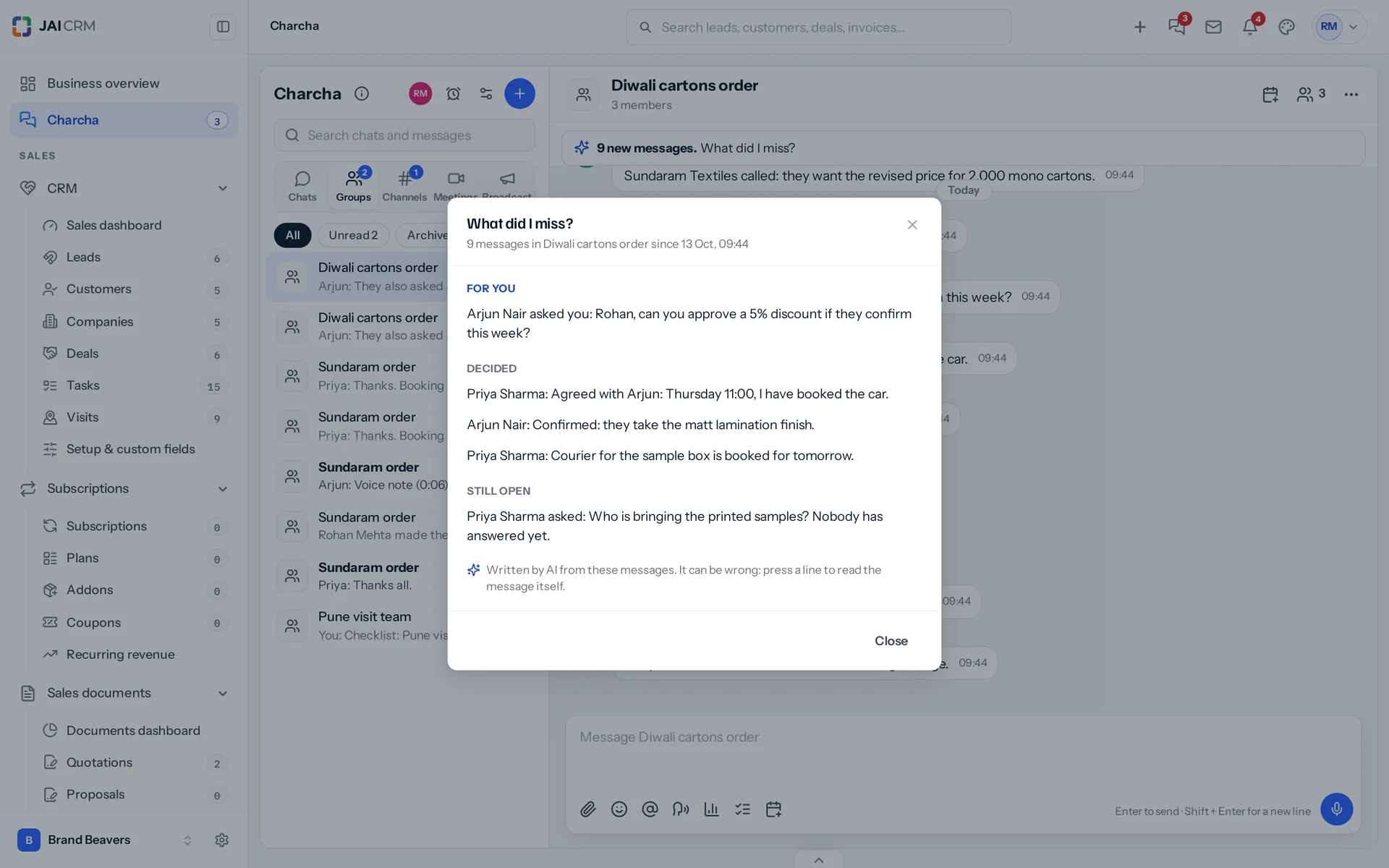
Back from a meeting to forty unread messages? What did I miss? sorts them into what is for you, what was decided, what is still open and what was shared, each line linked to its message. AI also drafts tasks from a message, writes your day note, and writes out voice notes.

What did I miss? over a busy group, written by AI: what is for Rohan, what was decided and what is still open, each line linked to its message.
What did I miss?
Offered over a busy group or channel. It reads only what you could read yourself, and every line opens the message it came from.
Tasks from a message
Draft with AI works out what needs doing, by whom and by when. A message asking for three things gives three drafts, and Make all makes them.
Voice into words
Show the words under any voice note, and type by speaking in English, Hindi, Marathi, Gujarati, Tamil, Telugu, Kannada, Bengali, Malayalam or Punjabi.
Nothing goes by itself
Every answer comes back to the person who asked, marked as written by AI. Each job has its own switch in Settings, AI writing.

Broadcast

One message, down the reporting line

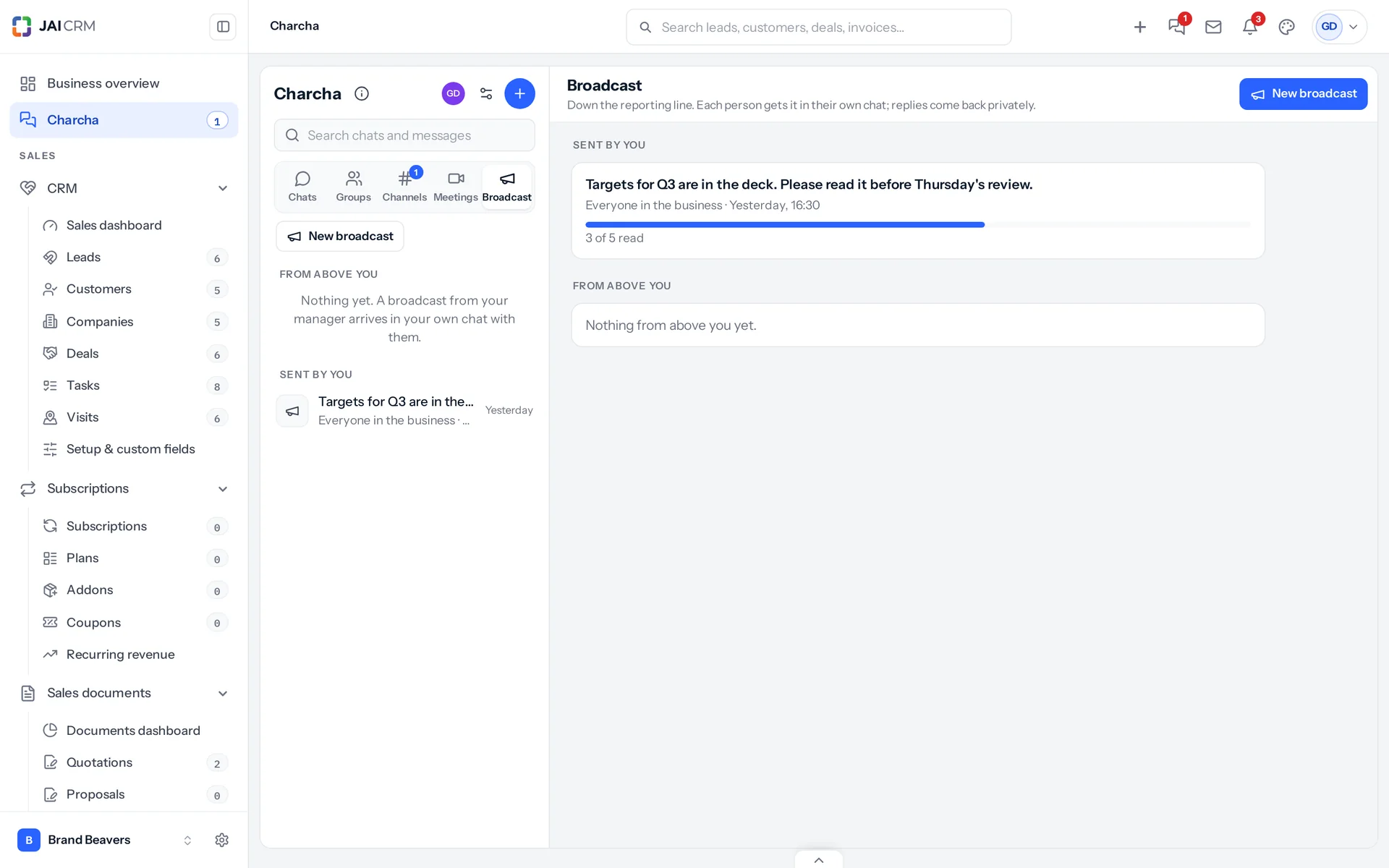
A manager sends one message to everyone under them, to the level just below, or to chosen people among those. Each person gets it in their own chat with the manager, and replies come back privately rather than to a crowd.

A broadcast from the owner to everyone in the business, with 3 of 5 people having read it.
Down, never sideways
Broadcast follows the roles in your reporting line. A manager reaches the people below them and nobody else; the owner can reach the whole business.
See who has read it
The Broadcast section lists what you sent, with how many people have read each one. Everyone else sees what came to them from above.
A right on the role
Broadcasting is a permission on the role, as are making groups and channels, posting in announcement-only channels, scheduling meetings for others and running every group and channel.

Everywhere

A full page, or a chat box over any page

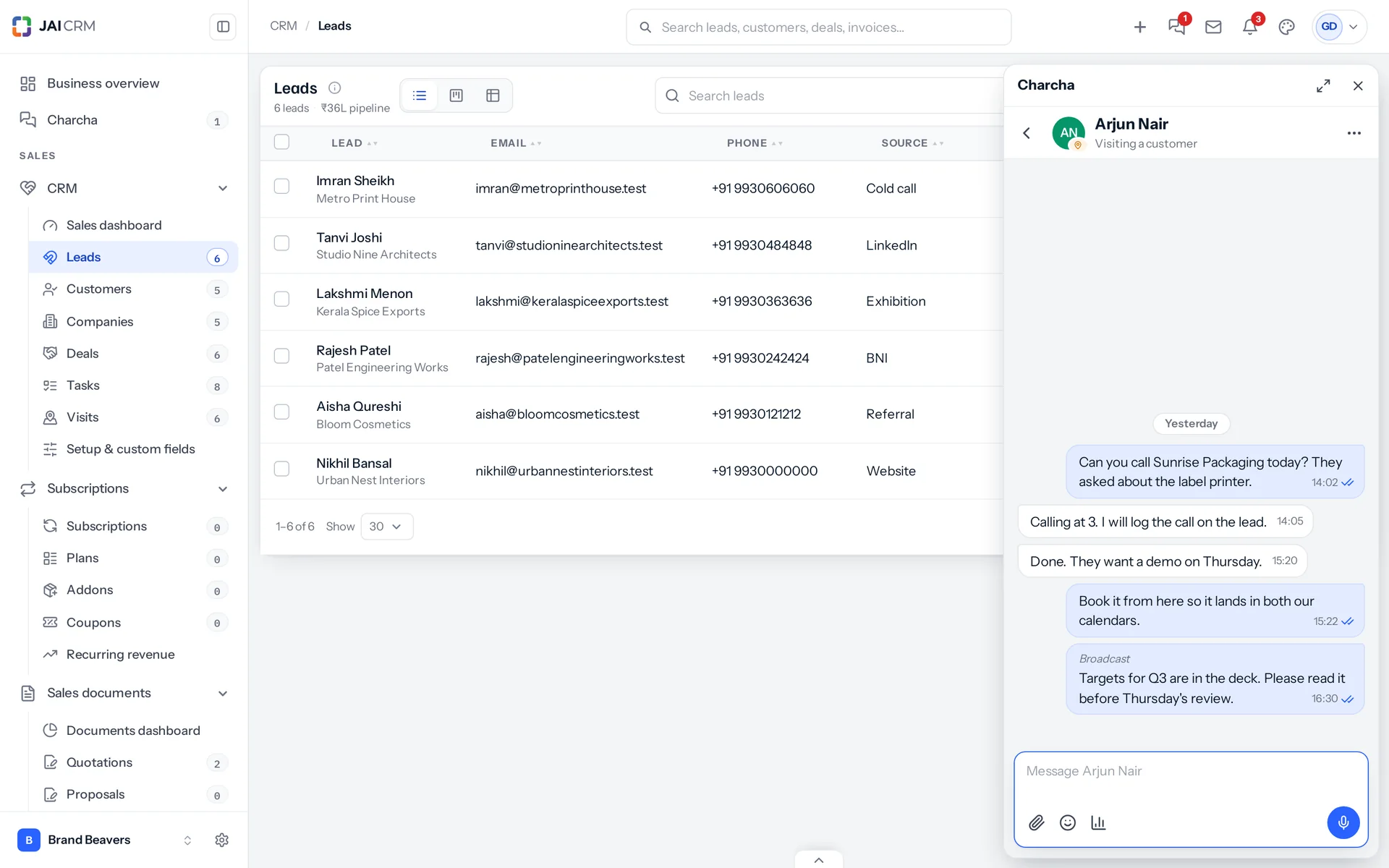
Charcha has its own page, just under Business overview in the sidebar. The Charcha icon in the top bar slides a chat box in from the right, so a quick word does not mean leaving the lead or invoice you are on.

The Charcha chat box open over the leads list, so a quick word does not mean leaving the page.
On a phone
One screen at a time: your chats, then the conversation, then a thread. The message box starts as one line and grows as you type. It works the same in the Android app.
Light and dark
Charcha follows your appearance setting, light or dark, like the rest of JAI CRM.
Search
Search finds a chat by its name and a message by its words, across every conversation you are in, and takes you straight to the message.

Who opens Charcha, and what for

Swipe through the people who use it every day.

The owner announcing a change

Post it in an announcement-only channel, pin it, and see in message info exactly who has read it. Or broadcast it, so each person gets it in their own chat and can ask a question privately.

The sales team working a quotation

Somebody asks in #sales who can take the revised quotation. The answer and the GST question happen in a thread under that one message, the quotation is shared as a card, and the owner approves it from the card.

The sales head before the weekly review

Schedule the review from the channel with a Meet link. Everyone invited gets the card in the chat, a reminder ten minutes before, and a calendar entry if they want one.

Accounts telling the owner a return is filed

A direct message with the acknowledgement attached from Documents. It stays between the two of them, whatever anybody else's role.

A visit team on the road

A small group for the people going to Pune on Wednesday: who meets whom and when, who carries the samples, who books the car. Each person's status says they are visiting a customer.

A stall team at an exhibition

Three people at a packaging show scan cards all day. The pinned tally shows who has how many, the manager gets the closing report at 19:00 without asking, and the week after, the follow-up list shows which hot visitors still have not been called.

A new joiner

Add them to the channels they need and choose whether they see the earlier messages. Everything they need to catch up on is there, not scattered across other people's phones.

What is different once you have it

Work talk stays with the business

Conversations about customers and prices live in the business's own software, not on personal phones, and they stay when people move on.

You know who has read it

Ticks, message info with times, and read counts on broadcasts turn "I told everyone" into a list of names.

Less noise for each person

Threads keep side conversations out of the main channel, mute and archive keep quiet chats quiet, and @everyone can be kept to admins.

Nothing new to pay for

Charcha comes in every plan, for everybody on your team who uses JAI CRM.

What it works with

On its own it is a better spreadsheet. The value arrives when what it makes is what another part uses, with nobody typing it again.

Documents

Attach any file you can download from Documents. A copy goes into the chat, so everybody there can open it. About Documents

Notifications

Being mentioned, added to a group, sent a broadcast or invited to a meeting rings the bell, live, along with every other notification. About Notifications

CRM

Make a task from a message, linked to its lead, customer or deal, and save a message as a note on the record. Leads, deals and tasks shared in a chat show as cards that stay current. About CRM

Sales documents

Share a quotation, order or invoice as a card with its status and total, and approve or reject one that is waiting on you from the card. About Sales documents

Accounting & finance

Somebody marked on leave in Payroll shows as on leave in Charcha, without having to set a status. About Accounting & finance

Charcha comes with every plan

Charcha is included in every JAI CRM plan, for everyone on your team, at no extra cost. Plans are priced per person, per month, in rupees, with GST shown separately.

5 people

CRM + Sales Documents

Leads, customers and deals, with quotations and GST invoices

₹149 per person a month

For 5 people: ₹745 a month, billed as ₹8,940 a year. ₹10,549.20 with 18% GST.

  • Leads, customers, companies and deals
  • Quotations, sales orders and GST invoices
  • Your own mailbox, with replies filed against the record
  • Reports, dashboards and exports
  • 1 GB storage per workspace (organisation)
Start free

CRM + Sales Documents + Subscriptions + Warranty

For a business that bills on a cycle and stands behind what it sells

₹299 per person a month

For 5 people: ₹1,495 a month, billed as ₹17,940 a year. ₹21,169.20 with 18% GST.

  • Everything in CRM + Sales Documents
  • Recurring billing, plans, add-ons and coupons
  • Warranty registration and claims
  • Items and stock, which warranty is held against
  • 1 GB storage per workspace (organisation)
Start free

Every plan, and what is in each Prices in rupees, per person, per month. Parts can also be bought on their own.

Is there a limit on messages or files?

There is no limit on messages. Files count towards your business's storage, the same storage your other attachments use.

Already using JAI CRM?

Then Charcha is already switched on. You will find it just under Business overview in the sidebar, and every role on your team can use it.

Do customers or suppliers get access?

No. Charcha is for your own team. Customer and supplier logins never see it.

Yearly or monthly?

Both. Yearly works out cheaper per month and is paid once at the start. Monthly costs a little more and stops at the end of any month.

Questions people ask about Charcha

Answered in full. If yours is not here, ask us. A person replies.

Ask us something
What is Charcha in JAI CRM?

Charcha is the team chat inside JAI CRM: direct chats, private groups, open or private channels, threads, files, meetings by link and broadcasts down the reporting line. Messages arrive live, with no refresh, and it is included in every plan.

How much does Charcha cost?

Nothing extra. Charcha is included in every JAI CRM plan, for everyone on your team.

Can the owner read employees' direct chats?

No. A direct chat is between the two people in it. Neither the owner nor an administrator can read it. The only way to see a conversation's messages is to be in it.

Do I need to refresh the page to see new messages?

No. Messages, typing, read ticks, unread counts and the notification bell all update by themselves, usually within a fifth of a second.

What is the difference between a group and a channel?

A group is a private conversation for the people you choose. A channel is for a topic; an open channel can be found and joined by anyone in the business, and a private one is by invitation. Channels can also be announcement-only.

Can I edit or delete a message after sending it?

You can edit your own message at any time; it shows Edited, and anyone can see every earlier version with its date and time. You can delete any message for yourself, and your own message for everyone within the time the business or the channel's admins allow.

Who can see that I have read a message?

The person who sent it. In a direct chat the ticks turn blue; in a group or channel, message info lists who has read it and when.

Can I attach files from Google Drive or Dropbox?

Yes, once you have connected your own Google Drive or Dropbox in Settings, Integrations. You can also attach from your computer, up to 20 at a time, or from Documents. A copy goes into the chat so it opens for everyone there.

Does Charcha have video calls?

Not of its own. A meeting carries a Google Meet, Zoom or Teams link, with a card in the chat, a reminder for everyone invited and a calendar file. The call happens in the service the link belongs to.

What is a broadcast?

One message from a manager to everyone under them in the reporting line, to the level just below, or to chosen people among those. Each person gets it in their own chat with the manager, and replies come back privately. The owner can broadcast to the whole business.

Who can make groups and channels, or broadcast?

Whoever their role allows. Settings, Roles has a row for each: use Charcha, make groups and channels, broadcast, post in announcement-only channels, schedule meetings for others, and run every group and channel. Every role can use Charcha.

Does it work on a phone?

Yes, in the browser and in the Android app. On a phone Charcha shows one screen at a time: your chats, then the conversation, then a thread.

Will I get a notification when JAI CRM is closed?

In a browser, yes: turn on Push to this browser in Charcha settings once. A direct message, a mention, a broadcast or a meeting reminder then reaches you while JAI CRM is closed. In the Android app a message reaches you while the app is open; notifications while it is closed arrive in a later update.

Can I send a voice note?

Yes. Press the microphone in the message box, speak for up to five minutes, and send. It plays on a computer and on a phone.

Can I run a poll?

Yes. Press the chart button in the message box, write a question and up to ten options, and choose whether people may pick more than one. The counts update live for everyone.

Can I make a task from a message?

Yes. On any message choose More, then Make a task. The words become the task, you choose who does it and when, and the lead, customer or deal in the message is linked. A card for the task goes into the chat. It can also be a task in a project.

Can I approve a quotation from Charcha?

Yes, when it is waiting on you. A quotation, order or invoice shared in a chat shows Approve and Reject on its card for the person it is waiting on, and everyone looking sees it change. It is the same approval as on the record.

Can I set a reminder on a message?

Yes. Choose Remind me on the message: in 20 minutes, an hour, three hours, tomorrow at 9:00 or a time you pick. It rings in JAI CRM, notifies a closed browser if you allowed it, and waits in your Reminders list until you mark it done.

Can a checklist tick itself?

Yes. An item can follow a quotation, proposal, visit, task, deal or invoice and tick itself when it is sent, done, reaches the stage you chose or is paid. A target for the day counts the person's own visits, calls, quotations, tasks or new leads. Items can also be ticked by hand, and a checklist can repeat every weekday.

Does Charcha remind me before a visit?

Yes. Thirty minutes before a visit you are down for (or 15 minutes, an hour or two hours, as you choose), it rings with the time, the customer, who to meet and why, and a Navigate button that opens Google Maps directions.

Can my team send a daily report?

Yes. Send my day puts together each person's visits, follow-ups, quotations sent, deals moved, tasks and checklist progress, adds their note, and sends it to their manager, a group or a channel, now or by itself on the days and at the hour they choose.

Can we talk about a lead or an invoice in Charcha?

Yes. Every lead, deal, task and invoice can have a conversation of its own, in its Charcha tab or, on an invoice, its Charcha card. @mention a colleague there. Anybody who can open the record can join it, and nobody who cannot can be added.

Does Charcha follow our plugins and roles?

Yes. It offers only what your business has switched on: something that needs a module which is off says which module it needs, and asks you to contact your admin to switch it on or upgrade. A record card in a chat shows each person only what their own role and access let them open; anybody else sees that a record was shared, without its name or amount.

Does Charcha use AI?

Yes, for four jobs, each with its own switch in Settings, AI writing, once Charcha's AI is included with your workspace or you add your own AI account: What did I miss?, which sums up the messages you missed; Draft with AI, which turns a message into tasks; Write it with AI, which drafts your day report note; and writing out voice notes. Every answer goes only to the person who asked, to read before using. Nothing is sent or made by itself.

Can I type a message by speaking?

Yes. Press the speech button in the message box and talk; your words go into the box as you speak. It works in Chrome and Edge, in English, Hindi, Marathi, Gujarati, Tamil, Telugu, Kannada, Bengali, Malayalam and Punjabi, and costs nothing. In the Android app it comes in a later update.

Does Charcha help at exhibitions?

Yes. A fortnight before each exhibition it makes a private channel for the stall team, inside the exhibition's page. A pinned tally counts the cards as they are scanned, a closing report goes to the channel and the manager at 19:00 each show day, and after the show a checklist of hot visitors ticks itself as each is followed up. The channel is archived thirty days after the show.

Can customers or suppliers join a channel?

No. Charcha is for your own team. Customer and supplier portal logins cannot see or join it.

How long are messages kept?

Every message is kept unless an administrator chooses a period in Charcha settings: 30 days, 90 days, 6 months, 1 year or 2 years. Older messages are then removed each night with their files, for good. A thread goes whole, once its newest reply is older than the period.

Long enough to know, and it costs nothing to find out

Start a trial, open Charcha, and move one team's chat over for a week. If it does not help, walk away. We did not ask for a card.