
The record is where you answer the two questions people actually ask about a supplier: can we use them, and what do we owe them.
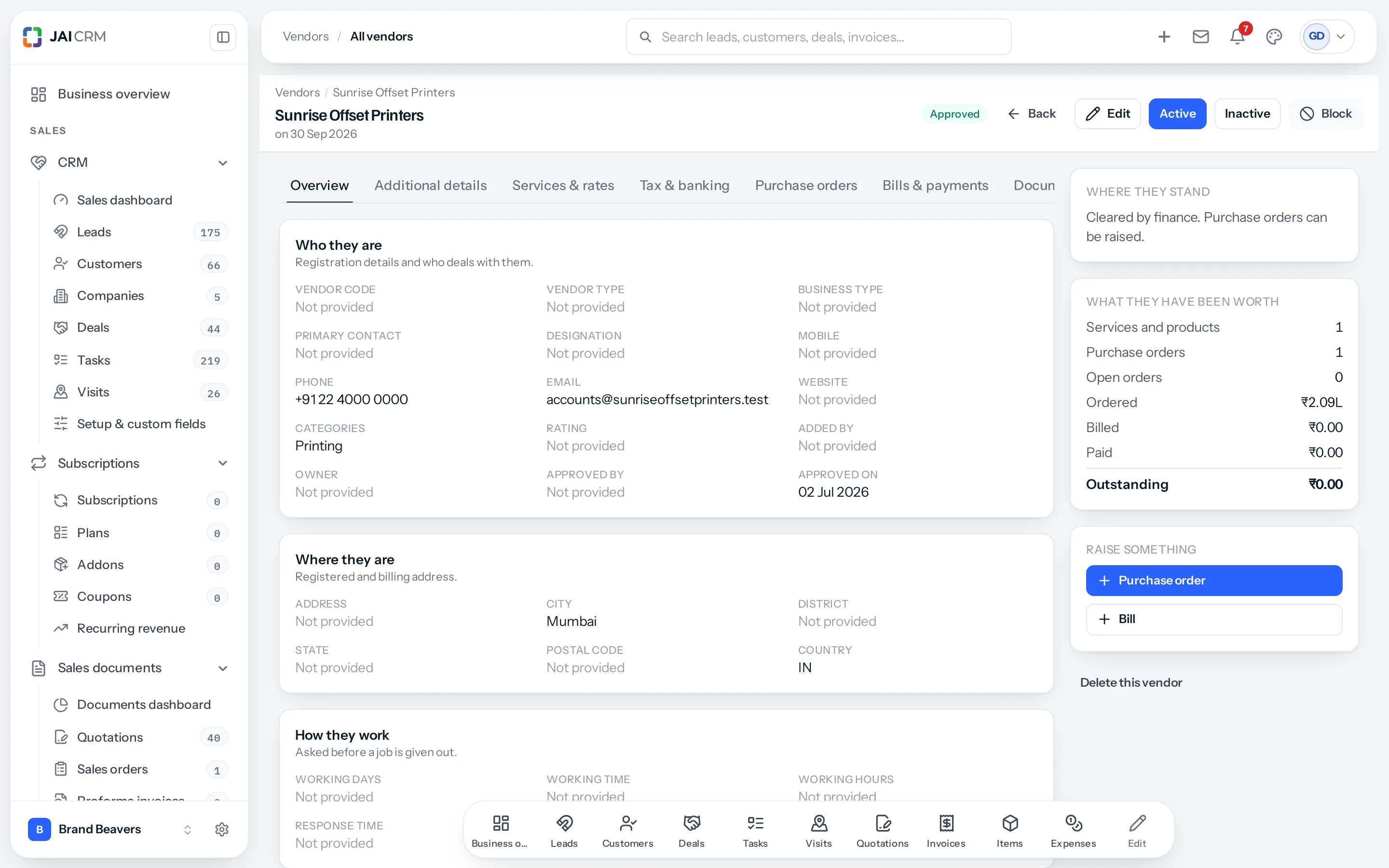
The tabs
| Tab | What is on it |
|---|---|
| Overview | Who they are, where they are, and how they work. |
| Additional details | Their further numbers and emails, More details, and any field your business put there in Fields & rules. Edit opens the vendor form on its Additional details step. |
| Services & rates | What they supply and what it costs. |
| Tax & banking | GSTIN, PAN, TDS and the bank account. |
| Purchase orders | Everything you have ordered from them. |
| Bills & payments | Everything they have billed and everything you have paid. |
| Documents | Their papers, with expiry dates. |
| Visits | Anybody who went to see them. |
| Messages | Messages to the vendor, which they can reply to. |
| Comments | What your own side says about them. A comment never reaches the vendor. |
| History | Every change to the record, who made it and when. |
Where they stand
One sentence, written from the stage they are in. An approved vendor reads “Cleared by finance. Purchase orders can be raised.” A blocked one reads the reason somebody typed when they blocked them.
That sentence exists so the person about to raise an order does not have to interpret a coloured badge.
What they have been worth
| Line | Answers |
|---|---|
| Services and products | How many things they supply. |
| Purchase orders | How many you have raised, ever. |
| Open orders | How many are still live. |
| Ordered | The value of everything ordered. |
| Billed | What they have actually invoiced. |
| Paid | What has gone out. |
| Outstanding | What you still owe them. |
Read Ordered against Billed and you have the answer to “have they delivered what we asked for”. Read Billed against Paid and you have “are we behind with them”. Those two comparisons are most of vendor management.
Raise something
A Purchase order or a Bill, straight from the record, with the vendor already filled in. This is the fast path, and it is also the safe one — a vendor picked from a list is a vendor somebody can pick wrongly.
Both buttons run the blocked check before anything is created. A blocked vendor stops here with the reason on screen, not three screens later.
The buttons along the top
- Edit — back into the eight-step form.
- Active and Inactive — move the stage by hand.
- Block — stop all dealings, with a reason.
- Delete this vendor — at the bottom of the rail, away from everything else, deliberately.
A worked read
Sunrise Offset Printers, opened because somebody wants to raise an order. The rail says:
| Line | Value | What it tells you |
|---|---|---|
| Where they stand | Cleared by finance. Purchase orders can be raised. | Safe to commit to. |
| Purchase orders | 1 | You have used them once. |
| Ordered | ₹2.09L | That order was substantial. |
| Billed | ₹0.00 | They have not invoiced it yet. |
| Paid | ₹0.00 | Nothing has gone out. |
| Outstanding | ₹0.00 | You owe nothing — because nothing has been billed. |
Read together, those six lines say: an order worth ₹2.09 lakh was placed and never invoiced. That is either goods not yet delivered, or an invoice sitting in somebody’s inbox — and it is a liability you have not recorded. Neither is visible from any single number.
Where to go next
Something missing or wrong here? Tell us. A question that needed asking usually means a page that needed writing.