
The Android app is not a browser pointed at the website. It carries its own copy of the whole product inside the installed file, which is why it opens at once and keeps working on a poor signal — and why a change that went live on the server this morning is not on anybody’s phone until a new app is installed.
That gap used to be invisible. An app installed in September stayed as it was in September while everyone’s browser moved on, and the two behaved differently for reasons nobody in the business could see. This screen is where you find out.
Signing in, not signing up
The app is for people whose business already uses JAI CRM. A new business signs up on the website, at jaicrm.ai, then signs in on the phone with the same email and password. The app has no sign-up screen, and choosing a plan or paying for one happens on the web.
Where it is
- Open Settings from the cog at the foot of the sidebar, or from your picture at the top right.
- Under Business, choose The app.
No permission is needed. Everybody can reach this screen, because everybody has a phone that might be behind and nobody should have to ask an administrator whether it is.
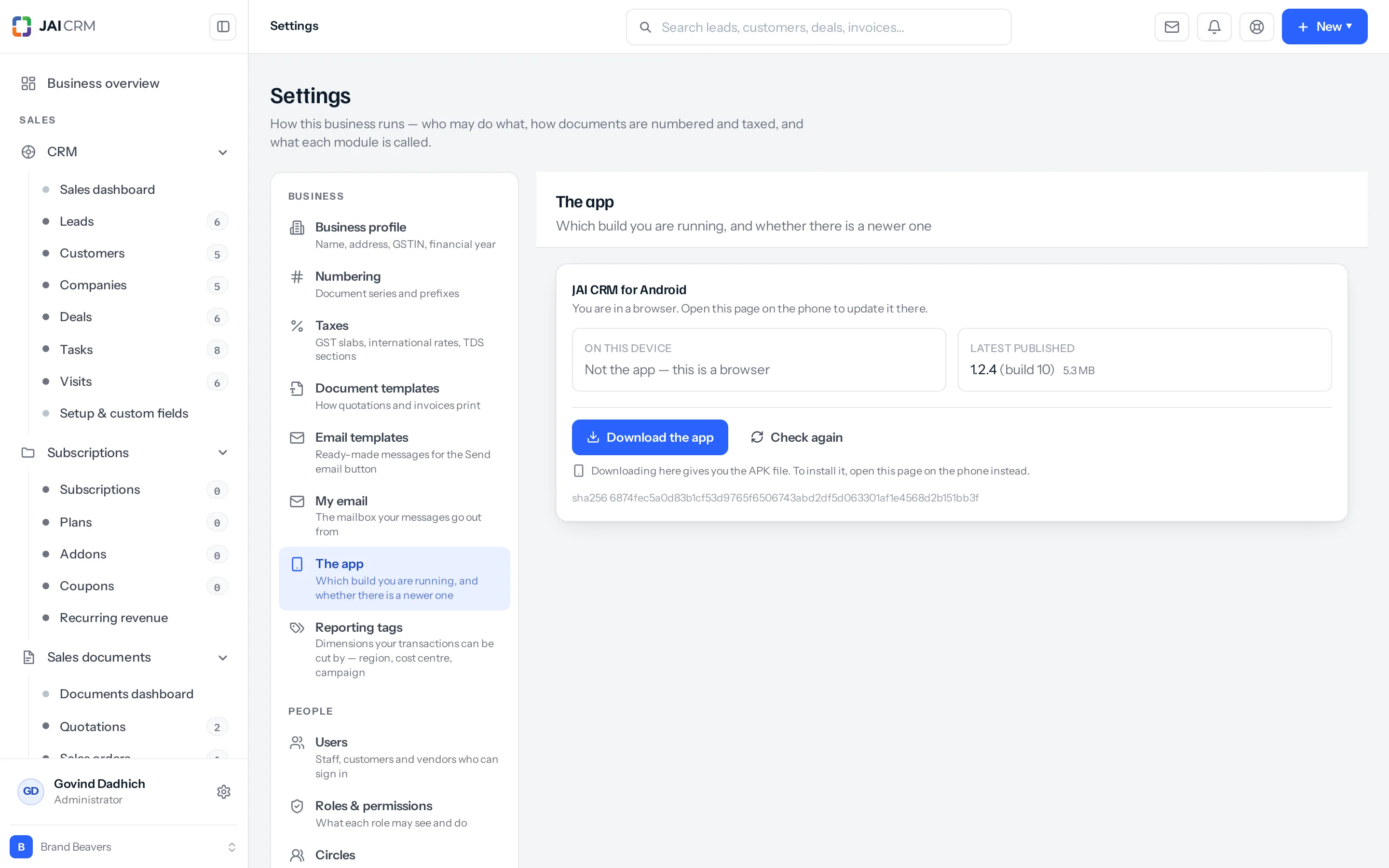
What the two boxes mean
| Box | What it shows | What to do about it |
|---|---|---|
| On this device | The build this app is running. In a browser it says Not the app — this is a browser, because a browser has no build to report and is always current anyway | Nothing, unless it disagrees with the right-hand box |
| Latest published | The newest build on the server, with its size. None published yet means no build has been made available for download | Where it is ahead of the left-hand box, install it |
Updating a phone
- Open Settings → The app on the phone itself, not on a computer.
- If there is a newer build, the screen says so and the button reads Download the update.
- Press it. Android asks for permission to install from this app the first time, and only the first time.
- Let it install. It goes over the top of what is there.
Nothing is lost and you are not signed out. Installing over the top keeps the session, so nobody has to find their password to get the fix they were waiting for.
Downloading the same page in a browser gives you the file but cannot install it — a computer has nowhere to put an Android app. The screen says so beneath the button rather than leaving you with a download that does nothing.
Why the build number, and not the version
Two numbers describe an app. The version — 1.2.4 — is written by a person and is there to be read. The build — 10 — is counted by the machine that made it and only ever goes up.
The comparison here is always on the build number, and the reason is that version names do not sort. Compared as text, “1.10.0” comes before “1.9.0”, because the character after the first dot is a 1 in one and a 9 in the other. A product that told everybody on 1.10.0 they were behind, for a month, until somebody worked out why, is a product that did the obvious thing.
When it cannot tell
An older app has no way to report which build it is. Rather than guess, the screen says This build cannot tell us its own version, and offers the download anyway — installing the same build over itself changes nothing, so the safe answer costs the reader nothing.
“I cannot tell” and “you are up to date” are different sentences, and only one of them is honest when nothing is known. This screen never claims the second on no evidence.
What is the sha256 for
The long line of characters at the foot is a fingerprint of the exact file. An administrator who wants to be certain the download is the one the build produced, and not something that replaced it on the way, can check it. Most people never will, and it costs them nothing to ignore.
If you never look at this screen
Nothing breaks, and that is the difficulty. The app keeps working with the product as it was on the day it was installed. A field somebody added last week is not on the phone, a fix that went out on Tuesday is not on the phone, and the person using it reports a bug that no longer exists — which is a slow, confusing way to lose a morning. If your business runs on the app, make looking at this screen somebody’s job once a month.
A worked example
Rohan’s phone shows 1.2.2 (build 8) on the left and 1.2.4 (build 10) on the right, so the screen tells him there is a newer build and the button offers the update. He presses it, allows the install once, and the app reopens still signed in — now with the delivery-note field his colleague added a fortnight ago, which he had been told was there and could not find.
Something missing or wrong here? Tell us. A question that needed asking usually means a page that needed writing.