
Everything else in Settings is about how your business runs. This one screen is about your arrangement with us: which plan you are on, what it switches on, how close you are to its limits, and what you have been billed.
Not to be confused with Recurring billing, under Customisation, which is about invoices you raise to your customers every month. Two entries a word apart, meaning opposite things — which is exactly how somebody cancels the wrong one.
Where it is
- Open Settings.
- Under System, choose Subscription.
It needs the Subscription permission, which most businesses give to an owner and to whoever does the accounts, and to nobody else. It shows what you pay and lets somebody change the plan.
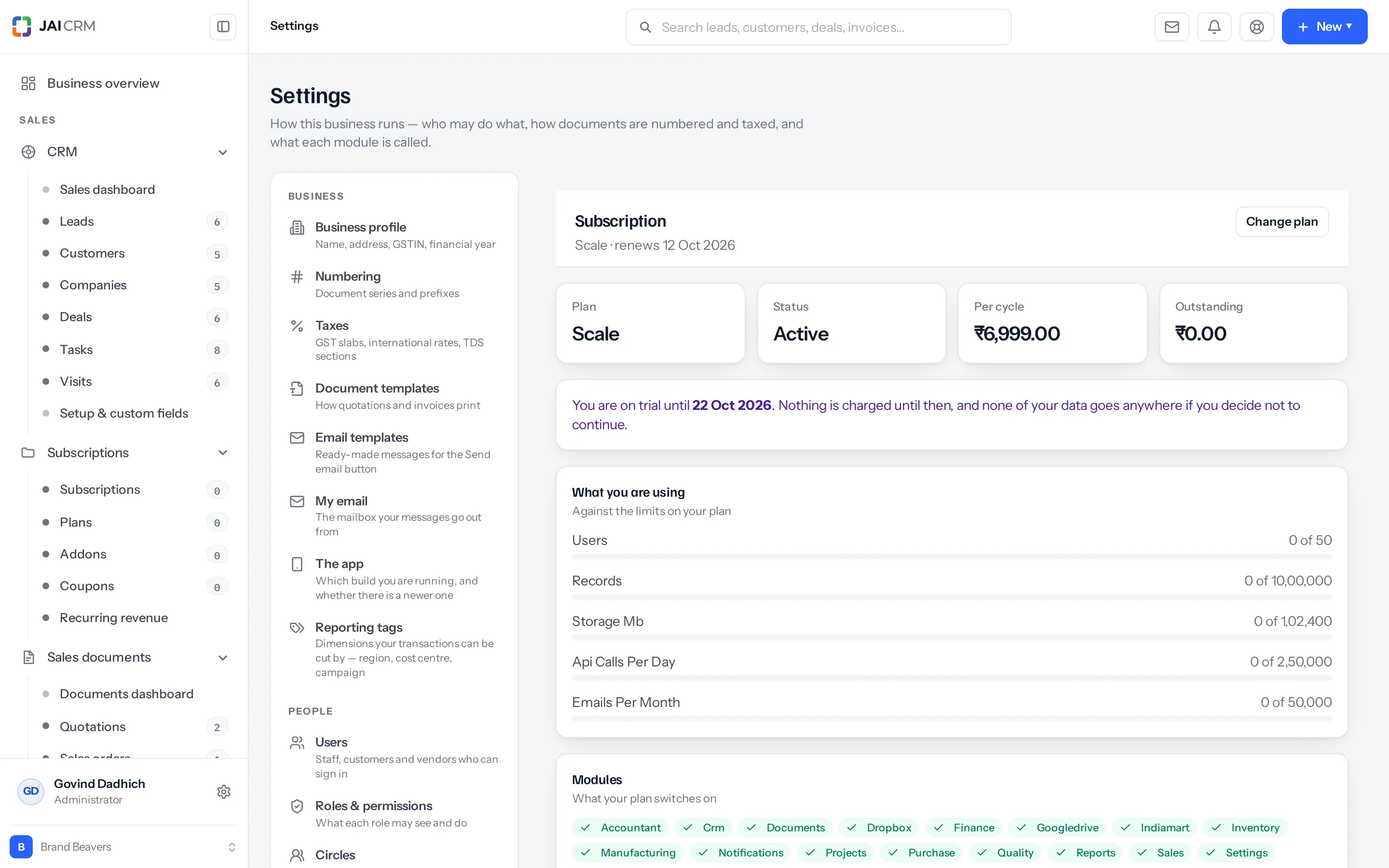
The four tiles
| Tile | What it means |
|---|---|
| Plan | The plan this business is on. The line under the heading adds the date it renews |
| Status | Active, trialing, past due or cancelled. Anything other than active is worth reading the rest of the screen for |
| Per cycle | What you are charged each time it renews — monthly or yearly, depending on the plan |
| Outstanding | What is owed right now. Zero is the number you want |
While you are on trial
A violet notice names the day the trial ends. Nothing is charged before it, and if you decide not to continue, none of your data goes anywhere — it stays where it is rather than being deleted on the day.
What you are using
Every limit on your plan, with how much of it you have used and a bar that changes colour as it fills: green while there is room, amber past seventy per cent, red past ninety. The limits are typically people who can sign in, records held, storage, API calls a day and emails a month.
This is the screen to look at before the month you add eight people, not after. A plan with no hard limits says so instead of showing empty bars.
Modules
Green badges for everything your plan switches on. It answers the question that otherwise turns into a support message — whether a module is missing because it is off for this business, or because the plan does not carry it. A module your plan includes but you are not using is switched on and off under Plugins; one your plan does not carry is not there to switch.
Integrations are not part of what a plan sells. IndiaMART, Just Dial, Shopify, Tally, Google Drive and Dropbox are free on every plan, each one on wherever the module it works with is on, and they are set up under Settings → Integrations.
Autopay
Off unless you set it up. With it on, the renewal is collected on the due date through a mandate rather than sitting as an invoice for somebody to pay. You still receive a receipt for each collection, and you can stop it at any time from the same card.
| With autopay | Without it | |
|---|---|---|
| On the due date | Collected against the mandate | An invoice waits to be paid |
| If nobody is looking | It renews | It can quietly go past due |
| To stop | Press Stop autopay | Nothing to stop |
Where autopay is not available, the card says why rather than offering a button that fails.
Payments
What is due, by its reference, with Pay beside it, and a receipt for every payment we have received: the date, what it was for, how it was paid, its reference and the exact amount. Every receipt is emailed too, and says the tax invoice for that payment follows soon. Before the first payment the receipts list is empty and says so.
Changing plan
Change plan opens the list with your current one marked. Moving up takes effect straight away, which is the point of it: the limit you have just hit stops being a limit. Moving down takes effect where it can without breaking what you already hold — a plan cannot be smaller than the data in it.
If you never open this screen
Usually nothing, until one of two days. The first is the day a limit fills and somebody cannot be invited or a file cannot be uploaded, which is bewildering unless you knew the limit existed. The second is the day a card expires and a renewal quietly goes past due. Both are visible on this screen for weeks beforehand, which is the only argument for looking at it once a month.
Something missing or wrong here? Tell us. A question that needed asking usually means a page that needed writing.