
IndiaMART does not send enquiries anywhere — you ask for them. This asks, on a schedule, and turns each answer into a lead carrying the buyer’s name, phone, city and what they asked about, with IndiaMART as its source.
IndiaMART is an integration, free on every plan that has CRM. Its screen is reached from Settings → Integrations: press Set up on the IndiaMART card.
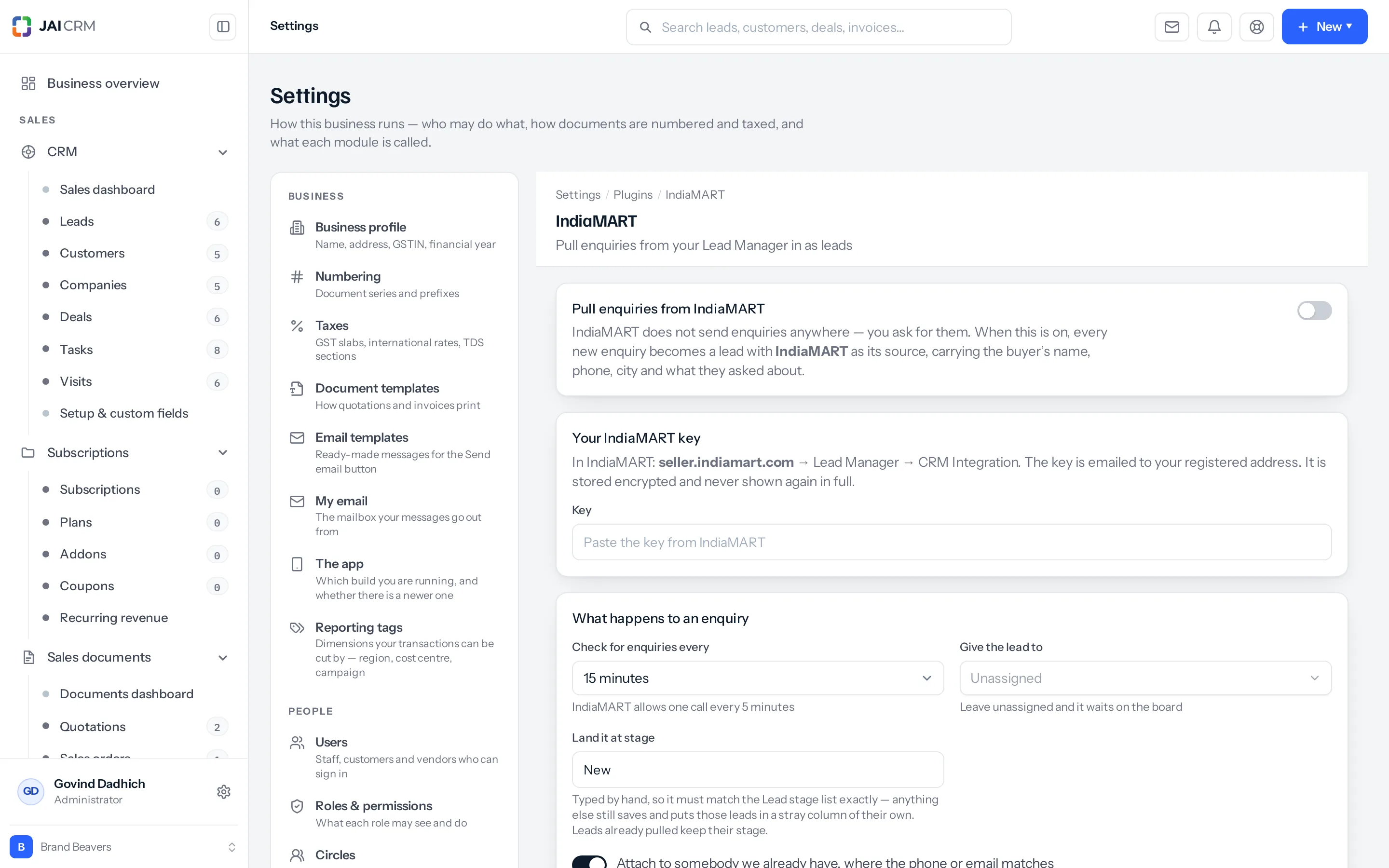
Getting the key
- Sign in at seller.indiamart.com.
- Go to Lead Manager → CRM Integration.
- IndiaMART emails the key to your registered address.
- Paste it here and save. It is stored encrypted and never shown again in full — only a hint of it.
What happens to an enquiry
| Setting | What it decides | What to choose |
|---|---|---|
| Check for enquiries every | How often we ask IndiaMART | IndiaMART allows one call every few minutes and the screen says how few. Fifteen minutes suits most businesses |
| Give the lead to | Who owns the lead when it arrives | Leave unassigned and it waits on the board for somebody to pick up. Name somebody and it is theirs, with whatever notification they have set |
| Land it at stage | Which column of the lead board it appears in | It is typed by hand, so it must match your Lead stage list exactly |
| Attach to somebody we already have | Whether a repeat enquiry joins an existing record | On, almost always — see below |
Land it at stage is the one that catches people. Anything that does not match a stage still saves, and the leads land in a stray column of their own where nobody is looking at them. Copy the stage name from your lead board rather than typing what you think it is called. Leads already pulled keep the stage they arrived at.
Attaching to somebody you already have
A buyer who enquires twice in a fortnight is one buyer. With this on, the second enquiry is written onto the lead or customer you already have — matched on phone or email — instead of making a second record of the same person. With it off you get both, and somebody has to merge them.
Leave it on unless you have a specific reason: on IndiaMART the same buyer shopping around across several of your products is ordinary behaviour, not a new relationship each time.
Knowing it is still working
This is the part that matters once it is running, and the reason the four tiles exist. An integration that has quietly stopped looks exactly like one with no enquiries — the screen is calm, the lead list is empty, and nothing tells you which of the two it is until somebody wonders where the leads went.
| Tile | What it tells you |
|---|---|
| Enquiries received | Everything ever pulled. A number that has not moved in a week is worth a look |
| Last pull | How many were new the last time we asked |
| Last checked | When we last asked at all. This is the one that gives away a stopped integration |
| State | Working, Attention or Not run, with what IndiaMART actually said |
When a pull fails, a red-edged card says so and repeats the error in the words IndiaMART used. An expired or revoked key is the usual cause, and it is fixed by pasting a new one.
If you never connect it
Enquiries stay in the IndiaMART Lead Manager and somebody retypes them, which is slower and is where the phone numbers with a digit missing come from. Nothing else changes.
A worked example
Trend In Need Retail connect their key, set fifteen minutes, assign to Anil, and land at New — copied from their lead board rather than typed. A buyer in Surat enquires about two products within an hour. The first arrives as a new lead for Anil; the second is written onto the same lead, because the phone number matches. A month later the tiles read 61 received and last checked eleven minutes ago, which is how they know it is still running.
Something missing or wrong here? Tell us. A question that needed asking usually means a page that needed writing.