
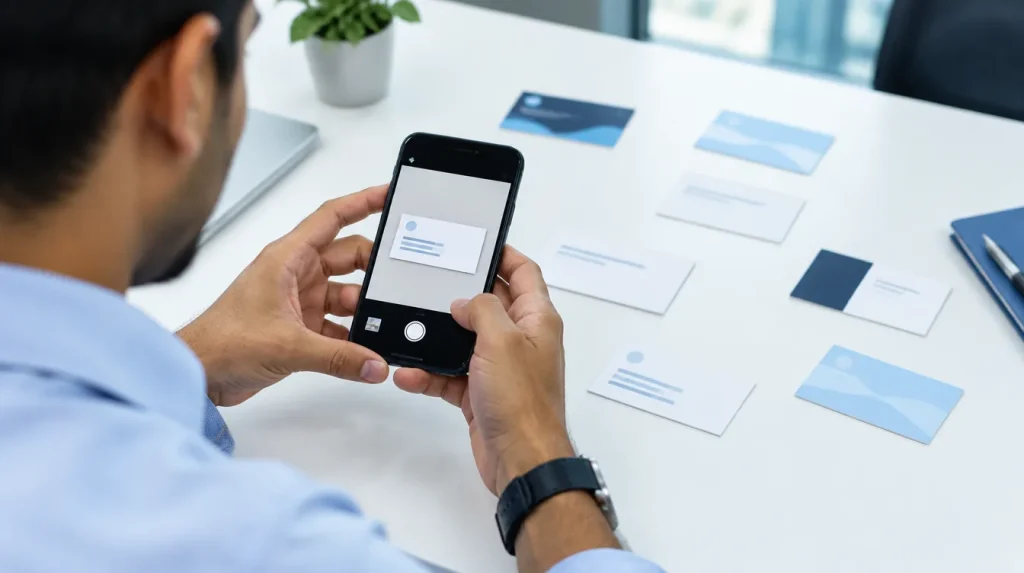
The best visiting card scanner for an Indian business reads GSTINs, several phone numbers and both sides of a card correctly, then files each person where your team follows up. We compared eight scanners on what each vendor publishes, read on 10 October 2026. We did not test them. One of the eight, JAI CRM, is ours.
In short
- Compared on
- What each vendor publishes, read on 10 October 2026. We tested no app.
- Free to start
- Google Lens, HubSpot’s scanner, Bigin’s one-user plan and Kauntech’s free plan
- Indian scripts
- None of the eight publishes reading of cards printed only in an Indian script
- CamCard
- Named in two Government of India blocking orders from 2020, so left out
- Ours
- JAI CRM files each card as a lead, customer or supplier with a follow-up task, from ₹149 per user per month plus GST
How did we compare these scanners?
We could not install the apps or open accounts, so this is not a test. We read each vendor’s own pages on 10 October 2026: product pages, help articles, pricing pages and their app store listings. Each claim below links to its page.
- “Not published” means the vendor says nothing about it. The app may still do it. Ask, or test it yourself.
- There are no accuracy figures. A vendor’s own accuracy claim cannot be checked from outside, and we have measured nobody’s scanner, our own included.
- Prices are as published, in the currency shown to a visitor from India.
- JAI CRM is ours. It is held to the same rules, limits included, and was checked in its own code the same day.
Most of these vendors call the product a business card scanner. In India we say visiting card, and our cards need their own checklist.
What must a scanner get right on an Indian visiting card?
Most scanner reviews assume one name, one phone and one email. Indian cards carry more, and each extra item is a place to go wrong.
- The GSTIN. A 15-character GSTIN whose first two digits are the state code. It needs its own field, for the first invoice and to check the firm on the GST portal.
- Several numbers, each marked as what it is. Two mobiles and an office landline are common. A Bengaluru landline written with +91 and its 80 code is ten digits starting with 8, the same shape as a mobile. A WhatsApp sent to it reaches nobody.
- Both sides. Many cards print English on the front and Hindi or a regional language on the back. Adding the back must not undo what you corrected on the front.
- Indian scripts. A scanner that reads English alone gives you an empty record for a card printed only in Gujarati, Tamil or Devanagari.
- The address, split. City, state and the six-digit PIN in their own fields let you filter by region and assign by territory.
- QR codes. A QR code holding a contact file is faster to read than the print, and exact.
- No signal. Many exhibition halls have weak reception. A scanner that needs the network for every card stalls when your queue is longest.
- Where the person lands. A contact in one salesperson’s phone is not a lead your business owns.
Is CamCard still available in India?
CamCard tops many global lists, so it needs a word. The Ministry of Electronics and Information Technology blocked CamCard apps under section 69A of the Information Technology Act. The Press Information Bureau’s list of 2 September 2020 names three CamCard apps, and its list of 24 November 2020 names two.
We found no notice withdrawing either order, and camcard.com did not load from an Indian connection on 10 October 2026. If you searched for a CamCard alternative, the eight below are the ones we could check.
How do the eight scanners compare?
Each cell is what the vendor publishes, linked in the sections that follow.
At the stall: capturing the card
| Scanner | Both sides | QR codes | Without signal | Card languages |
|---|---|---|---|---|
| Google Lens | Not published | Not published | Not published | Not published |
| HubSpot | Not published | Yes, vCard format | Not published | Not published |
| Zoho CRM app | Not published | Not published | Not published | Not published |
| Bigin by Zoho CRM | Not published | Yes, on iPhone | Not published | 16 listed, none Indian |
| Freshsales | Not published | Not published | Not published | English only |
| Covve Scan | Not published | Yes | Yes | 60 or more; Indian scripts not named |
| Kauntech | Yes | Yes, and NFC | Yes | Others “coming soon” |
| JAI CRM (ours) | Yes, add the back later | Yes: vCard, MeCard, links | Yes | English on its own server; see below |
After the scan: where the person goes, and the price
| Scanner | Where the person goes | Team | Price as published | Data location |
|---|---|---|---|---|
| Google Lens | Your phone’s contacts | No | Free | Not published |
| HubSpot | A HubSpot contact | Shared CRM | Free on every plan | US, Canada, Australia or Germany |
| Zoho CRM app | A Zoho CRM contact | Shared CRM | Free for 3 users; paid from ₹800 per user per month, yearly, plus GST | India offered |
| Bigin by Zoho CRM | A Bigin contact | Paid plans | Free for one user; paid from ₹400 per user per month, yearly, plus GST | India offered |
| Freshsales | A Freshsales contact | Shared CRM | From ₹749 per user per month, yearly; GST not stated | India offered |
| Covve Scan | The app; Excel, phone, Google, Outlook; CRMs on higher plans | Pro and up | From US$12 per seat per month, or US$119 a year | Europe (Azure, West Europe) |
| Kauntech | The phone; Sheets, WhatsApp, Gmail, Telegram, webhook | Ultra and up | Free for 49 scans a month; ₹1,499 or ₹2,499 a year; GST not stated | The phone; cloud backup optional |
| JAI CRM (ours) | A lead, customer or supplier, with a task | Shared CRM | ₹149 per user per month, yearly (₹175.82 with GST); ₹199 monthly | India (Mumbai) |
What does each scanner do well, and where does it fall short?
Google Lens
Google’s Play Store listing for Lens says it can save a card’s details to your phone’s contacts. It is free and there is nothing new to learn.
Lens is a camera tool, not a card scanner. Google publishes nothing about two-sided cards, number types, GSTINs or working without signal for this job. The contact lands in one person’s phone, with no owner and no follow-up. Lens suits an owner who meets a few people a month.
HubSpot
HubSpot’s scanner page says the scanner is free, and its help article lists it for all plans. It runs in the HubSpot app on Android and on iOS 16 or later, but not on iPads. You frame the card, confirm each value and save a contact. The same menu reads QR codes in vCard format.
The fields it lists are email, first and last name, job title, phone number, website, street address and postal code. That is one phone field, and no GSTIN, city or state. HubSpot hosts accounts in the US, Canada, Australia or Germany, not India. It suits teams already selling from HubSpot.
Zoho CRM and Bigin
The Zoho CRM mobile app scans a card into a contact and merges duplicates. Bigin, Zoho’s simpler CRM, lists its card scanner on every plan on its pricing page, including the free one-user plan with 500 records. Bigin’s iPhone app also reads QR codes on cards.
Zoho has data centres in Mumbai and Chennai, and prices in rupees: Zoho CRM from ₹800 and Bigin from ₹400 per user per month, billed yearly, plus GST. Zoho’s update post lists 16 languages for Bigin’s scanner, none Indian. Zoho’s older standalone Card Scanner page returned “not found” on 10 October 2026, so it is not compared.
Freshsales
The Freshsales help article describes the mobile app: photograph a card or pick one from the gallery, check the details beside the image, edit, and save a contact. Freshworks lists India among its data centre locations, and prices Freshsales from ₹749 per user per month, billed annually.
The same article says plainly that the app reads cards in English only. Nothing is published on QR codes, the back of a card or working without signal. Freshsales suits a team already on it whose visitors carry English cards.
Covve Scan
Covve is a standalone scanner from a company registered in Cyprus. Its pricing page lists, on the Essential plan, card and QR scanning, offline scanning, 60 or more languages, and export to Excel, phone contacts, Google and Outlook, for US$12 per seat per month or US$119 a year. Pro, at US$20 a month or US$199 a year, adds badge scanning, a web portal and team collaboration.
Its developer documentation says the scanner is hosted in Microsoft Azure’s West Europe data centres. The limits for an Indian buyer: dollar pricing, CRM integrations on the custom-priced Enterprise plan or as a Pro add-on, Indian scripts not named, and nothing on the back of a card. Covve suits a team wanting one scanner to feed a CRM it already has.
Kauntech
Kauntech is a Mumbai-based scanner for Indian sales teams. Its features page says cards are read on the phone with no internet, front and back, with QR codes and NFC. Leads can go to Google Sheets, WhatsApp, Gmail, Telegram or a webhook. Its pricing: free for 49 scans a month, Pro ₹1,499 a year, Ultra ₹2,499 a year with team collaboration, Enterprise per user.
Its privacy policy says scans stay on the phone unless you switch on cloud backup, and that AI features send card text to Google’s Gemini. Other languages are “coming soon”. Kauntech captures and routes; the follow-up lives wherever the sheet or webhook sends it.
JAI CRM (ours)
The scanner is part of the Exhibitions module, in every plan with CRM and Sales Documents. The camera has four modes: Card, QR code, Shot (photos of a stand or product) and Look up, which checks whether you know someone and keeps nothing. Scan the front, then use Add the back. QR codes holding a vCard, a MeCard or a contact-file link are read too.
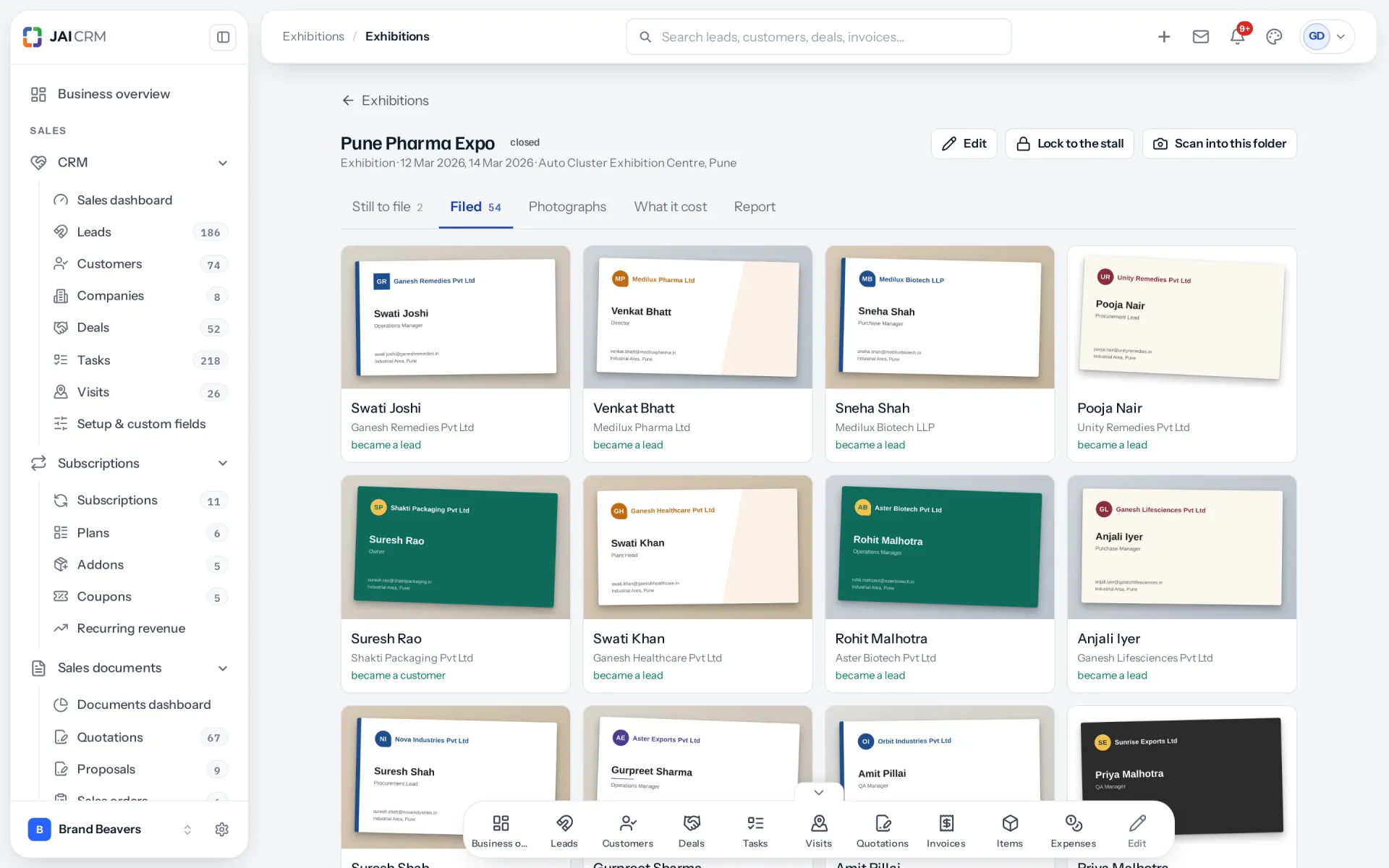
Up to four mobiles, three phones, three emails, the website, GSTIN, city, state and PIN land in their own fields. Where a PIN points to one state, the state is filled in. Unsure fields carry a warning mark, and a person checks every card. Without signal, cards and voice notes wait on the phone. Filing makes each card a lead, customer or supplier, matched against people you have by GSTIN, mobile, email, and company with city. A lead or customer gets a task for its owner, due in 48 hours, with the voice note.
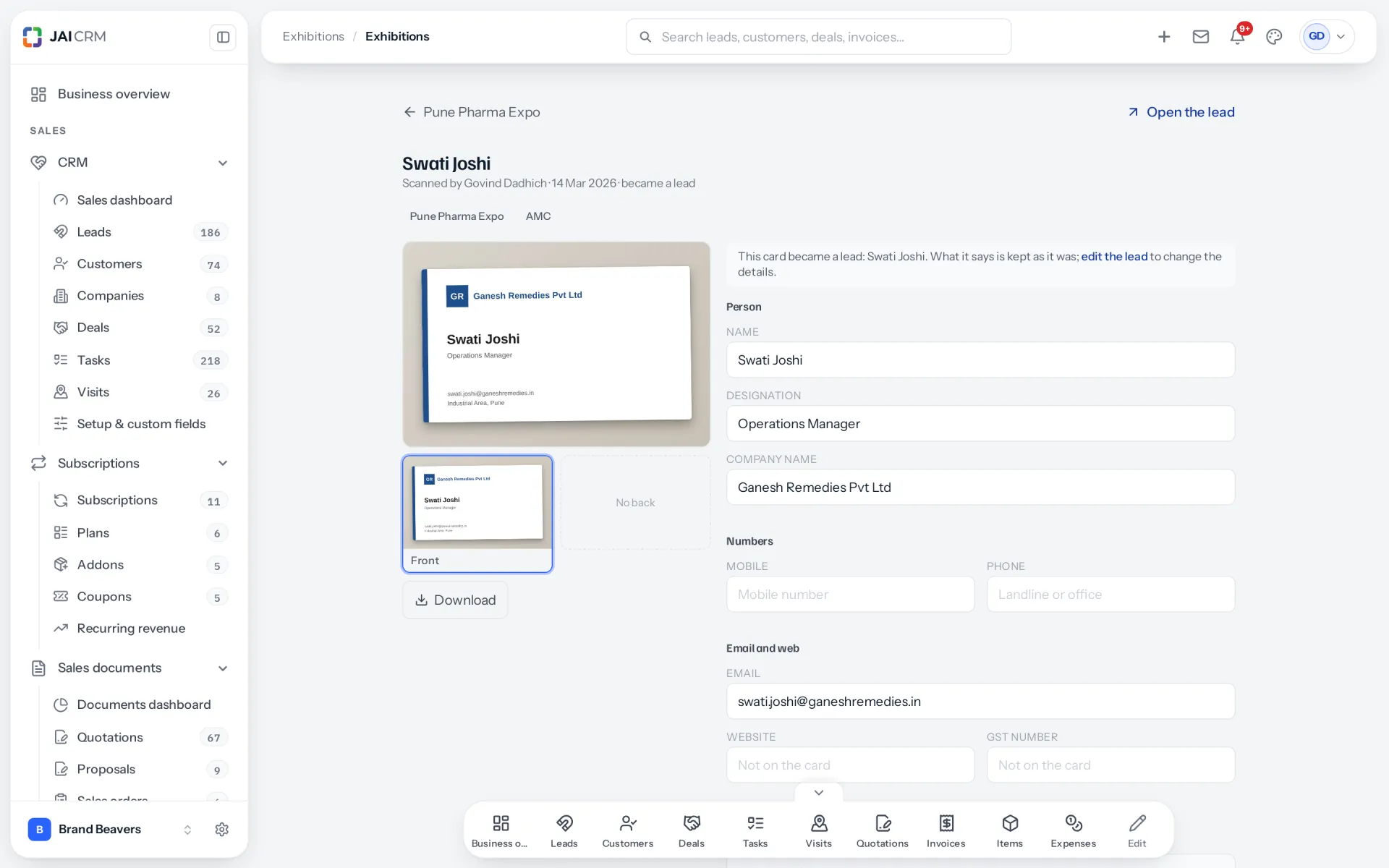
The limits, as plainly as the others’. There is no iPhone app; on an iPhone the scanner runs in the browser. Cards are read by AI only where the workspace has an AI model for cards, and the photo then goes to that provider; a switch in Settings turns it off. Otherwise cards are read on JAI CRM’s own servers, in English only. Where a name is printed in English and an Indian script, the AI keeps the English. The 48 hours cannot be changed. There is no free plan, only a 14-day trial.
Is a scanner that saves contacts enough, or do you need one that starts the follow-up?
Three people run a stall for three days and bring back 240 cards. With a contact-saving app, those are 240 contacts across three phones. A week later, one buyer has been called twice and the hottest lead not at all.
With a scanner that files into a CRM, each card becomes a record with an owner, a grade, a note and a dated task. The difference is not reading accuracy. It is whether anyone owns the next step.
Ownership also decides whether you can say what the fair earned. A payment traces back to a fair only when the payer is linked to the card. See the 7-day follow-up plan and the stall return calculator.
Run this 10-card test yourself before you choose
Every app here has a free plan or a trial. Pick ten cards from your own drawer, and use the same ten in every app, on the same phone, in the same light.
| Card | Pick | What it tests |
|---|---|---|
| 1 | Plain English card, one mobile, one email | The baseline: every field should be right |
| 2 | Two mobiles and a landline with its STD code | Every number kept, and the landline still a landline |
| 3 | A card printing a GSTIN | All 15 characters in a GSTIN field |
| 4 | English front, Hindi or regional back | Adding the back, and the second script |
| 5 | Printed only in your buyers’ script | Whether it reads at all |
| 6 | Glossy, dark or brightly coloured | Glare and low contrast |
| 7 | A card with a QR code | The code read, and agreeing with the print |
| 8 | A factory address with a PIN | City, state and PIN in separate fields |
| 9 | Someone already in your records | A warning instead of a duplicate |
| 10 | Any card, in aeroplane mode | Kept, then sent when the signal returns |
Copy this sheet once per app:
Score sheet. App, phone, date.
For each card: fields printed; fields right first time; fields fixed by hand; seconds from camera to saved.
Then four yes-or-no questions. Did adding the back keep my fixes? Did the landline stay a landline? Was the duplicate caught? Did the aeroplane-mode card arrive?
A field is right only if it sits in the right field, exactly as printed. Compare apps by the total fixed by hand, because hand fixes are the real cost. At 200 cards, three fixes a card is 600 corrections; one fix a card is 200.
Which scanner should you choose?
- Working alone, a few cards a month: Google Lens is free and saves to your phone. Kauntech’s free plan adds offline reading and a sheet.
- A team already on a CRM: start with your CRM’s own scanner in HubSpot, Zoho CRM, Bigin or Freshsales, and run the 10-card test. If it fails your cards, try a standalone scanner such as Covve that feeds your CRM.
- A business that exhibits and wants each fair’s return in rupees: this is what JAI CRM, ours, was built for. Cards become leads with owners and 48-hour tasks, and the exhibition report counts money received from those people against what the fair cost. Run the same test on it.
Where does the card data go, and what does the DPDP Act ask of you?
Section 3 of the Digital Personal Data Protection Act, 2023 applies the Act to personal data collected on paper and digitised later, which is what a scan does. So ask each vendor where the data is stored and who processes it.
From what vendors publish: Zoho and Freshworks offer data centres in India, while HubSpot’s and Covve’s are abroad. Kauntech keeps scans on the phone unless you back up to its cloud, and sends card text to Gemini for AI features. JAI CRM stores data in Mumbai, and sends a card photo to an AI provider only where the workspace reads cards with AI. Our post on visiting cards and the DPDP Act covers consent and which parts are in force. This is general information, not legal advice.
Common questions
Which app is best for scanning visiting cards in India?
It depends on where the details must end up. For your own phone contacts, Google Lens is free. For a team, choose a scanner that files each card into your CRM with an owner and a follow-up, and test it on ten of your own cards first.
Is CamCard banned in India?
CamCard apps are named in two blocking orders issued by India’s Ministry of Electronics and Information Technology in 2020, under section 69A of the Information Technology Act. We found no notice withdrawing them on 10 October 2026.
Can a scanner read both sides of a visiting card?
Some say so: Kauntech publishes front and back capture, and JAI CRM lets you add the back after the front. Most vendors publish nothing about it. Test with a two-sided card, and check that adding the back keeps your earlier fixes.
Can I scan visiting cards without internet?
Covve and Kauntech publish offline scanning, and JAI CRM keeps cards on the phone until the signal returns. The others publish nothing about it. Test in aeroplane mode at the office, before the fair.
Do scanner apps read Hindi or regional language visiting cards?
None of the eight compared here publishes reading of cards printed only in an Indian script. Freshsales says English only, and Bigin lists 16 languages with no Indian one. Test with your own cards.
Is it safe to scan customer visiting cards into an app?
Check where the vendor stores the data and who processes it, including any AI provider. A scanned card is covered by India’s DPDP Act, 2023, which places duties on the business deciding how it is used.
Correct as of October 2026. Features, prices and data locations are as each vendor published them on 10 October 2026, on the pages linked above; check them before you buy. JAI CRM was checked in its code the same day, and its screen labels are quoted as the app shows them. The stall, the three people and the 240 cards are examples.
Next
See it with your own data
Start free, import a spreadsheet of your customers, and raise a real GST invoice in the first ten minutes. No card, no sales call.