
A business with one shed does not need this page. A business with a godown in Hadapsar, one in Chinchwad, one in Wakad and two more in Nashik does: the store in-charge at Hadapsar has no reason to read Nashik’s stock, and every reason to be confused by it. The Restrict to the person’s own warehouses panel on a role is how you say that.
It is the one setting in this section that most often looks switched on and is not — and on the inventory screens, the ones it was built for, only half of it is wired up. Read the whole page before you promise anybody that somebody has been shut out of a site.
What the panel actually does
It is a second narrowing, not an alternative to the data scope above it. The scope answers “whose records” — their own, their team’s, or everything in the business. This answers “which places”. A record has to pass both. Neither one replaces the other.
That is why it still bites on a role set to Everything in the business. Everything in the business, in my two warehouses, is the ordinary shape of a store in-charge’s job — and it is how all five works-floor presets (Stores & inventory, Quality (QC), Production, Accountant, Bookkeeper) are built. They are wide on purpose, because a stock balance is owned by nobody, and the place restriction is what is meant to bring them back in.
It is also the only one of the access layers that nothing else can widen past. A module set to public under Data sharing settings still respects it. A sharing rule that hands somebody every record in a module still respects it. Being the assignee on a record does not beat it — a record outside your places is not yours to open even with your name on it.
It takes two steps, in two places
The setting is deliberately split in half, and each half is useless without the other.
- On a role — which modules are narrowed by place.
- On a person — which places they hold.
Split that way so that one person’s warehouses mean the same thing in stock, transfers, receipts and production without being set five times — and so a module can be switched to segmented for everyone on a role without opening each member’s record.
Step 1 — on the role
- Go to Settings → Roles & permissions and open the role.
- Set the permissions and the data scope as usual in the grid.
- Below the grid, find Restrict to the person’s own warehouses.
- Tick the modules that should be narrowed. Only modules whose records record a place are listed; see the two tables below.
- Save.
A role marked Preset is restricted like any other: tick the modules on it and save, and everybody on it is restricted. To restrict only some of them, use Copy on the role card first, tick the modules on the copy and give those people the copy.
Copy brings this panel with it. A copy of an already-restricted role, made for a second site, is restricted in the same modules; give its people their own warehouses or branches. Copies made before 19 Oct 2026 came with an empty panel, so check one made then.
Step 2 — on each person
- Go to Settings → Users and open the person.
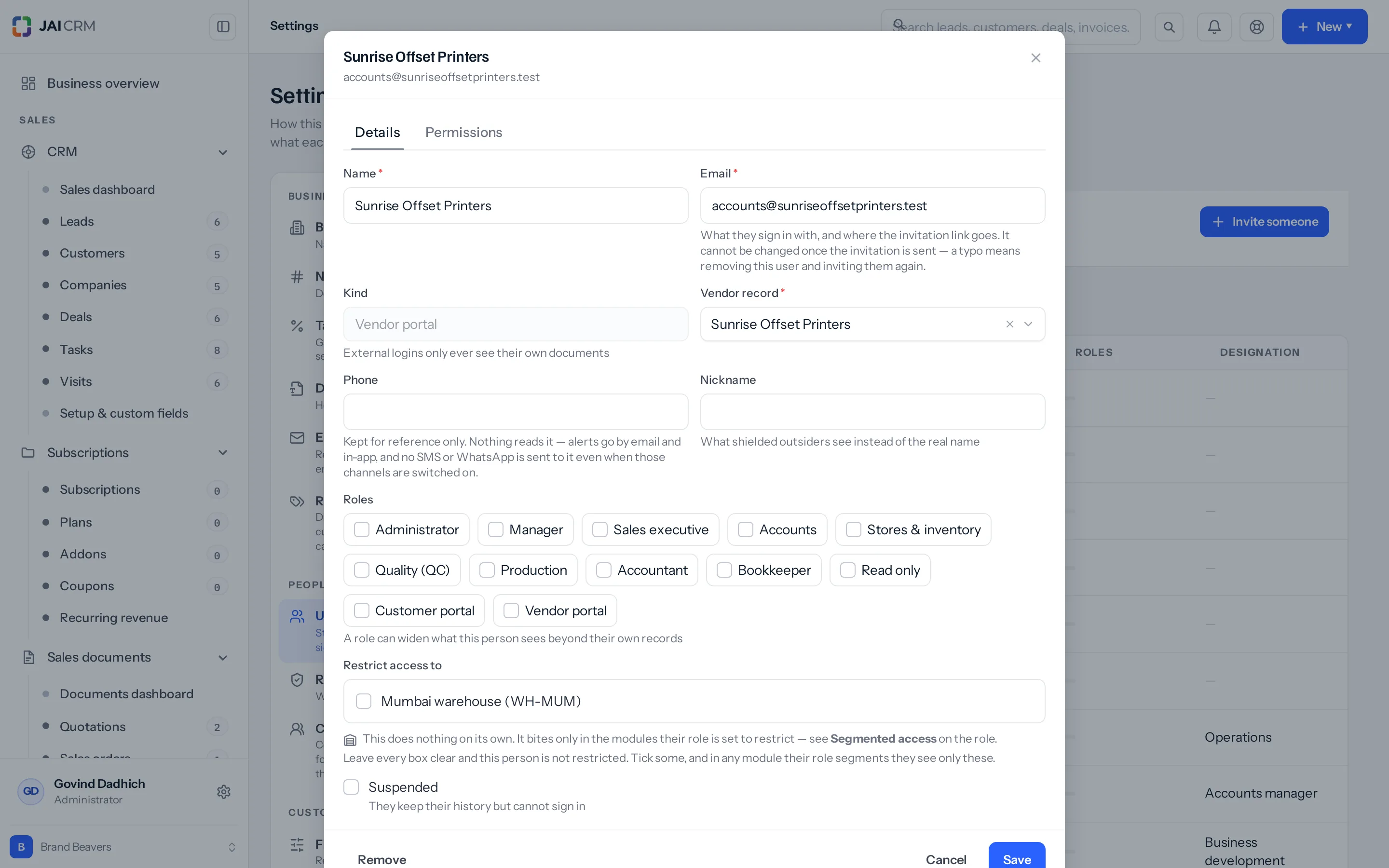
- On the Details tab, scroll to Restrict access to and tick their warehouses.
- Restrict access to branches appears above it only when more than one branch is on offer. Tick a branch to give them everything filed against it.
- Save.
Every workspace starts with one branch — Head office, created with the account — and no screen in the product lists or adds a second one. Only the API takes a new branch. So on most workspaces there is exactly one branch, the branch boxes never appear at all, and the warehouse boxes are the whole of this half. The same rule has a sharper edge for a restricted editor: somebody confined to exactly one branch is offered only that one, so the box does not appear for them either and they cannot hand their own branch to a new starter.
The hint under the warehouse boxes points you at “Segmented access on the role”. That is this same panel — the one now titled Restrict to the person’s own warehouses. Two names, one setting.
Both halves leave an audit entry — the role as a permission change, the person as an update to that user — but neither entry records what changed. The role entry compares the permission grid only, and the ticked modules are not in it; the person’s warehouses and branches sit in tables of their own that the user diff never reads. Change nothing but the places and the trail says somebody was updated, without saying how.
Every combination, and what each one shows
This is the table to send somebody who says the restriction is not working.
| Ticked on the role | Places ticked on the person | What they see in that module |
|---|---|---|
| No | None | Everything their data scope allows. No narrowing by place at all. |
| No | Hadapsar and Chinchwad | Everything their data scope allows — nothing they see is narrowed. The warehouses still do one thing: while somebody holds any, they may hand out only those warehouses when they edit another person, and only those are offered to them on Settings → Users. |
| Yes | None | Everything their data scope allows. Restricted to nothing is not restricted. |
| Yes | Hadapsar and Chinchwad | Records filed against Hadapsar or Chinchwad, plus records with no place on them — then narrowed again by the data scope. |
| Yes | The Pune branch | Everything filed against Pune, and everything in every warehouse inside Pune, including warehouses added to Pune next year. |
| Yes | The Pune branch and Ambad | Everything in Pune, plus Ambad, in the modules matched on a warehouse. On the document modules, Pune only: once a branch is ticked the product stops reading upward from warehouses, so Ambad’s own branch is never added. |
| Yes, on a module filed against a branch | Hadapsar and Chinchwad, both in the Pune branch | The whole of the Pune branch — wider than the two warehouses. See “It reads upward” below. |
| Yes, on a module filed against a branch | Hadapsar and Chinchwad, neither attached to any branch | Everything. There is no branch to read upward to, so no narrowing is built. |
| Anything | Anything — but the person is the account owner | Everything. The account owner is never restricted by place, whatever is ticked. |
Which modules can be restricted, and how each one is matched
The list in the panel is worked out from what the records themselves record, so it is the same list the save will accept. There are two kinds of place — a warehouse, and the wider branch the business trades from, with its own GSTIN and its own numbering series — and which one a module uses decides how tightly it can be narrowed.
| Listed in the panel as | What the record is filed against | What somebody holding two warehouses sees |
|---|---|---|
| Stock movements, Stock balances, Goods receipts, Adjustments, Packages, Shipments, Assemblies, Manufacturing orders, Work centres, Document lines | One warehouse | Exactly those two warehouses |
| Transfers | Two warehouses — a from and a to | Any transfer with either end in those two. The in-charge sending stock and the one receiving it both have a reason to see it. Note that either end also decides writing: somebody holding only Chinchwad may dispatch a transfer from Ambad into Chinchwad, and dispatching writes the stock out of Ambad, which they do not hold. |
| Quotations, Sales orders, Proforma invoices, Invoices, Bills of supply, Retainer invoices, Credit notes, Delivery challans, Purchase orders, Purchase bills, Debit notes, Documents | One branch | Every document filed against the branch those two warehouses sit in — not just the two |
| Warehouses | One branch | Every warehouse in that branch. Opening a warehouse record is what is guarded; the Warehouses list itself still shows them all. |
| Users | One branch — the branch that person works at | Staff filed against that branch, plus staff with no branch set |
Where it is enforced, and where it is not
Ticking a module does not mean the whole module honours it. The narrowing is applied by whichever handler serves the screen, and the inventory screens keep handlers of their own that never ask for it. Read this table before you tell anybody a site has been shut off from another.
| Module | Their list | Opening one record |
|---|---|---|
| Quotations, Sales orders, Proforma invoices, Invoices, Bills of supply, Retainer invoices, Credit notes, Delivery challans, Purchase orders, Purchase bills, Debit notes, Documents | Narrowed — and so are the boards, pivots, exports, dashboard tiles and reports built on them | Refused, as not found |
| Manufacturing orders, Packages, Assemblies | Narrowed, with their exports | Refused |
| Users | Narrowed | Not checked. A colleague’s record still opens from its link |
| Adjustments, Transfers | Not narrowed — every site’s are listed | Refused, and so are posting, dispatching, receiving and deleting |
| Goods receipts, Shipments | Not narrowed | Refused — but for everybody, whatever they hold. See the note below |
| Warehouses | Not narrowed — the list and the picker show them all | Refused. This is where that site’s whole stock listing sits |
| Work centres | Not narrowed | No record page. Editing or deleting a station is refused |
| Stock balances, Stock movements, Document lines | Not narrowed | No record page. Ticking these three changes nothing anywhere |
Goods receipts and shipments are guarded against a permission the product does not have. The receipt page asks for a key that is not in the registry, which resolves to no access at all before any place is looked at — so on a works-floor role every goods receipt answers Receipt not found, whichever warehouse it sits in, and refuses to post. Shipments do the same. Only roles carrying a module-wide Inventory row escape it, which in practice means Administrator and Manager. Until it is fixed, do not read a “not found” on a receipt as the place restriction working.
A worked example
A tile and sanitaryware distributor trades from two branches: Pune and Nashik. Pune holds three godowns — Hadapsar, Chinchwad and Wakad. Nashik holds Ambad and Satpur, and each godown has its Branch box filled in on its own record, which the document half of this depends on. Sunita Kulkarni runs Hadapsar and Chinchwad.
- On Settings → Roles & permissions, copy the Stores & inventory preset and name the copy Stores — Pune. The preset is scope “Everything in the business” on every line but Files, which ships at “Their own records” — which is the point: nothing in the grid is going to narrow her on stock, so the place panel has to.
- In Restrict to the person’s own warehouses on that copy, tick Adjustments, Transfers, Goods receipts and Packages. Stock balances and Stock movements are offered too; ticking them changes nothing today. Leave Purchase orders clear — the reason is two paragraphs down.
- Save the role.
- On Settings → Users, open Sunita, give her Stores — Pune, and under Restrict access to tick Hadapsar and Chinchwad. Leave the branch boxes clear.
- Save.
From her next screen, here is what actually changes. The stock ledger on Inventory → Stock & movements is untouched: it still shows all five godowns, and so does its CSV button. The adjustments, transfers and receipts lists still show Nashik’s. What changes is what will open. An adjustment raised at Wakad is listed and refuses to open. A transfer of 120 boxes from Chinchwad to Ambad opens, because Chinchwad is one end of it — and she can dispatch it, which takes the stock out of Ambad. A goods receipt booked into Ambad is listed and will not open, and neither will one booked into Hadapsar, for the reason in the note above. Packages narrow properly, list and record both.
Now the part that catches people. Had Purchase orders been ticked as well, Sunita would see every purchase order filed against the Pune branch — including a ₹2,40,000 order for Wakad that has nothing to do with her. Same for invoices: a ₹1,18,000 invoice (₹1,00,000 plus 18% GST) raised at Wakad would be in her list. A document is filed at branch level and there is nothing finer on it to match.
What changes the moment you save
- On the document modules, Users, manufacturing orders, packages and assemblies, the lists, boards, pivots, exports, dashboard tiles and reports all read the same filter, so they narrow together. The inventory screens do not: the stock, adjustment, transfer, receipt, shipment and work centre lists show every site, and so do the stock valuation, ageing, movement-summary and reorder reports and the stock balances CSV.
- A scheduled report narrows to whoever set the schedule up, not to whoever it is mailed to. One an administrator schedules and sends her carries the whole business, and a schedule with no recorded creator is not narrowed at all.
- Record pages and the buttons on them narrow as well, on every module in the table above except Users, Stock balances, Stock movements and Document lines. Opening a record outside her places returns not found rather than a permission message — naming it would confirm it exists, and at another site that is the whole of what was being kept back.
- Writing to a record that already exists is refused on the same basis: posting an adjustment, dispatching or receiving a transfer, deleting any of them. Creating one is not checked at all — see below.
- It takes effect on the person’s next screen. No sign-out is needed.
What it will not do
- It changes nothing on any record. Take a warehouse away and the records stay exactly as they were; only what comes back to that person changes.
- It does not restrict the account owner. The owner sees everything, by definition, and there is no way to confine them.
- It does not reach approvals. The approvals inbox reads every request waiting anywhere in the business and shows the ones the viewer may decide — title, amount and a link straight to the record — and the decision itself asks only whether they are on the approver list for the step that is waiting. Somebody confined to Pune can sign off a Nashik adjustment from there. Only posting it afterwards is refused, which is what makes this look like it works until somebody signs something off.
- It does not check any warehouse when a record is created — not the far end of a transfer, not the near one, and not the warehouse a goods receipt is booked into. Somebody holding Hadapsar and Chinchwad can raise an adjustment at Wakad, a transfer between the two Nashik godowns, and a receipt into Ambad. The refusal comes only when they go back to post it.
- It does not narrow the Warehouses list or the warehouse picker — those show every live warehouse. What it narrows is opening a warehouse record, which is where that site’s whole stock listing sits.
- Three of the boxes in the panel do nothing at all. Stock balances, Stock movements and Document lines are offered and read by nothing: none of those screens is narrowed, and none of those records has a page that could refuse.
- It does not reach modules that record no place. Leads, customers, deals, items, expenses, payments, quality inspections, job cards and bills of materials are not in the panel and cannot be added to it — the save refuses them.
- It does not apply retrospectively to how records were filed. A document’s branch is settled when the document is created and no screen offers it afterwards, so anything already filed against the wrong branch — or against none — stays there until somebody rewrites it through the API.
The four things that catch people out
1. Ticking alone does nothing — restricted to nothing is not restricted
This is the most common support call on the whole feature. You tick eight modules on the role, you save, you check with a new starter, and they see everything. Nothing is broken: nobody has given them any warehouses, and somebody who has not been confined to a place has not been confined to none of them.
The product had two readings to choose from and took the safe one. Reading an empty list as “no records” would lock a new joiner out of their own work on the day they arrived, with no error to explain it. So an empty list means “not restricted”, and it fails open rather than shut. The panel says so under the boxes once you tick anything: “A person with no warehouses is not restricted.”
The test for whether this is on is never “is the box ticked”. It is both halves: the module ticked on the role and at least one place ticked on the person — and then the enforcement table above, which says whether that module honours it. Check all three before concluding anything.
2. A branch brings its warehouses with it — including ones added later
Ticking Pune under “Restrict access to branches” gives that person every warehouse inside Pune. You do not then tick Hadapsar, Chinchwad and Wakad as well. Recording the same fact twice would be pointless on the day you did it and wrong on the day a fourth Pune godown is opened — the branch tick picks that one up on its own, the three warehouse ticks do not.
So tick a warehouse only to add one outside the branches you ticked. The screen says this too, once a branch is on: “The warehouses inside the branches above are already covered — tick one here only to add a warehouse outside them.” The two lists add up; they do not compete. What ticking a branch also does is switch off the upward read described next, so read that before you tick one.
3. It reads upward, so documents come out wider than you expect
Say this out loud to whoever is setting it up, because it is the thing nobody predicts. An invoice does not carry a warehouse. It carries a branch. So do quotations, sales orders, proformas, bills of supply, retainers, credit notes, delivery challans, purchase orders, purchase bills and debit notes.
Sunita holds two warehouses and no branch. If you tick Invoices on her role, there is no warehouse column on an invoice to match her two warehouses against. Rather than leave her unnarrowed, the product reads upward: it finds the branch each of her warehouses belongs to — Pune — and narrows her to Pune’s documents.
That is wider than her two warehouses, and it will look wrong to the person who set it up. It is the narrowest answer available: a branch can hold six godowns and a document is filed against the branch, not against any one of them. Before this read-upward existed, a store in-charge given warehouses and no branch got no clause built at all on sales and purchase — and no clause means no narrowing, so the narrow grant produced the widest possible result. Reading upward is strictly fewer records than that, not more.
If “the whole Pune branch” is too much, do not tick the document modules on the role at all. Restrict the stock modules, which match a warehouse exactly, and leave documents to the data scope and to sharing rules. There is no third setting that gets you documents-by-warehouse, because the record does not hold one.
There is a rule that switches the upward read off, and it surprises people the other way. It happens only while the person holds no branch at all. Tick any branch on somebody and the document modules use that branch list alone — so a person given the Pune branch and the Ambad warehouse sees Ambad’s stock, and none of Nashik’s documents, because Ambad’s own branch is never derived.
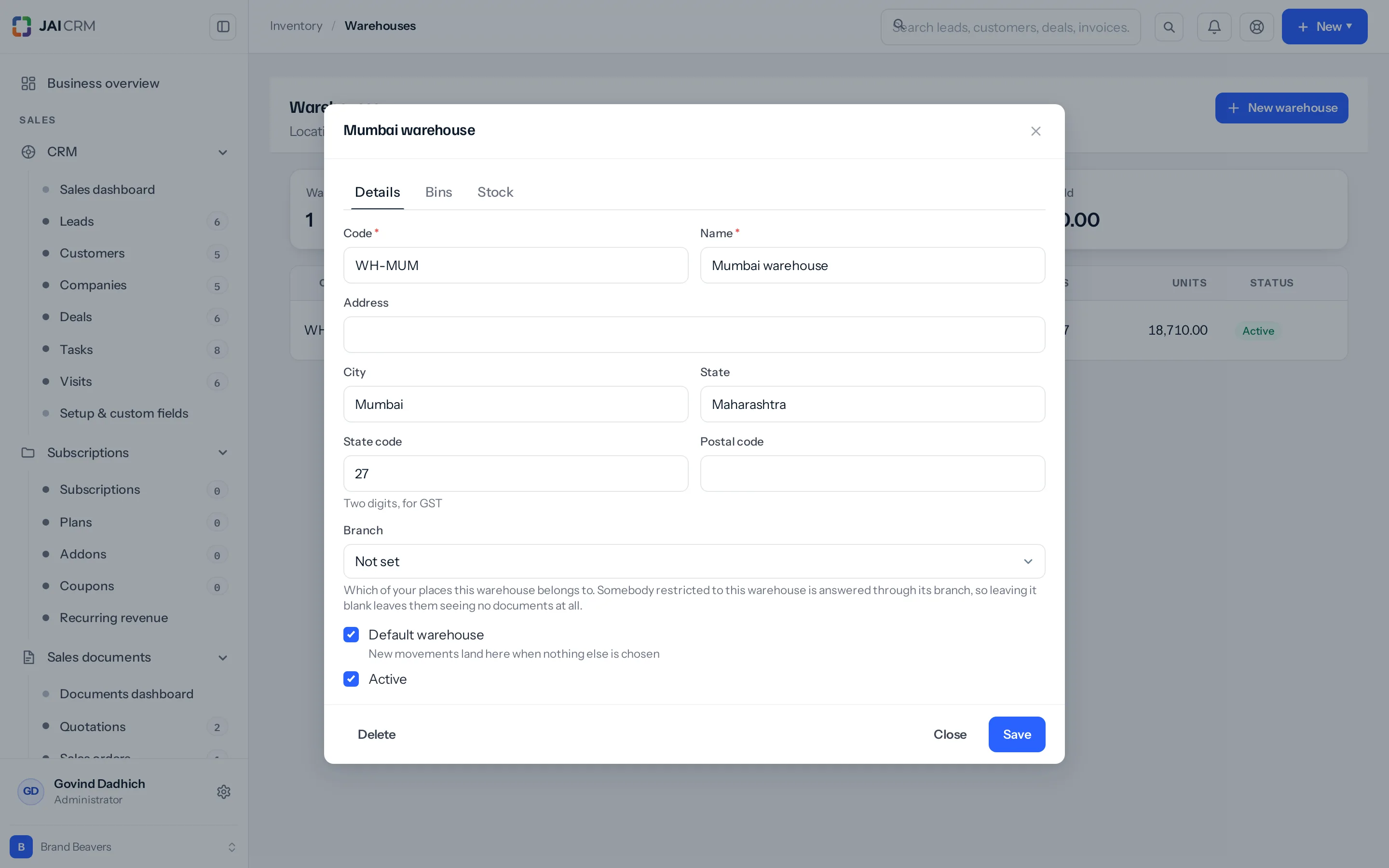
One more consequence of the same rule: if the person’s warehouses are attached to no branch, reading upward finds nothing and the document modules are not narrowed at all — they see every invoice in the business. A warehouse’s branch is the Branch box on the Details tab of the warehouse record, under Inventory → Warehouses. It starts at Not set, and warehouses added before that box existed still carry no branch, so check the ones you are relying on.
The hint printed under that Branch box has it backwards. It says that leaving the branch blank leaves the person “seeing no documents at all”; a blank branch leaves them seeing every document. Trust this page, not the hint.
And the wider version of the same problem: on a workspace with one branch — which is most of them — the document modules cannot narrow anybody. Every document is filed against that one branch, so whoever reaches the module reaches all of them. Restricting documents by place needs a second branch, and a second branch can only be added through the API.
4. A record with no place on it stays visible to everybody
For every place column on a module, a record where that column is empty is visible to everyone who can reach the module at all. A draft nobody has filed against a site yet is not somebody else’s branch’s business, and hiding it would strand whoever was writing it.
On documents this matters more than it sounds. A document’s branch is resolved when it is created, in this order: whatever the request named, then the branch the person creating it works at, then the branch marked default for the business. Every workspace has a default branch, so the third answer always answers and documents raised now do carry one. The blanks are the backlog: everything raised before the product started resolving this carries no branch at all, and nothing fills it in later. A business that ran for two years before branches were set up has invoices, bills, orders and notes that no place restriction will ever hide.
You cannot count those blanks from the screen. No module offers Branch as a column, a filter or a saved view — it is not in any module’s field list — and no form sets one on a document afterwards. Before you promise anybody that a restriction is watertight, know that the branchless records can only be found, and only be repaired, through the API or the database.
Why "Users" is in that list
Because a person is filed against a place like anything else: a user record carries the branch that person works at, set in the Belongs to box on their Details tab. So Users is offered, and ticking it narrows the staff list on Settings → Users to people at the branches the viewer’s places reach, plus anyone with no branch set.
There is a matching rule on the other side, and it is what makes the whole thing safe to delegate. You can only hand out places of the same kind you hold yourself. Warehouses are checked against the warehouses on your own record, branches against the branches on yours, and the boxes you are shown are only the ones you hold; the save refuses the rest and names them: “You can only give somebody access to warehouses you run yourself.” Somebody nobody has confined — an administrator, or anyone with no places of their own — may hand out any of them.
The catch is that the two kinds do not cross. A manager confined to the Pune branch but given no warehouses of their own counts as unrestricted on warehouses, and may hand out every warehouse in the business, Nashik’s included; somebody given warehouses but no branch may hand out any branch. So this does let a site manager take somebody on without fetching an administrator for every hire — but it closes only the list of the kind they hold. Give a site manager both their branches and their warehouses if you want neither list open to them.
Two more caveats on Users. A place already ticked on somebody stays visible to whoever is editing, even if the editor does not hold it, so saving an unrelated change does not silently strip a warehouse somebody else granted. And Belongs to starts at Default branch, which stores no branch at all — so until that box is being filled in, everybody has no branch and everybody stays visible to everybody. Ticking Users is worth doing only once it is, and even then it narrows the staff list and not the staff records: a colleague’s record still opens from its link.
Why some modules are not offered at all
Because they have no place to be filtered by. Narrowing Leads to a warehouse would be a filter on a column that is not there, and the list could never honour it — so the panel does not offer the module and the save refuses it with “Those modules do not record a warehouse, so they cannot be restricted by one.”
Of roughly eighty record types in the suite, twenty-five carry a place. The rest do not, and some of the absences surprise people: quality inspections, job cards and bills of materials are not restrictable, though manufacturing orders and work centres are. Neither are payments received or payments made, though the invoices and bills they settle are. A lead, a customer, a deal, an item and an expense belong to a person or to the business, not to a shed.
For those modules the tool is the data scope and the sharing rules, not this panel. The two answer different questions, and the reason this feature exists at all is that ownership could never answer the second one: a stock balance is owned by nobody. It belongs to a place.
Something missing or wrong here? Tell us. A question that needed asking usually means a page that needed writing.