
A salesperson says a lead has gone from her list. A manager opens Invoices and finds an invoice he was not expecting. Both are the same question asked from opposite ends: which records does this person see, and why. This page traces the whole answer in the order the product works it out, so you can follow it once and then diagnose from it.
The question the product asks of every record
Two separate questions are asked, and both must pass. The first is about the kind of work: may this person view leads at all, create them, delete them. The second is about this one row: may they touch that lead. Passing one never carries the other.
| The question | What answers it | Where it is set |
|---|---|---|
| May you do this kind of thing at all? | The permission grid on a role — module, submodule and action | Settings › Roles & permissions › Roles, opening a role |
| May you do it to this one record? | Ownership, the role tree, sharing, being named on the record, and the place it is filed at | The data scope on the same grid row, the organisation tree, Data sharing settings, the record itself, and the branches and warehouses on the person |
Failing the first reads as You do not have permission to view leads. Failing the second is about one record: on a CRM record you get This lead belongs to someone else. Ask its owner to add you as an assignee., and on stock, receipts, packages, assemblies, works orders and work centres you get a plain not found — naming a record you may not reach would confirm it exists.
Reach never adds an action, and an action never widens reach. Somebody who reaches a record through a read-only share still cannot edit it; somebody whose role holds delete still cannot delete a record they do not reach.
Ownership: whose record it is
A record that can be owned has exactly one owner. The Owner field on the form fills with you by default, and if you leave it the person who created the record becomes its owner. Changing it later sends the assigned notice to the new owner. Everybody else on a record — assignees and watchers — is a separate row, not an owner.
- Records with an Owner field: leads, companies, customers — where it is labelled Account owner — deals, tasks, visits, vendors, projects, subscriptions, every sales and purchase document including delivery challans, manufacturing orders, where it is labelled Answerable, and any module this business added for itself.
- Records with no owner, narrowed instead by who entered them: items, expenses and payments, and every stock, works-floor and quality record that keeps a creator — movements, transfers, adjustments, goods receipts, shipments, packages, assemblies, bills of materials, quality rules, templates and inspections. There is no Owner field to change on these, so a narrowing scope shows somebody what they entered themselves and nothing more.
- Records nobody can own: warehouses, work centres, operations, job cards, price lists, bank accounts and employees. Nothing on the row says whose it is.
On a module in that third group the scope dropdown still offers “Their own records”, and choosing it narrows no list — everybody with view still sees every one of those records. It is not harmless, though. A record page asks the same question one record at a time, and with nothing on the row to say whose it is the answer is no: a role set to “Their own records” on Warehouses lists every warehouse and cannot open a single one. Give a role that has to open them “Everything in the business”, and restrict it with the actions you grant and with the place restriction further down this page.
The role tree
Every role names one superior. That is the Reports to field on the role, and it is not decoration — it is what decides who reads whose records. As shipped: Administrator at the top; Manager under it; Sales executive, Accounts, Stores & inventory, Quality (QC), Production and Read only under Manager; Accountant under Administrator; Bookkeeper under Accountant. The two shipped portal roles sit outside the tree on purpose, so an outside login is never somebody’s subordinate.
- Go to Settings › Roles & permissions and stay on the Roles tab.
- Open the role and set Reports to. On a role that already exists, leaving it at “At the top” puts it at the head of the tree.
- On a new role it does not. Saved with no superior, a new role is placed directly beneath whichever role is already at the top — usually Administrator — whatever the hint under the box says. Set the superior you want, or open the role afterwards and change it.
- Save, then open the Organisation tree tab to see the shape you have made. A portal role you make yourself is placed in the tree like any other new role, and that tab does not draw portal roles — so it sits under the top role without showing there.
- A role cannot report to itself or to anything already beneath it. The save refuses with “That role already reports to this one, so this would make a loop”.
What the tree grants is one thing: a person reaches records owned by anybody holding a role below theirs. It does not reach sideways and it does not reach upwards. Two managers of two different desks are not beneath one another, so neither reads the other’s work.
Peers are off by default. The Share data with peers checkbox on a role says whether two holders of that one role see each other’s records. Off, they are strangers to each other; on, they share sideways as well as downwards.
What a superior may do with what they reach is a separate business decision. Settings › Roles & permissions › Organisation tree carries “What a superior may do to a subordinate’s records”: Edit and delete them, which is the default, or Edit them, but not delete. Reading is not affected by either setting.
The scope called “Their own records” still walks down the tree. A role set to it, with roles reporting to it, reaches everything those people own. The difference between “own” and “team” is not the hierarchy — it is circles. For a role at the bottom of the tree there is nothing beneath it, which is why the label reads true in practice for a sales executive and not for a supervisor.
The scope: how far a permission reaches
The scope is the dropdown at the right of each row in the permission grid, and it appears as soon as that row has an action ticked. It is set per submodule, so a role can read every invoice in the business and only its own leads.
| Setting | What the person actually reaches |
|---|---|
| Their own records | Records they own or created; records they are named on; records owned by anybody holding a role beneath theirs; their peers’ records if the role shares with peers; and whatever a sharing rule adds. |
| Their team’s records | Everything above, plus records owned by anybody they share a circle with. |
| Everything in the business | Every record in the module, narrowed only by the place restriction. |
| No row at all | The module is not reachable. No amount of sharing, naming or hierarchy changes that. |
A person may hold more than one role. Every role is merged and the widest scope wins, which is how one manager can be given a wider role without touching the twelve other people who share their main one. A person’s own permissions are not added on top: while somebody holds any role, the roles alone decide, and their own permissions apply only when they hold none.
To answer “who can delete invoices” without opening five roles one at a time, use the Who can do what tab on the same screen. It draws one row per submodule and one column per role, portal roles left out, and each cell counts the actions that role holds and names its scope. A module-wide row and Manage are both counted there, so what you read is what the server will do.
The “All access” button on a module header writes a module-wide row as well as ticking the submodules, and a module-wide row merges into every submodule beneath it. Clearing a submodule afterwards does not take back the view that the module row carries. To grant one submodule only, tick it on its own row and leave the module header alone — ticking a submodule already makes the module reachable, and that inferred reachability does not spread to its siblings.
The shipped roles cannot have their permission grid or their warehouse restriction changed — the dialog says so and the controls are locked. You may still rename one, change its superior and change its peer sharing. Use the copy button to make an editable version, but note what a copy does not bring with it: it is created with no superior, nothing reporting to it, no segmented modules, and Share data with peers off whatever the original had. A copy of Manager left on “Their team’s records” reaches nobody until you point other roles at it.
What the organisation shares by default
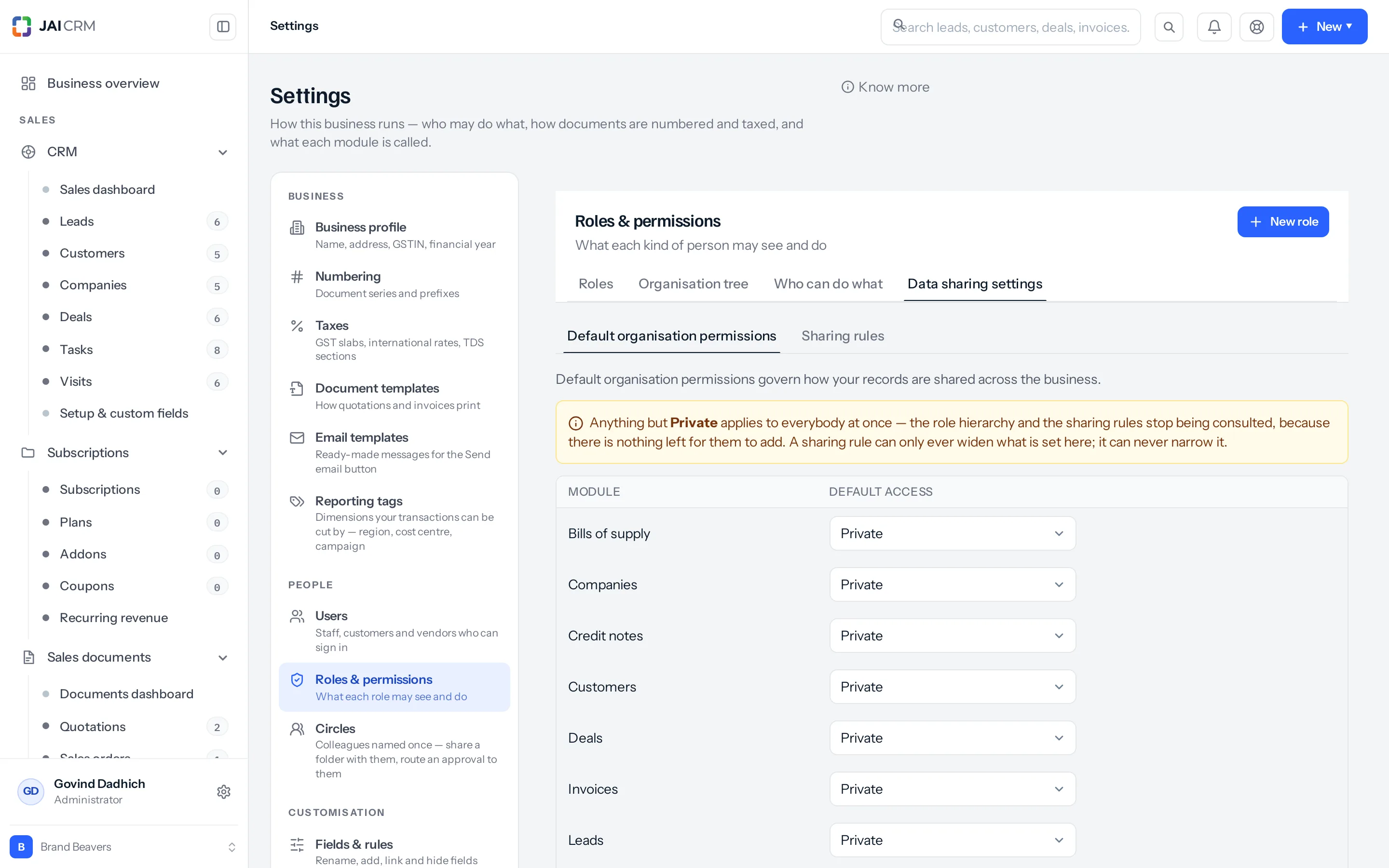
Before any role is considered, each module has a default. It lives on Settings › Roles & permissions › Data sharing settings, first tab, Default organisation permissions. Every module starts at Private, and a module with no row saved is Private.
Sixteen modules appear on that tab, and they are the same sixteen a sharing rule can name: leads, companies, customers, deals, tasks, visits, vendors, projects, subscriptions, and the seven sales documents from quotation to credit note. Warehouses, stock, employees, items, expenses, payments, purchase documents, delivery challans and the works-floor modules are not on it. That is not Private by exception — they are simply not governed here, and most of them are still narrowed by whoever owns or entered them.
| Default access | What it means |
|---|---|
| Private | A record belongs to its owner, to whoever is above them in the tree, and to whoever it has been shared with. This is the starting point. |
| Public (Read Only) | Everybody whose role lets them view that module reads every record in it, whoever owns it. |
| Public (Read/Write) | The same, and changing a record no longer depends on owning it — it still needs edit on their role. |
| Public (Read/Write/Delete) | The same again, with delete. |
Anything but Private settles who may find the module: from then on no list in it is narrowed by ownership, so the hierarchy and the sharing rules add nothing to what people can search and open. They are still read one record at a time, where they can add changing or deleting on top of the reading a public setting grants — on a module set to Public (Read Only), a manager still gets delete over a subordinate’s record. Two things it does not do: it lets nobody into a module their role has no row for, and it does not lift the place restriction. When you want to know the least somebody can see, read this tab first.
Contacts on a company page
A company can have several customers under it, looked after by different people. The same tab, under the module defaults, decides what its Contacts tab shows to somebody who can open the company.
| Choice | What the Contacts tab shows |
|---|---|
| All contacts at the company (the default) | The contacts filed on the company itself, and the contacts of every customer under it. |
| Only the contacts they may see | The contacts filed on the company itself, and those of the customers the person can already see. A colleague’s customer keeps its people to itself. |
A contact added with a customer belongs to that customer, so whether somebody sees it follows whether they can see the customer. A contact added to the company with no customer belongs to the company, and anybody who can open the company sees it either way.
Sharing rules
A rule is an exception, and it only ever grants more. Nothing on this tab can take access away, which is what makes the default readable as a floor.
- Go to Settings › Roles & permissions › Data sharing settings and open the Sharing rules tab.
- Choose Create sharing rule. Pick the module — it is fixed once saved, so a second module needs a second rule.
- Name the rule. The name grants nothing; it is what the search box matches and what the audit trail quotes.
- Under What is shared, choose “Records owned by a role or team”.
- Under Whose records, pick All Users, a Role, Role and Subordinates, or a Team — the picker lists your circles.
- Under Shared with, pick who receives it.
- Set Permission to Read Only, Read/Write or Read/Write/Delete. That is the most the rule can add.
- Decide Superiors allowed. Off, a manager above the receiving role does not inherit the gift.
- Save. The rule is live at once; the Status switch on the list turns it off again without deleting it.
- All Users on the receiving side reaches everybody.
- Role reaches holders of that exact role.
- Role and Subordinates reaches that role and everyone reporting below it, walked live on each request.
- Team reaches everyone in the named circle.
- Superiors allowed additionally reaches the people above the receiving role — but only on a rule shared with a Role or with Role and Subordinates. Ticked on a rule shared with a Team it does nothing, because there is no role for the product to look above, and the list still shows the Superiors column reading “Included”.
Membership is read fresh on every request. A new joiner put into the role or the circle a rule names is covered immediately, with no edit to the rule, and switching the rule off takes the access away just as quickly. A rule whose “whose records” is All Users shares the whole module, whoever owns what.
A rule never grants a module. What the receiver may do is still capped by the actions their own role holds — a rule set to Read/Write over invoices gives nothing at all to somebody whose role has no invoice row, and gives reading only to somebody whose role has view but not edit.
The second kind of rule, Records matching a condition, is built in the dialog itself. Choose the module first, because the conditions are its own fields, then add at least one — a rule with none would share the whole module, and the save refuses it. The conditions are read on every request, so a record that starts matching is shared from that moment without anybody editing the rule. One thing to know before you rely on it: a record reached only by a condition appears in the list and still refuses to open, because a record page asks the question owner by owner. Share by owner wherever people need to open what they find.
Being named on a record
A record has one owner and any number of other people named on it. Which name you give somebody decides what they may do, and the three are not the same thing.
| Named as | How it is set | What it gives them |
|---|---|---|
| Owner | The Owner field on the record, or a bulk reassign | Full reach: read, change and delete, capped by the actions their role holds |
| Assignee | Not a control on the record form. It is written through the API or a bulk assign, and on a project by the People tab | The same reach as the owner |
| Watcher | The Mark to field on the record | Reading only — its help text says “Kept in the loop — they can see it, they do not own it” |
Being named is a route to one record, not to a module. Marking your accountant on a lead does nothing for them if their role has no Leads row: they still get “You do not have permission to view leads”. And a watcher cannot change what they were marked on. On a record form the choice is Owner or Mark to and nothing else, so if somebody needs to work on it rather than watch it, hand it over by changing the Owner. You do not lose it by doing so: whoever entered a record still reaches it after it is reassigned.
The place restriction: branches and warehouses
Ownership cannot express “the store in-charge at Bhosari has no business reading Satpur’s stock”, because a stock balance is owned by nobody — it belongs to a place. So there is a second, independent narrowing, set in two halves that must both be present.
- The role’s half: open the role and use Restrict to the person’s own warehouses. Tick the modules to be narrowed. Only modules whose records record a warehouse or a branch can be ticked; anything else is refused with “Those modules do not record a warehouse, so they cannot be restricted by one”.
- The person’s half: Settings › Users, open the person, and tick Restrict access to branches and Restrict access to for the warehouses. Save.
- Test it by signing in as them, or by clearing every box, which removes the restriction entirely.
- A branch brings its warehouses with it. Giving somebody the Nashik branch covers every warehouse inside it, including one added next year.
- Sales and purchase documents record a branch and never a warehouse. Somebody given warehouses and no branch is narrowed to the branches those warehouses sit in.
- A transfer is matched at either end, because the in-charge sending the stock and the one receiving it both have a reason to see it.
- A record with no branch and no warehouse on it stays visible — a draft nobody has filed yet is not another site’s business.
- Somebody with no branch and no warehouse ticked is not restricted to none of them; they are simply not restricted.
- You can hand out only the places you hold yourself. Somebody confined to Nashik staffing their own desk is offered Nashik, and the save refuses the rest: “You can only give somebody access to branches you run yourself”.
- The branch tick boxes appear only when more than one branch is left to show. Inactive branches are dropped, and somebody who is themselves confined to branches sees only theirs — so a manager restricted to one branch never sees that panel, however many the business has.
Two things about this one catch people. It bites at “Everything in the business” as well — a store in-charge on every record still sees only their own sites, which is the normal shape of the job. And it does not follow the widest-wins rule: if any role a person holds segments a module, they are restricted in it. Adding a second role that does not segment it lifts nothing.
How they combine
Two halves, and they are AND-ed: a record has to satisfy the ownership question and the place question. A record that passes one and fails the other is not theirs to read.
Inside the ownership half, the routes are OR-ed. Any one of these is enough:
- They own it, or they created it.
- They are named on it as an assignee or a watcher.
- They hold a role above the owner’s role in the tree.
- They share a role with the owner and that role shares with peers.
- They share a circle with the owner and their scope is “Their team’s records”.
- A sharing rule reaches them and covers that record.
- Their scope is “Everything in the business”, or the organisation’s default for the module is not Private. Either one stops a list being narrowed by ownership at all. On one record the scope still settles it outright, while a public default only sets the floor — the tree and the rules are read on top of it.
| Ownership half | Place half | Result |
|---|---|---|
| Passes | Passes, or the role does not segment this module, or they hold no places | They reach the record |
| Passes | Fails — the record is filed at a place they do not hold | Nothing. The list omits it and the record page refuses it |
| Fails | Passes | Nothing |
| Passes by several routes at once | Passes | They reach it, and the strongest of those routes decides what they may do |
That last row matters. A watcher row grants reading; the hierarchy grants edit or delete depending on the business’s setting; a rule grants whatever the rule says; being the owner grants everything. The strongest applies. Then, and only then, the action gate applies: reaching a record with delete in hand still needs delete on that submodule.
A worked example
Sahyadri Pumps, Pune. Two branches — Pune (PUN) and Nashik (NSK) — and two warehouses, Bhosari and Satpur. The shipped roles are in place and nobody has changed the tree. On 2 September, Kavita Pawar enters a lead: Deccan Hardware, Kolhapur, expected value ₹4,80,000.
| Person | Role | Scope on Leads | Places held |
|---|---|---|---|
| Kavita Pawar | Sales executive | Their own records | Pune branch |
| Sameer Kulkarni | Sales executive | Their own records | Pune branch |
| Rohit Deshmukh | Manager | Their team’s records | Nashik branch |
| Anjali Rao | Accounts | No Leads row at all | None |
| Meera Iyer | Administrator, and the account owner | Everything in the business | None |
- Kavita sees it because she owns it — she left the Owner field as herself, so the lead was stamped with her name. Her role holds view, create, edit, import and convert on Leads, so she can work on it and cannot delete it: the Sales executive role has no delete action on leads at all.
- Sameer does not see it. He holds the same role, and Share data with peers is off on it, so two sales executives are strangers to each other’s records.
- Rohit sees it. Sales executive reports to Manager, so Kavita is beneath him and everything she owns is within his reach. He can edit it, and he can delete it while the organisation tree setting stays on “Edit and delete them”.
- Anjali does not see it and cannot be given it by naming. The Accounts role has no Leads row, so Leads is not in her sidebar and the address gives “You do not have permission to view leads”.
- Meera sees it, as she sees everything: the account owner holds every permission and cannot be locked out.
- Kavita puts Sameer in Mark to. He now sees the lead in his own Leads list and can open it. When he tries to change it he is told “You can see this lead but not change it — it is shared with you for reading”, because Mark to writes a watcher row and a watcher reads.
- She hands it over instead, changing the Owner to Sameer. Now he reaches it in full, and what he may do is capped by his role: he can edit it, and delete is still refused — this time by the action gate rather than by his reach. Kavita has not lost sight of it either, because she entered it.
No place restriction applies to any of that, because a lead records neither a branch nor a warehouse. Now the lead is won, and Kavita raises the invoice: ₹4,80,000 plus 18% GST of ₹86,400, ₹5,66,400 in all, filed at the Pune branch.
Rohit is confined to the Nashik branch, and Sahyadri has given him a second role — Nashik desk — which grants nothing at all and exists only to tick Invoices under “Restrict to the person’s own warehouses”. Sahyadri used a second role rather than ticking it on Manager, so the other managers are left as they are; and one role that segments a module is enough, whatever his other roles say. So Rohit cannot see that invoice, even though Kavita reports to him and his scope on invoices is her whole desk. The ownership half passes and the place half fails, and both must pass. Untick Invoices on the second role, or clear his branches, and the invoice reappears.
What changes the moment you save
- Role and scope changes reach the person on their next request — within about fifteen seconds at the outside. Ask them to reload rather than to sign out and in.
- Lists, record pages, boards, search, exports and bulk actions all read the same filter, so narrowing a role narrows all of them at once. A bulk edit only touches the rows that person could change one at a time.
- A sharing rule is read live on every request. Putting somebody into the role or circle it names covers them on their next page load, with no edit to the rule.
- Changing a module’s default away from Private takes effect immediately, for everybody whose role lets them view that module. From then on no list in it is narrowed by ownership; the tree and the rules are still read one record at a time, where they can add changing or deleting on top.
- Every change here is written to Settings › Audit log — the role that changed, what one person may do, and what a module’s default access was set to.
What it will not do
- It changes nothing retrospectively. Widening a scope reassigns no records; narrowing one leaves every owner exactly as it was.
- It does not hide fields. Hiding or locking individual fields is a separate part of a grant, and a field is hidden only where every one of a person’s grants hides it.
- A sharing rule can never take access away. Switching one off removes only what that rule added, and dropping one from Read/Write to Read may change nothing at all if the hierarchy or another rule already reaches the same records.
- The place restriction does nothing on modules whose records carry neither a branch nor a warehouse. Leads, customers, companies, deals, tasks and visits are not affected by it.
- It does not govern customer and vendor portal logins. Those see what is addressed to the customer or vendor record their login is attached to, through the portal, and never a staff screen.
- Hiding a menu item in Settings › Modules & menu is not a permission. What it hides is still reachable by typing the address. Anything that must not be reached needs a permission.
I cannot see a record I should
| Check, in this order | Where to look | What it tells you |
|---|---|---|
| Does anything give them a row for that submodule? | Settings › Users, open the person. With a role ticked, the role decides; with none, their own Permissions tab does. | No row at all means no reach will ever help: grant the submodule first. To see which role carries it, use the Who can do what tab. |
| Is the module part of the plan, and switched on? | The error text itself | “… is not included in your plan” or “The … module is switched off for this business” — Settings › Plugins. |
| What is the scope on that row? | The role’s permission grid | “Their own records” reaches what they own or created, what they are named on, what their subordinates own, their peers’ records where the role shares with peers, and whatever an active rule adds. Rule those last two out before deciding the scope is what let them in. |
| Who owns the record? | The Owner field on the record | If the owner is a peer rather than a subordinate, there is no route unless the role shares with peers. |
| Is the owner’s role beneath theirs? | The Organisation tree tab | A sibling role is not a subordinate. Reporting lines, not job titles, decide this. |
| Are they restricted to a place? | Settings › Users, open the person | A branch or warehouse ticked, with that module ticked on the role, hides everything filed elsewhere — even at “Everything in the business”. |
| Has the rule you were relying on been switched off? | Data sharing settings › Sharing rules, the Status switch | A duplicated rule always arrives switched off. |
| May you grant the fix yourself? | The save | You can hand out only what you hold: “You cannot give somebody the … role, because it includes things you do not have yourself”. The same goes for branches and warehouses. If that stops you, an administrator can do it. |
| Have they reloaded? | — | Permissions are re-read on their next request. A page open since before the change still shows the old answer. |
Somebody can see a record they should not
| Check, in this order | Where to look | What it tells you |
|---|---|---|
| Are they the account owner, or on Administrator? | Settings › Users, the Roles column | The owner holds every permission by definition and cannot be restricted. |
| Is the module’s default still Private? | Data sharing settings › Default organisation permissions | Anything public lets everybody who may view the module read every record in it, and narrows no list by ownership after that. |
| Is there a module-wide row on the role? | The role’s grid, the module header | “All access” writes one, and it merges into every submodule beneath it. |
| Do they hold a second role? | Settings › Users, the Roles column | The widest scope across every role wins. One role at “Everything in the business” settles it. |
| Are they above the owner in the tree? | The Organisation tree tab | Superiors read everything owned below them, at every scope, including “Their own records”. |
| Does that role share with peers? | The role dialog, “Share data with peers” | On, every holder of the role sees every other holder’s records. |
| Is there a sharing rule on this module? | Data sharing settings › Sharing rules, filtered to the module | Check the Shared to and Superiors columns. A rule whose “whose records” is All Users shares the entire module. |
| Are they named on the record? | The Owner and Mark to fields on the record | A watcher can read it, whatever the role tree says. |
| Does the module record an owner at all? | — | Warehouses, work centres, job cards, price lists and employees cannot be narrowed by ownership: whoever holds view sees them all. Stock, quality and works-floor records are narrowed by who entered them, which nobody can change afterwards. |
| Who changed this, and when? | Settings › Audit log | Role changes, per-person changes and default-access changes are all recorded, with the before and after. |
One last thing that looks like a fault and is not: the number beside a sidebar entry is the count of every record in that module, not the count of the ones that person can see. A sales executive with four leads of her own can sit under a badge reading 312. Judge a restriction by opening the list, never by the badge.
Something missing or wrong here? Tell us. A question that needed asking usually means a page that needed writing.