
Open the Leads list and you will see small icons on some rows, and some rows tinted red or yellow. None of it is decoration. Every mark answers one question: is there something on this row that I am late for?
This page explains all of it. It is worth five minutes, because once you can read the list at a glance you stop having to open records to find out whether they need you.
Part one: the three icons
There is a narrow column near the left of the list with no heading. It is called Outstanding in the Columns menu. It can show up to three icons.
| Icon | What it means | Where it takes you |
|---|---|---|
| Calendar | A task is still open on this record. | The Tasks tab of the record. |
| Telephone | A call or meeting has been promised and not done yet. | The Activity tab, where the promise was made. |
| Map pin | A visit is planned and has not happened yet. | The Visits tab. |
A pin is used for a visit because a visit is the one of the three that is about a place.
No icon means nothing is owed. A row with a dash instead of icons has nothing outstanding against it. That is deliberate — the eye should be pulled to the few rows that need you, not asked to filter through all of them.
Part two: the three colours
Each icon takes a colour. The colour is decided by the date of the earliest thing still outstanding of that kind.
| Colour | What it means | What to do |
|---|---|---|
| Red | The date has already passed. You are late. | Today, if not sooner. |
| Yellow / amber | It is due today. | Before you go home. |
| Grey | It is due later, or it has no date at all. | Nothing yet. It is on the list so you know it exists. |
The line of the icon is also drawn thicker when it is red or amber, and thinner when it is grey. That is on purpose: about one man in twelve cannot tell red from green easily, and a mark that relies only on colour is a mark those readers cannot use. The weight says the same thing as the colour.
Dates are compared as days, not as clock time
This matters more than it sounds. A call due today at nine in the morning does not turn red at ten past nine. It stays amber all day and only turns red tomorrow.
The one exception is an hour you chose. A task’s due date and a lead’s next follow-up can carry an hour of their own. When you add one, the hour is the promise: the mark and the row turn red once it has passed, and the words say due today at 16:00. Without an hour they work by the day, as below.
The reason is simple: when you promise to ring somebody on Thursday, the promise is Thursday. It is not nine o’clock. A system that marks you late at 9:01 is a system you learn to ignore, and once you are ignoring the red marks the whole column is worthless.
The number beside an icon
If there is more than one thing outstanding of the same kind, a small number appears next to the icon. A telephone with a 3 beside it means three calls are promised and not done. The colour still comes from the earliest of them, so three calls where one was due last week shows red.
Hover for the words
Point at any icon and a small label appears telling you which day and how many — for example “A call was due 12 September”. The colour tells you that you are late. Only the words tell you how late.
Clicking an icon
Clicking an icon opens the record on the tab that answers it. Click the telephone and you land on the Activity tab looking at the promised call, not on the front page of the record with the answer three clicks further in.
Clicking anywhere else on the row opens the record normally.
Part three: the tinted row
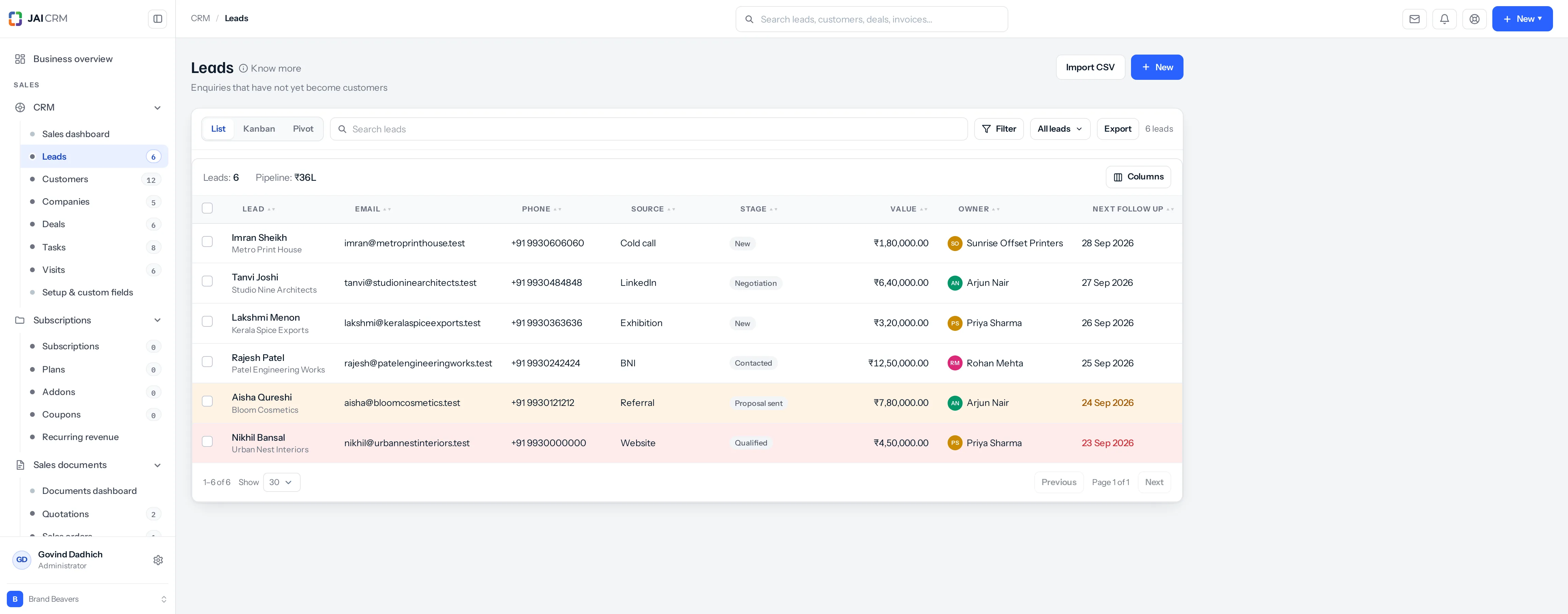
Separately from the icons, a whole row can be tinted. This comes from one field only: the lead’s own Next follow-up date.
| Row looks like | What it means |
|---|---|
| Pale red background | The next follow-up date has passed, or, when it has an hour, today’s hour has. |
| Pale yellow background | The next follow-up is today. |
| No tint | The follow-up is in the future, or there is no date set. |
The date itself is also printed in the same colour, and in a slightly heavier weight, so it reads even if you are looking at the date rather than the row.
The one exception worth knowing
A lead that has been won or lost shows no tint at all, whatever its follow-up date says.
Think about why. A lead you won in March has a follow-up date that passed months ago. It means nothing now — the conversation is over. Colouring it red would say something is wrong when nothing is, and a list where most of the red is noise is a list where the real red stops being read. So closed leads go quiet.
The same rule runs everywhere. Leads, customers, companies, deals and visits all use these marks and these colours, so you only have to learn them once.
Reading a list quickly
Put together, here is how to scan a list in about four seconds:
- Look for red. Anything red is late. Deal with it first.
- Look for yellow. That is today’s work.
- Ignore grey for now. It is coming, but not yet.
- Rows with no marks at all have nothing owed on them.
If you see no marks anywhere
Two possibilities. Either nothing is genuinely outstanding, which is good news; or the Outstanding column is switched off in your view. Click Columns at the top right of the list and make sure it is ticked.
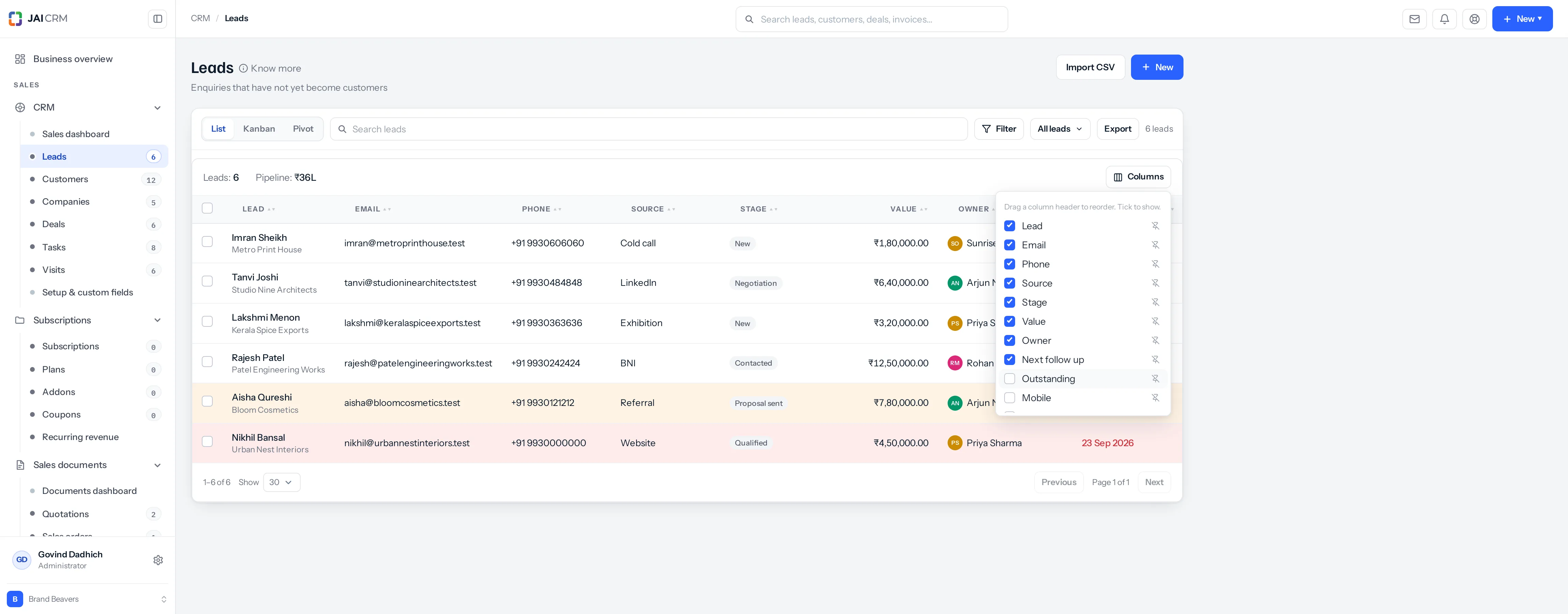
Why it can arrive switched off. A column added to the product after you saved your column arrangement is not in that arrangement, so it does not appear until you tick it. If your whole team is missing the marks, this is why. See Columns, filters and saved views.
Where to go next
Something missing or wrong here? Tell us. A question that needed asking usually means a page that needed writing.