
They said yes. Now the lead needs to become a customer, because that is the record an invoice can be raised against.
Converting
- Open the lead.
- Press Convert to customer, the blue button under the lead’s card on the right.
- Check the Company. It starts as the company typed on the lead, and the line under it says what will happen.
- Decide whether to open a deal as well. Tick it if there is a specific piece of business to chase; leave it if they are simply now a customer.
- Press Convert. The customer opens.
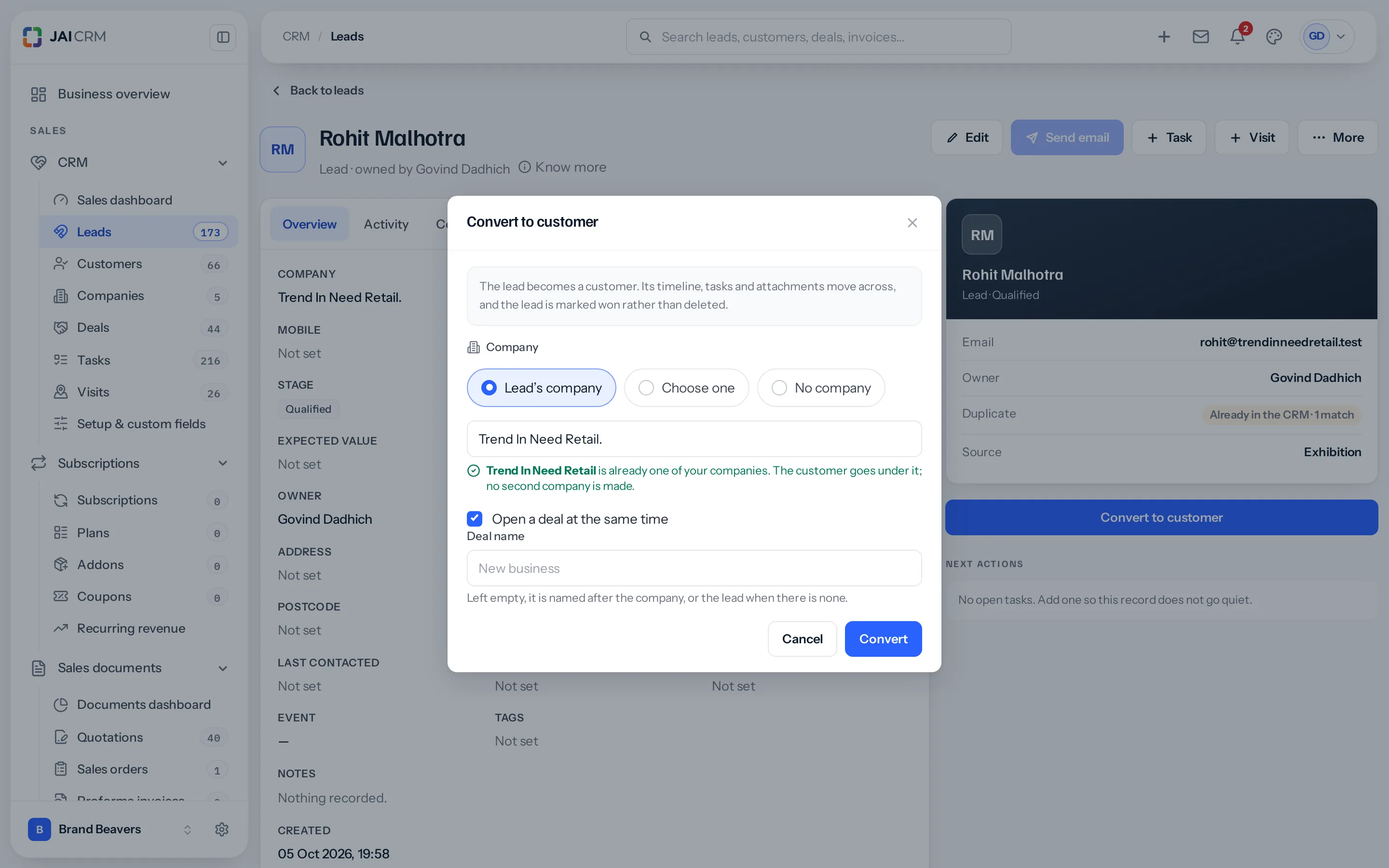
Which company the customer goes under
| Choice | What happens |
|---|---|
| Lead’s company | The name typed on the lead, which you can correct here. If it is already one of your companies, the customer goes under that one. If not, it is added to Companies with the lead’s address, phone, email and website. |
| Choose one | Search your companies and pick the right one, for when the lead spelt it differently. |
| No company | The customer stands on its own: an individual, say. |
Matching ignores capitals, spaces and punctuation, so “Prime Labs Pvt. Ltd.” finds “Prime Labs Pvt Ltd”. Different words are different names: “Private Limited” does not find “Pvt Ltd”. When the green line does not appear and you know the company is there, use Choose one.
Somebody who may not add companies can still convert. An existing company is used as usual; a name that is not yet a company is left off, and the window says so.
What you end up with
| Record | What happens to it |
|---|---|
| The lead | Stays. Marked as converted, with a link to what it became. |
| A new customer | Created, carrying the name, contact details, address, source and event from the lead, under the company you chose. |
| The company | The one already there, or a new one, as the window said. Never a second copy. |
| A new deal | Created only if you asked for one. Left unnamed, it is called after the company, “Trend In Need Retail opportunity”, or after the lead when there is no company. |
| The history | Every call, note, email and visit stays readable, and the lead’s tasks, visits and files move across to the customer. |
Why the lead is not deleted
This surprises people, so it is worth a sentence. The lead is the only record of where this customer came from: which source, which campaign, how long it took from first contact to yes.
Delete it and you can still see that you have a customer. You can no longer see that they came from an exhibition in February and took eleven weeks. That is the number that tells you whether to book the exhibition again.
Before you convert
- Check the Similar tab. Converting a duplicate creates a duplicate customer, which is harder to unpick afterwards.
- Fill in the company on the lead if there is one, so the customer is filed under it from the start.
- Get the state right if they are in India. It decides how GST behaves on every invoice you will ever raise for them.
Where to go next
- Work the deal you just created
- How customers, companies and contacts fit together
- Raise a quotation for them
Something missing or wrong here? Tell us. A question that needed asking usually means a page that needed writing.