
A list you have arranged to suit your job is worth far more than the one it ships with. Three controls do it: Columns, Filter and the view selector.
Columns
- Click Columns at the top right of the list.
- Tick a column to show it, untick to hide it.
- Drag a column heading in the table to move it.
- Drag the edge of a heading to make it wider or narrower.
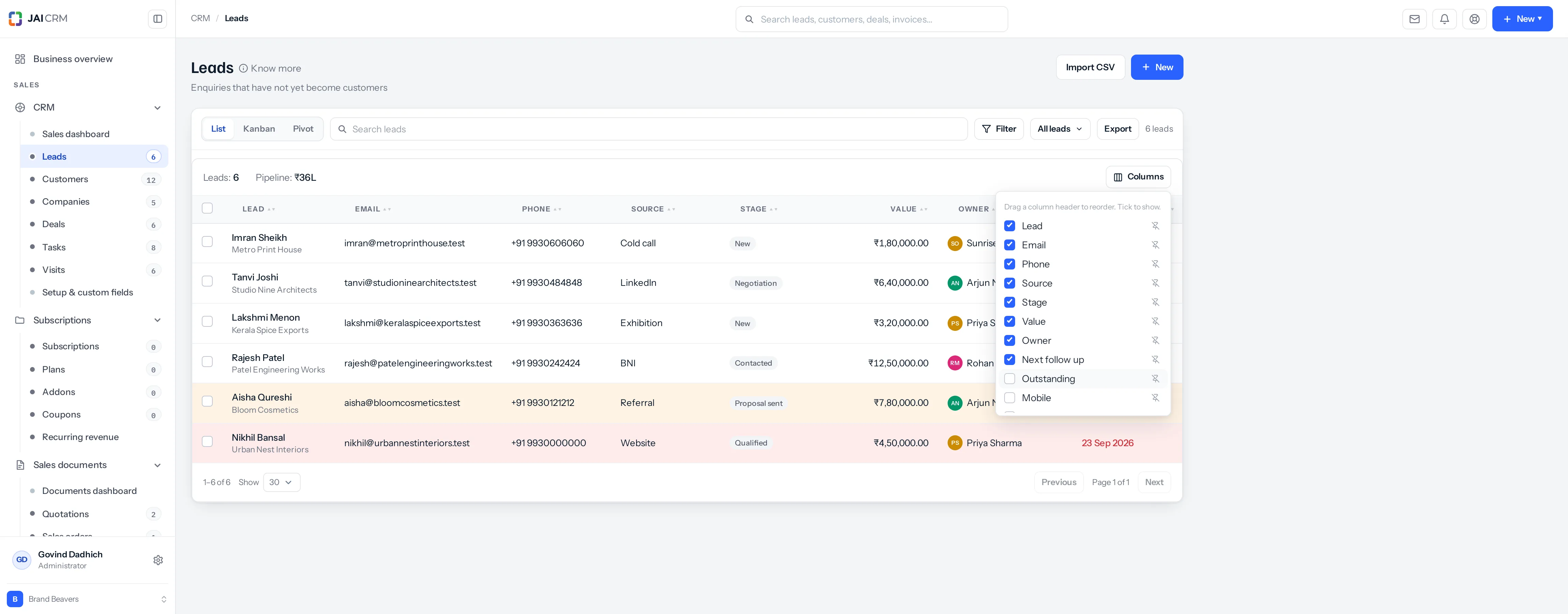
If a column you expected is missing, this is the first place to look. A column added to the product after you saved your arrangement is not in that arrangement, so it arrives hidden.
A deal's customer, as columns
On Deals, Columns also offers Customer mobile, Customer phone, Customer email, Customer company and Customer city. They are read from the deal’s customer as it is now, so a number corrected on the customer shows on every deal at once. Tick them and they are in the file when you export the list as well.
They show to anybody who can see the deal, including somebody whose role cannot open Customers, such as a telecalling team that works from the Deals list. On the list a number rings and an email opens a new message; the same three appear under At a glance on the deal itself. To keep them from a role, hide the fields in Settings, Fields and rules.
Filters
Click Filter to narrow the list. A filter is a field, a test and usually a value — Stage is Qualified, Value is more than 1,00,000, Next follow-up is overdue.
There are twenty-nine tests. The ones that get used most on a Monday morning are the date ones, because they need no value typed at all:
| Test | Finds |
|---|---|
| Overdue | Anything whose date has passed. |
| Today | Due today. |
| This week | Due in the current week. |
| Next 7 days / next 30 days | Coming up. |
| Is empty / is not empty | Records missing a field — leads with no source, for instance. |
Several rules can be combined with and or or, and grouped in brackets for anything complicated.
Saving it as a view
Once a list is arranged and filtered the way you want, save it. It becomes a named tab you can come back to.
- Arrange the columns and set the filters.
- Click the view selector at the top and choose Save view.
- Name it something you will recognise — My overdue leads, Hot, over a lakh.
- Save.
A saved view remembers the filters, the columns, their order and their widths. Views are yours unless you share them.
Searching
The search box above the list matches across the main text fields. It is for “find me that one record”; filters are for “show me this kind of record”.
Exporting
Export gives you a CSV of exactly what you are looking at — the filtered rows, the columns you chose, in the order you arranged them. Somebody senior will always want it in a spreadsheet, and refusing that is not a hill worth dying on.
Where to go next
Something missing or wrong here? Tell us. A question that needed asking usually means a page that needed writing.