
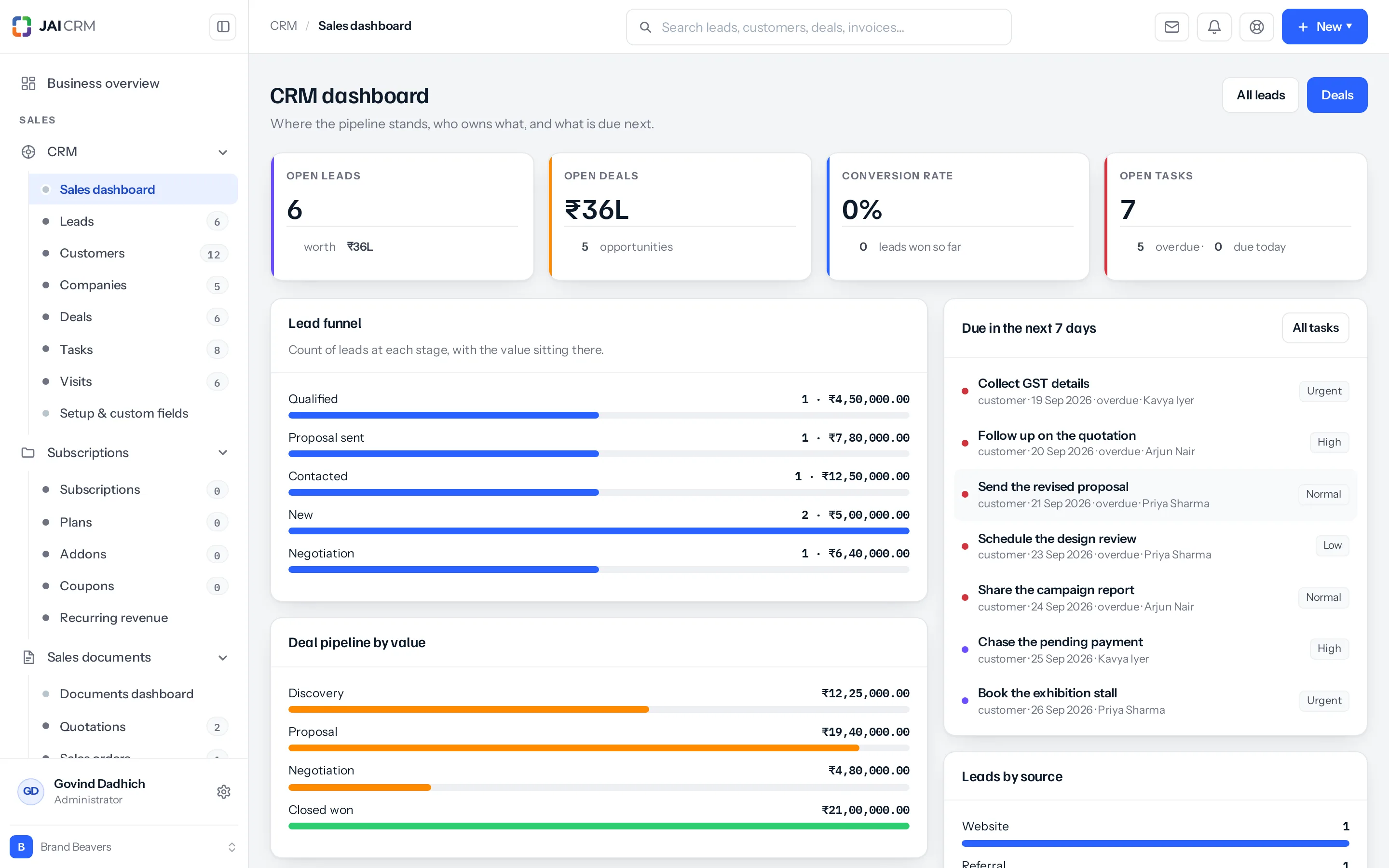
Go to CRM → Sales dashboard. It is the screen to open first thing, because it answers the questions you would otherwise ask three people.
What is on it
| Panel | Answers |
|---|---|
| Tasks due this week | What have I promised, and what is already late. |
| Deal pipeline by value | What is in play, and at which stage. |
| Owner leaderboard | Who is carrying what. |
| Leads by source | Which channel is actually producing enquiries. |
| Latest activity | What has happened in the last day or two. |
Every figure respects your permissions. A salesperson set to see only their own records sees a dashboard of their own work. Nothing on it leaks the rest of the desk.
Dashboards of your own
Every module has a ready-made dashboard, and you can make your own, share it and set it as your home. See Dashboards.
Where to go next
Something missing or wrong here? Tell us. A question that needed asking usually means a page that needed writing.