
When a customer writes to you, Suggest reply drafts the answer. It does not rewrite their email back at them: it works out what they need, and writes the reply a good salesperson would, using what your business already knows about them. You read the draft, change what you want, and send it yourself. Nothing is ever sent for you.
Steps
- Open the email. It can be from the mail panel at the top of the screen, or from the Activity tab of the lead, customer or deal it is filed on, with Open and reply.
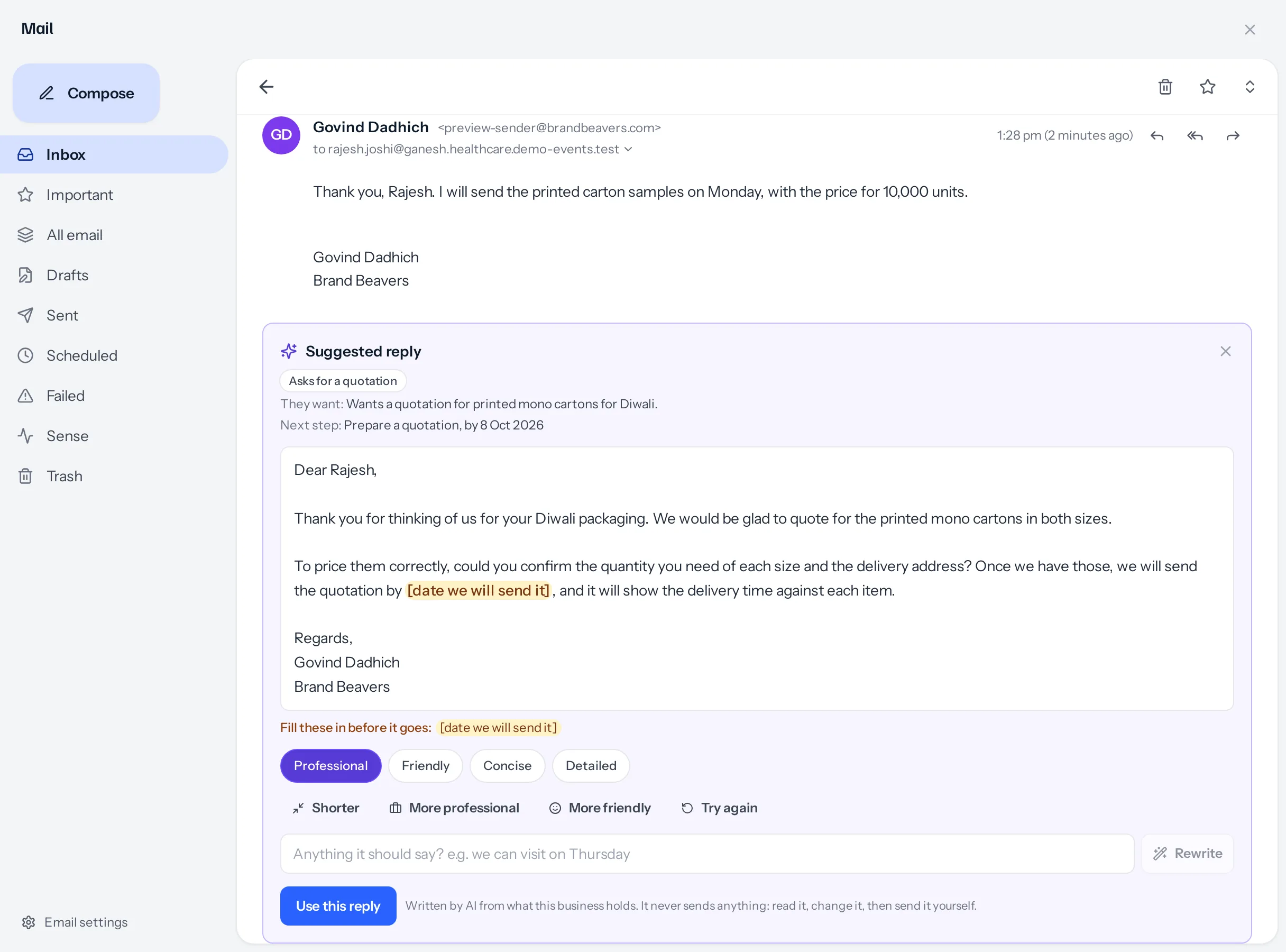
- Press Suggest reply under the conversation, or inside a reply you have already started. A panel opens and fills in within a few seconds.
- Read the draft. Anything in square brackets, such as [delivery date], is a gap only you can fill. The panel lists the gaps under the draft.
- Change the style or the length if you want to (see below), then press Use this reply. The draft moves into the reply box.
- Edit it there like anything you write, fill the gaps, and press Send.
What the panel tells you first
Above the draft, the email is read for you: what kind of email it is (Asks for a quotation, Complaint, Confirms an order and so on), whether it is Urgent, whether the sender is unhappy, what they want in one sentence, and the next step, with a date when the email gives one. The next step is a suggestion: nothing is created for you.
Changing the draft
- Professional, Friendly, Concise and Detailed rewrite it in that style. The business chooses which one a draft starts in (see Style and your own rules).
- Shorter, More professional and More friendly change the draft you are looking at, keeping what it says.
- Try again writes a fresh one.
- Anything it should say? takes your own words, for example we can visit on Thursday, and Rewrite works them in.
Changing a draft does not read the email again, so it is quicker than the first one.
What it reads
Only what you can already open yourself:
- The email itself. Mail clients copy the whole earlier conversation under every reply; that part is left out, so the draft answers what the customer has just said.
- Up to four earlier messages in the same conversation, so a reply after a sales call or a quotation does not treat the request as new.
- The lead, customer or supplier behind the sender’s address, or the deal or company the email is filed on, if you are allowed to open it: name, company, stage, source and who looks after them.
- Up to three of their latest quotations (number, subject, status and validity, never the amounts), up to five open tasks, and up to four recent notes, calls and meetings.
When the address belongs to more than one record
One address can sit on two records: a customer and a lead from the same company, or the same person entered twice. When the sender’s address belongs to two or more records you can open, Suggest reply asks Which record is this about? before writing anything. Choose one, and the reply is written from that record; or choose None of these to write it without one. Choose another under the draft asks again.
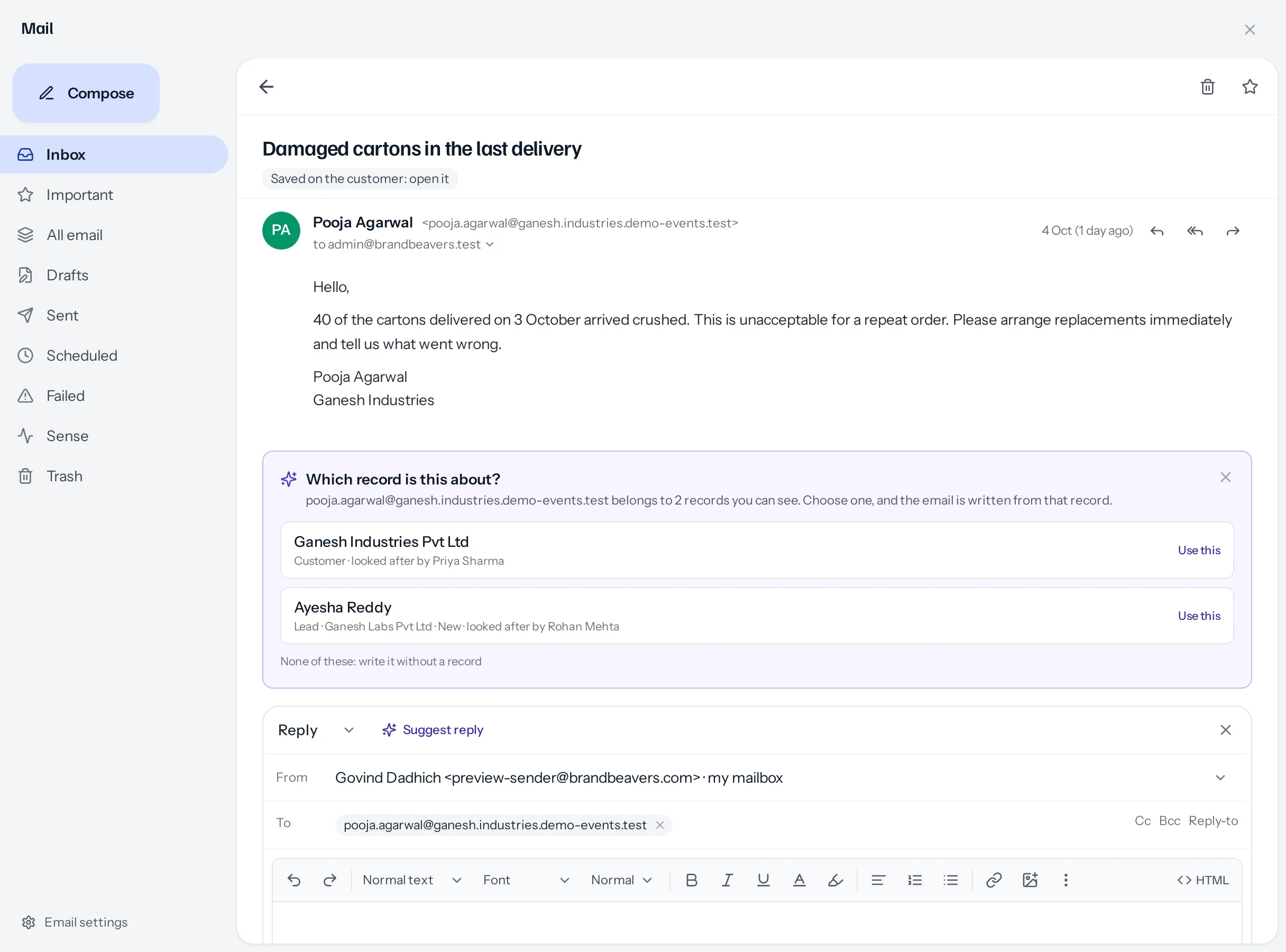
Only records you can open are ever offered. If the same address is on a lead assigned to a colleague you cannot see, that lead is not listed, and nothing hints that it exists. Two people asking about the same email can be offered different choices.
Gaps, and sending with them
If you press Send while a gap from the suggestion is still in the reply, you are asked Send it with the gaps still in? with the gaps named. Fill it in takes you back to the reply; Send as it is sends it. A square bracket can be deliberate, so it asks rather than refuses.
If you already wrote something in the reply box, Use this reply asks before replacing it.
Replies are written in the language and script the customer used: English, Hindi, or Hindi and English mixed in Roman letters. They end with Regards, your name and the business name, so your mailbox signature is not added under them a second time.
Something missing or wrong here? Tell us. A question that needed asking usually means a page that needed writing.