
Targets & Commission is a module of its own, separate from CRM, Sales and Payroll. It comes with the Full Suite plan and is not sold on its own. A business that takes Full Suite gets it switched on. A Full Suite business that was already with us on 14 October 2026 has it switched off, ready to switch on in Settings, Plugins whenever it wants. On any other plan, Plugins lists it as not in the plan.
What appears
Once it is on, the Sales group in the sidebar gains a Targets & Commission section with up to five entries. Each person sees only the ones their role allows.
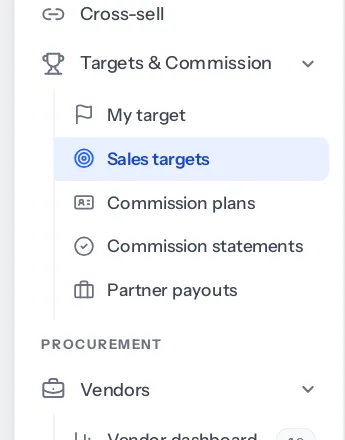
| Entry | What it is for |
|---|---|
| My target | A salesperson’s own month: how far they have got, the lines it came from, and their commission so far. |
| Sales targets | Setting each person’s or circle’s figure for each month of the year. |
| Commission plans | Writing the plans that say who is paid, on what and at what rate. |
| Commission statements | Each month’s statements, to check, approve or send back. |
| Partner payouts | What channel partners are owed. Shown only where Channel Partners is on too. |
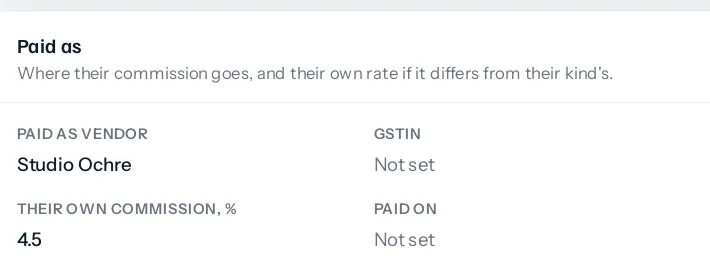
A channel partner’s page also gains two fields in its Paid as section: Their own commission, % and Paid on, for a partner paid differently from others of their kind. Payroll gains a Commission column, shown only in a run that pays some.
What needs to be in place
- CRM, because targets read deals and invoices. Sales documents and payments are what most targets count.
- Staff in circles, if you want a plan or a target for a whole team. Circles are set up in Settings, Circles.
- Each salesperson linked to their employee record, if commission is to be paid with salary. An employee record with no linked sign-in cannot be matched to a statement.
- Channel Partners, and each partner linked to a vendor, for partner payouts.
What does not change
For a business without the module, nothing appears and nothing is counted. The monthly job that works out statements reads only businesses with the module on and at least one plan or partner term. Payroll adds commission only for approved statements, so a business with the module on but no plan sees payroll exactly as before.
Switching the module off later hides the screens and stops the monthly job. Statements already approved and paid stay in the payroll runs that paid them.
Next: set the first targets, or decide first what a target should count.
Something missing or wrong here? Tell us. A question that needed asking usually means a page that needed writing.