
Channel partners, such as the architects, interior designers and builders who send you customers, are usually paid a referral commission. Partner payouts works it out each month from the invoices and payments of the customers they referred, and makes the purchase bill that pays them. It needs Channel Partners to be on, because that is where each sale is credited to a partner.
Terms, by kind of partner
The top of the page lists each kind of partner: Architect, Interior designer, Builder, Contractor and so on, taken from your list of partner kinds. Give each kind a rate and choose what it is paid on:
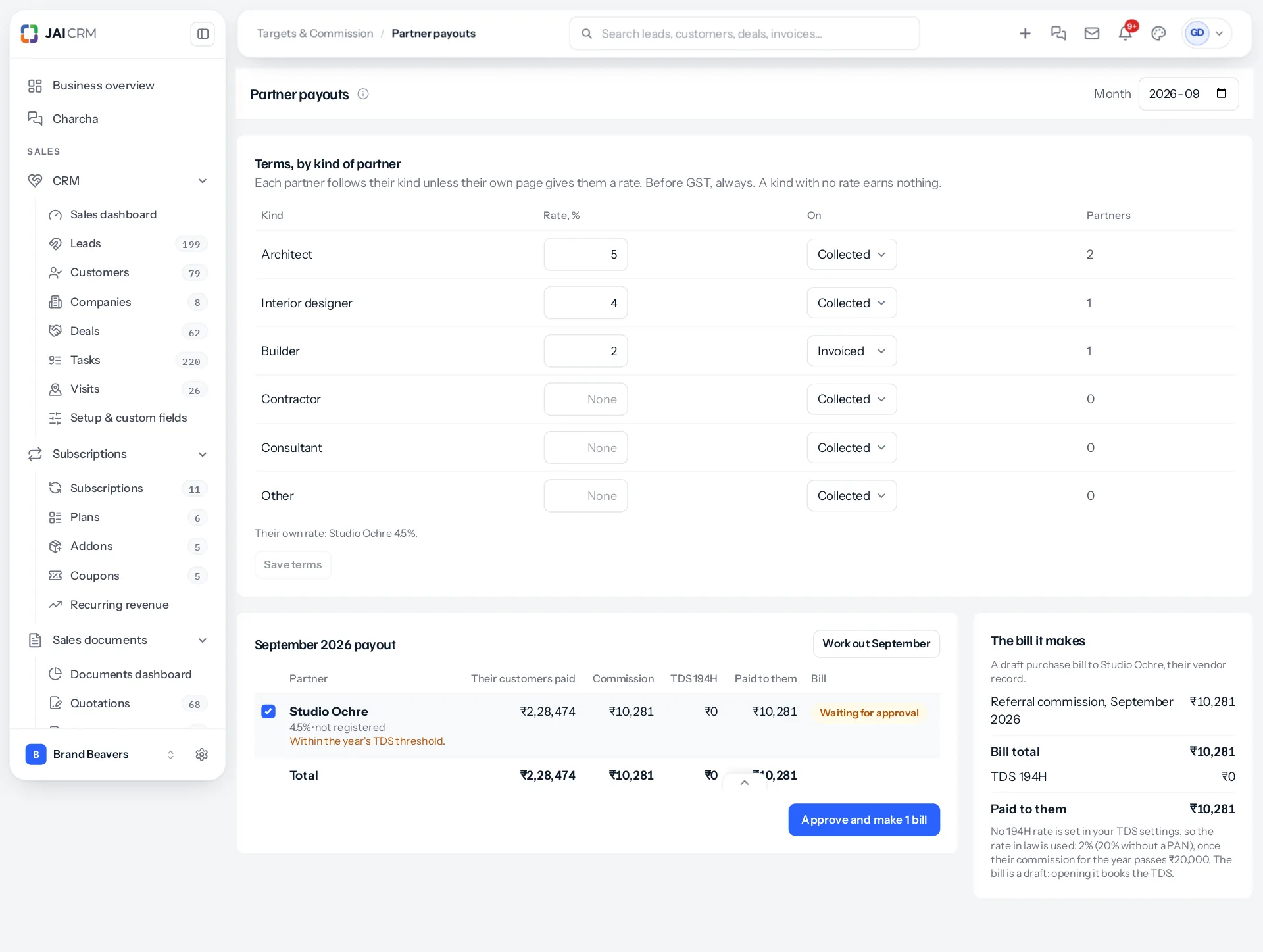
- Collected: a share of money received against invoices credited to the partner, before GST.
- Invoiced: a share of invoices credited to the partner, issued in the month, less credit notes, before GST.
A kind with no rate earns nothing. Press Save terms, then work the month out again to use them.
A partner's own rate
One architect may have agreed 4.5% when others of their kind get 5%. On that partner’s page, under Paid as, fill in Their own commission, % and, if it differs, Paid on. Empty follows their kind. The payouts page lists every partner with their own rate under the terms.
The month's payout
Choose the month and press Work out. Each partner owed something gets a row: what their customers paid or were invoiced, the commission, TDS, and what is paid to them. A payout is worked out by itself on the 1st for the month before, and each night until the 7th, like staff statements.
Credit notes on a partner’s invoices take back in the month they are issued; on Collected, only what was collected beyond what the invoice is now worth. TDS a customer keeps back counts as collected, and a write-off takes back what was written off, in the month it is written off.
Months already billed, and payouts below zero
A month already billed that changes later, such as a credit note dated back into it or a payment deleted, is put right on the next payout, by the difference, as a line naming the invoice and the month.
A payout that comes out below zero is owed back by the partner, and no bill is made for it. The partner’s page shows the amount owed back, and it comes off their next payout before anything is billed, shown on the bill preview as Less owed back from earlier months, until it is recovered.
Paying them
Tick the partners to pay and press Approve and make bills. Each becomes a draft purchase bill to the vendor linked to that partner, with GST when they are registered and TDS under 194H. The bill a payout makes explains it, and TDS and GST on partner commission the tax.
A partner with no linked vendor shows “No vendor is linked to this partner, so no bill can be made.” Link one on the partner’s page first.
Which sales are a partner's
Invoices credited to the partner, the way Channel Partners credits a sale when it is made, from the customer, lead or deal the partner referred. An invoice keeps the partner it was raised with: changing Referred by on a customer changes the invoices raised from then on, never the ones already raised, so old payouts do not move by themselves.
Something missing or wrong here? Tell us. A question that needed asking usually means a page that needed writing.