
Paying a partner goes through purchases, like paying any supplier, so it reaches your books, your GST input credit and your TDS register the usual way. Approve and make bills makes the bill for you.
What is on it
- Vendor: the vendor linked to the partner.
- Subject: “Referral commission”, with the month, for example “Referral commission, September 2026”.
- One line of that name, with SAC 996111, services provided for a fee or commission, quantity 1, at the commission amount.
- GST at 18% on the line if the vendor has a GSTIN; none otherwise.
- TDS under section 194H at the rate the payout used, when TDS is due that month.
- A note saying the partner, the rate, whether on collected or invoiced, and the amount it was worked out on.
- Dated the last day of the commission month, so its GST input credit and its TDS fall in that month.
- Booked to Commission, not Purchases.
- Never reverse charge: an agent’s commission is not a notified reverse-charge supply, so an unregistered partner’s bill carries no GST at all.
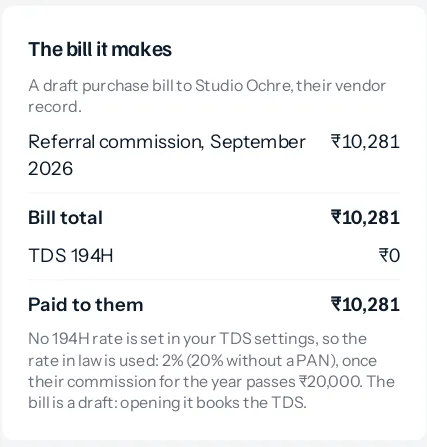
The payouts page shows the bill before it is made, under The bill it makes: commission, GST, bill total, TDS, and what is paid to the partner.
A draft, on purpose
The bill is made as a draft. A partner usually sends their own invoice; open the draft, type their bill number and date, check the amount matches, and open it. Opening it is what books it in your accounts and books its TDS in the register. Until then, nothing has been posted.
Several at once
Tick as many partners as you like. Each bill is made separately, so one that cannot be made does not stop the others. The message afterwards says how many were made, and why any were not: no linked vendor, nothing to pay, or the payout already billed.
After it is made
The payout shows the bill’s number, which opens it. A billed payout is never worked out again, so the bill and the payout always agree; a later change to that month is put right on the next payout. If the bill is deleted while a draft, or cancelled once open, the payout waits to be billed again.
A partner’s vendor need not be approved to be billed or paid, as long as it is not blocked: approving the payout is the check.
Who can do it
Approve on Partner payouts, and Create on purchase bills, because a bill is being made. Somebody with only the first sees the button refused with the reason.
In your books
Once opened, the bill is booked like any purchase: the commission to Commission, GST as input credit where the partner is registered, TDS in the TDS register under 194H against the partner’s vendor record, and the balance as owed to the partner. Paying it is recorded the usual way, against the bill.
Something missing or wrong here? Tell us. A question that needed asking usually means a page that needed writing.