
A proposal is the long form of an offer. A quotation says what something costs, line by line. A proposal says what you would do, how, by when and on what terms, on your letterhead, with a cover page and as many pages as it takes.
Use one when the price alone will not win the work: a shopfront to design and build, a year of brand upkeep, a software rollout. When the client says yes, the quotation, order or invoice follows.
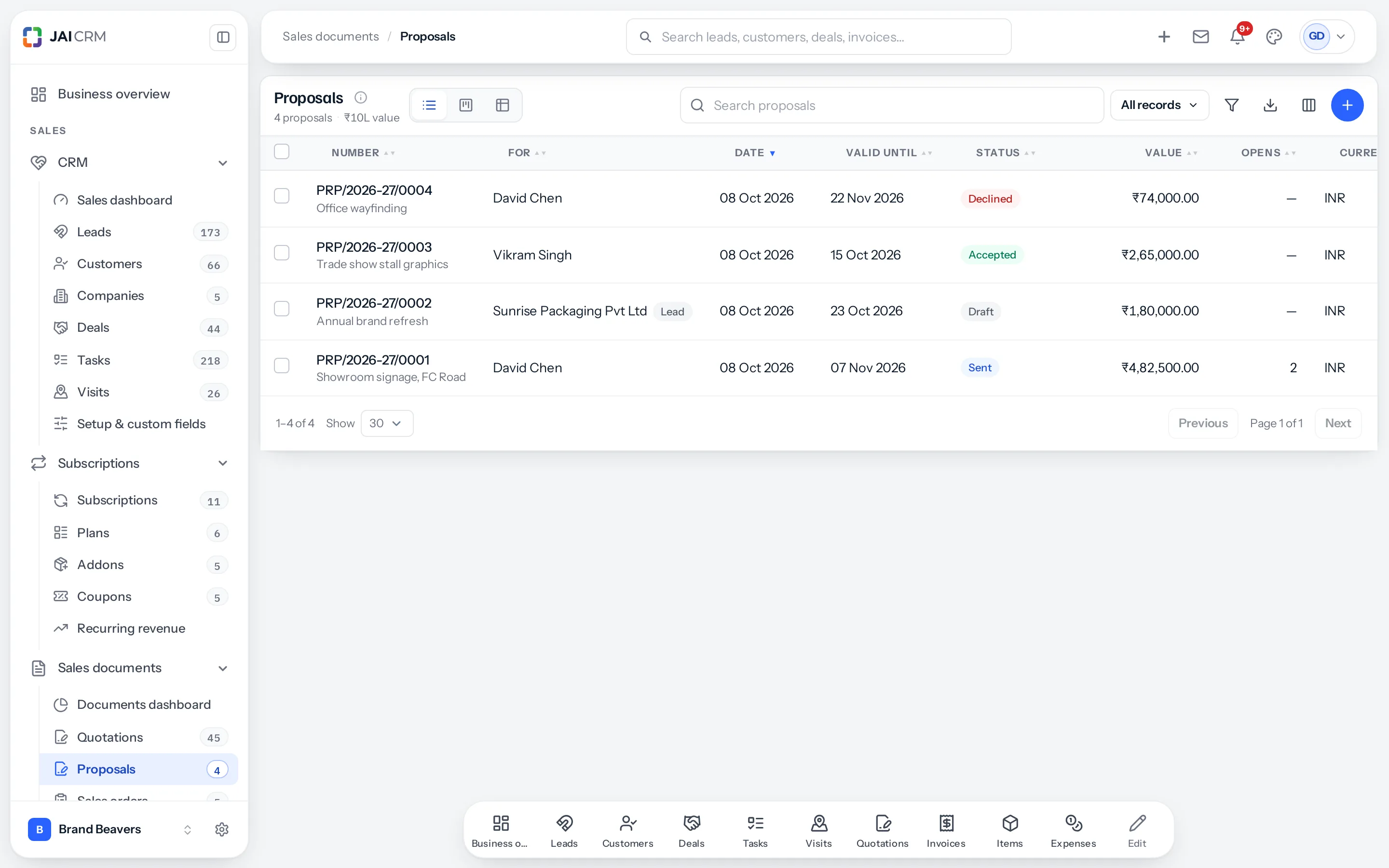
Where they live
- Sales documents › Proposals: every proposal, with the same list, board, filters and export as quotations.
- A Proposals tab on every lead, customer and deal: number, date, who created it, status, valid until, value and opens, with New proposal above it.
- + New › Proposal in the top bar, and Create proposal in a lead’s, customer’s or deal’s menu.
Proposals are numbered in their own series, PRP/2026-27/0001 onwards, which you can change in Settings › Numbering. When a lead becomes a customer, its proposals go with it.
Creating one
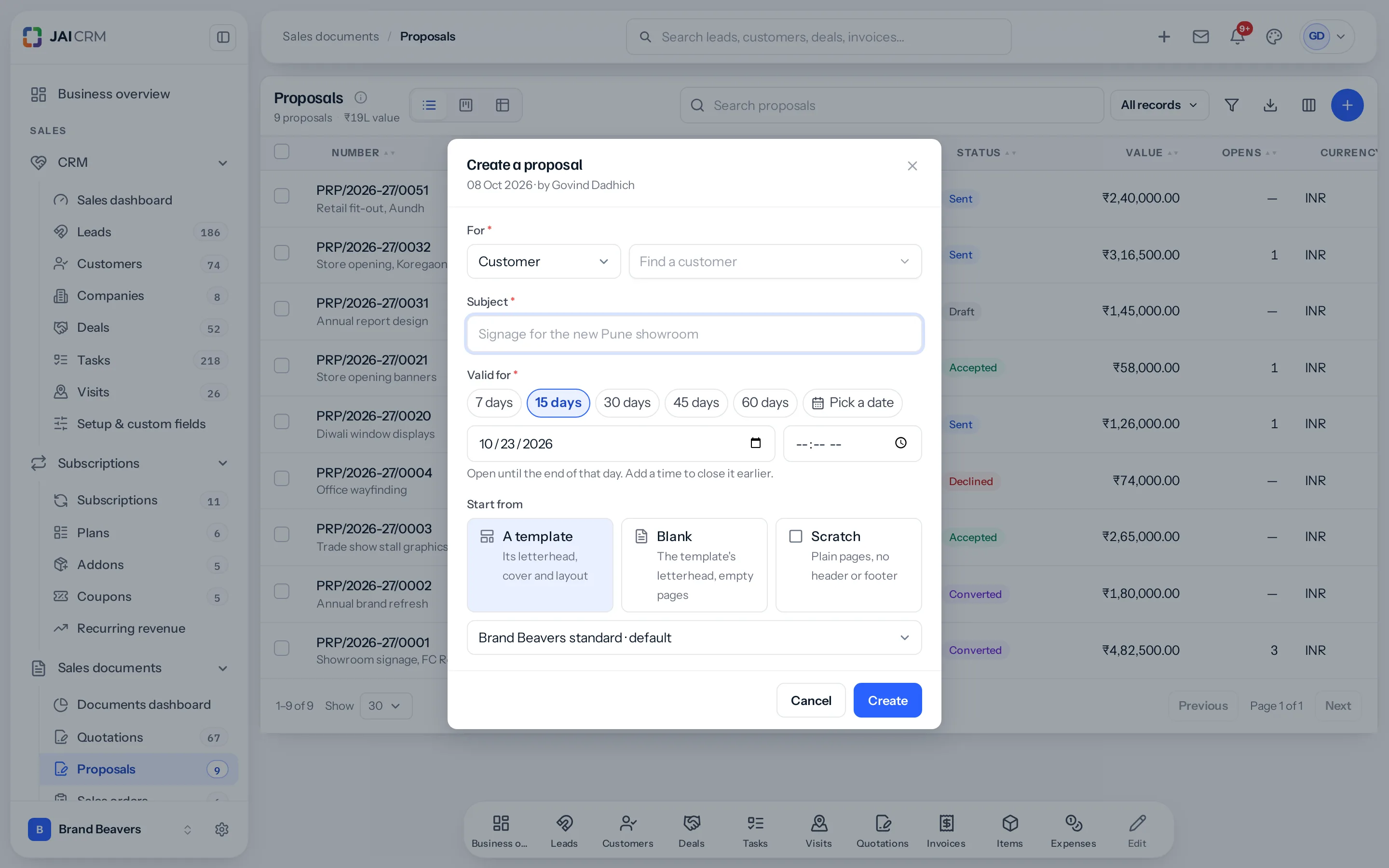
Creating a proposal asks for four things, in a window that rises from the bottom on a phone. The date and your name are filled in for you. Its value comes later, once it is written.
| Field | What it does |
|---|---|
| For | The lead or customer. Started from a lead, customer or deal, it is already set; a deal brings its customer. |
| Subject | Required. The proposal’s title, printed large on the cover page. |
| Valid for | 7, 15, 30, 45 or 60 days, as a lead’s follow-up offers days, or a date you pick. Add a time and it closes at that minute on your workspace’s clock; without one, at the end of that day. |
| Start from | A template (your default is chosen for you), Blank (the template’s letterhead around empty pages) or Scratch (plain pages with no header, footer or letterhead). |
Its value
Write the proposal first, then give it a value on its page, in the Value card under the pages and above the files: choose the currency, type the amount and press Save. It is optional. Approval rules read it, the Value column on the list adds it up, and the top of the page shows it.

The stages
A stage path runs across the top of every proposal, as it does on a lead, so you can see at a glance where it stands.
| Stage | Reached when |
|---|---|
| Draft | It is created. |
| In approval, Approved | An approval rule applies and it is put up for approval, then every approver agrees. Not shown where no rule applies. |
| Sent | The email goes, or you mark it as sent. |
| Viewed | The client first opens the link. |
| Accepted, Declined | The client answers online, or you record their answer, at any time, even after it expired. |
| Expired | The valid-until date and time pass with no answer. The client can no longer accept online. |
| Cancelled | You withdraw it. |
In approval, Approved and Viewed are read from the approval and from the opens, so they are shown and not pressed. Sent, Accepted, Declined and Cancelled can be pressed on the path where they are allowed.
The proposal page
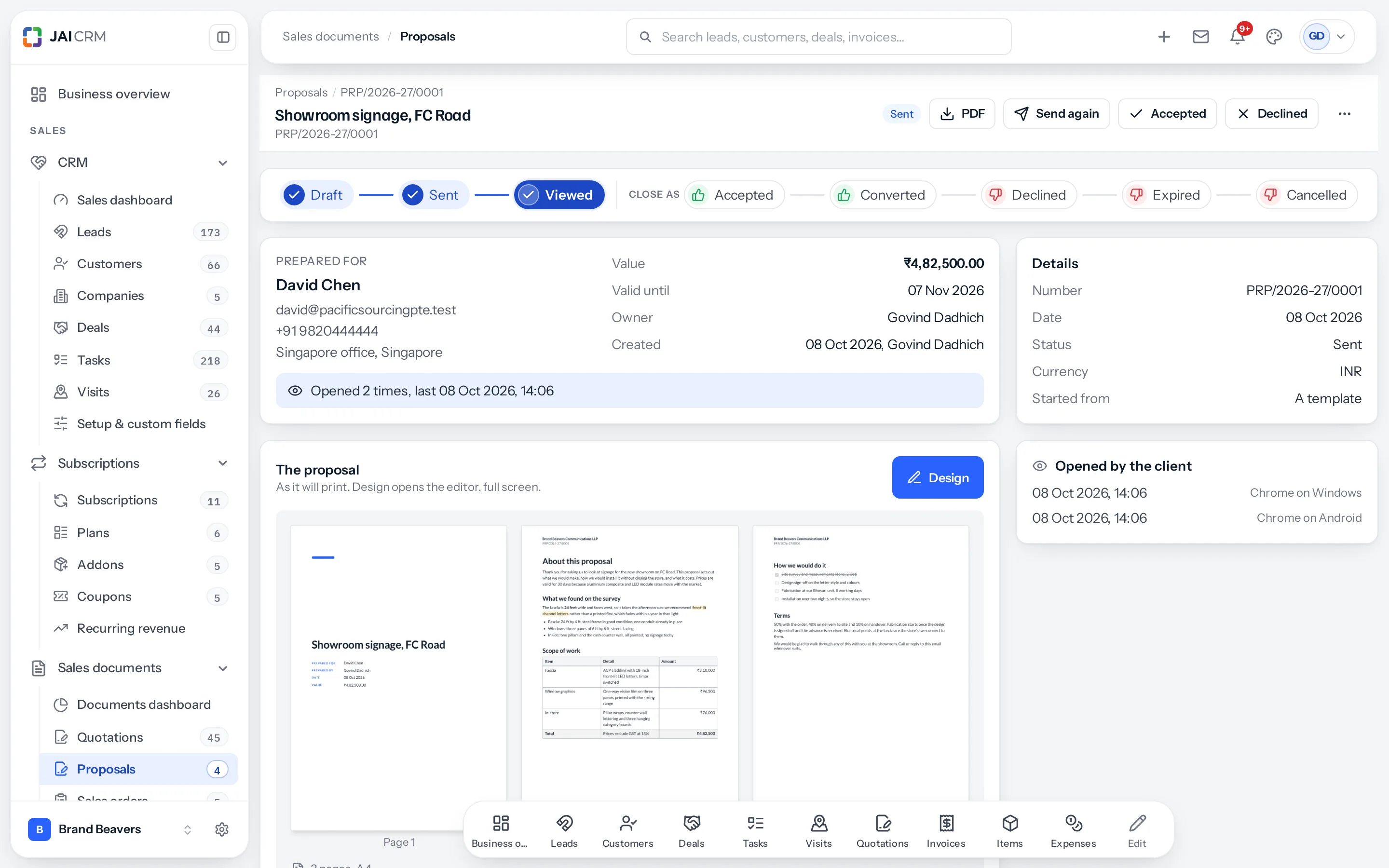
- At the top: the stage path, who it is for with their email, phone and address, the value, valid until, owner, and how often the client has opened it.
- In the middle: a large Design button, and the pages as they will print. Press a page to read it at full size.
- Under the pages: its value, then the products and services it offers. Beside them: whose signature it carries, and the quotation, order or invoice made from it.
- Below: files attached to it, and comments and history. These are internal and never go to the client.
- Actions: Send, Download PDF, Mark as accepted or declined, Convert to quotation, sales order or invoice, The client’s link, Ask someone to approve it, Earlier versions, Save as template, Revise, Duplicate and Cancel. Each shows only when it applies.
On a phone the stage path scrolls sideways, and Design and Send stay in a bar along the bottom.
A worked example
- A shop owner asks for new signage. The enquiry is a lead, and from the lead’s Proposals tab you press New proposal.
- Subject Showroom signage, FC Road, valid for 30 days, from the business template.
- Design: the survey findings, the scope as a table, the installation plan as a check list, the terms after a page break.
- Back on its page, the value under the pages: ₹4,82,500.
- Send. The client opens it twice that evening; you see each open on the page.
- They sign and accept on their phone. You are told, and ⋯ › Convert to quotation raises the quotation, with the proposal’s number as its reference.
Switching proposals off
A business that does not write proposals can turn them off in Settings › Sales documents › Use proposals. They leave the sidebar, the tabs and the create menus; those already written are kept and come back when it is turned on again.
Where to go next
- Write a proposal in the designer
- Charts, text boxes and columns
- Open a Word document
- Proposal templates
- Signatures on a proposal
- What a proposal offers, and a costing approval
- Approve, send and follow a proposal
- Convert a proposal to a quotation, sales order or invoice
Something missing or wrong here? Tell us. A question that needed asking usually means a page that needed writing.