
If you bill a customer the same amount every month, you should not be typing it every month. A recurring invoice is that invoice, described once, raised on its date.
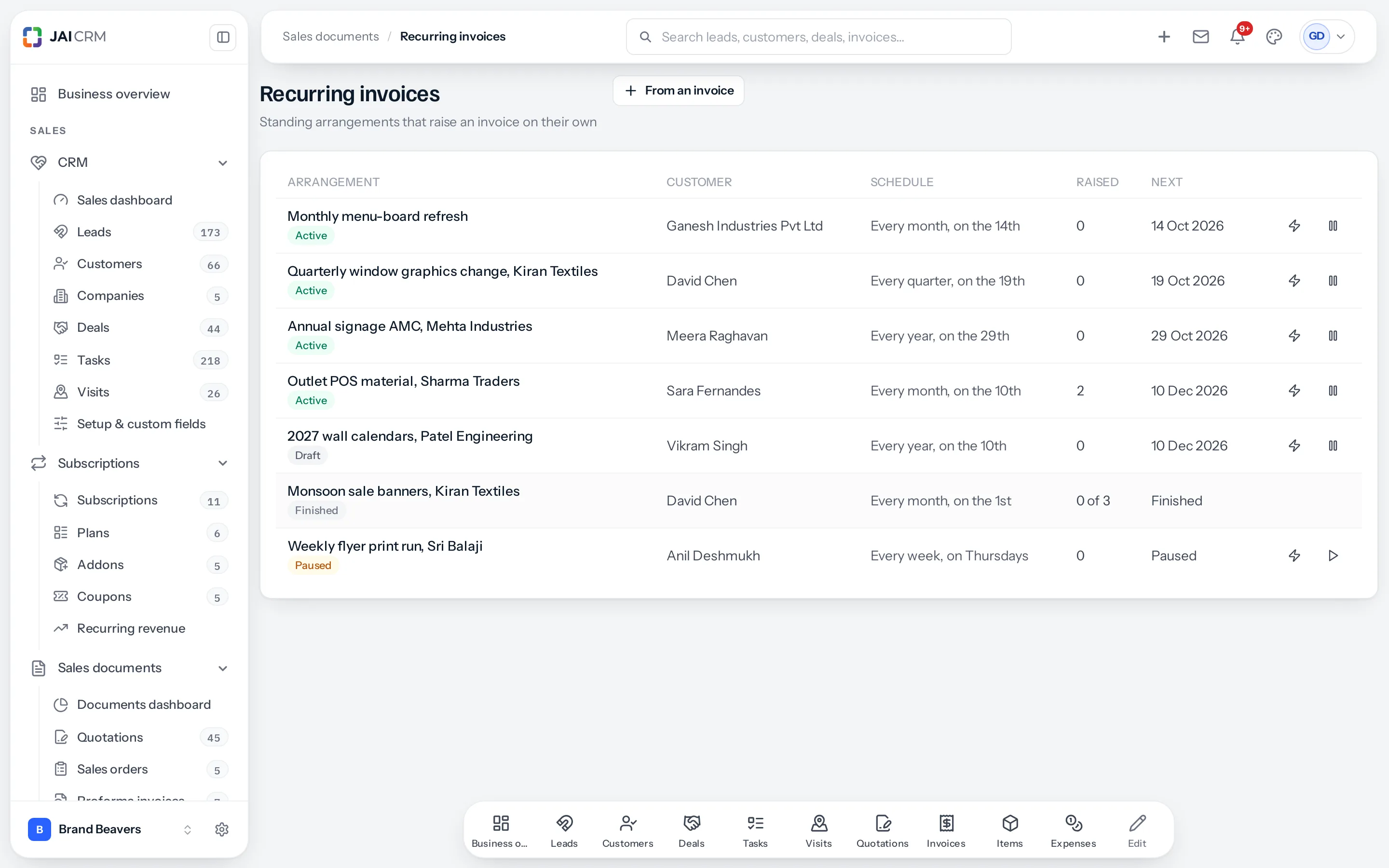
Setting one up
You do not build one from scratch. Open an invoice you have already raised and choose ⋯ › Repeat this invoice. Its customer, lines, charges, taxes and terms are copied into the arrangement. Then set the schedule:
| Setting | What it means |
|---|---|
| Call it | What the list shows. It follows how often until you type your own. |
| How often | Seven choices, below. |
| Starting | The first one. Its day is the day every later one falls on. |
| Until | Optional. Nothing after this date. |
| Or after this many | Optional. Stop after this many, counting the ones already raised. |
| Payment due | Days after each invoice is raised. |
| Send each one as it is raised | Raise and send, or raise and hold as a draft for somebody to check. |
Changing the original invoice later does not change what the arrangement raises: it keeps its own copy.
Opening an arrangement
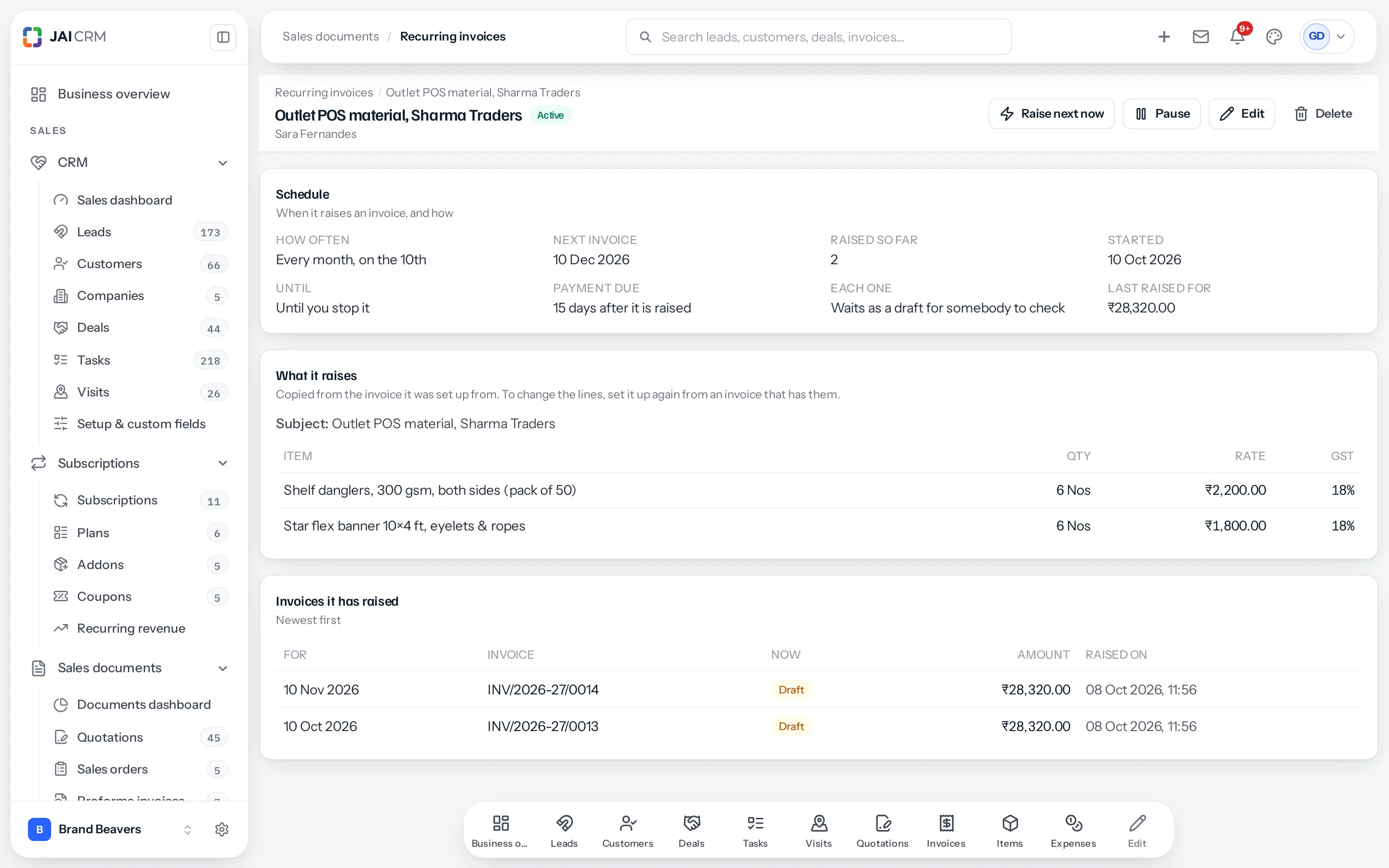
Press its name in the list (on a phone, the whole card). The page has three parts.
| Part | What it shows |
|---|---|
| Schedule | How often and on which day, the next invoice, how many it has raised, when it started and until when, when payment falls due, whether each one is sent or waits as a draft, and what the last one came to |
| What it raises | The lines and charges it copies onto each invoice, with quantity, rate and GST |
| Invoices it has raised | Newest first: the date each was raised for, its number (press it to open the invoice), what has become of it since (Draft, Sent, Paid, Cancelled) and its amount. A run that could not raise an invoice says why |
Across the top: Raise next now, Pause or Resume, Edit and Delete.
The seven frequencies
| Choice | Gap |
|---|---|
| Every week | 7 days, on the weekday it started. |
| Every fortnight | 14 days. |
| Every month | 1 month, on the day it started. |
| Every quarter | 3 months. |
| Every six months | 6 months. |
| Every year | 12 months. |
| Every so many days | A number you choose. |
Month ends are handled properly
An arrangement started on the 31st raises on the 31st. In February it raises on the 28th, and then goes back to the 31st in March.
Most systems walk the date backwards, so a 31st becomes a 28th in February and stays the 28th for ever. This one remembers the day it started on, and works every date out from that.
When it runs
A nightly run at a quarter to one raises everything due. You can also press Raise next now on the arrangement, or the ⚡ on its row, to raise the next one early.
Both go through exactly the same code, so a manual run and an automatic one produce the same invoice.
No date is raised twice
Each invoice is raised for one of the arrangement’s own dates, and the next is always the first of its dates after the last one it raised. Raise December early with Raise next now and the next one is January, whatever you do in between: pause, resume or edit.
Pausing, resuming and stopping
- Pause: nothing is raised until you resume.
- Resume: it carries on from the last invoice it raised. A date that passed while it was paused is skipped, not raised late.
- Delete: it is stopped for good. The invoices it already raised are untouched.
- An arrangement finishes on its own once it is past its end date or has raised the number it was told to.
If the nightly run misses a night
An arrangement that is due and was not raised (the server was down, say) is caught up one invoice a night, not several at once, because several invoices arriving together is how a customer stops trusting the sender.
Every run is written down
Including the ones that failed. The arrangement’s page shows what happened and when.
| Outcome | Means |
|---|---|
| Raised | The invoice exists. It shows the number, and what has become of the invoice since. |
| Held back | The invoice exists but is sitting as a draft, because an approval, the tax treatment or a mandatory tag would not let it out. |
| Not raised | No invoice exists. It shows why. |
| Skipped | Nothing was due. |
Held back is not failed. The invoice is there, as a draft, waiting on the thing that stopped it, usually an approval. Clear that and send it.
The same three gates as Send
A raised invoice is checked for its approval, its tax treatment and its mandatory tags, the same three checks the Send button runs. A recurring invoice cannot get out of a door a manual one could not.
Who sees an arrangement
Anybody who may see invoices, narrowed the same way as invoices: somebody who sees only their own customers sees only those customers’ arrangements, in the list and on the page.
Where to go next
Something missing or wrong here? Tell us. A question that needed asking usually means a page that needed writing.