
The pages of a proposal say what you would do, in your own words. Products and services says the same thing as a list: what it offers, how many and at what rate. The list decides two things: whether a costing approval applies, and the lines of the quotation, order or invoice made from the proposal.
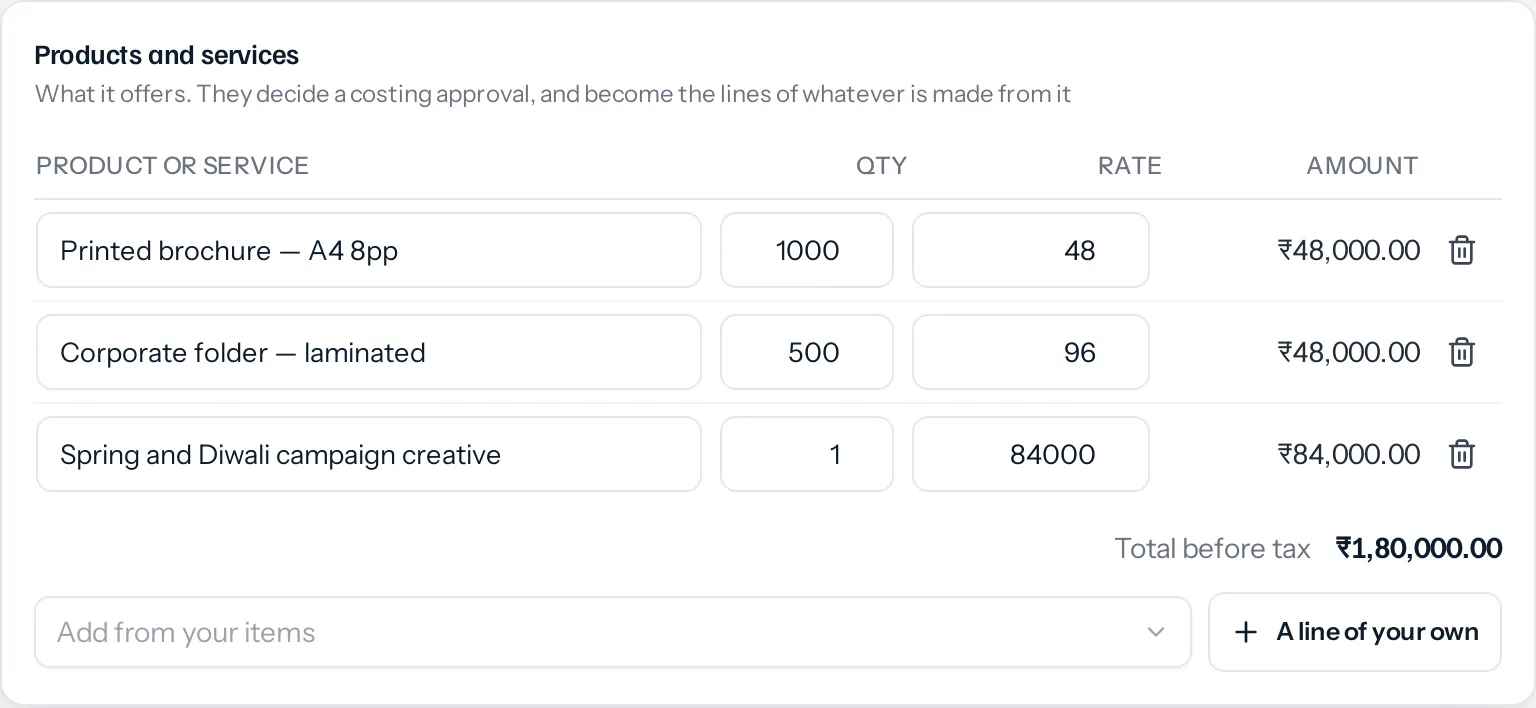
Listing them
- Open the proposal. Products and services is under the pages.
- Add from your items searches your item catalogue and brings in the item’s name, selling rate and unit. A line of your own is for anything not in the catalogue.
- Set the quantity and the rate on each line. The amount and the Total before tax work themselves out.
- Press Save. Nothing is kept until you do.
- If the total differs from the proposal’s value, Use as the proposal’s value copies it across.
Up to 200 lines. The list can be changed while the pages can, in Draft, Sent, Declined and Expired, and reads as plain text after that.
The list does not print. The client sees the pages, and the pages say what you write in them. To show prices to the client, put a table in the designer.
A costing approval
Some things should not be offered without somebody checking the cost first: a photography day, an outside contractor, a material whose price moves. In Settings › Approvals, a rule can apply only when a document includes one of them.
- Press New approval, call it something like Costing check, and choose Proposals under On which documents.
- Under Only when it includes, add the products or services that need the check. Any one of them is enough.
- Set who has to agree, and save.
A proposal listing any of them now needs approving before it can be sent. One that lists none of them goes as it would without the rule. Fill in Only over as well, and it must be over that value too.
The same condition works on quotations, sales orders, proformas, invoices and credit notes, where it reads the items on the lines.
Changing the list after the proposal was approved follows your business’s setting in Settings › Sales documents: it needs approving again, or it can go and whoever approved it is told.
A worked example
The rule Costing check applies to proposals that include a product photography day, and asks whoever the writer reports to.
| Line | Quantity | Rate | Amount |
|---|---|---|---|
| Printed brochure, A4, 8 pages | 1,000 | ₹48 | ₹48,000 |
| Corporate folder, laminated | 500 | ₹96 | ₹48,000 |
| Spring and Diwali campaign creative | 1 | ₹84,000 | ₹84,000 |
| Total before tax | ₹1,80,000 |
Nothing on it is a photography day, so it can be sent as it is. The client then asks for product shots, and a photography day at ₹42,000 is added and saved. The band at the top now says it needs approving under Costing check, and Use as the proposal’s value brings the value to ₹2,22,000. The manager approves it, and it goes.
Things that catch people out
- The item search needs permission to see items. Somebody without View on inventory items can still add lines of their own.
- A line of your own never triggers a costing rule. The rule reads items from the catalogue. Typing the same words on a line of your own is not the same item.
- The value is not worked out for you. The proposal’s value is what approval rules read and what the list of proposals adds up. Press Use as the proposal’s value when the list should decide it.
Where to go next
Something missing or wrong here? Tell us. A question that needed asking usually means a page that needed writing.