
A cap does its job by refusing. So the question a threshold always raises is: refusing in favour of what?
If every candidate a rule wanted is at their limit, the record goes to the default owner — a name you set on the Thresholds tab, under When everybody is full. It did not go there because anybody chose it. It went there because there was nowhere else.
That is the whole idea behind this tab, and everything on it follows from it. These records are different from every other record in the business, because nobody decided them. They are the only ones it is safe to move automatically.
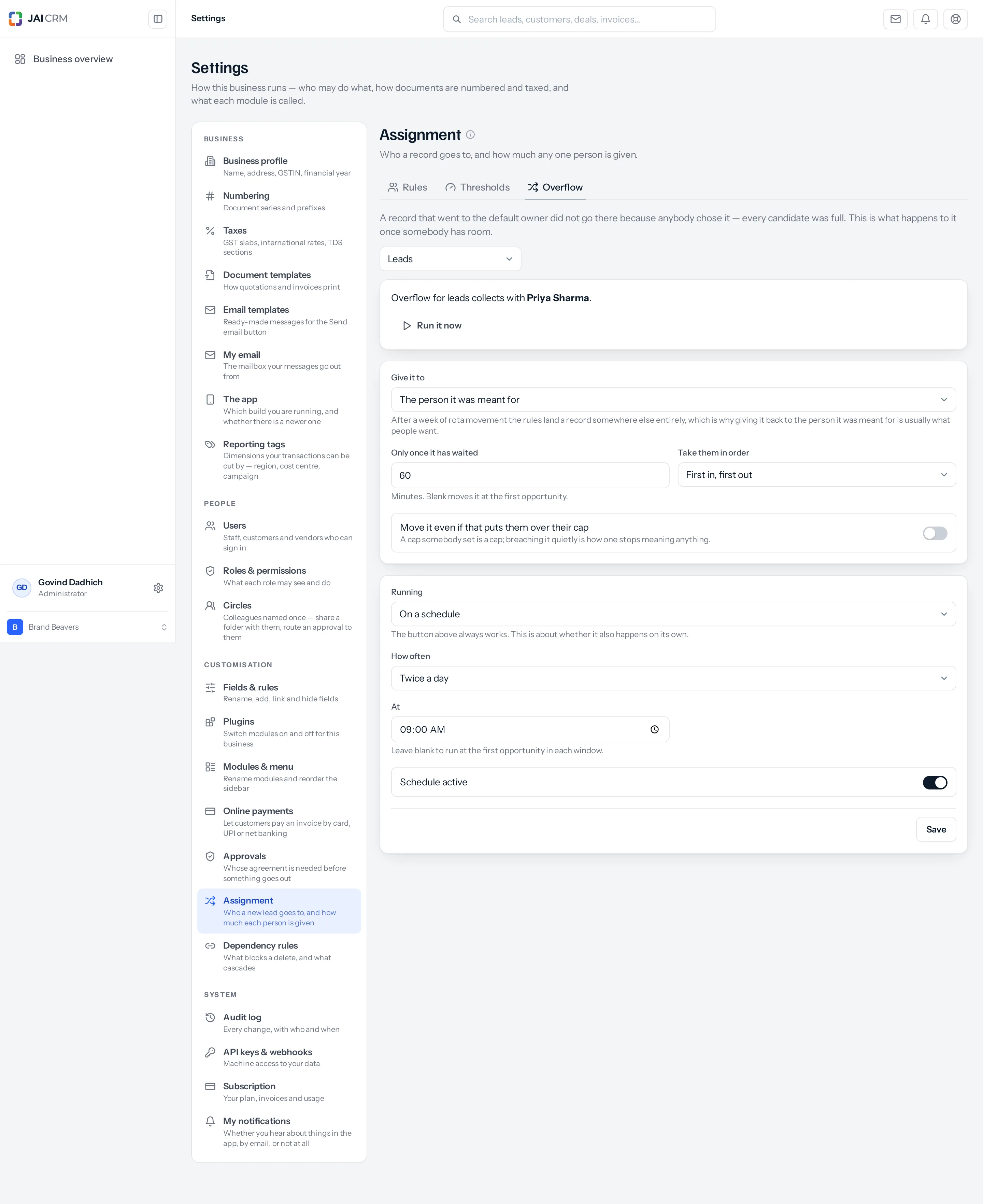
Before anything on this tab does anything
Overflow needs a default owner. Without one, nothing collects anywhere — a record that cannot be placed simply keeps whoever created it, and there is no pile to move on. The tab says so where the banner would be, and points you at the Thresholds tab. Set that first.
The banner at the top tells you two things: who the overflow collects with, and — once it has run at least once — when it last ran and what it did. Last run 25/09/2026, 09:00 — looked at 11, moved 4.
It touches the overflow and nothing else
This is the constraint the whole feature is built around. A sweep that re-ran the rules across a whole module would fight every reassignment anybody made by hand, every time it ran — somebody moves a lead to a colleague, the sweep moves it back, and no screen anywhere explains why. So the only records this can touch are the ones sitting with the default owner: the ones nobody chose to put there.
Two consequences worth knowing. A record you move off the default owner by hand is out of scope immediately and will never be touched again. And a record you move onto the default owner by hand is now in scope, and the next run may move it somewhere else — so the default owner is not a good place to park something deliberately.
Give it to
| Setting | What it does | When |
|---|---|---|
| The person it was meant for | Whoever the rule wanted before the cap intervened, written down at the moment it was turned away. | Nearly always. This is what people mean when they ask for the pile to be cleared. |
| Whoever the rules pick now | Runs the rules again from scratch, as though the record had just arrived. | When the rules themselves have changed since, or when the rota has moved on and you would rather have today’s answer than last week’s. |
The screen puts the reason under the dropdown: after a week of rota movement, running the rules again lands a record somewhere else entirely. That is sometimes right and often surprising, which is why the first option is the default.
A record turned away before this setting existed has nobody written down as its intended owner, so The person it was meant for cannot place it and it is counted as “still had nowhere to go”. If you have an old pile to clear, run it once on Whoever the rules pick now, then set it back.
Only once it has waited
Minutes before a record becomes eligible. Leave it blank and the next run may take it.
Set it, and somebody actively working a record does not have it pulled out from under them mid-conversation. The wait is measured from when the record was last touched, not when it arrived — so a record the default owner is working on stays put as long as they keep working on it, and one they opened and abandoned becomes eligible again.
| A sensible number | For |
|---|---|
| Blank | A pile nobody works — the default owner is a holding pen and nothing else. |
| 30 to 60 minutes | The usual. A manager triaging the pile has time to place a few by hand before the sweep takes the rest. |
| A day or more (1440+) | When the default owner genuinely works the pile and the sweep is only a safety net. |
Take them in order
| Setting | What it does |
|---|---|
| First in, first out | The order they landed on the default owner. Fair, and the right answer when the records are alike. |
| By a field | Two more boxes appear: Field, offering the module’s own numeric and date fields, and Order — Highest first or Lowest first. |
This only matters when there are more records waiting than there is room for. By a field, on value, highest first, means the largest enquiries are rescued first and the small ones wait — which is usually what a business would choose if asked, and never what first-in-first-out does.
Move it even if that puts them over their cap
Off unless you switch it on, and it should mostly stay off. A cap somebody set is a cap, and breaching it quietly is how a threshold stops meaning anything — two weeks later nobody trusts the numbers on the Thresholds tab because they have watched them be ignored.
Switch it on when clearing the backlog genuinely matters more than the limit: a Monday after a long weekend, a campaign that produced four times what anybody expected. Then switch it off again.
With this on, Only once it has waited becomes the thing protecting people rather than the cap. A record moves past somebody’s limit only after it has sat unclaimed for the time you set — so a long wait and a forced move together read as “if nobody has taken this in two hours, somebody is taking it anyway”, which is a reasonable policy. A forced move with no wait is not.
Run it by hand
There is a Run it now button, and it works whatever the schedule says. The first thing anybody wants after setting this up is to see it act on what is already waiting, and “wait until tomorrow morning” is not a way to find out whether the settings are right.
It reports what it did, in a sentence rather than four numbers to interpret: Looked at 11, moved 4, 2 not waited long enough, 5 still had nowhere to go.
| What it says | What it means |
|---|---|
| Nothing was waiting. | The default owner holds no records for this module. Either the caps are never being hit, or nothing has arrived yet. |
| moved N | N records now belong to somebody else, and each one carries a note saying why. |
| N not waited long enough | Your Only once it has waited setting held them back. They will be eligible on a later run. |
| N still had nowhere to go | Everybody is still full, or the intended owner was never recorded. This is the number that tells you the caps are too low. |
The button is greyed out until the settings below it have been saved once — the screen says Save the settings below first, so the run knows what to do. A run with no saved configuration would have to guess, and guessing is not a thing it should do with your records.
Or on a clock
Set Running to On a schedule and it also happens on its own. The dropdown’s other option, Only when I press Run it now, is the default — the button always works either way, and this setting is only about whether it also happens unattended.
| How often | Can be pinned to a time? | For |
|---|---|---|
| Every minute | No | A desk where leads arrive constantly and waiting is the whole cost. Genuinely useful, and heavier than it sounds — use it when minutes matter. |
| Every 2 minutes | No | The same, a little calmer. |
| Every 5 minutes | No | The sensible fast option for most businesses that want fast. |
| Twice a day | Yes — that time, and twelve hours later | Morning and evening sweeps. Pairs well with a cap counted per day. |
| Once a day | Yes, and a day of the week too | Slow, heavy modules. A weekly sweep of projects on a Monday morning. |
The minute-scale cadences are a plain interval and have no business with a time of day, so the At box is not offered on them — a control that did nothing would be worse than no control.
Leave At blank on a daily or twice-daily schedule and it runs at the first opportunity in each window instead. Schedule active is the switch that turns the whole schedule on; with it off, only the button works.
A run that arrives late still runs. A deploy, a restart or a busy minute over the moment a daily sweep was due does not mean it is skipped until tomorrow — the next tick notices it is overdue and runs it. What it will not do is run twice for the same window.
A worked week
A lead desk: three people capped at five a day, Priya as default owner, overflow set to The person it was meant for, a 60-minute wait, first in first out, no forced moves, running twice a day at 09:00.
| When | What happens |
|---|---|
| Monday, through the day | Fifteen leads are distributed. Six more arrive after everybody is full and collect with Priya. |
| Monday, 16:00 | Priya places two of them herself, by judgement — one is a large enquiry she wants a senior person on. Those two are now out of scope for good. |
| Monday, 21:00 | The evening run. Everybody is still at their cap for Monday, so: Looked at 4, moved 0, 4 still had nowhere to go. |
| Tuesday, 09:00 | Caps have reset. Looked at 4, moved 4. Each goes to the person the rule originally wanted, and each carries a note saying so. |
| Tuesday, onwards | Those four count against Tuesday’s caps, so only eleven new leads are distributed before the pile starts again. |
That last row is the one people miss, and it is the honest arithmetic of the whole arrangement. Overflow moves work; it does not create capacity. If the pile never empties, the caps are below what is arriving, and no schedule can fix that — only a bigger team or a higher cap can.
What goes wrong
| Symptom | Cause | Fix |
|---|---|---|
| The tab says nothing collects anywhere | No default owner is set for this module. | Set When everybody is full on the Thresholds tab. |
| Run it now is greyed out | The settings below have never been saved. | Press Save, then run it. |
| Every run reports still had nowhere to go | Everybody really is still full. The caps are below the volume arriving. | Raise the caps, widen the rule, or accept that the default owner is doing the placing. |
| Old records never move | They were turned away before the intended owner was recorded, so there is nobody to give them back to. | Run once on Whoever the rules pick now. |
| Every run reports not waited long enough | Only once it has waited is longer than the gap between runs, or the records keep being touched. | Shorten the wait, or lengthen the schedule. |
| A record you parked on the default owner moved | The default owner is the overflow pile, and the sweep treats everything there as unplaced. | Park things elsewhere — or set a long wait. |
| The schedule never fires | Schedule active is off, or Running is still on Only when I press Run it now. | Both have to be set. |
| Settings vanish when you switch modules | Each module has its own overflow settings. The picker at the top changes which you are editing. | Save before switching. |
Where to go next
Something missing or wrong here? Tell us. A question that needed asking usually means a page that needed writing.