
A rule on its own will keep handing work to the same people however much they already have. It has no opinion about whether anybody can cope. Thresholds are what stop it.
A cap is per person and per module. The same person can be capped at twenty leads a day and two projects a month, and those two numbers never meet.
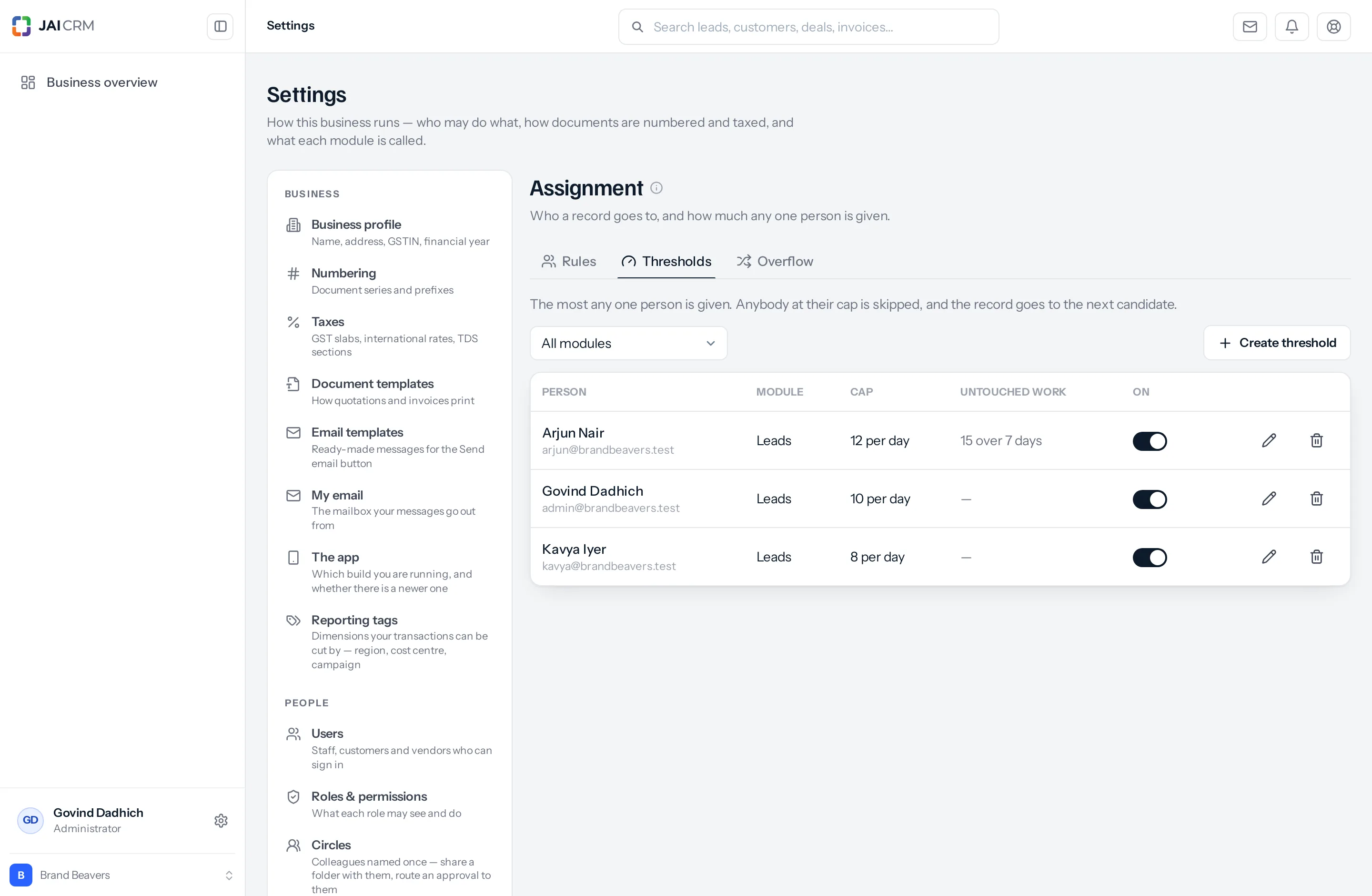
Reading the list
| Column | What it tells you |
|---|---|
| Person | Who the cap is on, with their email underneath. A cap is always on a named individual, never on a role or a group. |
| Module | Which module the cap governs. One person may appear several times, once per module. |
| Cap | The limit and the period — 12 per day. |
| Untouched work | The backlog cap if one is set — 15 over 7 days — or a dash. |
| On | A switch. Off means the cap is ignored but kept, which is how you lift a limit for a fortnight without losing the number you had settled on. |
Somebody with no row here has no cap at all. That is the default and it is often right — a manager who picks up whatever is left does not want a limit. But it also means a rule that names five people, of whom only three are capped, will keep filling the other two indefinitely.
Setting one
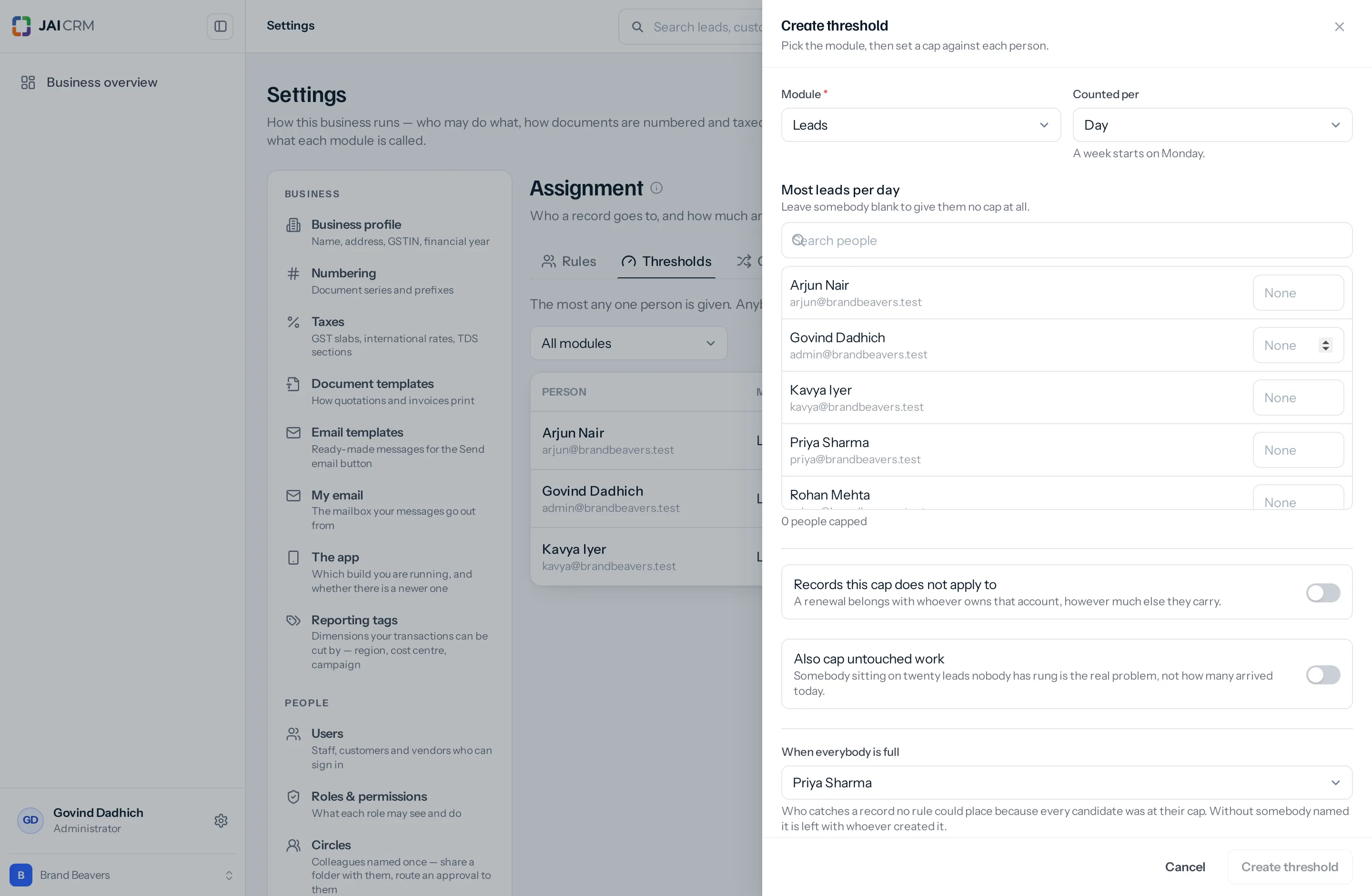
Press Create threshold. As on a rule, the module is asked first.
| Box | What it does | What to put |
|---|---|---|
| Module (required) | Which module the caps govern. | Leads, in most businesses, and often nothing else. |
| Counted per | Day, week or month. The heading below renames itself to match — Most leads per day. | Day for leads and anything else arriving continuously. Month for projects and other slow, heavy work. |
| The person list | A number box against each member of staff you are allowed to cap. The count underneath reads N people capped. | Fill in the ones who need a limit. Leave somebody blank to give them no cap at all. |
| Records this cap does not apply to | A switch that reveals the same condition builder used on rules. Anything matching goes to the person whether or not they are full. | Off, until you have a real exception. Covered below. |
| Also cap untouched work | A switch revealing two boxes: Most untouched and Untouched after (days), which accepts 1 to 60. | On, for leads. This is the cap that matters. |
| When everybody is full | Who catches a record no rule could place. The list also offers Leave it with whoever created it. | Name somebody — usually a sales manager. Covered in the overflow page. |
The When everybody is full setting is one per module, not one per person. Set it from any threshold on that module and it is set for all of them — which is why it sits below a divider, away from the per-person boxes.
The two caps, and why the second one is the real one
| Cap | What it counts | Use it when |
|---|---|---|
| Most per period | Records the rules gave them today, this week or this month. | Always. It is the required one. |
| Most untouched | Leads they own that have never been logged as contacted and were created more than N days ago. | Usually the more useful of the two. |
Twelve leads arriving today is a busy morning. Twelve leads nobody has rung in a fortnight is the actual problem — and only the backlog cap can see it. A volume cap measures what you handed somebody. A backlog cap measures what they did with it, which is the number you actually care about.
The backlog cap is offered on leads only, and deliberately. A lead records when it was last contacted; a company, a deal and an invoice do not. Measuring “untouched” on those would mean falling back on when the record was last edited, which counts a spelling correction as contact and would produce a number that looks precise and means nothing. So rather than offer a setting that silently never fires, the switch simply is not there on the other modules.
What happens at the cap
The person is skipped, and the record goes to the next candidate in the rotation. It is not held, queued or refused. Nothing waits.
| Situation | Where the record goes |
|---|---|
| One candidate is full, others have room | The next candidate with room. Nobody notices. |
| Every candidate the rule wanted is full, and a default owner is named | The default owner, and the record is marked as overflow so it can be moved on later. |
| Every candidate is full and no default owner is named | It keeps the owner it would have had anyway — whoever created it. Losing an enquiry is never the right answer. |
| The record matches the cap’s exemption conditions | Straight to the person, past their cap. |
| Somebody reassigns it by hand, or in bulk | Wherever they said. Caps do not apply to a decision a person made. |
How the count is worked out
| Period | Counted from |
|---|---|
| Day | Midnight this morning. |
| Week | Monday — not Sunday, which is the end of the week everywhere this is sold. The form says so under the dropdown. |
| Month | The first of the month. |
Only records the rules gave them are counted. A lead somebody created themselves, or was handed by a manager, or received in a bulk reassignment, does not use up their allowance. The cap governs automatic distribution, not their whole workload — which is the only reading that makes sense, since a manager could otherwise exhaust somebody’s cap by mid-morning and stop the rules reaching them for the rest of the day.
A cap that does not apply to everything
Switch on Records this cap does not apply to and you get the same condition builder used on rules. Anything matching goes to the person whether or not they are at their limit.
The case it exists for: a renewal belongs with whoever owns that account, however much else they are carrying. A cap that sent it elsewhere would be a cap doing harm — the customer rings the person they have dealt with for three years and finds somebody who has never heard of them.
Switch it on and leave the conditions empty and the screen warns you in amber: Nothing set yet — with no conditions the cap applies to everything, as before. An empty exemption exempts nothing, rather than everything. That is the safe way round, but it does mean a half-finished exemption quietly does nothing.
Other exemptions worth the trouble: enquiries above a value, where you would rather a senior person went over their limit than a large enquiry went to the overflow pile. Anything from a named key account. A source you have promised somebody a same-day response on.
Choosing a number
- Start from what somebody can actually follow up properly in a day, not what they can receive. Those are very different numbers and only one of them is useful.
- For most sales desks that is somewhere between five and fifteen a day.
- Set the backlog cap near the number at which somebody stops ringing people and starts triaging a list. For most people that is between ten and twenty untouched.
- Set Untouched after to the age at which an unrung lead is embarrassing rather than merely late. Three days for a hot channel, seven for a slower one.
- Then watch it for a fortnight and move it. A cap set once and never revisited is a cap set from a guess.
A worked morning
Three people — Priya, Arjun and Kavya — each capped at five leads a day, on one rule that rotates between them. Priya Sharma is also named as the default owner. Sixteen enquiries arrive.
| Enquiry | Goes to | Why |
|---|---|---|
| 1, 2, 3 | Priya, Arjun, Kavya | In turn. |
| 4 to 15 | Round again, four more times | Each of the three reaches five. |
| 16 | Priya, as default owner | All three are at their cap. The record is marked as overflow, not as a normal assignment. |
Fifteen are distributed evenly, and the sixteenth goes to whoever you named as the fallback — who can place it by judgement, or let the overflow schedule move it on tomorrow when the caps reset. Nothing is lost and nobody is buried.
Note that the sixteenth lands on Priya as the default owner, which does not count against her own cap of five — overflow is recorded differently from an assignment. Otherwise naming somebody as the fallback would be a way of quietly giving them the most work in the building.
If you find the default owner collecting records every morning, the caps are not the problem — the volume is. Either the team is too small for the enquiries you are generating, or the caps were set lower than what people can actually handle. Raising the cap is the honest fix; a bigger overflow pile is not.
What goes wrong
| Symptom | Cause | Fix |
|---|---|---|
| Caps appear to do nothing | The rows are switched off in the On column, or the people being filled have no row at all. | Check every person the rule can name has a row. |
| Everything reaches the default owner within an hour | The caps are far below the volume arriving. | Raise them, or widen the rule to more people. |
| One person is always full and others are empty | The rule names them in an entry the others are not in. A cap cannot spread work a rule never offered them. | Look at the rule, not the cap. |
| A renewal went to a stranger | No exemption is set, and the account owner was full. | Switch on Records this cap does not apply to. |
| The exemption is on and nothing is exempt | It has no conditions — the amber warning on the form says so. | Add at least one condition. |
| You cannot find the backlog switch | You are on a module other than Leads. Only a lead records when it was last contacted. | Nothing to fix; use the volume cap. |
| Somebody is skipped although they look empty | They are over the backlog cap rather than the volume one — sitting on old leads nobody has rung. | The record’s assignment note names which cap it was. |
Where to go next
Something missing or wrong here? Tell us. A question that needed asking usually means a page that needed writing.