
Open Cross-sell from the sidebar and press the round + (or Write the first rule when there are none). The rule is a page of eight numbered steps, read from top to bottom in the order the rule acts. As you fill them in, the line at the top says the whole rule in one sentence, so you can check it before saving.
The steps
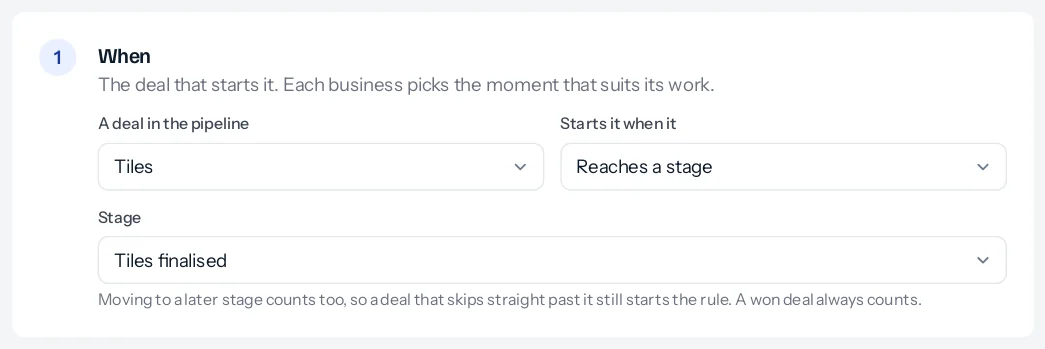
- When: the pipeline that starts it, and whether it starts when a deal reaches a stage, is won, or comes near a date on it. See When a rule starts.
- Wait: how many days after that, and whether only working days count. A date rule has no wait of its own. See The wait and working days.
- Then open: the pipeline and stage of the new deal, what it is called, and what it carries over. See What the new deal carries.
- Who gets it: your Deal assignment rules, a circle in turn, or one person. See Who gets the new deal.
- Their first step: a task, and the handover note in Charcha. See The first task and the handover.
- Credit for the first salesperson: none, or shown in the cross-sell report. See Credit for the first salesperson.
- Safeguards: what stops a deal opening. See What stops a deal opening.
- Who is told: the new owner always, and the first salesperson if you want. See Who is told.
Naming and saving
Give the rule a name people will recognise on the list, such as Tiles to Modular kitchen. At the bottom, Switched on is ticked; untick it to save a rule without it acting yet. Press Save rule. From then on the rule looks at your deals every five minutes.
If deals in the pipeline are already where the rule starts, the page says how many before you save, and the rule leaves them alone unless you tick that it should open deals for them too. See Deals already there when a rule is saved.
Changing or deleting a rule
Press Edit on the rule’s card to change any step. A change applies to deals that get there from then on; deals already waiting keep the day they were given. Delete at the bottom of the rule removes it: deals it already opened stay exactly as they are, and anything still waiting will not open.
Several rules can start from the same pipeline. To pass a tiles customer to both kitchens and wardrobes, write two rules from Tiles, one into each pipeline.
Something missing or wrong here? Tell us. A question that needed asking usually means a page that needed writing.