
Calling about a kitchen the minute the tiles are chosen can feel pushy; calling a week later can be too late. Step 2 of a rule sets the gap, so the call lands at the right time, for example while the tiles are going in.
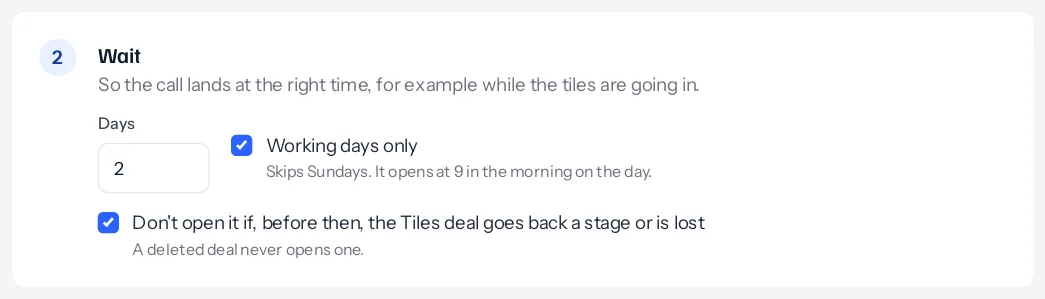
Days and working days
Type the number of days. With Working days only ticked, the days your business does not work are skipped. Those come from Settings, Calendar: the working week and the holidays for the whole business. Without calendar settings, Monday to Saturday are working days, so Sundays are skipped; the note under the tick says which days your business skips.
Counting starts from the day the deal got there. A tiles deal finalised on Wednesday 14 October with a wait of two working days opens on Friday 16 October. One finalised on Saturday 17 October skips the Sunday and opens on Tuesday 20 October. If Thursday 15 October were a holiday in your Calendar, the Wednesday deal would open on Saturday 17 October instead.
With the tick off, two days is two days on the calendar, Sundays included. A wait of 0 opens the deal within five minutes of the first deal getting there.
The hour it opens
A waiting deal opens at 9 in the morning on its day, in your business’s time zone, so the new owner finds it at the start of the day with its task. It shows on the waiting list until then, where a manager can open it earlier or stop it. See The waiting list.
If the first deal goes back
With Don’t open it if, before then, the deal goes back a stage or is lost ticked, the rule looks again on the day. If the tiles deal has moved back to an earlier stage, been lost, or moved to another pipeline, nothing opens and the reason is written on the deal’s History and its Cross-sell card, for example Not opened: The deal went back to Quotation sent.
With it unticked, the deal opens on its day even if the first deal has gone back, unless the first deal was deleted: a deleted deal never opens one.
Changing the wait on a rule affects deals that get there afterwards. Deals already on the waiting list keep the day they were given; open one now or stop it from the list if that day is no longer right.
Something missing or wrong here? Tell us. A question that needed asking usually means a page that needed writing.